
IKEA E2490
| Model | E2490 |
| Vendor | IKEA |
| Description | BILRESA remote control with scroll wheel (Matter) |
| Exposes | battery, voltage, identify, action |
| Picture | 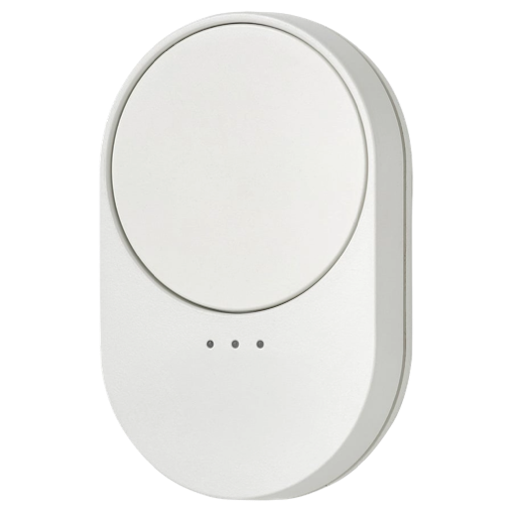 |
Unofficial support
This device is part of the IKEA Matter/Thread line-up.
The hidden Zigbee mode is not officially supported by IKEA. It exists mainly to keep backwards compatibility via Touchlink.
As a result, the Zigbee firmware is stripped-down to the essentials, and could even be removed in OTA updates.
Notes
Related
Information
- FCC - emissions and teardown
- CSA IoT - Matter compliance
- CSA IoT - Zigbee compliance
- Based on Qorvo chipset
Issues
Low click sensitivity: When pressed lightly, the buttons produce audible clicks, without the device actually registering presses. Press the buttons firmly to ensure it generates events
Partial and conflicting binding support: All remotes control the same devices! See Binding
Slow actions, out-of-sync On/Off commands, malformed MoveToLevel command: See Action mapping
Battery
Uses 2 x AAA battery.
The remaining percentage seems to be tuned for Alkalines (1.5V).
This device sleeps to preserve energy when it's not actively used.
While sleeping, it will not respond to any Zigbee2MQTT commands.
Press its buttons to wake it up and allow interactions.
Pairing
Take off the battery cover to find the pair button.
The remote can be used in one of the following modes:
paired to a Matter/Thread network
(with no binding support yet?)paired to a Zigbee network
(with partial binding support: all BILRESA remotes will control the same 1-3 groups)without network, bound to 1-3 groups of devices, via Touchlink
Factory reset
Hold the pair button for ~10s to factory reset the remote. LEDs blink red while you hold.
Release when LEDs pulse amber. Remote is now in Matter/Thread pairing mode.
Matter
After a factory reset, the device automatically enters Matter/Thread pairing mode.
Single-pressing the pair button also switches the device to Matter mode.
Zigbee
It's important to pair this device directly through a modern and updated coordinator.
Pairing with old versions, or through bad routers (e.g. Telink Tuya, AwoX) will cause issues.
There's also one report that pairing is impossible with v9.0.0 pre-release Silabs firmware.
You must go through this sequence to pair the remote to a Zigbee network. All steps are necessary:
- Factory reset the remote
- Move the remote away from other devices, or power them off
- Enter Touchlink mode, but avoid directly paring to nearby devices (for now)
- While in Touchlink mode, press the pair button 8 times to join a Zigbee network.
LEDs turn off, there is no visual indication of Zigbee pairing mode.
Touchlink
This remote uses Touchlink to set-up Zigbee binding. It works both inside and outside the network. Follow these steps:
- Optionally, factory reset the remote (to leave the network and clear bindings)
- Power off nearby devices, that you don't want to control with it
- Press the pair button 4 times to activate Touchlink mode
- First LED quickly blinks amber, indicating channel 1.
Press the front-bottom button to choose which channel to bind.
Channel 2 unlocks after successfully binding channel 1. Similarly, c3 unlocks after c2.
You can bind multiple channels to the same device. And you can add multiple devices to one channel. - Bring the remote close to the target device to start binding
- If the remote is not connected to a network: It will remove the target device from its network and add it to the remote's hidden Zigbee network
- If the remote is connected to the network, but the target is not: target identifies, but nothing happens
- If both remote and target are connected the same network: It will add the target device to the group corresponding to the selected channel (21658-21660)
- When successful, the target device identifies, and the remote LEDs stop blinking.
The remote should now directly control the target, as described in Action mapping
Cloning the remote via Touchlink was tested, but not successful.
Binding
Tested on model E2490, v1.8.5 (initial firmware):
All remotes directly control groups 21658, 21659, 21660 (channels 1-3). Group 21658 also conflicts with the BILRESA dual-button!
They can't be unbound / bound to anything else (binding requests from the coordinator appear successful, but have no effect).
This means that if you have multiple remotes in your network, you can't pair them to different devices/groups. Every remote will control each other's target. The workaround is using automations.
To directly control devices, follow the Touchlink steps. That will unlock the 3 channels and add the target devices to the respective groups.
After you've unlocked the 3 channels, you can create the groups in Zigbee2MQTT and add / remove any devices you want to control (skipping the Touchlink steps).
Zigbee2MQTT doesn't know the remote controls the groups. So you must additionally set up reporting for the target devices to keep their real states in sync with the virtual states.
Action mapping
| Press | Button | Z2M Action | Bind Action |
|---|---|---|---|
| Single | wheel | alternating on / off | alternating On / Off |
| Double | wheel | on_double | TradfriArrowSingle (256,13) |
| Triple | wheel | off_double | TradfriArrowSingle (257,13) |
| Quad+ | wheel | nothing | nothing |
| Long | wheel | nothing | nothing |
| Rotate | wheel | n × brightness_move_to_level | n × MoveToLevel (0→255 brightness, 1s transition) |
| Single | bottom | nothing | Cycle bound groups (21658→21660) |
Long-pressing the wheel is confirmed to generate no Zigbee events
The remote alternates between On and Off commands instead of sending Toggle
- Current on/off states are stored on the remote - one for each channel
- Benefit: all group members stay in sync with each other, instead of toggling individually
(i.e. Prevents light1 on, light2 off) - Downside: controlling the group from Zigbee2MQTT will get it out-of-sync
(e.g. Remote sends Off when group is already Off)
The remote sends multiple MoveToLevel commands while rotating the wheel
- Current brightness value is stored on the remote. The same value is used for all channels
- Rotate clockwise to increase, counter-clockwise to decrease
- The command is malformed, it's missing 2 parameters (option mask and override). And level 255 might be undefined. For lights, the maximum is 254.
Bottom button works only after the remote activated Touchlink on multiple channels
If the channels are unlocked, one LED lights up on every press to indicate the active channel
Clicks are not sent instantly
- A ~0.5s delay is built-in to decide between multi-presses
- It doesn't send any
initial_presslike the older SOMRIG does
Scenes
The remote sends custom IKEA commands to cycle between scenes.
Commands:
- TradfriArrowSingle (256,13) recalls next scene in group 65289
- TradfriArrowSingle (257,13) recalls previous scene in group 65289
Compatibility:
- IKEA WS Matter bulbs (2026) work and will create 8 scenes if there aren't any
- Default scenes store only color temp: 0-5 neutral-cold, 6,7,0 neutral-warm
- IKEA WS bulbs on v3.x.x (2024) work, and will create 3 scenes if there aren't any
- Default scenes store only color temp: 0 neutral, 1 cold, 2 warm
- IKEA WS bulbs on v2.x.x (2019) work, but may need adding scenes manually
- IKEA WS bulbs on v1.x.x (201x) might not know the commands at all
- Other brands won't recognize the IKEA commands!
Add / Edit scenes:
- Add IKEA bulbs to group 65289
- Create scenes in the group to overwrite them or add new ones
Firmware
- Initial batches come with v1.8.5 (20250226) preinstalled
- Updates are provided over Matter.
Move the device to a Thread hub to update - See the available versions here (search BILRESA or 4476)
Options
How to use device type specific configuration
identify_timeout: Sets the duration of the identification procedure in seconds (i.e., how long the device would flash).The value ranges from 1 to 30 seconds (default: 3). The value must be a number with a minimum value of1and with a maximum value of30simulated_brightness: Simulate a brightness value. If this device provides a brightness_move_up or brightness_move_down action it is possible to specify the update interval and delta. The action_brightness_delta indicates the delta for each interval. Example:
simulated_brightness:
  delta: 20 # delta per interval, default = 20
  interval: 200 # interval in milliseconds, default = 200
Exposes
Battery (numeric)
Remaining battery in %. Value can be found in the published state on the battery property. To read (/get) the value publish a message to topic zigbee2mqtt/FRIENDLY_NAME/get with payload {"battery": ""}. It's not possible to write (/set) this value. The minimal value is 0 and the maximum value is 100. The unit of this value is %.
Voltage (numeric)
Reported battery voltage in millivolts. Value can be found in the published state on the voltage property. To read (/get) the value publish a message to topic zigbee2mqtt/FRIENDLY_NAME/get with payload {"voltage": ""}. It's not possible to write (/set) this value. The unit of this value is mV.
Identify (enum)
Initiate device identification. This device is asleep by default.You may need to wake it up first before sending the identify command.. Value will not be published in the state. It's not possible to read (/get) this value. To write (/set) a value publish a message to topic zigbee2mqtt/FRIENDLY_NAME/set with payload {"identify": NEW_VALUE}. The possible values are: identify.
Action (enum)
Triggered action (e.g. a button click). Value can be found in the published state on the action property. It's not possible to read (/get) or write (/set) this value. The possible values are: on, off, brightness_move_to_level, off_double, on_double.