
IKEA E2489
| Model | E2489 |
| Vendor | IKEA |
| Description | BILRESA remote control with buttons (Matter) |
| Exposes | battery, voltage, identify, action |
| Picture | 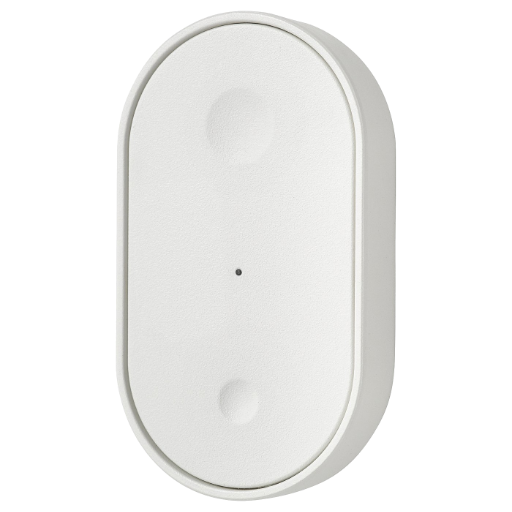 |
Unofficial support
This device is part of the IKEA Matter/Thread line-up.
The hidden Zigbee mode is not officially supported by IKEA. It exists mainly to keep backwards compatibility via Touchlink.
As a result, the Zigbee firmware is stripped-down to the essentials, and could even be removed in OTA updates.
Notes
Related
Battery
Uses 2 x AAA battery.
The remaining percentage is reported correctly with Alkalines (1.5V).
This device sleeps to preserve energy when it's not actively used.
When sleeping, it will not respond to any Z2M commands.
Press its buttons to keep it awake and allow interactions.
Pairing
You must go through this sequence to pair the remote:
- Take off the faceplate / battery cover to find the pair button (middle)
- Hold the pair button for ~10s to factory reset the remote. Red LED blinks while you hold.
Release when amber LED pulsates. Remote is now in Thread pairing mode - Move the remote away from other devices.
Press the pair button 4 times to activate Touchlink. Amber LED quickly blinks.
Remote is now trying to bind to nearby devices - Press the pair button 8 times. LEDs stay off!
Remote is now in Zigbee pairing mode
It's important to pair this device through the coordinator!
Pairing through 'bad' routers (e.g. Telink Tuya, AwoX) might cause buttons not working.
A modern and updated coordinator may be required.
Binding
Tested on model E2489, v1.8.5:
All remotes directly control group 21658. They can't be unbound / bound to anything else.
Pairing inside the network is possible by adding target devices to group 21658.
- You must manually set up reporting for the target devices
- Binds and unbinds appear successful, but they have no effect
- Devices can be inside groups without Z2M knowing.
In Z2M UI, add them to the group first, so you can remove them afterwards
Pairing outside the network is possible through Touchlink
- Keep it very close to the target device (and power-off conflicting devices)
- Activate Touchlink as described in Pairing. (No need to reset)
- Cloning the remote is unknown / not possible (at least with older remotes)
- If the remote is outside the network, activating Touchlink will:
- Remove the target device from its network
- Bind the devices
- If both remote and target are inside the network, activating Touchlink will:
- Add the target to group 21658
- Not remove it from other groups
Action mapping
| Real Action | Z2M Action | Bind Action (on group 21658) |
|---|---|---|
| Single press ON | on | On |
| Double press ON | on_double | TradfriArrowSingle (256,13) |
| Triple+ press ON | nothing | nothing |
| Long press ON, (hold + release) | brightness_move_up + brightness_stop | Move (Up, 83) + StopWithOnOff |
| Single press OFF | off | Off |
| Double press OFF | off_double | TradfriArrowSingle (257,13) |
| Triple+ press OFF | nothing | nothing |
| Long press OFF, (hold + release) | brightness_move_down + brightness_stop | Move (Down, 83) + StopWithOnOff |
- Commands are not sent instantly!
- There is a full 1s delay for every action.
(Needed to decide between single and double press) - It doesn't send any
initial_presslike the older SOMRIG does
- There is a full 1s delay for every action.
- There is no way to achieve triple press (or higher).
Remote doesn't send any message, so Z2M or automations can't detect it
Scenes
The remote sends custom IKEA commands to cycle between scenes.
Commands:
- TradfriArrowSingle (256,13) recalls next scene in group 65289
- TradfriArrowSingle (257,13) recalls previous scene in group 65289
Compatibility:
- IKEA WS Matter bulbs (2026) work and will create 8 scenes if there aren't any
- Default scenes store only color temp: 0-5 neutral-cold, 6,7,0 neutral-warm
- IKEA WS bulbs on v3.x.x (2024) work, and will create 3 scenes if there aren't any
- Default scenes store only color temp: 0 neutral, 1 cold, 2 warm
- IKEA WS bulbs on v2.x.x (2019) work, but may need adding scenes manually
- IKEA WS bulbs on v1.x.x (201x) might not know the commands at all
- Other brands won't recognize the IKEA commands!
Add / Edit scenes:
- Add IKEA bulbs to group 65289
- Create scenes in the group to overwrite them or add new ones
Firmware
- Initial batches come with v1.8.5 (20250206) preinstalled
- Updates will be provided over Matter.
Move the device to a Thread hub to update - See the available versions here (search BILRESA or 4476)
Troubleshooting
- Action reports N/A, difficulties pairing
- Use a modern and updated coordinator
- Power-off 'bad' routers (e.g. Telink Tuya, AwoX) and pair again
- Pair directly through the coordinator
- Add USB 2.0 extension to dongle coordinators
- Use rechargeable batteries
- Action works, but battery reports N/A
- Power-cycle the remote and refresh percentage
- Otherwise same as 1
- Device doesn't respond to Z2M requests
- Press its buttons to wake it up
Options
How to use device type specific configuration
identify_timeout: Sets the duration of the identification procedure in seconds (i.e., how long the device would flash).The value ranges from 1 to 30 seconds (default: 3). The value must be a number with a minimum value of1and with a maximum value of30simulated_brightness: Simulate a brightness value. If this device provides a brightness_move_up or brightness_move_down action it is possible to specify the update interval and delta. The action_brightness_delta indicates the delta for each interval. Example:
simulated_brightness:
  delta: 20 # delta per interval, default = 20
  interval: 200 # interval in milliseconds, default = 200
Exposes
Battery (numeric)
Remaining battery in %. Value can be found in the published state on the battery property. To read (/get) the value publish a message to topic zigbee2mqtt/FRIENDLY_NAME/get with payload {"battery": ""}. It's not possible to write (/set) this value. The minimal value is 0 and the maximum value is 100. The unit of this value is %.
Voltage (numeric)
Reported battery voltage in millivolts. Value can be found in the published state on the voltage property. To read (/get) the value publish a message to topic zigbee2mqtt/FRIENDLY_NAME/get with payload {"voltage": ""}. It's not possible to write (/set) this value. The unit of this value is mV.
Identify (enum)
Initiate device identification. This device is asleep by default.You may need to wake it up first before sending the identify command.. Value will not be published in the state. It's not possible to read (/get) this value. To write (/set) a value publish a message to topic zigbee2mqtt/FRIENDLY_NAME/set with payload {"identify": NEW_VALUE}. The possible values are: identify.
Action (enum)
Triggered action (e.g. a button click). Value can be found in the published state on the action property. It's not possible to read (/get) or write (/set) this value. The possible values are: on, off, brightness_move_up, brightness_move_down, brightness_stop, off_double, on_double.