
IKEA E2001/E2002/E2313
| Model | E2001/E2002/E2313 |
| Vendor | IKEA |
| Description | STYRBAR remote control |
| Exposes | identify, battery, action |
| Picture | 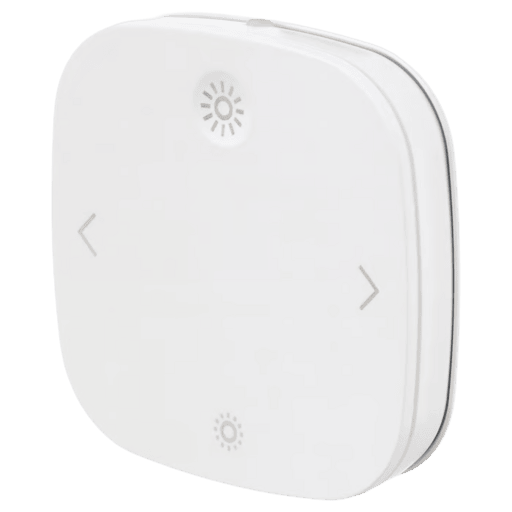 |
Notes
Battery
Uses 2 x AAA battery (rechargeable recommended)
This device sleeps to preserve energy when it's not actively used.
When sleeping, it will not respond to any Z2M commands.
Press its buttons repeatedly to keep it awake and allow interactions, for example when attempting to bind.
Pairing
Press the pair button 4 times to factory reset and start pairing.
A red light should flash and pulsate until it connects.
The button is found under the back cover, next to the battery.
If that doesn't, work try pressing the on button (big sun) 6 times before pressing the pair button 4 times.
It's important to pair this device through the coordinator!
Pairing through 'bad' routers (e.g. Telink Tuya, AwoX) might cause buttons not working.
Binding
Tested on model E2313, version 2.4.17 (20240725):
The remote can directly control devices or one group.
Simultaneously controlling individual devices and multiple groups may be possible on older firmware versions
The remote may spam the network, drain its battery or disconnect if the bound device goes offline!
- Doesn't apply when bound to a group
Pairing to devices inside the network is possible by binding:
on newer fw, every cluster you need:
- OnOff cluster for toggling
- LevelCtrl cluster for dimming
- Scenes cluster for cycling scenes on IKEA devices, or recalling 1 scene on other devices
on older fw, a single (any) cluster, e.g. OnOff
- It enables all actions
- If you bind multiple clusters, the remote may repeat the commands!
Pairing to groups inside the network is possible by:
- binding genBasic cluster (enables every action)
- and unbinding everything else, including the coordinator
- This may not be needed on older fw versions
- The coordinator still receives the events
Pairing outside the network is possible through Touchlink
- Keep it very close to the target device (and power-off conflicting devices).
- Hold the pair button for ~10s to activate.
The red light will pulsate if the target responds - Clone the paired remote by keeping it close to another one, and activating Touchlink on both
- If the remote is outside the network, activating Touchlink will:
- Remove the target device from its network
- Bind the devices
- If both remote and target are inside the network, activating Touchlink will:
- Pick a random G (only the first time)
- Remove the target device from all groups
- Add the target to group G
- Set the G parameter in RecallScene (GroupId=G, SceneId=0)
- Bind the remote to the group
(Has no effect until you unbind it from everything else)
Action mapping
| Press | Btn | Z2M Action | Bind Action |
|---|---|---|---|
| Single | ON | on | On |
| Double | ON | 1 × on | 1 × On |
| Long | ON | brightness_move_up + brightness_stop | MoveWithOnOff (Up,83) + StopWithOnOff |
| Single | OFF | off | Off |
| Double | OFF | 1 × off | 1 × Off |
| Long | OFF | brightness_move_down + brightness_stop | Move (Down,83) + Stop |
| Single | < | arrow_left_click | TradfriArrowSingle (257,13) |
| Double | < | 2 × arrow_left_click | 2 × TradfriArrowSingle (257,13) |
| Long | < | arrow_left_hold + arrow_left_release | TradfriArrowRelease (0) + On + RecallScene (G, 0) + TradfriArrowHold (3329) + TradfriArrowRelease (?) |
| Single | > | arrow_right_click | TradfriArrowSingle (256,13) |
| Double | > | 2 × arrow_right_click | 2 × TradfriArrowSingle (256,13) |
| Long | > | arrow_right_hold + arrow_right_release | TradfriArrowRelease (0) + On + RecallScene (G, 0) + TradfriArrowHold (3328) + TradfriArrowRelease (?) |
Commands are sent instantly and there is no delay between clicks.
ON/OFF buttons are heavily debounced at firmware-level and can't be double-pressed.
Scenes
The remote sends custom IKEA commands to cycle between scenes.
But the normal RecallScene in the long-press can be used by any device.
Commands:
- TradfriArrowSingle (256,13) recalls next scene in group 65289
- TradfriArrowSingle (257,13) recalls previous scene in group 65289
- TradfriArrowHold (3328) continuously cycles scenes in group 65289 forward
- TradfriArrowHold (3329) continuously cycles scenes in group 65289 backward
(a few cycles, or until TradfriArrowRelease)
Compatibility:
- IKEA WS Matter bulbs (2026) work and will create 8 scenes if there aren't any
- Default scenes store only color temp: 0-5 neutral-cold, 6,7,0 neutral-warm
- IKEA WS bulbs on v3.x.x (2024) work, and will create 3 scenes if there aren't any
- Default scenes store only color temp: 0 neutral, 1 cold, 2 warm
- IKEA WS bulbs on v2.x.x (2019) work, but may need adding scenes manually
- IKEA WS bulbs on v1.x.x (201x) might not know the commands at all
- Other brands won't recognize the IKEA commands, but they will respond to On and RecallScene (G,0)
Add / Edit scenes:
- For IKEA commands, add the bulbs to group 65289.
Create scenes in the group to overwrite them or add new ones - For other brands, use Touchlink to generate the group number G.
Use debug logs to see the number G.
Add the devices to group G and create scene 0 in group G
Firmware
- Latest batches come with v2.4.17 preinstalled, documented above
- Latest available on Z2M is v2.4.16 - no differences found
- Older firmware supports binding to multiple groups and devices simultaneously
- Older firmware might not support cycling scenes
- IKEA changed the firmware versioning after the original 1.0.0.24
- That gives the error "Firmware on ... is newer than latest firmware online",
despite the online firmware being actually newer - Follow the instructions in this issue to force update the firmware
- That gives the error "Firmware on ... is newer than latest firmware online",
Troubleshooting
- Difficulties pairing, action reports N/A
- Update coordinator
- Power-off 'bad' routers (e.g. Telink Tuya, AwoX) and pair again
- Pair directly through the coordinator
- Add USB 2.0 extension to dongle coordinators
- Use rechargeable batteries
- Battery reports N/A after pairing
- Power-cycle the remote and refresh percentage
- Otherwise same as 1
- Battery drains too quick, action reports N/A, remote went offline
- Reset or unbind it from offline devices
- Missing Scenes cluster
- Update, interview, reconfigure
OTA updates
This device supports OTA updates, for more information see OTA updates.
Options
How to use device type specific configuration
identify_timeout: Sets the duration of the identification procedure in seconds (i.e., how long the device would flash).The value ranges from 1 to 30 seconds (default: 3). The value must be a number with a minimum value of1and with a maximum value of30simulated_brightness: Simulate a brightness value. If this device provides a brightness_move_up or brightness_move_down action it is possible to specify the update interval and delta. The action_brightness_delta indicates the delta for each interval. Example:
simulated_brightness:
  delta: 20 # delta per interval, default = 20
  interval: 200 # interval in milliseconds, default = 200
Exposes
Identify (enum)
Initiate device identification. This device is asleep by default.You may need to wake it up first before sending the identify command.. Value will not be published in the state. It's not possible to read (/get) this value. To write (/set) a value publish a message to topic zigbee2mqtt/FRIENDLY_NAME/set with payload {"identify": NEW_VALUE}. The possible values are: identify.
Battery (numeric)
Remaining battery in %. Value can be found in the published state on the battery property. To read (/get) the value publish a message to topic zigbee2mqtt/FRIENDLY_NAME/get with payload {"battery": ""}. It's not possible to write (/set) this value. The minimal value is 0 and the maximum value is 100. The unit of this value is %.
Action (enum)
Triggered action (e.g. a button click). Value can be found in the published state on the action property. It's not possible to read (/get) or write (/set) this value. The possible values are: on, off, brightness_move_up, brightness_move_down, brightness_stop, arrow_left_click, arrow_left_hold, arrow_left_release, arrow_right_click, arrow_right_hold, arrow_right_release.