
Shelly S4SW-002P16EU-COVER
| Model | S4SW-002P16EU-COVER |
| Vendor | Shelly |
| Description | 2PM Gen4 (Cover mode) |
| Exposes | action, switch_type, cover (state, position, tilt), wifi_status, ip_address, dhcp_enabled, wifi_config, identify |
| Picture | 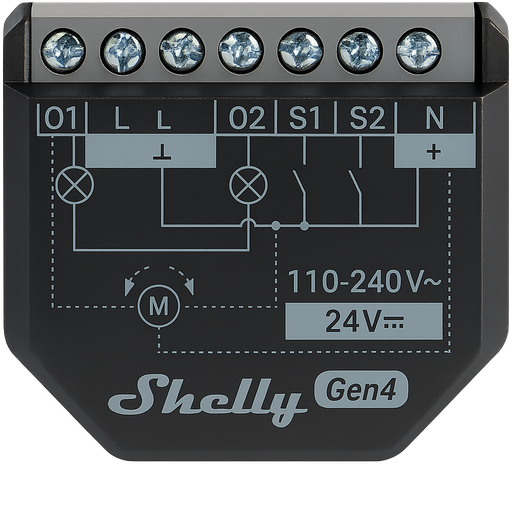 |
Firmware
It is recommended to connect Shelly devices by WiFi / Bluetooth, and update their firmware, until they gain support for OTA updates over Zigbee.
The latest firmware fixes known issues like negative power readings on some models.
Note they roll-out updates in phases. Check "beta" channels if you are specifically looking for a fix.
Notes
Zigbee / Matter mode
The device ships in Matter mode by default. To use the device with Zigbee2MQTT, switching to Zigbee mode is required. This can either be done via the Web UI, or by pressing the button on the back of the device 5 times. Afterwards, the device will start pairing mode for 3 minutes. To restart pairing mode, press the button three times again.
Usage scenarios
The Shelly 2PM Gen4 device allows two different usage scenarios that appear as separate devices in Zigbee2MQTT:
- Cover Control (
S4SW-002P16EU-COVER) - This device supports window covering controls with lift and tilt functionality with power monitoring - Switch Control (
S4SW-002P16EU-SWITCH) - Provides dual switch functionality with power monitoring
The usage is automatically detected based on the endpoint configuration. For now, changing usage is only possible through Shelly WebUI.
Switch inputs
Zigbee2MQTT exposes switch input type controls for each input endpoint reported by the device. Cover-mode devices normally expose switch_type_sw1 and switch_type_sw2; devices that do not report a second switch input endpoint only expose the available input.
Cover Mode Features
When operating in cover mode, this device provides:
- Window covering controls
- Position feedback
- State reporting (OPEN/CLOSE)
Tilt support is only available when slat control is enabled on the Shelly device. The cover_tilt_enabled device option controls whether Zigbee2MQTT exposes tilt: auto reads the Shelly cover configuration over RPC, while true or false can be used to override the detected value.
Vendor product page: Shelly 2PM Gen4
Maintenance and factory reset
To enable the on-device access point and bluetooth for maintenance, press and hold the button on the back of the device for 5 seconds. Doing so for 10 seconds will trigger a factory reset.
OTA updates
This device supports OTA updates, for more information see OTA updates.
Options
How to use device type specific configuration
cover_tilt_enabled: Expose tilt/slat controls for covers with Shelly slat control enabled. The value must be one ofauto,true,falseshelly_wifi_ssid: Full Wi-Fi SSID to use when the Shelly Wi-Fi setup cluster reports a shortened network name. The value must be textual.invert_cover: Inverts the reported cover position and the state derived from it, false: open=100,close=0, true: open=0,close=100 (default false). The value must betrueorfalsecover_position_tilt_disable_report: Do not publish set cover target position as a normal 'position' value (default false). The value must betrueorfalseidentify_timeout: Sets the duration of the identification procedure in seconds (i.e., how long the device would flash).The value ranges from 1 to 30 seconds (default: 3). The value must be a number with a minimum value of1and with a maximum value of30
Exposes
Action (enum)
Triggered action (e.g. a button click). Value can be found in the published state on the action property. It's not possible to read (/get) or write (/set) this value. The possible values are: input_1_on, input_1_off, input_1_toggle, input_1_single, input_1_double, input_1_triple, input_1_hold, input_2_on, input_2_off, input_2_toggle, input_2_single, input_2_double, input_2_triple, input_2_hold.
Switch type (enum, sw1 endpoint)
Switch input type. Value can be found in the published state on the switch_type_sw1 property. To read (/get) the value publish a message to topic zigbee2mqtt/FRIENDLY_NAME/get with payload {"switch_type_sw1": ""}. To write (/set) a value publish a message to topic zigbee2mqtt/FRIENDLY_NAME/set with payload {"switch_type_sw1": NEW_VALUE}. The possible values are: toggle, momentary.
Switch type (enum, sw2 endpoint)
Switch input type. Value can be found in the published state on the switch_type_sw2 property. To read (/get) the value publish a message to topic zigbee2mqtt/FRIENDLY_NAME/get with payload {"switch_type_sw2": ""}. To write (/set) a value publish a message to topic zigbee2mqtt/FRIENDLY_NAME/set with payload {"switch_type_sw2": NEW_VALUE}. The possible values are: toggle, momentary.
Cover
The current state of this cover is in the published state under the state property (value is OPEN or CLOSE). To control this cover publish a message to topic zigbee2mqtt/FRIENDLY_NAME/set with payload {"state": "OPEN"}, {"state": "CLOSE"}, {"state": "STOP"}. It's not possible to read (/get) this value. To change the position publish a message to topic zigbee2mqtt/FRIENDLY_NAME/set with payload {"position": VALUE} where VALUE is a number between 0 and 100. To change the tilt publish a message to topic zigbee2mqtt/FRIENDLY_NAME/set with payload {"tilt": VALUE} where VALUE is a number between 0 and 100.
Wi-Fi status (text)
Current connection status. Value can be found in the published state on the wifi_status property. To read (/get) the value publish a message to topic zigbee2mqtt/FRIENDLY_NAME/get with payload {"wifi_status": ""}. It's not possible to write (/set) this value.
IP address (text)
IP address currently assigned to the device. Value can be found in the published state on the ip_address property. To read (/get) the value publish a message to topic zigbee2mqtt/FRIENDLY_NAME/get with payload {"ip_address": ""}. It's not possible to write (/set) this value.
DHCP enabled (binary)
Indicates whether DHCP is used to automatically assign network settings. Value can be found in the published state on the dhcp_enabled property. To read (/get) the value publish a message to topic zigbee2mqtt/FRIENDLY_NAME/get with payload {"dhcp_enabled": ""}. It's not possible to write (/set) this value. If value equals true dHCP enabled is ON, if false OFF.
Wi-Fi Configuration (composite)
Can be set by publishing to zigbee2mqtt/FRIENDLY_NAME/set with payload {"wifi_config": {"enabled": VALUE, "ssid": VALUE, "password": VALUE, "static_ip": VALUE, "net_mask": VALUE, "gateway": VALUE, "name_server": VALUE}} To read (/get) the value publish a message to topic zigbee2mqtt/FRIENDLY_NAME/get with payload {"wifi_config": ""}.
enabled(binary): Enable/disable Wi-Fi connectivity allowed values:trueorfalsessid(text): Name (SSID) of the Wi-Fi network to connect topassword(text): Password for the selected Wi-Fi networkstatic_ip(text): Manually assigned IP address (used when DHCP is disabled)net_mask(text): Subnet mask for the static IP configurationgateway(text): Default gateway address for static IP configurationname_server(text): Name server address for static IP configuration
Identify (enum)
Initiate device identification. Value will not be published in the state. It's not possible to read (/get) this value. To write (/set) a value publish a message to topic zigbee2mqtt/FRIENDLY_NAME/set with payload {"identify": NEW_VALUE}. The possible values are: identify.