
Excellux ZG-104PLV
| Model | ZG-104PLV |
| Vendor | Excellux |
| Description | PIR motion sensor, vibration sensor, and light sensor |
| Exposes | occupancy, vibration, illuminance_warning, battery, illuminance, vibration_count, sampling_interval, vibration_sensitivity, illuminance_v0, illuminance_v1, illuminance_calibration |
| Picture | 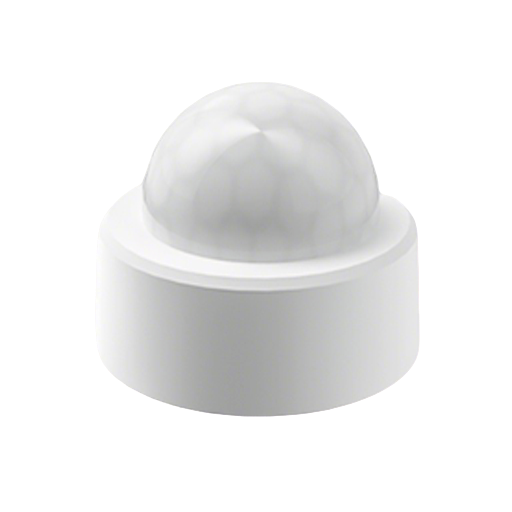 |
Notes
Battery
Uses 1 x CR2450 battery
Issues
Network spam
This device may generate very frequent Zigbee traffic (multiple messages per second), even when no sensor state changes occur. This can result in significantly reduced battery life (a few weeks).
Low light sensor sensitivity
The device uses the PIR sensor area as its light sensor and reports lux=0 even when the environment is not yet dark (lux>1000 on other sensors in the same location). This can be improved slightly by drilling a small hole, around 1 mm, in the center of the opaque Fresnel lens dome. However, even with this modification, the device is still not suitable for locations where you want to trigger lights only when a hallway is genuinely dark.
Options
How to use device type specific configuration
time_start: Reply to Tuya-specific time synchronization requests: "1970" - Reply with seconds since 1970/01/01 (recommended, should stop the device from asking), "2000" - Reply with seconds since 2000/01/01 (use if the weekday is wrong with 1970), "off" - Don't reply (use if replying causes too much traffic). Default for this device: "off". The value must be one of1970,2000,offilluminance_calibration: Calibrates the illuminance value (percentual offset), takes into effect on next report of device. The value must be a number.
Exposes
Occupancy (binary)
Presence state, true: motion detected, false: no motion. Value can be found in the published state on the occupancy property. It's not possible to read (/get) or write (/set) this value. If value equals true occupancy is ON, if false OFF.
Vibration (binary)
Vibration state, true: vibration detected, false: no vibration. Value can be found in the published state on the vibration property. It's not possible to read (/get) or write (/set) this value. If value equals true vibration is ON, if false OFF.
Illuminance warning (enum)
Illuminance warning level. Value can be found in the published state on the illuminance_warning property. It's not possible to read (/get) or write (/set) this value. The possible values are: none, low, high.
Battery (numeric)
Remaining battery in %, can take up to 24 hours before reported. Value can be found in the published state on the battery property. It's not possible to read (/get) or write (/set) this value. The minimal value is 0 and the maximum value is 100. The unit of this value is %.
Illuminance (numeric)
Measured illuminance. Value can be found in the published state on the illuminance property. It's not possible to read (/get) or write (/set) this value. The unit of this value is lx.
Vibration count (numeric)
Vibration count detected by the vibration sensor. Value can be found in the published state on the vibration_count property. It's not possible to read (/get) or write (/set) this value. The minimal value is 0 and the maximum value is 500. The unit of this value is times.
Sampling interval (numeric)
Sampling illuminance interval. Value can be found in the published state on the sampling_interval property. It's not possible to read (/get) this value. To write (/set) a value publish a message to topic zigbee2mqtt/FRIENDLY_NAME/set with payload {"sampling_interval": NEW_VALUE}. The minimal value is 5 and the maximum value is 1200. The unit of this value is s.
Vibration sensitivity (numeric)
Vibration sensitivity. Value can be found in the published state on the vibration_sensitivity property. It's not possible to read (/get) this value. To write (/set) a value publish a message to topic zigbee2mqtt/FRIENDLY_NAME/set with payload {"vibration_sensitivity": NEW_VALUE}. The minimal value is 0 and the maximum value is 50.
Illuminance v0 (numeric)
Illuminance v0 threshold setting. Value can be found in the published state on the illuminance_v0 property. It's not possible to read (/get) this value. To write (/set) a value publish a message to topic zigbee2mqtt/FRIENDLY_NAME/set with payload {"illuminance_v0": NEW_VALUE}. The minimal value is 0 and the maximum value is 10000. The unit of this value is lux.
Illuminance v1 (numeric)
Illuminance v1 threshold setting. Value can be found in the published state on the illuminance_v1 property. It's not possible to read (/get) this value. To write (/set) a value publish a message to topic zigbee2mqtt/FRIENDLY_NAME/set with payload {"illuminance_v1": NEW_VALUE}. The minimal value is 0 and the maximum value is 10000. The unit of this value is lux.
Illuminance calibration (numeric)
Illuminance calibration. Value can be found in the published state on the illuminance_calibration property. It's not possible to read (/get) this value. To write (/set) a value publish a message to topic zigbee2mqtt/FRIENDLY_NAME/set with payload {"illuminance_calibration": NEW_VALUE}. The minimal value is -1000 and the maximum value is 1000. The unit of this value is lux.