
Nedis ZBWD20RD
| Model | ZBWD20RD |
| Vendor | Nedis |
| Description | SmartLife Triac Dimmer |
| Exposes | power_on_behavior, light (state, brightness, min_brightness, max_brightness), switch_type |
| Picture | 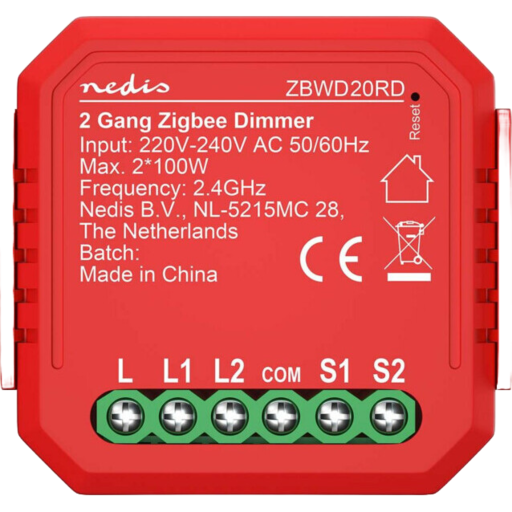 |
Notes
The inputs of the device are only for toggle switches and do not work with momentary buttons. Therfore only switching the light on and off is possible with the input. Dimming is only available by zigbee commands. For details: https://github.com/Koenkk/zigbee2mqtt/issues/27364
Options
How to use device type specific configuration
time_start: Reply to Tuya-specific time synchronization requests: "1970" - Reply with seconds since 1970/01/01 (recommended, should stop the device from asking), "2000" - Reply with seconds since 2000/01/01 (use if the weekday is wrong with 1970), "off" - Don't reply (use if replying causes too much traffic). Default for this device: "off". The value must be one of1970,2000,offstate_action: State actions will also be published as 'action' when true (default false). The value must betrueorfalse
Exposes
Power-on behavior (enum)
Controls the behavior when the device is powered on after power loss. Value can be found in the published state on the power_on_behavior property. To read (/get) the value publish a message to topic zigbee2mqtt/FRIENDLY_NAME/get with payload {"power_on_behavior": ""}. To write (/set) a value publish a message to topic zigbee2mqtt/FRIENDLY_NAME/set with payload {"power_on_behavior": NEW_VALUE}. The possible values are: off, previous, on.
Light (l1 endpoint)
This light supports the following features: state, brightness, min_brightness, max_brightness.
state: To control the state publish a message to topiczigbee2mqtt/FRIENDLY_NAME/setwith payload{"state_l1": "ON"},{"state_l1": "OFF"}or{"state_l1": "TOGGLE"}. To read the state send a message tozigbee2mqtt/FRIENDLY_NAME/getwith payload{"state_l1": ""}.brightness: To control the brightness publish a message to topiczigbee2mqtt/FRIENDLY_NAME/setwith payload{"brightness_l1": VALUE}whereVALUEis a number between0and254. To read the brightness send a message tozigbee2mqtt/FRIENDLY_NAME/getwith payload{"brightness_l1": ""}.
Light (l2 endpoint)
This light supports the following features: state, brightness, min_brightness, max_brightness.
state: To control the state publish a message to topiczigbee2mqtt/FRIENDLY_NAME/setwith payload{"state_l2": "ON"},{"state_l2": "OFF"}or{"state_l2": "TOGGLE"}. To read the state send a message tozigbee2mqtt/FRIENDLY_NAME/getwith payload{"state_l2": ""}.brightness: To control the brightness publish a message to topiczigbee2mqtt/FRIENDLY_NAME/setwith payload{"brightness_l2": VALUE}whereVALUEis a number between0and254. To read the brightness send a message tozigbee2mqtt/FRIENDLY_NAME/getwith payload{"brightness_l2": ""}.
Switch type (enum, l1 endpoint)
Type of the switch. Value can be found in the published state on the switch_type_l1 property. To read (/get) the value publish a message to topic zigbee2mqtt/FRIENDLY_NAME/get with payload {"switch_type_l1": ""}. To write (/set) a value publish a message to topic zigbee2mqtt/FRIENDLY_NAME/set with payload {"switch_type_l1": NEW_VALUE}. The possible values are: toggle, state, momentary.
Switch type (enum, l2 endpoint)
Type of the switch. Value can be found in the published state on the switch_type_l2 property. To read (/get) the value publish a message to topic zigbee2mqtt/FRIENDLY_NAME/get with payload {"switch_type_l2": ""}. To write (/set) a value publish a message to topic zigbee2mqtt/FRIENDLY_NAME/set with payload {"switch_type_l2": NEW_VALUE}. The possible values are: toggle, state, momentary.