
Aqara WT-A03E
| Model | WT-A03E |
| Vendor | Aqara |
| Description | Radiator thermostat W600 |
| Exposes | battery, valve_alarm, window_open, climate (local_temperature, local_temperature_calibration, occupied_heating_setpoint, system_mode, running_state, preset), temperature_setpoint_hold_duration, override_active, local_temperature_internal, sensor, external_temperature_input, calibrate, calibrated, temperature_control_abnormal_notification, display_flip, window_detection, child_lock, anti_freeze_temperature, preset_home_temperature, preset_away_temperature, preset_sleep_temperature, preset_vacation_temperature, preset_wind_down_temperature, weekly_schedule_sunday, weekly_schedule_monday, weekly_schedule_tuesday, weekly_schedule_wednesday, weekly_schedule_thursday, weekly_schedule_friday, weekly_schedule_saturday, schedule_upload_status, save_schedule, clear_schedule, position, identify |
| Picture | 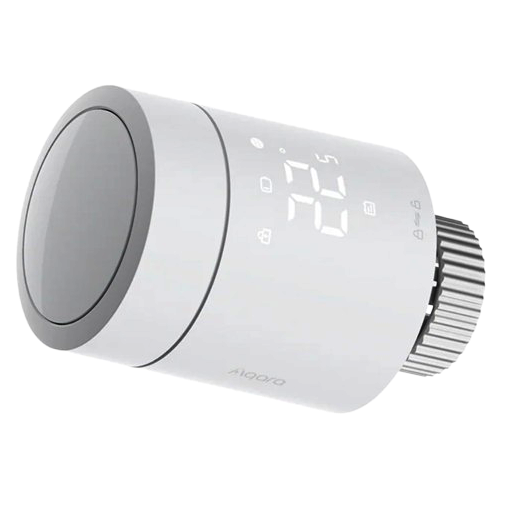 |
Notes
Pairing
The thermostat needs to be flashed with the correct firmware before it can be used with Zigbee. This works without using a proprietary hub, but requires a iOS/Android device with Bluetooth and an Aqara account.
- Download the Aqara app, sign in and proceed to adding a new device.
- (Skip this step in case of a new device) Put the thermostat into pairing mode by pressing and holding the center button for 10 seconds until the display starts flashing. The device should now show up in the app.
- Select the thermostat in the app and when prompted, choose Zigbee as the connection method. The app will then flash the correct firmware.
- Once the flashing process is complete, the thermostat will start pairing using Zigbee.
OTA updates
This device supports OTA updates, for more information see OTA updates.
Options
How to use device type specific configuration
thermostat_unit: Controls the temperature unit of the thermostat (default celsius). The value must be one ofcelsius,fahrenheitidentify_timeout: Sets the duration of the identification procedure in seconds (i.e., how long the device would flash).The value ranges from 1 to 30 seconds (default: 3). The value must be a number with a minimum value of1and with a maximum value of30
Exposes
Battery (numeric)
Battery percentage. Value can be found in the published state on the battery property. It's not possible to read (/get) or write (/set) this value. The minimal value is 0 and the maximum value is 100. The unit of this value is %.
Valve alarm (binary)
Indicates whether temperature control abnormal notification has reported an active alert. Value can be found in the published state on the valve_alarm property. It's not possible to read (/get) or write (/set) this value. If value equals true valve alarm is ON, if false OFF.
Window open (binary)
Indicates whether open window detection has reported an open window. Value can be found in the published state on the window_open property. It's not possible to read (/get) or write (/set) this value. If value equals true window open is ON, if false OFF.
Climate
This climate device supports the following features: local_temperature, local_temperature_calibration, occupied_heating_setpoint, system_mode, running_state, preset.
occupied_heating_setpoint: Temperature setpoint. To control publish a message to topiczigbee2mqtt/FRIENDLY_NAME/setwith payload{"occupied_heating_setpoint": VALUE}whereVALUEis the °C between5and30. To read send a message tozigbee2mqtt/FRIENDLY_NAME/getwith payload{"occupied_heating_setpoint": ""}.local_temperature: Current temperature used by the thermostat (in °C). To read send a message tozigbee2mqtt/FRIENDLY_NAME/getwith payload{"local_temperature": ""}.system_mode: Mode of this device. To control publish a message to topiczigbee2mqtt/FRIENDLY_NAME/setwith payload{"system_mode": VALUE}whereVALUEis one of:off,heat,auto. To read send a message tozigbee2mqtt/FRIENDLY_NAME/getwith payload{"system_mode": ""}.preset: Selected preset scene. To control publish a message to topiczigbee2mqtt/FRIENDLY_NAME/setwith payload{"preset": VALUE}whereVALUEis one of:home,away,sleep,vacation,wind_down. To read send a message tozigbee2mqtt/FRIENDLY_NAME/getwith payload{"preset": ""}.running_state: The current running state. Possible values are:idle,heat. To read send a message tozigbee2mqtt/FRIENDLY_NAME/getwith payload{"running_state": ""}.local_temperature_calibration: Offset to add/subtract to the local temperature. To control publish a message to topiczigbee2mqtt/FRIENDLY_NAME/setwith payload{"local_temperature_calibration": VALUE}.To read send a message tozigbee2mqtt/FRIENDLY_NAME/getwith payload{"local_temperature": ""}.The minimal value is-5and the maximum value is5with a step size of0.1.
Manual Override Duration (numeric)
Duration in minutes for the current manual override. 0 means until next schedule event, 65535 means indefinitely.. Value can be found in the published state on the temperature_setpoint_hold_duration property. To read (/get) the value publish a message to topic zigbee2mqtt/FRIENDLY_NAME/get with payload {"temperature_setpoint_hold_duration": ""}. To write (/set) a value publish a message to topic zigbee2mqtt/FRIENDLY_NAME/set with payload {"temperature_setpoint_hold_duration": NEW_VALUE}. The minimal value is 0 and the maximum value is 65535. The unit of this value is min.
Manual Override (binary)
Temporary manual override active. Value can be found in the published state on the override_active property. It's not possible to read (/get) or write (/set) this value. If value equals true manual Override is ON, if false OFF.
Internal sensor temperature (numeric)
Temperature measured by the thermostat's internal sensor. Value can be found in the published state on the local_temperature_internal property. It's not possible to read (/get) or write (/set) this value. The unit of this value is °C.
Temperature source (enum)
Choose whether the thermostat uses its internal sensor or data provided via 'External Sensor Temperature'. Value can be found in the published state on the sensor property. To read (/get) the value publish a message to topic zigbee2mqtt/FRIENDLY_NAME/get with payload {"sensor": ""}. To write (/set) a value publish a message to topic zigbee2mqtt/FRIENDLY_NAME/set with payload {"sensor": NEW_VALUE}. The possible values are: internal, external.
External temperature input (numeric)
Manual external temperature forwarded to the W600 when temperature source is external. Value can be found in the published state on the external_temperature_input property. To read (/get) the value publish a message to topic zigbee2mqtt/FRIENDLY_NAME/get with payload {"external_temperature_input": ""}. To write (/set) a value publish a message to topic zigbee2mqtt/FRIENDLY_NAME/set with payload {"external_temperature_input": NEW_VALUE}. The minimal value is -40 and the maximum value is 125. The unit of this value is °C.
Calibrate (enum)
Start valve calibration. Value will not be published in the state. It's not possible to read (/get) this value. To write (/set) a value publish a message to topic zigbee2mqtt/FRIENDLY_NAME/set with payload {"calibrate": NEW_VALUE}. The possible values are: start.
Calibration status (enum)
Valve calibration state. Value can be found in the published state on the calibrated property. To read (/get) the value publish a message to topic zigbee2mqtt/FRIENDLY_NAME/get with payload {"calibrated": ""}. It's not possible to write (/set) this value. The possible values are: not_ready, ready, error, in_progress.
Temperature control abnormal notification (binary)
Enable or disable reporting of abnormal temperature control status. When enabled, the valve alarm is set to true if an abnormality is detected. Value can be found in the published state on the temperature_control_abnormal_notification property. To read (/get) the value publish a message to topic zigbee2mqtt/FRIENDLY_NAME/get with payload {"temperature_control_abnormal_notification": ""}. To write (/set) a value publish a message to topic zigbee2mqtt/FRIENDLY_NAME/set with payload {"temperature_control_abnormal_notification": NEW_VALUE}. If value equals ON temperature control abnormal notification is ON, if OFF OFF.
Display flip (binary)
Flip the display orientation. Value can be found in the published state on the display_flip property. To read (/get) the value publish a message to topic zigbee2mqtt/FRIENDLY_NAME/get with payload {"display_flip": ""}. To write (/set) a value publish a message to topic zigbee2mqtt/FRIENDLY_NAME/set with payload {"display_flip": NEW_VALUE}. If value equals ON display flip is ON, if OFF OFF.
Open window detection (binary)
Enable or disable open window detection. When enabled, the window_open is set to true if an open window is detected. Value can be found in the published state on the window_detection property. To read (/get) the value publish a message to topic zigbee2mqtt/FRIENDLY_NAME/get with payload {"window_detection": ""}. To write (/set) a value publish a message to topic zigbee2mqtt/FRIENDLY_NAME/set with payload {"window_detection": NEW_VALUE}. If value equals ON open window detection is ON, if OFF OFF.
Child lock (binary)
Lock or unlock the physical controls on the device. Value can be found in the published state on the child_lock property. To read (/get) the value publish a message to topic zigbee2mqtt/FRIENDLY_NAME/get with payload {"child_lock": ""}. To write (/set) a value publish a message to topic zigbee2mqtt/FRIENDLY_NAME/set with payload {"child_lock": NEW_VALUE}. If value equals LOCK child lock is ON, if UNLOCK OFF.
Anti freeze temperature (numeric)
Minimum temperature limit for frost protection. Turns the thermostat on regardless of setpoint if the temperature drops below this.. Value can be found in the published state on the anti_freeze_temperature property. To read (/get) the value publish a message to topic zigbee2mqtt/FRIENDLY_NAME/get with payload {"anti_freeze_temperature": ""}. To write (/set) a value publish a message to topic zigbee2mqtt/FRIENDLY_NAME/set with payload {"anti_freeze_temperature": NEW_VALUE}. The minimal value is 5 and the maximum value is 15. The unit of this value is °C.
Home temperature (numeric)
Home preset temperature. Value can be found in the published state on the preset_home_temperature property. To read (/get) the value publish a message to topic zigbee2mqtt/FRIENDLY_NAME/get with payload {"preset_home_temperature": ""}. To write (/set) a value publish a message to topic zigbee2mqtt/FRIENDLY_NAME/set with payload {"preset_home_temperature": NEW_VALUE}. The minimal value is 5 and the maximum value is 30. The unit of this value is °C.
Away temperature (numeric)
Away preset temperature. Value can be found in the published state on the preset_away_temperature property. To read (/get) the value publish a message to topic zigbee2mqtt/FRIENDLY_NAME/get with payload {"preset_away_temperature": ""}. To write (/set) a value publish a message to topic zigbee2mqtt/FRIENDLY_NAME/set with payload {"preset_away_temperature": NEW_VALUE}. The minimal value is 5 and the maximum value is 30. The unit of this value is °C.
Sleep temperature (numeric)
Sleep preset temperature. Value can be found in the published state on the preset_sleep_temperature property. To read (/get) the value publish a message to topic zigbee2mqtt/FRIENDLY_NAME/get with payload {"preset_sleep_temperature": ""}. To write (/set) a value publish a message to topic zigbee2mqtt/FRIENDLY_NAME/set with payload {"preset_sleep_temperature": NEW_VALUE}. The minimal value is 5 and the maximum value is 30. The unit of this value is °C.
Vacation temperature (numeric)
Vacation preset temperature. Value can be found in the published state on the preset_vacation_temperature property. To read (/get) the value publish a message to topic zigbee2mqtt/FRIENDLY_NAME/get with payload {"preset_vacation_temperature": ""}. To write (/set) a value publish a message to topic zigbee2mqtt/FRIENDLY_NAME/set with payload {"preset_vacation_temperature": NEW_VALUE}. The minimal value is 5 and the maximum value is 30. The unit of this value is °C.
Wind down temperature (numeric)
Wind-down preset temperature. Value can be found in the published state on the preset_wind_down_temperature property. To read (/get) the value publish a message to topic zigbee2mqtt/FRIENDLY_NAME/get with payload {"preset_wind_down_temperature": ""}. To write (/set) a value publish a message to topic zigbee2mqtt/FRIENDLY_NAME/set with payload {"preset_wind_down_temperature": NEW_VALUE}. The minimal value is 5 and the maximum value is 30. The unit of this value is °C.
Sunday schedule (text)
Staged weekly schedule for this day. Use comma-delimited entries in the format HH:MM/preset, for example '08:00/home, 19:00/vacation'. Editing the text fields does not upload anything until Save schedule is triggered.. Value can be found in the published state on the weekly_schedule_sunday property. It's not possible to read (/get) this value. To write (/set) a value publish a message to topic zigbee2mqtt/FRIENDLY_NAME/set with payload {"weekly_schedule_sunday": NEW_VALUE}.
Monday schedule (text)
Staged weekly schedule for this day. Use comma-delimited entries in the format HH:MM/preset, for example '08:00/home, 19:00/vacation'. Editing the text fields does not upload anything until Save schedule is triggered.. Value can be found in the published state on the weekly_schedule_monday property. It's not possible to read (/get) this value. To write (/set) a value publish a message to topic zigbee2mqtt/FRIENDLY_NAME/set with payload {"weekly_schedule_monday": NEW_VALUE}.
Tuesday schedule (text)
Staged weekly schedule for this day. Use comma-delimited entries in the format HH:MM/preset, for example '08:00/home, 19:00/vacation'. Editing the text fields does not upload anything until Save schedule is triggered.. Value can be found in the published state on the weekly_schedule_tuesday property. It's not possible to read (/get) this value. To write (/set) a value publish a message to topic zigbee2mqtt/FRIENDLY_NAME/set with payload {"weekly_schedule_tuesday": NEW_VALUE}.
Wednesday schedule (text)
Staged weekly schedule for this day. Use comma-delimited entries in the format HH:MM/preset, for example '08:00/home, 19:00/vacation'. Editing the text fields does not upload anything until Save schedule is triggered.. Value can be found in the published state on the weekly_schedule_wednesday property. It's not possible to read (/get) this value. To write (/set) a value publish a message to topic zigbee2mqtt/FRIENDLY_NAME/set with payload {"weekly_schedule_wednesday": NEW_VALUE}.
Thursday schedule (text)
Staged weekly schedule for this day. Use comma-delimited entries in the format HH:MM/preset, for example '08:00/home, 19:00/vacation'. Editing the text fields does not upload anything until Save schedule is triggered.. Value can be found in the published state on the weekly_schedule_thursday property. It's not possible to read (/get) this value. To write (/set) a value publish a message to topic zigbee2mqtt/FRIENDLY_NAME/set with payload {"weekly_schedule_thursday": NEW_VALUE}.
Friday schedule (text)
Staged weekly schedule for this day. Use comma-delimited entries in the format HH:MM/preset, for example '08:00/home, 19:00/vacation'. Editing the text fields does not upload anything until Save schedule is triggered.. Value can be found in the published state on the weekly_schedule_friday property. It's not possible to read (/get) this value. To write (/set) a value publish a message to topic zigbee2mqtt/FRIENDLY_NAME/set with payload {"weekly_schedule_friday": NEW_VALUE}.
Saturday schedule (text)
Staged weekly schedule for this day. Use comma-delimited entries in the format HH:MM/preset, for example '08:00/home, 19:00/vacation'. Editing the text fields does not upload anything until Save schedule is triggered.. Value can be found in the published state on the weekly_schedule_saturday property. It's not possible to read (/get) this value. To write (/set) a value publish a message to topic zigbee2mqtt/FRIENDLY_NAME/set with payload {"weekly_schedule_saturday": NEW_VALUE}.
Schedule upload status (enum)
Current state of the custom OTA transfer used to upload the weekly schedule to the thermostat.. Value can be found in the published state on the schedule_upload_status property. It's not possible to read (/get) or write (/set) this value. The possible values are: idle, staged, in_progress, success, failed.
Save schedule (enum)
Upload the weekly schedule to the thermostat. Value will not be published in the state. It's not possible to read (/get) this value. To write (/set) a value publish a message to topic zigbee2mqtt/FRIENDLY_NAME/set with payload {"save_schedule": NEW_VALUE}. The possible values are: trigger.
Clear schedule (enum)
Clear all weekly schedule inputs and upload an empty schedule to the thermostat. Value will not be published in the state. It's not possible to read (/get) this value. To write (/set) a value publish a message to topic zigbee2mqtt/FRIENDLY_NAME/set with payload {"clear_schedule": NEW_VALUE}. The possible values are: trigger.
Valve position (numeric)
Position of the valve, 100% is fully open. Value can be found in the published state on the position property. To read (/get) the value publish a message to topic zigbee2mqtt/FRIENDLY_NAME/get with payload {"position": ""}. It's not possible to write (/set) this value. The minimal value is 0 and the maximum value is 100. The unit of this value is %.
Identify (enum)
Initiate device identification. Value will not be published in the state. It's not possible to read (/get) this value. To write (/set) a value publish a message to topic zigbee2mqtt/FRIENDLY_NAME/set with payload {"identify": NEW_VALUE}. The possible values are: identify.