
Shelly WS90
| Model | WS90 |
| Vendor | Shelly |
| Description | Weather station |
| Exposes | battery, voltage, capacitor_voltage, illuminance, temperature, pressure, humidity, wind_speed, wind_direction, gust_speed, uv_index, rain_status, precipitation, dew_point, wind_chill, humidex, apparent_temperature, heat_stress, rain_rate, pressure_trend, weather_condition, identify |
| Picture | 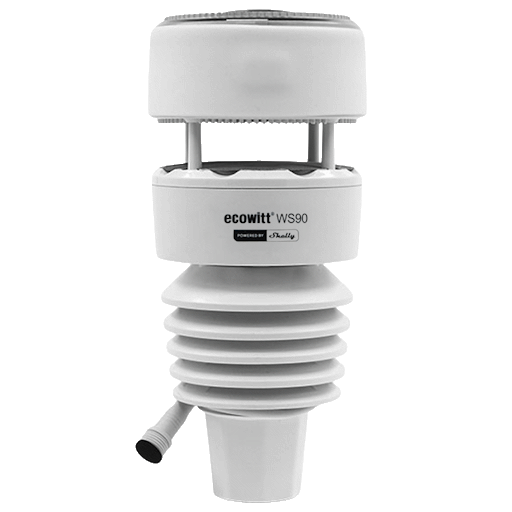 |
Firmware
It is recommended to connect Shelly devices by WiFi / Bluetooth, and update their firmware, until they gain support for OTA updates over Zigbee.
The latest firmware fixes known issues like negative power readings on some models.
Note they roll-out updates in phases. Check "beta" channels if you are specifically looking for a fix.
Pairing
Press the calibration button twice. This will activate Zigbee pairing mode for 3 minutes. If pairing is successful, the LED will flash one time.
Options
How to use device type specific configuration
illuminance_calibration: Calibrates the illuminance value (percentual offset), takes into effect on next report of device. The value must be a number.temperature_calibration: Calibrates the temperature value (absolute offset), takes into effect on next report of device. The value must be a number.temperature_precision: Number of digits after decimal point for temperature, takes into effect on next report of device. This option can only decrease the precision, not increase it. The value must be a number with a minimum value of0and with a maximum value of3pressure_calibration: Calibrates the pressure value (absolute offset), takes into effect on next report of device. The value must be a number.pressure_precision: Number of digits after decimal point for pressure, takes into effect on next report of device. This option can only decrease the precision, not increase it. The value must be a number with a minimum value of0and with a maximum value of3humidity_calibration: Calibrates the humidity value (absolute offset), takes into effect on next report of device. The value must be a number.humidity_precision: Number of digits after decimal point for humidity, takes into effect on next report of device. This option can only decrease the precision, not increase it. The value must be a number with a minimum value of0and with a maximum value of3identify_timeout: Sets the duration of the identification procedure in seconds (i.e., how long the device would flash).The value ranges from 1 to 30 seconds (default: 3). The value must be a number with a minimum value of1and with a maximum value of30illuminance_raw: Expose the raw illuminance value. The value must betrueorfalse
Exposes
Battery (numeric)
Remaining battery in %. Value can be found in the published state on the battery property. To read (/get) the value publish a message to topic zigbee2mqtt/FRIENDLY_NAME/get with payload {"battery": ""}. It's not possible to write (/set) this value. The minimal value is 0 and the maximum value is 100. The unit of this value is %.
Voltage (numeric)
Reported battery voltage in millivolts. Value can be found in the published state on the voltage property. To read (/get) the value publish a message to topic zigbee2mqtt/FRIENDLY_NAME/get with payload {"voltage": ""}. It's not possible to write (/set) this value. The unit of this value is mV.
Capacitor voltage (numeric)
Capacitor Voltage. Value can be found in the published state on the capacitor_voltage property. To read (/get) the value publish a message to topic zigbee2mqtt/FRIENDLY_NAME/get with payload {"capacitor_voltage": ""}. It's not possible to write (/set) this value. The unit of this value is V.
Illuminance (numeric)
Measured illuminance. Value can be found in the published state on the illuminance property. To read (/get) the value publish a message to topic zigbee2mqtt/FRIENDLY_NAME/get with payload {"illuminance": ""}. It's not possible to write (/set) this value. The unit of this value is lx.
Temperature (numeric)
Measured temperature value. Value can be found in the published state on the temperature property. To read (/get) the value publish a message to topic zigbee2mqtt/FRIENDLY_NAME/get with payload {"temperature": ""}. It's not possible to write (/set) this value. The unit of this value is °C.
Pressure (numeric)
The measured atmospheric pressure. Value can be found in the published state on the pressure property. To read (/get) the value publish a message to topic zigbee2mqtt/FRIENDLY_NAME/get with payload {"pressure": ""}. It's not possible to write (/set) this value. The unit of this value is kPa.
Humidity (numeric)
Measured relative humidity. Value can be found in the published state on the humidity property. To read (/get) the value publish a message to topic zigbee2mqtt/FRIENDLY_NAME/get with payload {"humidity": ""}. It's not possible to write (/set) this value. The unit of this value is %.
Wind speed (numeric)
Wind speed in m/s. Value can be found in the published state on the wind_speed property. To read (/get) the value publish a message to topic zigbee2mqtt/FRIENDLY_NAME/get with payload {"wind_speed": ""}. It's not possible to write (/set) this value. The minimal value is 0 and the maximum value is 140. The unit of this value is m/s.
Wind direction (numeric)
Wind direction in degrees. Value can be found in the published state on the wind_direction property. To read (/get) the value publish a message to topic zigbee2mqtt/FRIENDLY_NAME/get with payload {"wind_direction": ""}. It's not possible to write (/set) this value. The minimal value is 0 and the maximum value is 360. The unit of this value is °.
Gust speed (numeric)
Gust speed in m/s. Value can be found in the published state on the gust_speed property. To read (/get) the value publish a message to topic zigbee2mqtt/FRIENDLY_NAME/get with payload {"gust_speed": ""}. It's not possible to write (/set) this value. The minimal value is 0 and the maximum value is 140. The unit of this value is m/s.
Uv index (numeric)
UV index. Value can be found in the published state on the uv_index property. To read (/get) the value publish a message to topic zigbee2mqtt/FRIENDLY_NAME/get with payload {"uv_index": ""}. It's not possible to write (/set) this value. The minimal value is 0 and the maximum value is 11.
Rain status (binary)
Rain status. Value can be found in the published state on the rain_status property. To read (/get) the value publish a message to topic zigbee2mqtt/FRIENDLY_NAME/get with payload {"rain_status": ""}. It's not possible to write (/set) this value. If value equals true rain status is ON, if false OFF.
Precipitation (numeric)
Precipitation. Value can be found in the published state on the precipitation property. To read (/get) the value publish a message to topic zigbee2mqtt/FRIENDLY_NAME/get with payload {"precipitation": ""}. It's not possible to write (/set) this value. The minimal value is 0 and the maximum value is 100000. The unit of this value is mm.
Dew point (numeric)
Calculated dew point temperature. Value can be found in the published state on the dew_point property. It's not possible to read (/get) or write (/set) this value. The unit of this value is °C.
Wind chill (numeric)
Calculated wind chill temperature. Value can be found in the published state on the wind_chill property. It's not possible to read (/get) or write (/set) this value. The unit of this value is °C.
Humidex (numeric)
Calculated humidex (feels-like for warm conditions). Value can be found in the published state on the humidex property. It's not possible to read (/get) or write (/set) this value. The unit of this value is °C.
Apparent temperature (numeric)
Calculated apparent temperature. Value can be found in the published state on the apparent_temperature property. It's not possible to read (/get) or write (/set) this value. The unit of this value is °C.
Heat stress (numeric)
Calculated heat stress percentage (0-100%). Value can be found in the published state on the heat_stress property. It's not possible to read (/get) or write (/set) this value. The unit of this value is %.
Rain rate (numeric)
Calculated rainfall rate. Value can be found in the published state on the rain_rate property. It's not possible to read (/get) or write (/set) this value. The unit of this value is mm/h.
Pressure trend (numeric)
Pressure change rate (negative = falling). Value can be found in the published state on the pressure_trend property. It's not possible to read (/get) or write (/set) this value. The unit of this value is hPa/h.
Weather condition (text)
Weather condition (sunny, rainy, snowy, cloudy, etc.). Value can be found in the published state on the weather_condition property. It's not possible to read (/get) or write (/set) this value.
Identify (enum)
Initiate device identification. This device is asleep by default.You may need to wake it up first before sending the identify command.. Value will not be published in the state. It's not possible to read (/get) this value. To write (/set) a value publish a message to topic zigbee2mqtt/FRIENDLY_NAME/set with payload {"identify": NEW_VALUE}. The possible values are: identify.