Zigbee2MQTTZigbee2MQTT
  • Getting started
  • Supported Adapters
  • Supported Devices
  • Installation
  • Configuration
  • Usage
  • FAQ
Devices
  • Zigbee

    • Zigbee network
    • Improve network range and stability
    • Secure your Zigbee network
    • Sniff Zigbee traffic
    • Create a CC2530 router
  • Support new devices

    • Support new devices
    • Support new Tuya devices
    • Find Tuya Data Points
  • Remote Adapter

    • Connect to a remote adapter
    • Connect to a remote Sonoff ZBBridge
  • More

    • 3D cases
    • External converters
    • External extensions
    • Switch to the dev branch
    • Get Tuya and Xiaomi OTA url
  • Forum
  • Discord
  • Issues
  • Donate
GitHub
GitHub (docs)
  • Getting started
  • Supported Adapters
  • Supported Devices
  • Installation
  • Configuration
  • Usage
  • FAQ
Devices
  • Zigbee

    • Zigbee network
    • Improve network range and stability
    • Secure your Zigbee network
    • Sniff Zigbee traffic
    • Create a CC2530 router
  • Support new devices

    • Support new devices
    • Support new Tuya devices
    • Find Tuya Data Points
  • Remote Adapter

    • Connect to a remote adapter
    • Connect to a remote Sonoff ZBBridge
  • More

    • 3D cases
    • External converters
    • External extensions
    • Switch to the dev branch
    • Get Tuya and Xiaomi OTA url
  • Forum
  • Discord
  • Issues
  • Donate
GitHub
GitHub (docs)

SONOFF SNZB-02B

ModelSNZB-02B
VendorSONOFF
DescriptionTemperature and humidity sensor
Exposesbattery, voltage, temperature, humidity, cold_threshold, hot_threshold, dry_threshold, damp_threshold, temperature_calibration, humidity_calibration, temperature_max_in_hour, temperature_min_in_hour, temperature_aver_in_hour, humidity_max_in_hour, humidity_min_in_hour, humidity_aver_in_hour, temperature_half_hour_records, humidity_half_hour_records
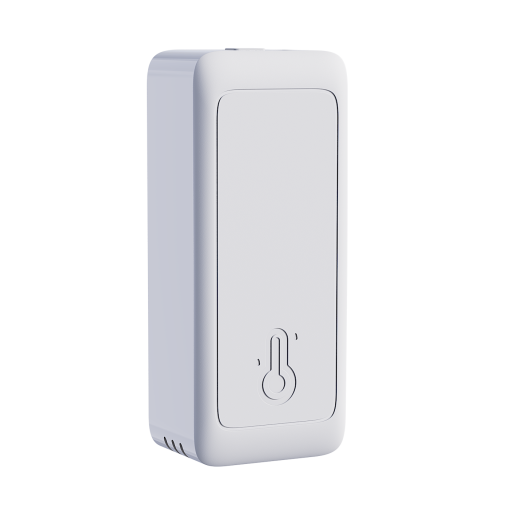
PictureSONOFF SNZB-02B

OTA updates

This device supports OTA updates, for more information see OTA updates.

Options

How to use device type specific configuration

  • temperature_calibration: Calibrates the temperature value (absolute offset), takes into effect on next report of device. The value must be a number.

  • temperature_precision: Number of digits after decimal point for temperature, takes into effect on next report of device. This option can only decrease the precision, not increase it. The value must be a number with a minimum value of 0 and with a maximum value of 3

  • humidity_calibration: Calibrates the humidity value (absolute offset), takes into effect on next report of device. The value must be a number.

  • humidity_precision: Number of digits after decimal point for humidity, takes into effect on next report of device. This option can only decrease the precision, not increase it. The value must be a number with a minimum value of 0 and with a maximum value of 3

Exposes

Battery (numeric)

Remaining battery in %. Value can be found in the published state on the battery property. To read (/get) the value publish a message to topic zigbee2mqtt/FRIENDLY_NAME/get with payload {"battery": ""}. It's not possible to write (/set) this value. The minimal value is 0 and the maximum value is 100. The unit of this value is %.

Voltage (numeric)

Reported battery voltage in millivolts. Value can be found in the published state on the voltage property. To read (/get) the value publish a message to topic zigbee2mqtt/FRIENDLY_NAME/get with payload {"voltage": ""}. It's not possible to write (/set) this value. The unit of this value is mV.

Temperature (numeric)

Measured temperature value. Value can be found in the published state on the temperature property. To read (/get) the value publish a message to topic zigbee2mqtt/FRIENDLY_NAME/get with payload {"temperature": ""}. It's not possible to write (/set) this value. The unit of this value is °C.

Humidity (numeric)

Measured relative humidity. Value can be found in the published state on the humidity property. To read (/get) the value publish a message to topic zigbee2mqtt/FRIENDLY_NAME/get with payload {"humidity": ""}. It's not possible to write (/set) this value. The minimal value is 0 and the maximum value is 100. The unit of this value is %.

Min comfort temperature (numeric)

Minimum temperature that is considered comfortable. Note: wake up the device by pressing the button on the back before changing this value.. Value can be found in the published state on the cold_threshold property. It's not possible to read (/get) this value. To write (/set) a value publish a message to topic zigbee2mqtt/FRIENDLY_NAME/set with payload {"cold_threshold": NEW_VALUE}. The minimal value is -10 and the maximum value is 60. The unit of this value is °C.

Max comfort temperature (numeric)

Maximum temperature that is considered comfortable. Note: wake up the device by pressing the button on the back before changing this value.. Value can be found in the published state on the hot_threshold property. It's not possible to read (/get) this value. To write (/set) a value publish a message to topic zigbee2mqtt/FRIENDLY_NAME/set with payload {"hot_threshold": NEW_VALUE}. The minimal value is -10 and the maximum value is 60. The unit of this value is °C.

Min comfort humidity (numeric)

Minimum relative humidity that is considered comfortable. Note: wake up the device by pressing the button on the back before changing this value.. Value can be found in the published state on the dry_threshold property. It's not possible to read (/get) this value. To write (/set) a value publish a message to topic zigbee2mqtt/FRIENDLY_NAME/set with payload {"dry_threshold": NEW_VALUE}. The minimal value is 5 and the maximum value is 95. The unit of this value is %.

Max comfort humidity (numeric)

Maximum relative humidity that is considered comfortable. Note: wake up the device by pressing the button on the back before changing this value.. Value can be found in the published state on the damp_threshold property. It's not possible to read (/get) this value. To write (/set) a value publish a message to topic zigbee2mqtt/FRIENDLY_NAME/set with payload {"damp_threshold": NEW_VALUE}. The minimal value is 5 and the maximum value is 95. The unit of this value is %.

Temperature calibration (numeric)

Offset to add/subtract to the reported temperature. Note: wake up the device by pressing the button on the back before changing this value.. Value can be found in the published state on the temperature_calibration property. To read (/get) the value publish a message to topic zigbee2mqtt/FRIENDLY_NAME/get with payload {"temperature_calibration": ""}. To write (/set) a value publish a message to topic zigbee2mqtt/FRIENDLY_NAME/set with payload {"temperature_calibration": NEW_VALUE}. The minimal value is -50 and the maximum value is 50. The unit of this value is °C.

Humidity calibration (numeric)

Offset to add/subtract to the reported relative humidity. Note: wake up the device by pressing the button on the back before changing this value.. Value can be found in the published state on the humidity_calibration property. To read (/get) the value publish a message to topic zigbee2mqtt/FRIENDLY_NAME/get with payload {"humidity_calibration": ""}. To write (/set) a value publish a message to topic zigbee2mqtt/FRIENDLY_NAME/set with payload {"humidity_calibration": NEW_VALUE}. The minimal value is -50 and the maximum value is 50. The unit of this value is %.

Temperature max in hour (numeric)

Maximum temperature recorded in the last hour. Value can be found in the published state on the temperature_max_in_hour property. To read (/get) the value publish a message to topic zigbee2mqtt/FRIENDLY_NAME/get with payload {"temperature_max_in_hour": ""}. It's not possible to write (/set) this value. The unit of this value is °C.

Temperature min in hour (numeric)

Minimum temperature recorded in the last hour. Value can be found in the published state on the temperature_min_in_hour property. To read (/get) the value publish a message to topic zigbee2mqtt/FRIENDLY_NAME/get with payload {"temperature_min_in_hour": ""}. It's not possible to write (/set) this value. The unit of this value is °C.

Temperature aver in hour (numeric)

Average temperature recorded in the last hour. Value can be found in the published state on the temperature_aver_in_hour property. To read (/get) the value publish a message to topic zigbee2mqtt/FRIENDLY_NAME/get with payload {"temperature_aver_in_hour": ""}. It's not possible to write (/set) this value. The unit of this value is °C.

Humidity max in hour (numeric)

Maximum humidity recorded in the last hour. Value can be found in the published state on the humidity_max_in_hour property. To read (/get) the value publish a message to topic zigbee2mqtt/FRIENDLY_NAME/get with payload {"humidity_max_in_hour": ""}. It's not possible to write (/set) this value. The unit of this value is %.

Humidity min in hour (numeric)

Minimum humidity recorded in the last hour. Value can be found in the published state on the humidity_min_in_hour property. To read (/get) the value publish a message to topic zigbee2mqtt/FRIENDLY_NAME/get with payload {"humidity_min_in_hour": ""}. It's not possible to write (/set) this value. The unit of this value is %.

Humidity aver in hour (numeric)

Average humidity recorded in the last hour. Value can be found in the published state on the humidity_aver_in_hour property. To read (/get) the value publish a message to topic zigbee2mqtt/FRIENDLY_NAME/get with payload {"humidity_aver_in_hour": ""}. It's not possible to write (/set) this value. The unit of this value is %.

Temperature half hour records (list)

Temperature readings reported during the last 30 minutes.. Can be set by publishing to zigbee2mqtt/FRIENDLY_NAME/set with payload {"temperature_half_hour_records": [{"value": VALUE, "time": VALUE}]}

  • value (numeric)
  • time (text): Time in local ISO format with timezone

Humidity half hour records (list)

Humidity readings reported during the last 30 minutes.. Can be set by publishing to zigbee2mqtt/FRIENDLY_NAME/set with payload {"humidity_half_hour_records": [{"value": VALUE, "time": VALUE}]}

  • value (numeric)
  • time (text): Time in local ISO format with timezone
Help to make the docu better and edit this page on Github ✌
Last Updated: 4/1/26, 7:57 PM