
Shelly SBTR-001AEU
| Model | SBTR-001AEU |
| Vendor | Shelly |
| Description | Thermostatic radiator valve |
| Exposes | calibration_ok, calibrate, external_temperature, external_occupancy, battery, climate (local_temperature, local_temperature_calibration, occupied_heating_setpoint, unoccupied_heating_setpoint, system_mode, pi_heating_demand), min_heat_setpoint_limit, max_heat_setpoint_limit, manual_mode, valve_position, identify |
| Picture | 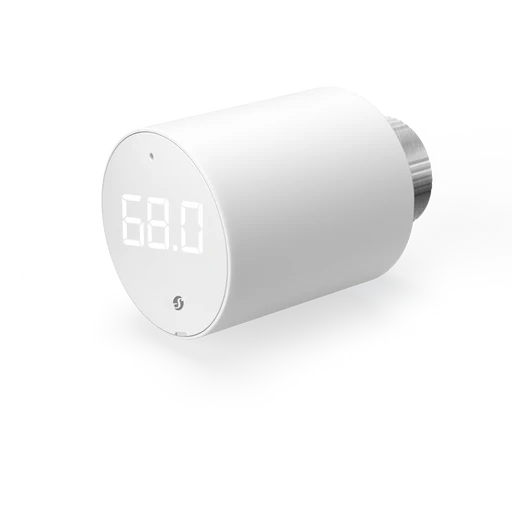 |
Firmware
It is recommended to connect Shelly devices by WiFi / Bluetooth, and update their firmware, until they gain support for OTA updates over Zigbee.
The latest firmware fixes known issues like negative power readings on some models.
Note they roll-out updates in phases. Check "beta" channels if you are specifically looking for a fix.
Options
How to use device type specific configuration
thermostat_unit: Controls the temperature unit of the thermostat (default celsius). The value must be one ofcelsius,fahrenheitidentify_timeout: Sets the duration of the identification procedure in seconds (i.e., how long the device would flash).The value ranges from 1 to 30 seconds (default: 3). The value must be a number with a minimum value of1and with a maximum value of30
Exposes
Calibration ok (binary)
Calibration OK. Value can be found in the published state on the calibration_ok property. It's not possible to read (/get) or write (/set) this value. If value equals true calibration ok is ON, if false OFF.
Calibrate (enum)
Trigger valve calibration. Value will not be published in the state. It's not possible to read (/get) this value. To write (/set) a value publish a message to topic zigbee2mqtt/FRIENDLY_NAME/set with payload {"calibrate": NEW_VALUE}. The possible values are: trigger.
External temperature (numeric)
External room temperature used by the thermostat. Value can be found in the published state on the external_temperature property. It's not possible to read (/get) this value. To write (/set) a value publish a message to topic zigbee2mqtt/FRIENDLY_NAME/set with payload {"external_temperature": NEW_VALUE}. The minimal value is -40 and the maximum value is 85. The unit of this value is °C.
External occupancy (binary)
External occupancy state used to select the occupied or unoccupied heating setpoint. Value can be found in the published state on the external_occupancy property. It's not possible to read (/get) this value. To write (/set) a value publish a message to topic zigbee2mqtt/FRIENDLY_NAME/set with payload {"external_occupancy": NEW_VALUE}. If value equals true external occupancy is ON, if false OFF.
Battery (numeric)
Remaining battery in %. Value can be found in the published state on the battery property. To read (/get) the value publish a message to topic zigbee2mqtt/FRIENDLY_NAME/get with payload {"battery": ""}. It's not possible to write (/set) this value. The minimal value is 0 and the maximum value is 100. The unit of this value is %.
Climate
This climate device supports the following features: local_temperature, local_temperature_calibration, occupied_heating_setpoint, unoccupied_heating_setpoint, system_mode, pi_heating_demand.
occupied_heating_setpoint: Temperature setpoint. To control publish a message to topiczigbee2mqtt/FRIENDLY_NAME/setwith payload{"occupied_heating_setpoint": VALUE}whereVALUEis the °C between4and30. To read send a message tozigbee2mqtt/FRIENDLY_NAME/getwith payload{"occupied_heating_setpoint": ""}.pi_heating_demand: Position of the valve (= demanded heat) where 0% is fully closed and 100% is fully open. Writing (/set) this attribute is not possible. Reading (/get) this attribute is not possible.local_temperature: Current temperature measured on the device (in °C). To read send a message tozigbee2mqtt/FRIENDLY_NAME/getwith payload{"local_temperature": ""}.system_mode: Mode of this device. To control publish a message to topiczigbee2mqtt/FRIENDLY_NAME/setwith payload{"system_mode": VALUE}whereVALUEis one of:off,auto,heat. To read send a message tozigbee2mqtt/FRIENDLY_NAME/getwith payload{"system_mode": ""}.local_temperature_calibration: Offset to add/subtract to the local temperature. To control publish a message to topiczigbee2mqtt/FRIENDLY_NAME/setwith payload{"local_temperature_calibration": VALUE}.To read send a message tozigbee2mqtt/FRIENDLY_NAME/getwith payload{"local_temperature": ""}.The minimal value is-10and the maximum value is10with a step size of0.1.
Min heat setpoint limit (numeric)
Minimum Heating set point limit. Value can be found in the published state on the min_heat_setpoint_limit property. To read (/get) the value publish a message to topic zigbee2mqtt/FRIENDLY_NAME/get with payload {"min_heat_setpoint_limit": ""}. To write (/set) a value publish a message to topic zigbee2mqtt/FRIENDLY_NAME/set with payload {"min_heat_setpoint_limit": NEW_VALUE}. The minimal value is 4 and the maximum value is 30. The unit of this value is °C.
Max heat setpoint limit (numeric)
Maximum Heating set point limit. Value can be found in the published state on the max_heat_setpoint_limit property. To read (/get) the value publish a message to topic zigbee2mqtt/FRIENDLY_NAME/get with payload {"max_heat_setpoint_limit": ""}. To write (/set) a value publish a message to topic zigbee2mqtt/FRIENDLY_NAME/set with payload {"max_heat_setpoint_limit": NEW_VALUE}. The minimal value is 4 and the maximum value is 30. The unit of this value is °C.
Manual mode (binary)
Manual mode (0 = auto, 1 = manual). Value can be found in the published state on the manual_mode property. To read (/get) the value publish a message to topic zigbee2mqtt/FRIENDLY_NAME/get with payload {"manual_mode": ""}. To write (/set) a value publish a message to topic zigbee2mqtt/FRIENDLY_NAME/set with payload {"manual_mode": NEW_VALUE}. If value equals true manual mode is ON, if false OFF.
Valve position (numeric)
Valve position (0-100%). Value can be found in the published state on the valve_position property. To read (/get) the value publish a message to topic zigbee2mqtt/FRIENDLY_NAME/get with payload {"valve_position": ""}. To write (/set) a value publish a message to topic zigbee2mqtt/FRIENDLY_NAME/set with payload {"valve_position": NEW_VALUE}. The minimal value is 0 and the maximum value is 100. The unit of this value is %.
Identify (enum)
Initiate device identification. Value will not be published in the state. It's not possible to read (/get) this value. To write (/set) a value publish a message to topic zigbee2mqtt/FRIENDLY_NAME/set with payload {"identify": NEW_VALUE}. The possible values are: identify.