
SONOFF S60ZBTPF
| Model | S60ZBTPF |
| Vendor | SONOFF |
| Description | Zigbee smart plug |
| Exposes | energy, switch (state), power_on_behavior, network_indicator, current, voltage, power, energy_yesterday, energy_today, energy_month, inching_control_set, outlet_control_protect, overload_protection |
| Picture | 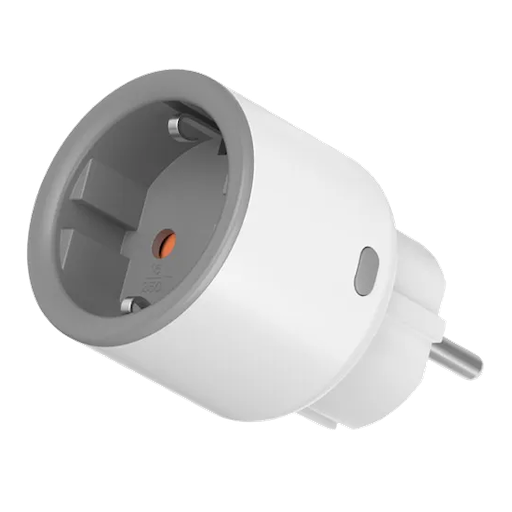 |
OTA updates
This device supports OTA updates, for more information see OTA updates.
Options
How to use device type specific configuration
energy_calibration: Calibrates the energy value (percentual offset), takes into effect on next report of device. The value must be a number.energy_precision: Number of digits after decimal point for energy, takes into effect on next report of device. This option can only decrease the precision, not increase it. The value must be a number with a minimum value of0and with a maximum value of3current_calibration: Calibrates the current value (percentual offset), takes into effect on next report of device. The value must be a number.current_precision: Number of digits after decimal point for current, takes into effect on next report of device. This option can only decrease the precision, not increase it. The value must be a number with a minimum value of0and with a maximum value of3voltage_calibration: Calibrates the voltage value (percentual offset), takes into effect on next report of device. The value must be a number.voltage_precision: Number of digits after decimal point for voltage, takes into effect on next report of device. This option can only decrease the precision, not increase it. The value must be a number with a minimum value of0and with a maximum value of3power_calibration: Calibrates the power value (percentual offset), takes into effect on next report of device. The value must be a number.power_precision: Number of digits after decimal point for power, takes into effect on next report of device. This option can only decrease the precision, not increase it. The value must be a number with a minimum value of0and with a maximum value of3state_action: State actions will also be published as 'action' when true (default false). The value must betrueorfalse
Exposes
Energy (numeric)
Sum of consumed energy. Value can be found in the published state on the energy property. It's not possible to read (/get) or write (/set) this value. The unit of this value is kWh.
Switch
The current state of this switch is in the published state under the state property (value is ON or OFF). To control this switch publish a message to topic zigbee2mqtt/FRIENDLY_NAME/set with payload {"state": "ON"}, {"state": "OFF"} or {"state": "TOGGLE"}. To read the current state of this switch publish a message to topic zigbee2mqtt/FRIENDLY_NAME/get with payload {"state": ""}.
On with timed off
When setting the state to ON, it might be possible to specify an automatic shutoff after a certain amount of time. To do this add an additional property on_time to the payload which is the time in seconds the state should remain on. Additionally an off_wait_time property can be added to the payload to specify the cooldown time in seconds when the switch will not answer to other on with timed off commands. Support depends on the switch firmware. Some devices might require both on_time and off_wait_time to work Examples : {"state" : "ON", "on_time": 300}, {"state" : "ON", "on_time": 300, "off_wait_time": 120}.
Power-on behavior (enum)
Controls the behavior when the device is powered on after power loss. Value can be found in the published state on the power_on_behavior property. To read (/get) the value publish a message to topic zigbee2mqtt/FRIENDLY_NAME/get with payload {"power_on_behavior": ""}. To write (/set) a value publish a message to topic zigbee2mqtt/FRIENDLY_NAME/set with payload {"power_on_behavior": NEW_VALUE}. The possible values are: off, on, toggle, previous.
Network indicator (binary)
Network indicator settings, turn off/on the blue online status network indicator.. Value can be found in the published state on the network_indicator property. To read (/get) the value publish a message to topic zigbee2mqtt/FRIENDLY_NAME/get with payload {"network_indicator": ""}. To write (/set) a value publish a message to topic zigbee2mqtt/FRIENDLY_NAME/set with payload {"network_indicator": NEW_VALUE}. If value equals true network indicator is ON, if false OFF.
Current (numeric)
Current. Value can be found in the published state on the current property. To read (/get) the value publish a message to topic zigbee2mqtt/FRIENDLY_NAME/get with payload {"current": ""}. It's not possible to write (/set) this value. The unit of this value is A.
Voltage (numeric)
Voltage. Value can be found in the published state on the voltage property. To read (/get) the value publish a message to topic zigbee2mqtt/FRIENDLY_NAME/get with payload {"voltage": ""}. It's not possible to write (/set) this value. The unit of this value is V.
Power (numeric)
Active power. Value can be found in the published state on the power property. To read (/get) the value publish a message to topic zigbee2mqtt/FRIENDLY_NAME/get with payload {"power": ""}. It's not possible to write (/set) this value. The unit of this value is W.
Energy yesterday (numeric)
Electricity consumption for the yesterday. Value can be found in the published state on the energy_yesterday property. To read (/get) the value publish a message to topic zigbee2mqtt/FRIENDLY_NAME/get with payload {"energy_yesterday": ""}. It's not possible to write (/set) this value. The unit of this value is kWh.
Energy today (numeric)
Electricity consumption for the day. Value can be found in the published state on the energy_today property. To read (/get) the value publish a message to topic zigbee2mqtt/FRIENDLY_NAME/get with payload {"energy_today": ""}. It's not possible to write (/set) this value. The unit of this value is kWh.
Energy this month (numeric)
Electricity consumption for the month. Value can be found in the published state on the energy_month property. To read (/get) the value publish a message to topic zigbee2mqtt/FRIENDLY_NAME/get with payload {"energy_month": ""}. It's not possible to write (/set) this value. The unit of this value is kWh.
Inching control set (composite)
Device Inching function Settings. The device will automatically turn off (turn on) after each turn on (turn off) for a specified period of time.. Can be set by publishing to zigbee2mqtt/FRIENDLY_NAME/set with payload {"inching_control_set": {"inching_control": VALUE, "inching_time": VALUE, "inching_mode": VALUE}}
inching_control(binary): Enable/disable inching function. allowed values:ENABLEorDISABLEinching_time(numeric): Delay time for executing a inching action. min value is 0.5, max value is 3599.5, unit is secondsinching_mode(binary): Set inching off or inching on mode. allowed values:ONorOFF
Outlet control protect (binary)
Outlet overload protection Settings. Value can be found in the published state on the outlet_control_protect property. To read (/get) the value publish a message to topic zigbee2mqtt/FRIENDLY_NAME/get with payload {"outlet_control_protect": ""}. To write (/set) a value publish a message to topic zigbee2mqtt/FRIENDLY_NAME/set with payload {"outlet_control_protect": NEW_VALUE}. If value equals true outlet control protect is ON, if false OFF.
Overload protection (composite)
Over load protection, max power and max current are required,other is optional. Can be set by publishing to zigbee2mqtt/FRIENDLY_NAME/set with payload {"overload_protection": {"max_power": VALUE, "enable_min_power": VALUE, "min_power": VALUE, "enable_max_voltage": VALUE, "max_voltage": VALUE, "enable_min_voltage": VALUE, "min_voltage": VALUE, "max_current": VALUE, "enable_min_current": VALUE, "min_current": VALUE}} To read (/get) the value publish a message to topic zigbee2mqtt/FRIENDLY_NAME/get with payload {"overload_protection": ""}.
max_power(numeric): max power min value is 0.1, max value is 4000, unit is Wenable_min_power(binary): Enable/disable lower limit of power overload protection. allowed values:ENABLEorDISABLEmin_power(numeric): Lower limit of power overload protection min value is 0.1, max value is 4000, unit is Wenable_max_voltage(binary): Enable/disable upper limit of voltage overload protection.. allowed values:ENABLEorDISABLEmax_voltage(numeric): Upper limit of voltage overload protection. min value is 165, max value is 277, unit is Venable_min_voltage(binary): Enable/disable lower limit of voltage overload protection. allowed values:ENABLEorDISABLEmin_voltage(numeric): Lower limit of voltage overload protection. min value is 165, max value is 277, unit is Vmax_current(numeric): Upper limit of current overload protection. min value is 0.1, max value is 17, unit is Aenable_min_current(binary): Enable/disable lower limit of current overload protection. allowed values:ENABLEorDISABLEmin_current(numeric): Lower limit of current overload protection. min value is 0.1, max value is 17, unit is A