
Schneider Electric S520619
| Model | S520619 |
| Vendor | Schneider Electric |
| Description | Wiser Odace Smart thermostat |
| Exposes | keypad_lockout, temperature_display_mode, climate (occupied_heating_setpoint, occupied_cooling_setpoint, local_temperature, system_mode, running_state, pi_heating_demand, pi_cooling_demand), temperature, occupancy, schneider_pilot_mode |
| Picture | 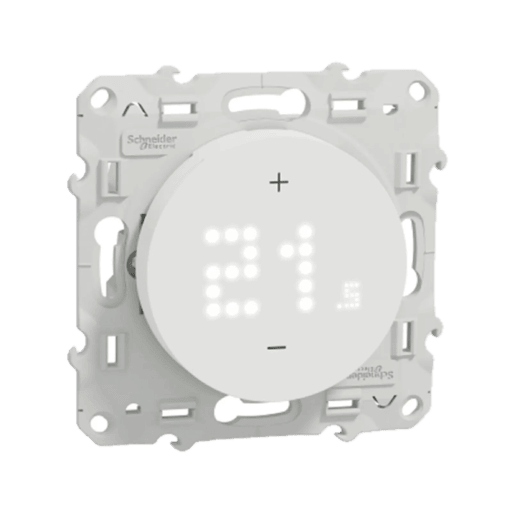 |
Options
How to use device type specific configuration
measurement_poll_interval: Polling interval of the occupied heating/cooling setpoint. The value must be a number with a minimum value of-1temperature_calibration: Calibrates the temperature value (absolute offset), takes into effect on next report of device. The value must be a number.temperature_precision: Number of digits after decimal point for temperature, takes into effect on next report of device. This option can only decrease the precision, not increase it. The value must be a number with a minimum value of0and with a maximum value of3thermostat_unit: Controls the temperature unit of the thermostat (default celsius). The value must be one ofcelsius,fahrenheitno_occupancy_since: Sends a message after the last time no occupancy (occupancy: false) was detected. When setting this for example to [10, 60] a{"no_occupancy_since": 10}will be sent after 10 seconds and a{"no_occupancy_since": 60}after 60 seconds. The value must be a list of numbers.
Exposes
Keypad lockout (binary)
Enables/disables physical input on the device. Value can be found in the published state on the keypad_lockout property. It's not possible to read (/get) this value. To write (/set) a value publish a message to topic zigbee2mqtt/FRIENDLY_NAME/set with payload {"keypad_lockout": NEW_VALUE}. If value equals lock1 keypad lockout is ON, if unlock OFF.
Temperature display mode (enum)
The temperature format displayed on the thermostat screen. Value can be found in the published state on the temperature_display_mode property. To read (/get) the value publish a message to topic zigbee2mqtt/FRIENDLY_NAME/get with payload {"temperature_display_mode": ""}. To write (/set) a value publish a message to topic zigbee2mqtt/FRIENDLY_NAME/set with payload {"temperature_display_mode": NEW_VALUE}. The possible values are: celsius, fahrenheit.
Climate
This climate device supports the following features: occupied_heating_setpoint, occupied_cooling_setpoint, local_temperature, system_mode, running_state, pi_heating_demand, pi_cooling_demand.
occupied_heating_setpoint: Temperature setpoint. To control publish a message to topiczigbee2mqtt/FRIENDLY_NAME/setwith payload{"occupied_heating_setpoint": VALUE}whereVALUEis the °C between4and30. To read send a message tozigbee2mqtt/FRIENDLY_NAME/getwith payload{"occupied_heating_setpoint": ""}.occupied_cooling_setpoint: Temperature setpoint. To control publish a message to topiczigbee2mqtt/FRIENDLY_NAME/setwith payload{"occupied_cooling_setpoint": VALUE}whereVALUEis the °C between4and30. To read send a message tozigbee2mqtt/FRIENDLY_NAME/getwith payload{"occupied_cooling_setpoint": ""}.pi_heating_demand: Position of the valve (= demanded heat) where 0% is fully closed and 100% is fully open. Writing (/set) this attribute is not possible. Reading (/get) this attribute is not possible.local_temperature: Current temperature measured on the device (in °C). To read send a message tozigbee2mqtt/FRIENDLY_NAME/getwith payload{"local_temperature": ""}.system_mode: Mode of this device. To control publish a message to topiczigbee2mqtt/FRIENDLY_NAME/setwith payload{"system_mode": VALUE}whereVALUEis one of:off,heat,cool. To read send a message tozigbee2mqtt/FRIENDLY_NAME/getwith payload{"system_mode": ""}.running_state: The current running state. Possible values are:idle,heat,cool. To read send a message tozigbee2mqtt/FRIENDLY_NAME/getwith payload{"running_state": ""}.
Temperature (numeric)
Measured temperature value. Value can be found in the published state on the temperature property. It's not possible to read (/get) or write (/set) this value. The unit of this value is °C.
Occupancy (binary)
Indicates whether the device detected occupancy. Value can be found in the published state on the occupancy property. It's not possible to read (/get) or write (/set) this value. If value equals true occupancy is ON, if false OFF.
Schneider pilot mode (enum)
Controls piloting mode (from 'old description'). According to SE the attribute is called 'Heating output mode', and the corresponding custom cluster is heatingCoolingOutputClusterServer.. Value can be found in the published state on the schneider_pilot_mode property. To read (/get) the value publish a message to topic zigbee2mqtt/FRIENDLY_NAME/get with payload {"schneider_pilot_mode": ""}. To write (/set) a value publish a message to topic zigbee2mqtt/FRIENDLY_NAME/set with payload {"schneider_pilot_mode": NEW_VALUE}. The possible values are: contactor, pilot.