
Shelly S4DM-0A101WWL
| Model | S4DM-0A101WWL |
| Vendor | Shelly |
| Description | Dimmer Gen4 |
| Exposes | light (state, brightness), effect, power_on_behavior, power, voltage, current, energy, wifi_status, ip_address, dhcp_enabled, wifi_config, identify |
| Picture | 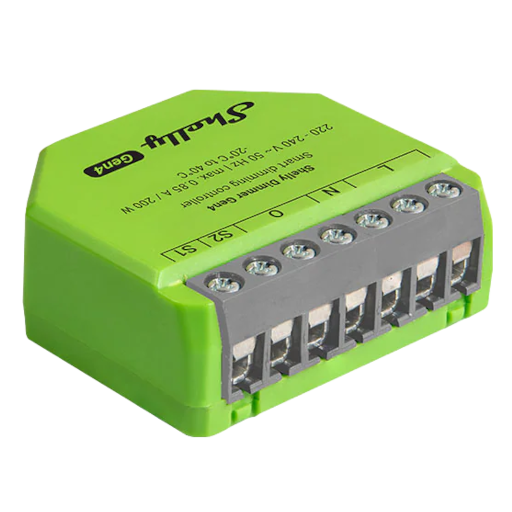 |
Firmware
It is recommended to connect Shelly devices by WiFi / Bluetooth, and update their firmware, until they gain support for OTA updates over Zigbee.
The latest firmware fixes known issues like negative power readings on some models.
Note they roll-out updates in phases. Check "beta" channels if you are specifically looking for a fix.
Options
How to use device type specific configuration
shelly_wifi_ssid: Full Wi-Fi SSID to use when the Shelly Wi-Fi setup cluster reports a shortened network name. The value must be textual.power_calibration: Calibrates the power value (percentual offset), takes into effect on next report of device. The value must be a number.power_precision: Number of digits after decimal point for power, takes into effect on next report of device. This option can only decrease the precision, not increase it. The value must be a number with a minimum value of0and with a maximum value of3voltage_calibration: Calibrates the voltage value (percentual offset), takes into effect on next report of device. The value must be a number.voltage_precision: Number of digits after decimal point for voltage, takes into effect on next report of device. This option can only decrease the precision, not increase it. The value must be a number with a minimum value of0and with a maximum value of3current_calibration: Calibrates the current value (percentual offset), takes into effect on next report of device. The value must be a number.current_precision: Number of digits after decimal point for current, takes into effect on next report of device. This option can only decrease the precision, not increase it. The value must be a number with a minimum value of0and with a maximum value of3energy_calibration: Calibrates the energy value (percentual offset), takes into effect on next report of device. The value must be a number.energy_precision: Number of digits after decimal point for energy, takes into effect on next report of device. This option can only decrease the precision, not increase it. The value must be a number with a minimum value of0and with a maximum value of3transition: Controls the transition time (in seconds) of on/off, brightness, color temperature (if applicable) and color (if applicable) changes. Defaults to0(no transition). The value must be a number with a minimum value of0identify_timeout: Sets the duration of the identification procedure in seconds (i.e., how long the device would flash).The value ranges from 1 to 30 seconds (default: 3). The value must be a number with a minimum value of1and with a maximum value of30state_action: State actions will also be published as 'action' when true (default false). The value must betrueorfalse
Exposes
Light
This light supports the following features: state, brightness.
state: To control the state publish a message to topiczigbee2mqtt/FRIENDLY_NAME/setwith payload{"state": "ON"},{"state": "OFF"}or{"state": "TOGGLE"}. To read the state send a message tozigbee2mqtt/FRIENDLY_NAME/getwith payload{"state": ""}.brightness: To control the brightness publish a message to topiczigbee2mqtt/FRIENDLY_NAME/setwith payload{"brightness": VALUE}whereVALUEis a number between0and254. To read the brightness send a message tozigbee2mqtt/FRIENDLY_NAME/getwith payload{"brightness": ""}.
On with timed off
When setting the state to ON, it might be possible to specify an automatic shutoff after a certain amount of time. To do this add an additional property on_time to the payload which is the time in seconds the state should remain on. Additionally an off_wait_time property can be added to the payload to specify the cooldown time in seconds when the light will not answer to other on with timed off commands. Support depends on the light firmware. Some devices might require both on_time and off_wait_time to work Examples : {"state" : "ON", "on_time": 300}, {"state" : "ON", "on_time": 300, "off_wait_time": 120}.
Transition
For all of the above mentioned features it is possible to do a transition of the value over time. To do this add an additional property transition to the payload which is the transition time in seconds. Examples: {"brightness":156,"transition":3}, {"color_temp":241,"transition":1}.
Moving/stepping
Instead of setting a value (e.g. brightness) directly it is also possible to:
- move: this will automatically move the value over time, to stop send value
stopor0. - step: this will increment/decrement the current value by the given one.
The direction of move and step can be either up or down, provide a negative value to move/step down, a positive value to move/step up. To do this send a payload like below to zigbee2mqtt/FRIENDLY_NAME/set
NOTE: brightness move/step will stop at the minimum brightness and won't turn on the light when it's off. In this case use brightness_move_onoff/brightness_step_onoff
{
  "brightness_move": -40, // Starts moving brightness down at 40 units per second
  "brightness_move": 0, // Stop moving brightness
  "brightness_step": 40 // Increases brightness by 40
}
Effect (enum)
Triggers an effect on the light (e.g. make light blink for a few seconds). Value will not be published in the state. It's not possible to read (/get) this value. To write (/set) a value publish a message to topic zigbee2mqtt/FRIENDLY_NAME/set with payload {"effect": NEW_VALUE}. The possible values are: blink, breathe, okay, channel_change, finish_effect, stop_effect.
Power-on behavior (enum)
Controls the behavior when the device is powered on after power loss. Value can be found in the published state on the power_on_behavior property. To read (/get) the value publish a message to topic zigbee2mqtt/FRIENDLY_NAME/get with payload {"power_on_behavior": ""}. To write (/set) a value publish a message to topic zigbee2mqtt/FRIENDLY_NAME/set with payload {"power_on_behavior": NEW_VALUE}. The possible values are: off, on, toggle, previous.
Power (numeric)
Instantaneous measured power. Value can be found in the published state on the power property. To read (/get) the value publish a message to topic zigbee2mqtt/FRIENDLY_NAME/get with payload {"power": ""}. It's not possible to write (/set) this value. The unit of this value is W.
Voltage (numeric)
Measured electrical potential value. Value can be found in the published state on the voltage property. To read (/get) the value publish a message to topic zigbee2mqtt/FRIENDLY_NAME/get with payload {"voltage": ""}. It's not possible to write (/set) this value. The unit of this value is V.
Current (numeric)
Instantaneous measured electrical current. Value can be found in the published state on the current property. To read (/get) the value publish a message to topic zigbee2mqtt/FRIENDLY_NAME/get with payload {"current": ""}. It's not possible to write (/set) this value. The unit of this value is A.
Energy (numeric)
Sum of consumed energy. Value can be found in the published state on the energy property. To read (/get) the value publish a message to topic zigbee2mqtt/FRIENDLY_NAME/get with payload {"energy": ""}. It's not possible to write (/set) this value. The unit of this value is kWh.
Wi-Fi status (text)
Current connection status. Value can be found in the published state on the wifi_status property. To read (/get) the value publish a message to topic zigbee2mqtt/FRIENDLY_NAME/get with payload {"wifi_status": ""}. It's not possible to write (/set) this value.
IP address (text)
IP address currently assigned to the device. Value can be found in the published state on the ip_address property. To read (/get) the value publish a message to topic zigbee2mqtt/FRIENDLY_NAME/get with payload {"ip_address": ""}. It's not possible to write (/set) this value.
DHCP enabled (binary)
Indicates whether DHCP is used to automatically assign network settings. Value can be found in the published state on the dhcp_enabled property. To read (/get) the value publish a message to topic zigbee2mqtt/FRIENDLY_NAME/get with payload {"dhcp_enabled": ""}. It's not possible to write (/set) this value. If value equals true dHCP enabled is ON, if false OFF.
Wi-Fi Configuration (composite)
Can be set by publishing to zigbee2mqtt/FRIENDLY_NAME/set with payload {"wifi_config": {"enabled": VALUE, "ssid": VALUE, "password": VALUE, "static_ip": VALUE, "net_mask": VALUE, "gateway": VALUE, "name_server": VALUE}} To read (/get) the value publish a message to topic zigbee2mqtt/FRIENDLY_NAME/get with payload {"wifi_config": ""}.
enabled(binary): Enable/disable Wi-Fi connectivity allowed values:trueorfalsessid(text): Name (SSID) of the Wi-Fi network to connect topassword(text): Password for the selected Wi-Fi networkstatic_ip(text): Manually assigned IP address (used when DHCP is disabled)net_mask(text): Subnet mask for the static IP configurationgateway(text): Default gateway address for static IP configurationname_server(text): Name server address for static IP configuration
Identify (enum)
Initiate device identification. Value will not be published in the state. It's not possible to read (/get) this value. To write (/set) a value publish a message to topic zigbee2mqtt/FRIENDLY_NAME/set with payload {"identify": NEW_VALUE}. The possible values are: identify.