
Merrytek MSA201Z
| Model | MSA201Z |
| Vendor | Merrytek |
| Description | 24 GHz human presence sensor |
| Exposes | state, presence, current_status, illuminance, hold_delay_time, sensitivity, trigger_distance, forbidden_area, ai_self_learning, fast_setting, indicator, sensor_mode, single_mode, absence_circling_report, absence_circling_interval, find_device, enable_sensor, factory_reset, lux_mode, daylight_threshold, lux_report_mode, lux_timed_interval, lux_difference_threshold, lux_difference_value, interference_positions, home_environment |
| Picture | 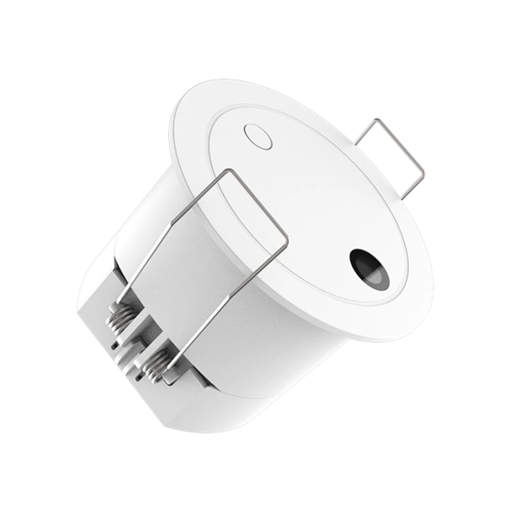 |
Options
How to use device type specific configuration
time_start: Reply to Tuya-specific time synchronization requests: "1970" - Reply with seconds since 1970/01/01 (recommended, should stop the device from asking), "2000" - Reply with seconds since 2000/01/01 (use if the weekday is wrong with 1970), "off" - Don't reply (use if replying causes too much traffic). Default for this device: "off". The value must be one of1970,2000,offilluminance_calibration: Calibrates the illuminance value (percentual offset), takes into effect on next report of device. The value must be a number.
Exposes
Status (enum)
Value can be found in the published state on the state property. It's not possible to read (/get) or write (/set) this value. The possible values are: absence, presence, disabled.
Presence (binary)
Indicates whether the device detected presence. Value can be found in the published state on the presence property. It's not possible to read (/get) or write (/set) this value. If value equals true presence is ON, if false OFF.
Current status (enum)
Value can be found in the published state on the current_status property. It's not possible to read (/get) or write (/set) this value. The possible values are: approaching, departing, clear.
Luminance (numeric)
Measured illuminance. Value can be found in the published state on the illuminance property. It's not possible to read (/get) or write (/set) this value. The unit of this value is lx.
Hold delay time (numeric)
Delay (seconds) before switching from Presence to Absence after no motion is detected. Recommended ≥ 15s to avoid premature Absence switching.. Value can be found in the published state on the hold_delay_time property. It's not possible to read (/get) this value. To write (/set) a value publish a message to topic zigbee2mqtt/FRIENDLY_NAME/set with payload {"hold_delay_time": NEW_VALUE}. The minimal value is 0 and the maximum value is 300. The unit of this value is s.
Sensitivity (enum)
        Sensitivity of human presence detection:
        • High: suitable for environments with minimal motion interference, such as meeting rooms or cloakrooms away from windows.
        • Medium: suitable for most scenarios, such as living rooms or restaurants.
        • Low: suitable for environments with some minor motion interference, such as bedrooms.
      .
Value can be found in the published state on the sensitivity property. It's not possible to read (/get) this value. To write (/set) a value publish a message to topic zigbee2mqtt/FRIENDLY_NAME/set with payload {"sensitivity": NEW_VALUE}. The possible values are: low, medium, high.
Trigger distance (numeric)
Distance within which the sensor detects motion, adjustable from 0.5m to 4m, in 0.5m steps.. Value can be found in the published state on the trigger_distance property. It's not possible to read (/get) this value. To write (/set) a value publish a message to topic zigbee2mqtt/FRIENDLY_NAME/set with payload {"trigger_distance": NEW_VALUE}. The minimal value is 0.5 and the maximum value is 4. The unit of this value is m.
Forbidden area (numeric)
Distance from the sensor within which motion is ignored to prevent false detection (0-1.8m).. Value can be found in the published state on the forbidden_area property. It's not possible to read (/get) this value. To write (/set) a value publish a message to topic zigbee2mqtt/FRIENDLY_NAME/set with payload {"forbidden_area": NEW_VALUE}. The minimal value is 0 and the maximum value is 1.8. The unit of this value is m.
AI environment self-learning (enum)
AI self-learning to help the sensor ignore non-human motion in the environment. The learning process takes 1 minute, during which the sensor will blink. Ensure the area is completely empty during this time.. Value will not be published in the state. It's not possible to read (/get) this value. To write (/set) a value publish a message to topic zigbee2mqtt/FRIENDLY_NAME/set with payload {"ai_self_learning": NEW_VALUE}. The possible values are: AI self-learning.
Fast setting (enum)
        Fast setting based on the size of the space:
        • Small: area less than 16m², e.g., tea room, bathroom.
        • Medium: area 16–25m², e.g., private office, public toilet, kitchen.
        • Large: area greater than 25m², e.g., open office, large conference room, living room.
      .
Value can be found in the published state on the fast_setting property. It's not possible to read (/get) this value. To write (/set) a value publish a message to topic zigbee2mqtt/FRIENDLY_NAME/set with payload {"fast_setting": NEW_VALUE}. The possible values are: small, medium, large.
LED indicator (binary)
LED indicator providing a visual signal when motion is detected or the sensor changes state.. Value can be found in the published state on the indicator property. It's not possible to read (/get) this value. To write (/set) a value publish a message to topic zigbee2mqtt/FRIENDLY_NAME/set with payload {"indicator": NEW_VALUE}. If value equals ON lED indicator is ON, if OFF OFF.
Sensor mode (enum)
        Operating mode of the radar sensor:
        • Presence: detects micro-movements for continuous occupancy detection.
        • Motion: detects larger movements while ignoring small activity to reduce false triggers.
      .
Value can be found in the published state on the sensor_mode property. It's not possible to read (/get) this value. To write (/set) a value publish a message to topic zigbee2mqtt/FRIENDLY_NAME/set with payload {"sensor_mode": NEW_VALUE}. The possible values are: presence, motion.
Single mode (binary)
Suitable for spaces where only one person is present at a time. The sensor maintains Presence while the person is within range and automatically switches to Absence 15 seconds after they leave.. Value can be found in the published state on the single_mode property. It's not possible to read (/get) this value. To write (/set) a value publish a message to topic zigbee2mqtt/FRIENDLY_NAME/set with payload {"single_mode": NEW_VALUE}. If value equals ON single mode is ON, if OFF OFF.
Absence circling report (binary)
Periodic reporting of the Absence state after the sensor switches to Absence, it will send regular status updates automatically.. Value can be found in the published state on the absence_circling_report property. It's not possible to read (/get) this value. To write (/set) a value publish a message to topic zigbee2mqtt/FRIENDLY_NAME/set with payload {"absence_circling_report": NEW_VALUE}. If value equals ON absence circling report is ON, if OFF OFF.
Absence circling interval (numeric)
Interval (minutes) between periodic Absence reports after switching to Absence.. Value can be found in the published state on the absence_circling_interval property. It's not possible to read (/get) this value. To write (/set) a value publish a message to topic zigbee2mqtt/FRIENDLY_NAME/set with payload {"absence_circling_interval": NEW_VALUE}. The minimal value is 2 and the maximum value is 30. The unit of this value is min.
Find device (binary)
Indicator LED flashes to help locate the sensor.. Value can be found in the published state on the find_device property. It's not possible to read (/get) this value. To write (/set) a value publish a message to topic zigbee2mqtt/FRIENDLY_NAME/set with payload {"find_device": NEW_VALUE}. If value equals ON find device is ON, if OFF OFF.
Enable sensor (binary)
Enable or disable the sensor.. Value can be found in the published state on the enable_sensor property. It's not possible to read (/get) this value. To write (/set) a value publish a message to topic zigbee2mqtt/FRIENDLY_NAME/set with payload {"enable_sensor": NEW_VALUE}. If value equals ON enable sensor is ON, if OFF OFF.
Factory reset (enum)
Restores factory defaults, removing all customized settings.. Value will not be published in the state. It's not possible to read (/get) this value. To write (/set) a value publish a message to topic zigbee2mqtt/FRIENDLY_NAME/set with payload {"factory_reset": NEW_VALUE}. The possible values are: factory reset.
Lux mode (enum)
        Lux sensor operation mode:
          • Threshold: triggers based on a fixed daylight level.
          • Report: periodically reports light levels using time-based or change-based intervals.
      .
Value can be found in the published state on the lux_mode property. It's not possible to read (/get) this value. To write (/set) a value publish a message to topic zigbee2mqtt/FRIENDLY_NAME/set with payload {"lux_mode": NEW_VALUE}. The possible values are: threshold, report.
Daylight threshold (numeric)
Lux level defining sufficient natural light (daylight), applicable only when Lux mode is set to Threshold.. Value can be found in the published state on the daylight_threshold property. It's not possible to read (/get) this value. To write (/set) a value publish a message to topic zigbee2mqtt/FRIENDLY_NAME/set with payload {"daylight_threshold": NEW_VALUE}. The minimal value is 1 and the maximum value is 3000. The unit of this value is lux.
Lux report mode (enum)
        Reporting style when Lux mode is set to Report:
        • Timed: sends light level updates at fixed intervals.
        • Difference: (Not implemented on this device) reports only when lux changes exceed a set threshold.
      .
Value can be found in the published state on the lux_report_mode property. It's not possible to read (/get) this value. To write (/set) a value publish a message to topic zigbee2mqtt/FRIENDLY_NAME/set with payload {"lux_report_mode": NEW_VALUE}. The possible values are: timed, difference.
Lux timed interval (numeric)
Interval (seconds) for timed lux reports when Lux report mode is set to Timed.. Value can be found in the published state on the lux_timed_interval property. It's not possible to read (/get) this value. To write (/set) a value publish a message to topic zigbee2mqtt/FRIENDLY_NAME/set with payload {"lux_timed_interval": NEW_VALUE}. The minimal value is 5 and the maximum value is 3600. The unit of this value is s.
Lux difference threshold (numeric)
        Lux change required to trigger a report when Lux report mode is set to Difference.
        Note: This device does not support Difference reporting, so this setting has no effect.
      .
Value can be found in the published state on the lux_difference_threshold property. It's not possible to read (/get) this value. To write (/set) a value publish a message to topic zigbee2mqtt/FRIENDLY_NAME/set with payload {"lux_difference_threshold": NEW_VALUE}. The minimal value is 1 and the maximum value is 2000. The unit of this value is lux.
Lux difference value (numeric)
        Reported lux value for Difference mode.
        Note: This device does not support Difference reporting, so this setting has no effect.
      .
Value can be found in the published state on the lux_difference_value property. It's not possible to read (/get) or write (/set) this value.
Interference positions (text)
List of distances (m) where non-human interference was detected.. Value can be found in the published state on the interference_positions property. It's not possible to read (/get) or write (/set) this value.
Home environment (enum)
Environmental interference level detected by the sensor.. Value can be found in the published state on the home_environment property. It's not possible to read (/get) or write (/set) this value. The possible values are: normal, slight, strong, severe.