
Lytko L101Ze-SMN
| Model | L101Ze-SMN |
| Vendor | Lytko |
| Description | Single channel thermostat with small display |
| Exposes | climate (local_temperature, local_temperature_calibration, occupied_heating_setpoint, system_mode, running_mode), identify, child_lock, occupied_setback, sensor_type, target_first |
| Picture | 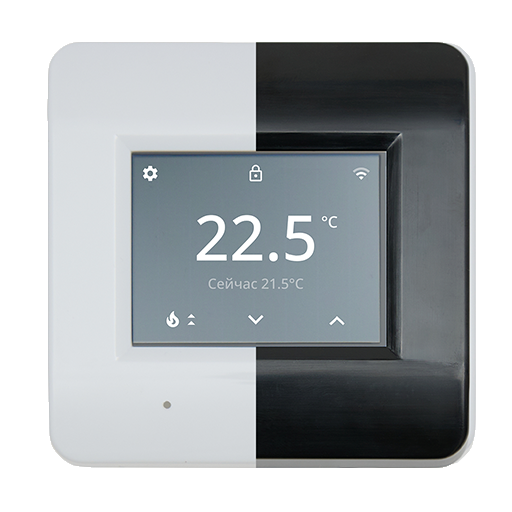 |
OTA updates
This device supports OTA updates, for more information see OTA updates.
Options
How to use device type specific configuration
thermostat_unit: Controls the temperature unit of the thermostat (default celsius). The value must be one ofcelsius,fahrenheitidentify_timeout: Sets the duration of the identification procedure in seconds (i.e., how long the device would flash).The value ranges from 1 to 30 seconds (default: 3). The value must be a number with a minimum value of1and with a maximum value of30
Exposes
Climate (3 endpoint)
This climate device supports the following features: local_temperature, local_temperature_calibration, occupied_heating_setpoint, system_mode, running_mode.
occupied_heating_setpoint: Temperature setpoint. To control publish a message to topiczigbee2mqtt/FRIENDLY_NAME/setwith payload{"occupied_heating_setpoint_3": VALUE}whereVALUEis the °C between5and40. To read send a message tozigbee2mqtt/FRIENDLY_NAME/getwith payload{"occupied_heating_setpoint_3": ""}.local_temperature: Current temperature measured on the device (in °C). To read send a message tozigbee2mqtt/FRIENDLY_NAME/getwith payload{"local_temperature_3": ""}.system_mode: Mode of this device. To control publish a message to topiczigbee2mqtt/FRIENDLY_NAME/setwith payload{"system_mode_3": VALUE}whereVALUEis one of:off,heat. To read send a message tozigbee2mqtt/FRIENDLY_NAME/getwith payload{"system_mode_3": ""}.local_temperature_calibration: Offset to add/subtract to the local temperature. To control publish a message to topiczigbee2mqtt/FRIENDLY_NAME/setwith payload{"local_temperature_calibration_3": VALUE}.To read send a message tozigbee2mqtt/FRIENDLY_NAME/getwith payload{"local_temperature_3": ""}.The minimal value is-2.5and the maximum value is2.5with a step size of0.1.
Identify (enum)
Initiate device identification. Value will not be published in the state. It's not possible to read (/get) this value. To write (/set) a value publish a message to topic zigbee2mqtt/FRIENDLY_NAME/set with payload {"identify": NEW_VALUE}. The possible values are: identify.
Child lock (binary)
Enables/disables physical input on the device. Value can be found in the published state on the child_lock property. To read (/get) the value publish a message to topic zigbee2mqtt/FRIENDLY_NAME/get with payload {"child_lock": ""}. To write (/set) a value publish a message to topic zigbee2mqtt/FRIENDLY_NAME/set with payload {"child_lock": NEW_VALUE}. If value equals lock child lock is ON, if unlock OFF.
Occupied setback (numeric, 3 endpoint)
Hysteresis. Value can be found in the published state on the occupied_setback_3 property. To read (/get) the value publish a message to topic zigbee2mqtt/FRIENDLY_NAME/get with payload {"occupied_setback_3": ""}. To write (/set) a value publish a message to topic zigbee2mqtt/FRIENDLY_NAME/set with payload {"occupied_setback_3": NEW_VALUE}. The minimal value is 1 and the maximum value is 2.5. The unit of this value is °C.
Sensor (enum, 3 endpoint)
Sensor type. Value can be found in the published state on the sensor_type_3 property. To read (/get) the value publish a message to topic zigbee2mqtt/FRIENDLY_NAME/get with payload {"sensor_type_3": ""}. To write (/set) a value publish a message to topic zigbee2mqtt/FRIENDLY_NAME/set with payload {"sensor_type_3": NEW_VALUE}. The possible values are: 3.3K, 5.0K, 6.8K, 10.0K, 12.0K, 14.8K, 15.0K, 20.0K, 33.0K, 47.0K.
First temperature (enum, 3 endpoint)
Display target/current temperature first. Value can be found in the published state on the target_first_3 property. To read (/get) the value publish a message to topic zigbee2mqtt/FRIENDLY_NAME/get with payload {"target_first_3": ""}. To write (/set) a value publish a message to topic zigbee2mqtt/FRIENDLY_NAME/set with payload {"target_first_3": NEW_VALUE}. The possible values are: Target, Current.