Zigbee2MQTTZigbee2MQTT
  • Getting started
  • Supported Adapters
  • Supported Devices
  • Installation
  • Configuration
  • Usage
  • FAQ
Devices
  • Zigbee

    • Zigbee network
    • Improve network range and stability
    • Secure your Zigbee network
    • Sniff Zigbee traffic
    • Create a CC2530 router
  • Support new devices

    • Support new devices
    • Support new Tuya devices
    • Find Tuya Data Points
  • Remote Adapter

    • Connect to a remote adapter
    • Connect to a remote Sonoff ZBBridge
  • More

    • 3D cases
    • External converters
    • External extensions
    • Switch to the dev branch
    • Get Tuya and Xiaomi OTA url
  • Forum
  • Discord
  • Issues
  • Donate
GitHub
GitHub (docs)
  • Getting started
  • Supported Adapters
  • Supported Devices
  • Installation
  • Configuration
  • Usage
  • FAQ
Devices
  • Zigbee

    • Zigbee network
    • Improve network range and stability
    • Secure your Zigbee network
    • Sniff Zigbee traffic
    • Create a CC2530 router
  • Support new devices

    • Support new devices
    • Support new Tuya devices
    • Find Tuya Data Points
  • Remote Adapter

    • Connect to a remote adapter
    • Connect to a remote Sonoff ZBBridge
  • More

    • 3D cases
    • External converters
    • External extensions
    • Switch to the dev branch
    • Get Tuya and Xiaomi OTA url
  • Forum
  • Discord
  • Issues
  • Donate
GitHub
GitHub (docs)

Heiman HS1SA-E

ModelHS1SA-E
VendorHeiman
DescriptionSmoke detector
Exposesbattery, temperature, smoke, battery_low, test, fault_state, muted, trigger_selftest, temporary_mute, heartbeat_indicator, interconnectable, smoke_level, smoke_unit, chamber_contamination, siren_for_automation_only, reported_packages, rejoin_count, reboot_count
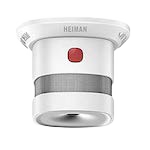
PictureHeiman HS1SA-E

OTA updates

This device supports OTA updates, for more information see OTA updates.

Options

How to use device type specific configuration

  • temperature_calibration: Calibrates the temperature value (absolute offset), takes into effect on next report of device. The value must be a number.

  • temperature_precision: Number of digits after decimal point for temperature, takes into effect on next report of device. This option can only decrease the precision, not increase it. The value must be a number with a minimum value of 0 and with a maximum value of 3

Exposes

Battery (numeric)

Remaining battery in %. Value can be found in the published state on the battery property. To read (/get) the value publish a message to topic zigbee2mqtt/FRIENDLY_NAME/get with payload {"battery": ""}. It's not possible to write (/set) this value. The minimal value is 0 and the maximum value is 100. The unit of this value is %.

Temperature (numeric)

Measured temperature value. Value can be found in the published state on the temperature property. To read (/get) the value publish a message to topic zigbee2mqtt/FRIENDLY_NAME/get with payload {"temperature": ""}. It's not possible to write (/set) this value. The unit of this value is °C.

Smoke (binary)

Indicates whether the device detected smoke. Value can be found in the published state on the smoke property. It's not possible to read (/get) or write (/set) this value. If value equals true smoke is ON, if false OFF.

Battery low (binary)

Indicates whether the battery of the device is almost empty. Value can be found in the published state on the battery_low property. It's not possible to read (/get) or write (/set) this value. If value equals true battery low is ON, if false OFF.

Test (binary)

Indicates whether the device is currently performing a test. Value can be found in the published state on the test property. It's not possible to read (/get) or write (/set) this value. If value equals true test is ON, if false OFF.

Fault state (text)

Device fault status (normal or fault types).. Value can be found in the published state on the fault_state property. To read (/get) the value publish a message to topic zigbee2mqtt/FRIENDLY_NAME/get with payload {"fault_state": ""}. It's not possible to write (/set) this value.

Muted (text)

Device mute status (normal or mute types).. Value can be found in the published state on the muted property. To read (/get) the value publish a message to topic zigbee2mqtt/FRIENDLY_NAME/get with payload {"muted": ""}. It's not possible to write (/set) this value.

Trigger selftest (enum)

Trigger smoke alarm self-check test.. Value will not be published in the state. It's not possible to read (/get) this value. To write (/set) a value publish a message to topic zigbee2mqtt/FRIENDLY_NAME/set with payload {"trigger_selftest": NEW_VALUE}. The possible values are: test.

Temporary mute (enum)

temporarily mute smoke alarm but please ensure there is no real fire.. Value will not be published in the state. It's not possible to read (/get) this value. To write (/set) a value publish a message to topic zigbee2mqtt/FRIENDLY_NAME/set with payload {"temporary_mute": NEW_VALUE}. The possible values are: mute.

Heartbeat indicator (binary)

active green indicator. Value can be found in the published state on the heartbeat_indicator property. To read (/get) the value publish a message to topic zigbee2mqtt/FRIENDLY_NAME/get with payload {"heartbeat_indicator": ""}. To write (/set) a value publish a message to topic zigbee2mqtt/FRIENDLY_NAME/set with payload {"heartbeat_indicator": NEW_VALUE}. If value equals true heartbeat indicator is ON, if false OFF.

Interconnectable (binary)

used for interconnection automation.. Value can be found in the published state on the interconnectable property. To read (/get) the value publish a message to topic zigbee2mqtt/FRIENDLY_NAME/get with payload {"interconnectable": ""}. It's not possible to write (/set) this value. If value equals true interconnectable is ON, if false OFF.

Smoke level (numeric)

smoke level. Value can be found in the published state on the smoke_level property. To read (/get) the value publish a message to topic zigbee2mqtt/FRIENDLY_NAME/get with payload {"smoke_level": ""}. It's not possible to write (/set) this value. The minimal value is 0 and the maximum value is 20.

Smoke unit (enum)

smoke level unit. Value can be found in the published state on the smoke_unit property. To read (/get) the value publish a message to topic zigbee2mqtt/FRIENDLY_NAME/get with payload {"smoke_unit": ""}. It's not possible to write (/set) this value. The possible values are: dB/m, %ft OBS.

Chamber contamination (enum)

it indicates that how serious the smoke chamber get contaminated.. Value can be found in the published state on the chamber_contamination property. To read (/get) the value publish a message to topic zigbee2mqtt/FRIENDLY_NAME/get with payload {"chamber_contamination": ""}. It's not possible to write (/set) this value. The possible values are: normal, light_contamination, medium_contamication, critical_contamication.

Siren for automation only (enum)

siren effect. Value can be found in the published state on the siren_for_automation_only property. To read (/get) the value publish a message to topic zigbee2mqtt/FRIENDLY_NAME/get with payload {"siren_for_automation_only": ""}. To write (/set) a value publish a message to topic zigbee2mqtt/FRIENDLY_NAME/set with payload {"siren_for_automation_only": NEW_VALUE}. The possible values are: stop, smoke_siren, co_siren.

Reported packages (numeric)

for diagnostic purpose, how many zigbee packages has the reported in a day.. Value can be found in the published state on the reported_packages property. To read (/get) the value publish a message to topic zigbee2mqtt/FRIENDLY_NAME/get with payload {"reported_packages": ""}. It's not possible to write (/set) this value. The minimal value is 0 and the maximum value is 60000.

Rejoin count (numeric)

for diagnostic purpose, how many times has the product rejoined to zigbee network.. Value can be found in the published state on the rejoin_count property. To read (/get) the value publish a message to topic zigbee2mqtt/FRIENDLY_NAME/get with payload {"rejoin_count": ""}. It's not possible to write (/set) this value. The minimal value is 0 and the maximum value is 60000.

Reboot count (numeric)

for diagnostic purpose, how many times has the product rebooted.. Value can be found in the published state on the reboot_count property. To read (/get) the value publish a message to topic zigbee2mqtt/FRIENDLY_NAME/get with payload {"reboot_count": ""}. It's not possible to write (/set) this value. The minimal value is 0 and the maximum value is 60000.

Help to make the docu better and edit this page on Github ✌
Last Updated: 1/1/26, 2:17 PM