
ShinaSystem HQM-300Z
| Model | HQM-300Z |
| Vendor | ShinaSystem |
| Description | SiHAS Zigbee Wireless Round Thermostat |
| Exposes | climate (system_mode, preset, local_temperature, occupied_heating_setpoint, occupied_cooling_setpoint), valve_status, schedule_time, humidity, battery |
| Picture | 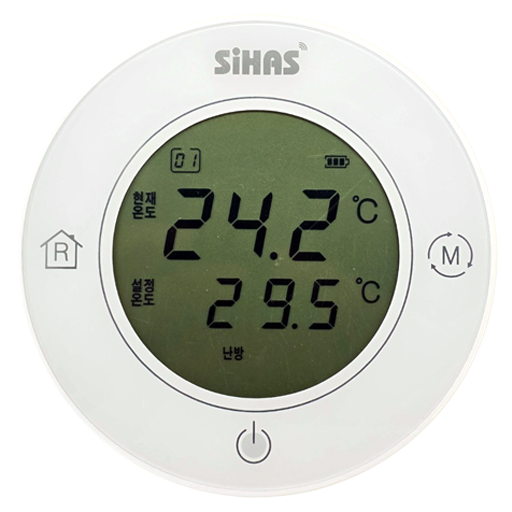 |
OTA updates
This device supports OTA updates, for more information see OTA updates.
Options
How to use device type specific configuration
humidity_calibration: Calibrates the humidity value (absolute offset), takes into effect on next report of device. The value must be a number.humidity_precision: Number of digits after decimal point for humidity, takes into effect on next report of device. This option can only decrease the precision, not increase it. The value must be a number with a minimum value of0and with a maximum value of3thermostat_unit: Controls the temperature unit of the thermostat (default celsius). The value must be one ofcelsius,fahrenheit
Exposes
Climate
This climate device supports the following features: system_mode, preset, local_temperature, occupied_heating_setpoint, occupied_cooling_setpoint.
occupied_heating_setpoint: Temperature setpoint. To control publish a message to topiczigbee2mqtt/FRIENDLY_NAME/setwith payload{"occupied_heating_setpoint": VALUE}whereVALUEis the °C between5and35. To read send a message tozigbee2mqtt/FRIENDLY_NAME/getwith payload{"occupied_heating_setpoint": ""}.occupied_cooling_setpoint: Temperature setpoint. To control publish a message to topiczigbee2mqtt/FRIENDLY_NAME/setwith payload{"occupied_cooling_setpoint": VALUE}whereVALUEis the °C between5and35. To read send a message tozigbee2mqtt/FRIENDLY_NAME/getwith payload{"occupied_cooling_setpoint": ""}.local_temperature: Current temperature measured on the device (in °C). To read send a message tozigbee2mqtt/FRIENDLY_NAME/getwith payload{"local_temperature": ""}.system_mode: Mode of this device. To control publish a message to topiczigbee2mqtt/FRIENDLY_NAME/setwith payload{"system_mode": VALUE}whereVALUEis one of:off,cool,heat. To read send a message tozigbee2mqtt/FRIENDLY_NAME/getwith payload{"system_mode": ""}.preset: Mode of this device (similar to system_mode). To control publish a message to topiczigbee2mqtt/FRIENDLY_NAME/setwith payload{"preset": VALUE}whereVALUEis one of:off,cool,heat,away,schedule. Reading (/get) this attribute is not possible.
Valve status (binary)
Valve status. Value can be found in the published state on the valve_status property. To read (/get) the value publish a message to topic zigbee2mqtt/FRIENDLY_NAME/get with payload {"valve_status": ""}. It's not possible to write (/set) this value. If value equals open valve status is ON, if close OFF.
Schedule time (numeric)
Operating Time (minutes per hour). Only applicable in schedule mode.. Value can be found in the published state on the schedule_time property. To read (/get) the value publish a message to topic zigbee2mqtt/FRIENDLY_NAME/get with payload {"schedule_time": ""}. To write (/set) a value publish a message to topic zigbee2mqtt/FRIENDLY_NAME/set with payload {"schedule_time": NEW_VALUE}. The minimal value is 10 and the maximum value is 50. The unit of this value is min.
Humidity (numeric)
Measured relative humidity. Value can be found in the published state on the humidity property. To read (/get) the value publish a message to topic zigbee2mqtt/FRIENDLY_NAME/get with payload {"humidity": ""}. It's not possible to write (/set) this value. The unit of this value is %.
Battery (numeric)
Remaining battery in %. Value can be found in the published state on the battery property. To read (/get) the value publish a message to topic zigbee2mqtt/FRIENDLY_NAME/get with payload {"battery": ""}. It's not possible to write (/set) this value. The minimal value is 0 and the maximum value is 100. The unit of this value is %.