
Schneider Electric EKO07259
| Model | EKO07259 |
| Vendor | Schneider Electric |
| Description | Smart thermostat |
| Exposes | climate (local_temperature, occupied_heating_setpoint, system_mode, running_state, pi_heating_demand, control_sequence_of_operation), max_heat_setpoint_limit, min_heat_setpoint_limit, power, energy, fixed_load_demand, display_brightness_active, display_brightness_inactive, display_active_timeout, local_temperature_source_select, control_type, control_status, thermostat_application, heating_emitter, heating_output_mode, temperature_sensor_correction, temperature_sensor_type, temperature_display_mode, child_lock |
| Picture | 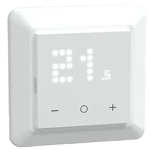 |
Options
How to use device type specific configuration
power_calibration: Calibrates the power value (percentual offset), takes into effect on next report of device. The value must be a number.power_precision: Number of digits after decimal point for power, takes into effect on next report of device. This option can only decrease the precision, not increase it. The value must be a number with a minimum value of0and with a maximum value of3energy_calibration: Calibrates the energy value (percentual offset), takes into effect on next report of device. The value must be a number.energy_precision: Number of digits after decimal point for energy, takes into effect on next report of device. This option can only decrease the precision, not increase it. The value must be a number with a minimum value of0and with a maximum value of3thermostat_unit: Controls the temperature unit of the thermostat (default celsius). The value must be one ofcelsius,fahrenheit
Exposes
Climate
This climate device supports the following features: local_temperature, occupied_heating_setpoint, system_mode, running_state, pi_heating_demand, control_sequence_of_operation.
occupied_heating_setpoint: Temperature setpoint. To control publish a message to topiczigbee2mqtt/FRIENDLY_NAME/setwith payload{"occupied_heating_setpoint": VALUE}whereVALUEis the °C between4and40. To read send a message tozigbee2mqtt/FRIENDLY_NAME/getwith payload{"occupied_heating_setpoint": ""}.pi_heating_demand: Position of the valve (= demanded heat) where 0% is fully closed and 100% is fully open. Writing (/set) this attribute is not possible. Reading (/get) this attribute is not possible.local_temperature: The temperature measured by the selected sensor (see 'Local temperature source select', Ambient or External). (in °C). To read send a message tozigbee2mqtt/FRIENDLY_NAME/getwith payload{"local_temperature": ""}.system_mode: Mode of this device. To control publish a message to topiczigbee2mqtt/FRIENDLY_NAME/setwith payload{"system_mode": VALUE}whereVALUEis one of:off,heat. To read send a message tozigbee2mqtt/FRIENDLY_NAME/getwith payload{"system_mode": ""}.running_state: The current running state. Possible values are:idle,heat. To read send a message tozigbee2mqtt/FRIENDLY_NAME/getwith payload{"running_state": ""}.
Max heat setpoint limit (numeric)
Maximum Heating set point limit. Value can be found in the published state on the max_heat_setpoint_limit property. To read (/get) the value publish a message to topic zigbee2mqtt/FRIENDLY_NAME/get with payload {"max_heat_setpoint_limit": ""}. To write (/set) a value publish a message to topic zigbee2mqtt/FRIENDLY_NAME/set with payload {"max_heat_setpoint_limit": NEW_VALUE}. The minimal value is 4 and the maximum value is 40. The unit of this value is °C.
Min heat setpoint limit (numeric)
Minimum Heating set point limit. Value can be found in the published state on the min_heat_setpoint_limit property. To read (/get) the value publish a message to topic zigbee2mqtt/FRIENDLY_NAME/get with payload {"min_heat_setpoint_limit": ""}. To write (/set) a value publish a message to topic zigbee2mqtt/FRIENDLY_NAME/set with payload {"min_heat_setpoint_limit": NEW_VALUE}. The minimal value is 4 and the maximum value is 40. The unit of this value is °C.
Power (numeric)
Instantaneous measured power. Value can be found in the published state on the power property. To read (/get) the value publish a message to topic zigbee2mqtt/FRIENDLY_NAME/get with payload {"power": ""}. It's not possible to write (/set) this value. The unit of this value is W.
Energy (numeric)
Sum of consumed energy. Value can be found in the published state on the energy property. To read (/get) the value publish a message to topic zigbee2mqtt/FRIENDLY_NAME/get with payload {"energy": ""}. It's not possible to write (/set) this value. The unit of this value is kWh.
Fixed load demand (numeric)
Load in W when heating is on (between 1-3600 W). The thermostat reports this value as power (instantaneousDemand) when heating is on. The load has to be defined if the device should report running state ('heat' or 'idle').. Value can be found in the published state on the fixed_load_demand property. To read (/get) the value publish a message to topic zigbee2mqtt/FRIENDLY_NAME/get with payload {"fixed_load_demand": ""}. To write (/set) a value publish a message to topic zigbee2mqtt/FRIENDLY_NAME/set with payload {"fixed_load_demand": NEW_VALUE}. The minimal value is 0 and the maximum value is 3600. The unit of this value is W.
Display brightness active (numeric)
Sets brightness of the temperature display during active state. Value can be found in the published state on the display_brightness_active property. To read (/get) the value publish a message to topic zigbee2mqtt/FRIENDLY_NAME/get with payload {"display_brightness_active": ""}. To write (/set) a value publish a message to topic zigbee2mqtt/FRIENDLY_NAME/set with payload {"display_brightness_active": NEW_VALUE}. The minimal value is 0 and the maximum value is 100. The unit of this value is %.
Display brightness inactive (numeric)
Sets brightness of the temperature display during inactive state. Value can be found in the published state on the display_brightness_inactive property. To read (/get) the value publish a message to topic zigbee2mqtt/FRIENDLY_NAME/get with payload {"display_brightness_inactive": ""}. To write (/set) a value publish a message to topic zigbee2mqtt/FRIENDLY_NAME/set with payload {"display_brightness_inactive": NEW_VALUE}. The minimal value is 0 and the maximum value is 100. The unit of this value is %.
Display active timeout (numeric)
Sets timeout of the temperature display active state. Value can be found in the published state on the display_active_timeout property. To read (/get) the value publish a message to topic zigbee2mqtt/FRIENDLY_NAME/get with payload {"display_active_timeout": ""}. To write (/set) a value publish a message to topic zigbee2mqtt/FRIENDLY_NAME/set with payload {"display_active_timeout": NEW_VALUE}. The minimal value is 5 and the maximum value is 600. The unit of this value is seconds.
Local temperature source select (enum)
On devices with more than one temperature input, this selects which should be used for LocalTemperature.. Value can be found in the published state on the local_temperature_source_select property. To read (/get) the value publish a message to topic zigbee2mqtt/FRIENDLY_NAME/get with payload {"local_temperature_source_select": ""}. To write (/set) a value publish a message to topic zigbee2mqtt/FRIENDLY_NAME/set with payload {"local_temperature_source_select": NEW_VALUE}. The possible values are: Ambient, External.
Control type (enum)
'On/Off', 'PI' and 'None' supported. This specifies the type of control algorithm to be used to regulate temperature.. Value can be found in the published state on the control_type property. To read (/get) the value publish a message to topic zigbee2mqtt/FRIENDLY_NAME/get with payload {"control_type": ""}. To write (/set) a value publish a message to topic zigbee2mqtt/FRIENDLY_NAME/set with payload {"control_type": NEW_VALUE}. The possible values are: On/Off, PI, None.
Control status (enum)
This indicates the status of the thermostat and allows reporting of abnormal and fault conditions.. Value can be found in the published state on the control_status property. It's not possible to read (/get) or write (/set) this value. The possible values are: Normal Operation, No Temperature, Remote Demand Override, Window Open, Local Force On, Maintenance, Output Temporal Limit, Sensor Fault.
Thermostat application (enum)
This is used to specify what the Thermostat is regulating. 'Occupied Space' - heating where the room temperature is used as the control value, 'Floor' - Floor warming applications where the temperature of the floor itself is regulated.. Value can be found in the published state on the thermostat_application property. To read (/get) the value publish a message to topic zigbee2mqtt/FRIENDLY_NAME/get with payload {"thermostat_application": ""}. To write (/set) a value publish a message to topic zigbee2mqtt/FRIENDLY_NAME/set with payload {"thermostat_application": NEW_VALUE}. The possible values are: Occupied Space, Floor, Not known.
Heating emitter (enum)
This is used to specify the heat emitter.. Value can be found in the published state on the heating_emitter property. To read (/get) the value publish a message to topic zigbee2mqtt/FRIENDLY_NAME/get with payload {"heating_emitter": ""}. To write (/set) a value publish a message to topic zigbee2mqtt/FRIENDLY_NAME/set with payload {"heating_emitter": NEW_VALUE}. The possible values are: None, Radiator, Fan Assisted Radiator, Radiant Panel, Floor, Not specified.
Heating output mode (enum)
On devices with alternate heating output types, this selects which should be used to control the heating unit. This attribute is (mistakenly) also called pilot_mode on some devices.. Value can be found in the published state on the heating_output_mode property. To read (/get) the value publish a message to topic zigbee2mqtt/FRIENDLY_NAME/get with payload {"heating_output_mode": ""}. To write (/set) a value publish a message to topic zigbee2mqtt/FRIENDLY_NAME/set with payload {"heating_output_mode": NEW_VALUE}. The possible values are: Disabled, Relay.
Temperature sensor correction (numeric, floor endpoint)
This is a user correction, possibly negative, to be added to the temperature measured by the sensor.. Value can be found in the published state on the temperature_sensor_correction_floor property. To read (/get) the value publish a message to topic zigbee2mqtt/FRIENDLY_NAME/get with payload {"temperature_sensor_correction_floor": ""}. To write (/set) a value publish a message to topic zigbee2mqtt/FRIENDLY_NAME/set with payload {"temperature_sensor_correction_floor": NEW_VALUE}. The minimal value is -9 and the maximum value is 9. The unit of this value is °C.
Temperature sensor type (enum, floor endpoint)
This is used to specify the type of temperature sensor connected to this input. Value can be found in the published state on the temperature_sensor_type_floor property. To read (/get) the value publish a message to topic zigbee2mqtt/FRIENDLY_NAME/get with payload {"temperature_sensor_type_floor": ""}. To write (/set) a value publish a message to topic zigbee2mqtt/FRIENDLY_NAME/set with payload {"temperature_sensor_type_floor": NEW_VALUE}. The possible values are: 2kΩ sensor from HRT/Alre, 10kΩ sensor from B+J, 12kΩ sensor from OJ, 15kΩ sensor from DEVI, 33kΩ sensor from EBERLE, 47kΩ sensor from CTM, No sensor.
Temperature display mode (enum)
The unit of the temperature displayed on the device screen. Celsius is the only supported unit.. Value can be found in the published state on the temperature_display_mode property. To read (/get) the value publish a message to topic zigbee2mqtt/FRIENDLY_NAME/get with payload {"temperature_display_mode": ""}. To write (/set) a value publish a message to topic zigbee2mqtt/FRIENDLY_NAME/set with payload {"temperature_display_mode": NEW_VALUE}. The possible values are: celsius.
Child lock (binary)
Enables/disables physical input on the device. Value can be found in the published state on the child_lock property. To read (/get) the value publish a message to topic zigbee2mqtt/FRIENDLY_NAME/get with payload {"child_lock": ""}. To write (/set) a value publish a message to topic zigbee2mqtt/FRIENDLY_NAME/set with payload {"child_lock": NEW_VALUE}. If value equals LOCK child lock is ON, if UNLOCK OFF.