
Nous D4Z
| Model | D4Z |
| Vendor | Nous |
| Description | Smart energy monitor for 3P+N system |
| Exposes | faults, power, power_factor, ac_frequency, energy, produced_energy, energy_reset, power_a, power_b, power_c, power_factor_a, power_factor_b, power_factor_c, current_a, current_b, current_c, voltage_a, voltage_b, voltage_c, energy_a, energy_b, energy_c, energy_produced_a, energy_produced_b, energy_produced_c, alarm_set_1, alarm_set_2 |
| Picture | 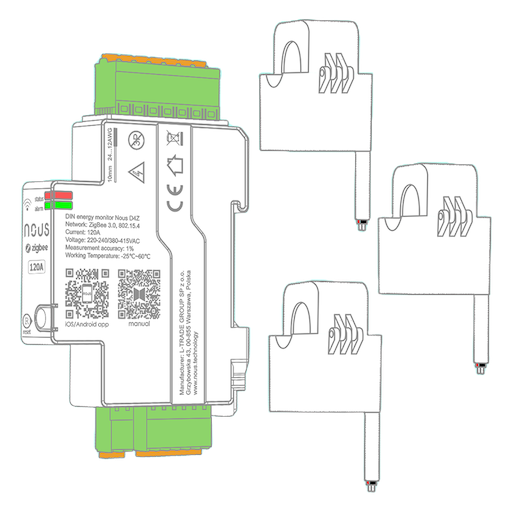 |
Notes
Pairing
Press and hold the reset button for 5s to put the device in pairing mode.
The yellow status LED will flash until it connects.
Options
How to use device type specific configuration
time_start: Reply to Tuya-specific time synchronization requests: "1970" - Reply with seconds since 1970/01/01 (recommended, should stop the device from asking), "2000" - Reply with seconds since 2000/01/01 (use if the weekday is wrong with 1970), "off" - Don't reply (use if replying causes too much traffic). Default for this device: "off". The value must be one of1970,2000,offpower_calibration: Calibrates the power value (percentual offset), takes into effect on next report of device. The value must be a number.power_precision: Number of digits after decimal point for power, takes into effect on next report of device. This option can only decrease the precision, not increase it. The value must be a number with a minimum value of0and with a maximum value of3ac_frequency_calibration: Calibrates the ac_frequency value (absolute offset), takes into effect on next report of device. The value must be a number.ac_frequency_precision: Number of digits after decimal point for ac_frequency, takes into effect on next report of device. This option can only decrease the precision, not increase it. The value must be a number with a minimum value of0and with a maximum value of3energy_calibration: Calibrates the energy value (percentual offset), takes into effect on next report of device. The value must be a number.energy_precision: Number of digits after decimal point for energy, takes into effect on next report of device. This option can only decrease the precision, not increase it. The value must be a number with a minimum value of0and with a maximum value of3
Exposes
Faults (list)
List of current faults. Can be set by publishing to zigbee2mqtt/FRIENDLY_NAME/set with payload {"faults": ["short_circuit", "surge", "overload", "leakage_current", "temperature", "fire", "high_power", "self_test", "over_current", "unbalance", "over_voltage", "under_voltage", "miss_phase", "outage", "magnetism", "credit", "no_balance"]}
Power (numeric)
Total active power. Value can be found in the published state on the power property. It's not possible to read (/get) or write (/set) this value. The unit of this value is W.
Power factor (numeric)
Total power factor. Value can be found in the published state on the power_factor property. It's not possible to read (/get) or write (/set) this value. The unit of this value is %.
AC frequency (numeric)
Measured electrical AC frequency. Value can be found in the published state on the ac_frequency property. It's not possible to read (/get) or write (/set) this value. The unit of this value is Hz.
Energy (numeric)
Total consumed energy. Value can be found in the published state on the energy property. It's not possible to read (/get) or write (/set) this value. The unit of this value is kWh.
Produced energy (numeric)
Total produced energy. Value can be found in the published state on the produced_energy property. It's not possible to read (/get) or write (/set) this value. The unit of this value is kWh.
Energy reset (enum)
Set the energy measurements to zero. Value can be found in the published state on the energy_reset property. It's not possible to read (/get) this value. To write (/set) a value publish a message to topic zigbee2mqtt/FRIENDLY_NAME/set with payload {"energy_reset": NEW_VALUE}. The possible values are: RESET.
Power a (numeric)
Instantaneous measured power (phase A). Value can be found in the published state on the power_a property. It's not possible to read (/get) or write (/set) this value. The unit of this value is W.
Power b (numeric)
Instantaneous measured power (phase B). Value can be found in the published state on the power_b property. It's not possible to read (/get) or write (/set) this value. The unit of this value is W.
Power c (numeric)
Instantaneous measured power (phase C). Value can be found in the published state on the power_c property. It's not possible to read (/get) or write (/set) this value. The unit of this value is W.
Power factor a (numeric)
Instantaneous measured power factor (phase A). Value can be found in the published state on the power_factor_a property. It's not possible to read (/get) or write (/set) this value. The unit of this value is %.
Power factor b (numeric)
Instantaneous measured power factor (phase B). Value can be found in the published state on the power_factor_b property. It's not possible to read (/get) or write (/set) this value. The unit of this value is %.
Power factor c (numeric)
Instantaneous measured power factor (phase C). Value can be found in the published state on the power_factor_c property. It's not possible to read (/get) or write (/set) this value. The unit of this value is %.
Current a (numeric)
Instantaneous measured electrical current (phase A). Value can be found in the published state on the current_a property. It's not possible to read (/get) or write (/set) this value. The unit of this value is A.
Current b (numeric)
Instantaneous measured electrical current (phase B). Value can be found in the published state on the current_b property. It's not possible to read (/get) or write (/set) this value. The unit of this value is A.
Current c (numeric)
Instantaneous measured electrical current (phase C). Value can be found in the published state on the current_c property. It's not possible to read (/get) or write (/set) this value. The unit of this value is A.
Voltage a (numeric)
Measured electrical potential value (phase A). Value can be found in the published state on the voltage_a property. It's not possible to read (/get) or write (/set) this value. The unit of this value is V.
Voltage b (numeric)
Measured electrical potential value (phase B). Value can be found in the published state on the voltage_b property. It's not possible to read (/get) or write (/set) this value. The unit of this value is V.
Voltage c (numeric)
Measured electrical potential value (phase C). Value can be found in the published state on the voltage_c property. It's not possible to read (/get) or write (/set) this value. The unit of this value is V.
Energy a (numeric)
Sum of consumed energy (phase A). Value can be found in the published state on the energy_a property. It's not possible to read (/get) or write (/set) this value. The unit of this value is kWh.
Energy b (numeric)
Sum of consumed energy (phase B). Value can be found in the published state on the energy_b property. It's not possible to read (/get) or write (/set) this value. The unit of this value is kWh.
Energy c (numeric)
Sum of consumed energy (phase C). Value can be found in the published state on the energy_c property. It's not possible to read (/get) or write (/set) this value. The unit of this value is kWh.
Energy produced a (numeric)
Sum of produced energy (phase A). Value can be found in the published state on the energy_produced_a property. It's not possible to read (/get) or write (/set) this value. The unit of this value is kWh.
Energy produced b (numeric)
Sum of produced energy (phase B). Value can be found in the published state on the energy_produced_b property. It's not possible to read (/get) or write (/set) this value. The unit of this value is kWh.
Energy produced c (numeric)
Sum of produced energy (phase C). Value can be found in the published state on the energy_produced_c property. It's not possible to read (/get) or write (/set) this value. The unit of this value is kWh.
Alarm set 1 (composite)
Configuration for RS485 wired communication (if supported by device) and high power alarm. Can be set by publishing to zigbee2mqtt/FRIENDLY_NAME/set with payload {"alarm_set_1": {"rs485_baud_rate_enabled": VALUE, "rs485_baud_rate": VALUE, "rs485_address_enabled": VALUE, "rs485_address": VALUE, "rs485_data_format_enabled": VALUE, "rs485_data_format": VALUE, "high_power_alarm": VALUE, "high_power_threshold": VALUE}}
rs485_baud_rate_enabled(binary) allowed values:ONorOFFrs485_baud_rate(enum) allowed values:2400,4800,9600,19200,38400rs485_address_enabled(binary) allowed values:ONorOFFrs485_address(numeric) min value is 1, max value is 100rs485_data_format_enabled(binary) allowed values:ONorOFFrs485_data_format(enum) allowed values:N81,E81,O81,N82high_power_alarm(binary): Trigger alarm when power draw exceeds the limit (Default OFF) allowed values:ONorOFFhigh_power_threshold(numeric): Power limit (Default 25 kW) max value is 65535, unit is kW
Alarm set 2 (composite)
Configuration for alarms and reporting frequency. Can be set by publishing to zigbee2mqtt/FRIENDLY_NAME/set with payload {"alarm_set_2": {"over_current_alarm": VALUE, "over_current_threshold": VALUE, "over_voltage_alarm": VALUE, "over_voltage_threshold": VALUE, "under_voltage_alarm": VALUE, "under_voltage_threshold": VALUE, "unbalanced_load_alarm": VALUE, "unbalanced_load_threshold": VALUE, "phase_loss_alarm": VALUE, "negative_active_power_alarm": VALUE, "custom_data_reporting_interval": VALUE, "data_reporting_interval": VALUE}}
over_current_alarm(binary): Trigger alarm when current is higher than the limit (Default OFF) allowed values:ONorOFFover_current_threshold(numeric): Current upper limit (Default 100A) max value is 65535, unit is Aover_voltage_alarm(binary): Trigger alarm when the voltage is above the limit (Default ON) allowed values:ONorOFFover_voltage_threshold(numeric): Voltage upper limit (Default 253V) max value is 65535, unit is Vunder_voltage_alarm(binary): Trigger alarm when the voltage is below the limit (Default OFF) allowed values:ONorOFFunder_voltage_threshold(numeric): Voltage lower limit (Default 180V) max value is 65535, unit is Vunbalanced_load_alarm(binary): Trigger alarm when power factor is below the limit (Default 15%) allowed values:ONorOFFunbalanced_load_threshold(numeric): Power factor lower limit (Default 15%) max value is 100, unit is %phase_loss_alarm(binary): Trigger alarm when one phase is unavailable (Default OFF) allowed values:ONorOFFnegative_active_power_alarm(binary): Trigger alarm when the active power is negative (Default ON) allowed values:ONorOFFcustom_data_reporting_interval(binary) allowed values:ONorOFFdata_reporting_interval(numeric): How often the device should report measurements (Default 5s) min value is 5, max value is 600, unit is s