
Moes ADCBZI01
| Model | ADCBZI01 |
| Vendor | Moes |
| Description | Curtain Robot |
| Exposes | cover (state, position), position, battery, illuminance, work_state, total_time, situation_set, fault, charging_status, open_threshold, close_threshold, curtain_status, total_distance, factory_test, custom_week_prog_1, custom_week_prog_2, custom_week_prog_3, custom_week_prog_4, calibration |
| Picture | 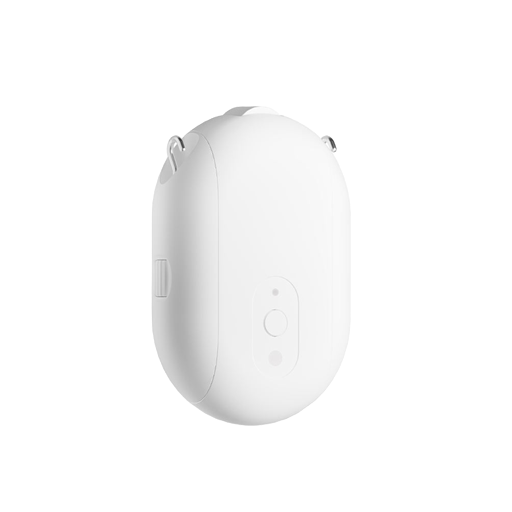 |
Options
How to use device type specific configuration
illuminance_calibration: Calibrates the illuminance value (percentual offset), takes into effect on next report of device. The value must be a number.invert_cover: Inverts the reported cover position and the state derived from it, false: open=100,close=0, true: open=0,close=100 (default false). The value must betrueorfalsecover_position_tilt_disable_report: Do not publish set cover target position as a normal 'position' value (default false). The value must betrueorfalse
Exposes
Cover
The current state of this cover is in the published state under the state property (value is OPEN or CLOSE). To control this cover publish a message to topic zigbee2mqtt/FRIENDLY_NAME/set with payload {"state": "OPEN"}, {"state": "CLOSE"}, {"state": "STOP"}. It's not possible to read (/get) this value. To change the position publish a message to topic zigbee2mqtt/FRIENDLY_NAME/set with payload {"position": VALUE} where VALUE is a number between 0 and 100.
Position (numeric)
Position. Value can be found in the published state on the position property. It's not possible to read (/get) or write (/set) this value. The unit of this value is %.
Battery (numeric)
Remaining battery in %, can take up to 24 hours before reported. Value can be found in the published state on the battery property. It's not possible to read (/get) or write (/set) this value. The minimal value is 0 and the maximum value is 100. The unit of this value is %.
Illuminance (numeric)
Measured illuminance. Value can be found in the published state on the illuminance property. It's not possible to read (/get) or write (/set) this value. The unit of this value is lx.
Work state (enum)
Current work state. Value can be found in the published state on the work_state property. It's not possible to read (/get) or write (/set) this value. The possible values are: standby, opening, closing.
Total time (numeric)
Total operation time. Value can be found in the published state on the total_time property. It's not possible to read (/get) or write (/set) this value. The unit of this value is s.
Situation set (enum)
Situation control. Value can be found in the published state on the situation_set property. It's not possible to read (/get) this value. To write (/set) a value publish a message to topic zigbee2mqtt/FRIENDLY_NAME/set with payload {"situation_set": NEW_VALUE}. The possible values are: fully_open, fully_close.
Fault (enum)
Fault status. Value can be found in the published state on the fault property. It's not possible to read (/get) or write (/set) this value. The possible values are: none.
Charging status (enum)
Charging status. Value can be found in the published state on the charging_status property. It's not possible to read (/get) or write (/set) this value. The possible values are: none, uncharged, charging, charged.
Open threshold (numeric)
Light threshold for opening. Value can be found in the published state on the open_threshold property. It's not possible to read (/get) this value. To write (/set) a value publish a message to topic zigbee2mqtt/FRIENDLY_NAME/set with payload {"open_threshold": NEW_VALUE}. The minimal value is 0 and the maximum value is 100.
Close threshold (numeric)
Light threshold for closing. Value can be found in the published state on the close_threshold property. It's not possible to read (/get) this value. To write (/set) a value publish a message to topic zigbee2mqtt/FRIENDLY_NAME/set with payload {"close_threshold": NEW_VALUE}. The minimal value is 0 and the maximum value is 100.
Curtain status (numeric)
Curtain status. Value can be found in the published state on the curtain_status property. It's not possible to read (/get) this value. To write (/set) a value publish a message to topic zigbee2mqtt/FRIENDLY_NAME/set with payload {"curtain_status": NEW_VALUE}. The minimal value is 0 and the maximum value is 255.
Total distance (numeric)
Total distance traveled. Value can be found in the published state on the total_distance property. It's not possible to read (/get) or write (/set) this value. The unit of this value is m.
Factory test (numeric)
Factory test feedback. Value can be found in the published state on the factory_test property. It's not possible to read (/get) or write (/set) this value. The minimal value is 0 and the maximum value is 100.
Custom week prog 1 (text)
Custom week program 1. Value can be found in the published state on the custom_week_prog_1 property. It's not possible to read (/get) this value. To write (/set) a value publish a message to topic zigbee2mqtt/FRIENDLY_NAME/set with payload {"custom_week_prog_1": NEW_VALUE}.
Custom week prog 2 (text)
Custom week program 2. Value can be found in the published state on the custom_week_prog_2 property. It's not possible to read (/get) this value. To write (/set) a value publish a message to topic zigbee2mqtt/FRIENDLY_NAME/set with payload {"custom_week_prog_2": NEW_VALUE}.
Custom week prog 3 (text)
Custom week program 3. Value can be found in the published state on the custom_week_prog_3 property. It's not possible to read (/get) this value. To write (/set) a value publish a message to topic zigbee2mqtt/FRIENDLY_NAME/set with payload {"custom_week_prog_3": NEW_VALUE}.
Custom week prog 4 (text)
Custom week program 4. Value can be found in the published state on the custom_week_prog_4 property. It's not possible to read (/get) this value. To write (/set) a value publish a message to topic zigbee2mqtt/FRIENDLY_NAME/set with payload {"custom_week_prog_4": NEW_VALUE}.
Calibration (enum)
Travel-range calibration. With the curtain fully closed, set 'calibrate' and the motor free-runs toward open; at the fully-open end set 'stop' to halt it and store the limit. Use 'calibrate_reverse' if it runs the wrong way. Always start fully closed, otherwise the open/close commands end up reversed.. Value can be found in the published state on the calibration property. To read (/get) the value publish a message to topic zigbee2mqtt/FRIENDLY_NAME/get with payload {"calibration": ""}. To write (/set) a value publish a message to topic zigbee2mqtt/FRIENDLY_NAME/set with payload {"calibration": NEW_VALUE}. The possible values are: stop, calibrate, calibrate_reverse.