
Namron 4566702
| Model | 4566702 |
| Vendor | Namron |
| Description | Zigbee Edge Thermostat |
| Exposes | climate (local_temperature, occupied_heating_setpoint, system_mode, running_state, local_temperature_calibration, pi_heating_demand), occupied_cooling_setpoint, programming_operation_mode, thermostat_mode, sensor_mode, regulator_percentage, regulator_cycle, frost, window_open_check, window_state, keypad_lockout, temperature_display_mode, panel_brightness, screen_on_time, countdown_set, countdown_left, vacation_mode, vacation_start, vacation_end, holiday_temp_set, holiday_temp_set_f, max_heat_temp, max_heat_temp_f, min_cool_temp, min_cool_temp_f, auto_time, sync_time, clock_last_synced, fault, firmware_version, firmware_date, min_heat_setpoint_limit, max_heat_setpoint_limit, min_cool_setpoint_limit, max_cool_setpoint_limit, min_heat_setpoint_limit_f, max_heat_setpoint_limit_f, min_cool_setpoint_limit_f, max_cool_setpoint_limit_f, occupied_heating_setpoint_f, occupied_cooling_setpoint_f, local_temperature_f, switch (state), humidity, power, current, energy |
| Picture | 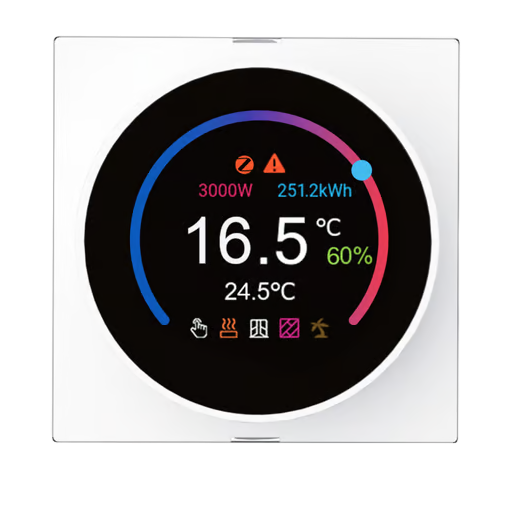 |
OTA updates
This device supports OTA updates, for more information see OTA updates.
Options
How to use device type specific configuration
humidity_calibration: Calibrates the humidity value (absolute offset), takes into effect on next report of device. The value must be a number.humidity_precision: Number of digits after decimal point for humidity, takes into effect on next report of device. This option can only decrease the precision, not increase it. The value must be a number with a minimum value of0and with a maximum value of3power_calibration: Calibrates the power value (percentual offset), takes into effect on next report of device. The value must be a number.power_precision: Number of digits after decimal point for power, takes into effect on next report of device. This option can only decrease the precision, not increase it. The value must be a number with a minimum value of0and with a maximum value of3current_calibration: Calibrates the current value (percentual offset), takes into effect on next report of device. The value must be a number.current_precision: Number of digits after decimal point for current, takes into effect on next report of device. This option can only decrease the precision, not increase it. The value must be a number with a minimum value of0and with a maximum value of3energy_calibration: Calibrates the energy value (percentual offset), takes into effect on next report of device. The value must be a number.energy_precision: Number of digits after decimal point for energy, takes into effect on next report of device. This option can only decrease the precision, not increase it. The value must be a number with a minimum value of0and with a maximum value of3thermostat_unit: Controls the temperature unit of the thermostat (default celsius). The value must be one ofcelsius,fahrenheitstate_action: State actions will also be published as 'action' when true (default false). The value must betrueorfalse
Exposes
Climate
This climate device supports the following features: local_temperature, occupied_heating_setpoint, system_mode, running_state, local_temperature_calibration, pi_heating_demand.
occupied_heating_setpoint: Temperature setpoint. To control publish a message to topiczigbee2mqtt/FRIENDLY_NAME/setwith payload{"occupied_heating_setpoint": VALUE}whereVALUEis the °C between5and35. To read send a message tozigbee2mqtt/FRIENDLY_NAME/getwith payload{"occupied_heating_setpoint": ""}.pi_heating_demand: Position of the valve (= demanded heat) where 0% is fully closed and 100% is fully open. Writing (/set) this attribute is not possible. Reading (/get) this attribute is not possible.local_temperature: Current temperature measured on the device (in °C). To read send a message tozigbee2mqtt/FRIENDLY_NAME/getwith payload{"local_temperature": ""}.system_mode: Mode of this device. To control publish a message to topiczigbee2mqtt/FRIENDLY_NAME/setwith payload{"system_mode": VALUE}whereVALUEis one of:off,heat,cool. To read send a message tozigbee2mqtt/FRIENDLY_NAME/getwith payload{"system_mode": ""}.running_state: The current running state. Possible values are:idle,heat,cool. To read send a message tozigbee2mqtt/FRIENDLY_NAME/getwith payload{"running_state": ""}.local_temperature_calibration: Offset to add/subtract to the local temperature. To control publish a message to topiczigbee2mqtt/FRIENDLY_NAME/setwith payload{"local_temperature_calibration": VALUE}.To read send a message tozigbee2mqtt/FRIENDLY_NAME/getwith payload{"local_temperature": ""}.The minimal value is-3and the maximum value is3with a step size of0.1.
Occupied cooling setpoint (numeric)
Cooling setpoint.. Value can be found in the published state on the occupied_cooling_setpoint property. To read (/get) the value publish a message to topic zigbee2mqtt/FRIENDLY_NAME/get with payload {"occupied_cooling_setpoint": ""}. To write (/set) a value publish a message to topic zigbee2mqtt/FRIENDLY_NAME/set with payload {"occupied_cooling_setpoint": NEW_VALUE}. The minimal value is 10 and the maximum value is 40. The unit of this value is °C.
Programming operation mode (enum)
Run mode. "setpoint" = manual, "schedule" = follow the weekly program, "eco" = ECO mode.. Value can be found in the published state on the programming_operation_mode property. To read (/get) the value publish a message to topic zigbee2mqtt/FRIENDLY_NAME/get with payload {"programming_operation_mode": ""}. To write (/set) a value publish a message to topic zigbee2mqtt/FRIENDLY_NAME/set with payload {"programming_operation_mode": NEW_VALUE}. The possible values are: setpoint, schedule, eco.
Thermostat mode (enum)
Convenience summary of which special mode is currently active (derived from the other attributes, read-only).. Value can be found in the published state on the thermostat_mode property. It's not possible to read (/get) or write (/set) this value. The possible values are: manual, schedule, eco, regulator, frost, holiday, countdown.
Sensor mode (enum)
Which sensor(s) control heating, or "regulator" for plain duty-cycle % control instead of a thermostat.. Value can be found in the published state on the sensor_mode property. To read (/get) the value publish a message to topic zigbee2mqtt/FRIENDLY_NAME/get with payload {"sensor_mode": ""}. To write (/set) a value publish a message to topic zigbee2mqtt/FRIENDLY_NAME/set with payload {"sensor_mode": NEW_VALUE}. The possible values are: air, floor, air_floor, external, external_floor, floor_percent, regulator.
Regulator percentage (numeric)
Output duty cycle when sensor_mode is "regulator".. Value can be found in the published state on the regulator_percentage property. To read (/get) the value publish a message to topic zigbee2mqtt/FRIENDLY_NAME/get with payload {"regulator_percentage": ""}. To write (/set) a value publish a message to topic zigbee2mqtt/FRIENDLY_NAME/set with payload {"regulator_percentage": NEW_VALUE}. The minimal value is 0 and the maximum value is 100. The unit of this value is %.
Regulator cycle (numeric)
Regulator cycle length.. Value can be found in the published state on the regulator_cycle property. To read (/get) the value publish a message to topic zigbee2mqtt/FRIENDLY_NAME/get with payload {"regulator_cycle": ""}. To write (/set) a value publish a message to topic zigbee2mqtt/FRIENDLY_NAME/set with payload {"regulator_cycle": NEW_VALUE}. The minimal value is 0 and the maximum value is 30. The unit of this value is min.
Frost (binary)
Frost protection. Only usable while system_mode is "heat".. Value can be found in the published state on the frost property. To read (/get) the value publish a message to topic zigbee2mqtt/FRIENDLY_NAME/get with payload {"frost": ""}. To write (/set) a value publish a message to topic zigbee2mqtt/FRIENDLY_NAME/set with payload {"frost": NEW_VALUE}. If value equals ON frost is ON, if OFF OFF.
Window open check (binary)
Open-window detection (auto pause heating).. Value can be found in the published state on the window_open_check property. To read (/get) the value publish a message to topic zigbee2mqtt/FRIENDLY_NAME/get with payload {"window_open_check": ""}. To write (/set) a value publish a message to topic zigbee2mqtt/FRIENDLY_NAME/set with payload {"window_open_check": NEW_VALUE}. If value equals ON window open check is ON, if OFF OFF.
Window state (enum)
Open-window detection result.. Value can be found in the published state on the window_state property. It's not possible to read (/get) or write (/set) this value. The possible values are: open, closed.
Keypad lockout (binary)
Physical button lock on the device.. Value can be found in the published state on the keypad_lockout property. To read (/get) the value publish a message to topic zigbee2mqtt/FRIENDLY_NAME/get with payload {"keypad_lockout": ""}. To write (/set) a value publish a message to topic zigbee2mqtt/FRIENDLY_NAME/set with payload {"keypad_lockout": NEW_VALUE}. If value equals LOCK keypad lockout is ON, if UNLOCK OFF.
Temperature display mode (enum)
Unit shown on the device's own screen.. Value can be found in the published state on the temperature_display_mode property. To read (/get) the value publish a message to topic zigbee2mqtt/FRIENDLY_NAME/get with payload {"temperature_display_mode": ""}. To write (/set) a value publish a message to topic zigbee2mqtt/FRIENDLY_NAME/set with payload {"temperature_display_mode": NEW_VALUE}. The possible values are: celsius, fahrenheit.
Panel brightness (numeric)
LCD backlight brightness.. Value can be found in the published state on the panel_brightness property. To read (/get) the value publish a message to topic zigbee2mqtt/FRIENDLY_NAME/get with payload {"panel_brightness": ""}. To write (/set) a value publish a message to topic zigbee2mqtt/FRIENDLY_NAME/set with payload {"panel_brightness": NEW_VALUE}. The minimal value is 1 and the maximum value is 100. The unit of this value is %.
Screen on time (enum)
How long the backlight stays on after a touch.. Value can be found in the published state on the screen_on_time property. To read (/get) the value publish a message to topic zigbee2mqtt/FRIENDLY_NAME/get with payload {"screen_on_time": ""}. To write (/set) a value publish a message to topic zigbee2mqtt/FRIENDLY_NAME/set with payload {"screen_on_time": NEW_VALUE}. The possible values are: always_on, 10s, 30s, 60s.
Countdown set (numeric)
Countdown timer; heating stops when it reaches 0. 0 = cancelled. Not usable in cooling mode.. Value can be found in the published state on the countdown_set property. To read (/get) the value publish a message to topic zigbee2mqtt/FRIENDLY_NAME/get with payload {"countdown_set": ""}. To write (/set) a value publish a message to topic zigbee2mqtt/FRIENDLY_NAME/set with payload {"countdown_set": NEW_VALUE}. The minimal value is 0 and the maximum value is 120. The unit of this value is min.
Countdown left (numeric)
Time remaining on the countdown timer.. Value can be found in the published state on the countdown_left property. To read (/get) the value publish a message to topic zigbee2mqtt/FRIENDLY_NAME/get with payload {"countdown_left": ""}. It's not possible to write (/set) this value. The unit of this value is min.
Vacation mode (binary)
Holds holiday_temp_set until vacation_end.. Value can be found in the published state on the vacation_mode property. To read (/get) the value publish a message to topic zigbee2mqtt/FRIENDLY_NAME/get with payload {"vacation_mode": ""}. To write (/set) a value publish a message to topic zigbee2mqtt/FRIENDLY_NAME/set with payload {"vacation_mode": NEW_VALUE}. If value equals ON vacation mode is ON, if OFF OFF.
Vacation start (text)
Vacation start date, format YYYY-MM-DD.. Value can be found in the published state on the vacation_start property. To read (/get) the value publish a message to topic zigbee2mqtt/FRIENDLY_NAME/get with payload {"vacation_start": ""}. To write (/set) a value publish a message to topic zigbee2mqtt/FRIENDLY_NAME/set with payload {"vacation_start": NEW_VALUE}.
Vacation end (text)
Vacation end date, format YYYY-MM-DD.. Value can be found in the published state on the vacation_end property. To read (/get) the value publish a message to topic zigbee2mqtt/FRIENDLY_NAME/get with payload {"vacation_end": ""}. To write (/set) a value publish a message to topic zigbee2mqtt/FRIENDLY_NAME/set with payload {"vacation_end": NEW_VALUE}.
Holiday temp set (numeric)
Target temperature while on vacation.. Value can be found in the published state on the holiday_temp_set property. To read (/get) the value publish a message to topic zigbee2mqtt/FRIENDLY_NAME/get with payload {"holiday_temp_set": ""}. To write (/set) a value publish a message to topic zigbee2mqtt/FRIENDLY_NAME/set with payload {"holiday_temp_set": NEW_VALUE}. The minimal value is 5 and the maximum value is 40. The unit of this value is °C.
Holiday temp set f (numeric)
Target temperature while on vacation (°F).. Value can be found in the published state on the holiday_temp_set_f property. To read (/get) the value publish a message to topic zigbee2mqtt/FRIENDLY_NAME/get with payload {"holiday_temp_set_f": ""}. To write (/set) a value publish a message to topic zigbee2mqtt/FRIENDLY_NAME/set with payload {"holiday_temp_set_f": NEW_VALUE}. The minimal value is 41 and the maximum value is 104. The unit of this value is °F.
Max heat temp (numeric)
Upper limit for the heating setpoint.. Value can be found in the published state on the max_heat_temp property. To read (/get) the value publish a message to topic zigbee2mqtt/FRIENDLY_NAME/get with payload {"max_heat_temp": ""}. To write (/set) a value publish a message to topic zigbee2mqtt/FRIENDLY_NAME/set with payload {"max_heat_temp": NEW_VALUE}. The minimal value is 15 and the maximum value is 35. The unit of this value is °C.
Max heat temp f (numeric)
Upper limit for the heating setpoint (°F).. Value can be found in the published state on the max_heat_temp_f property. To read (/get) the value publish a message to topic zigbee2mqtt/FRIENDLY_NAME/get with payload {"max_heat_temp_f": ""}. To write (/set) a value publish a message to topic zigbee2mqtt/FRIENDLY_NAME/set with payload {"max_heat_temp_f": NEW_VALUE}. The minimal value is 59 and the maximum value is 95. The unit of this value is °F.
Min cool temp (numeric)
Lower limit for the cooling setpoint.. Value can be found in the published state on the min_cool_temp property. To read (/get) the value publish a message to topic zigbee2mqtt/FRIENDLY_NAME/get with payload {"min_cool_temp": ""}. To write (/set) a value publish a message to topic zigbee2mqtt/FRIENDLY_NAME/set with payload {"min_cool_temp": NEW_VALUE}. The minimal value is 10 and the maximum value is 30. The unit of this value is °C.
Min cool temp f (numeric)
Lower limit for the cooling setpoint (°F).. Value can be found in the published state on the min_cool_temp_f property. To read (/get) the value publish a message to topic zigbee2mqtt/FRIENDLY_NAME/get with payload {"min_cool_temp_f": ""}. To write (/set) a value publish a message to topic zigbee2mqtt/FRIENDLY_NAME/set with payload {"min_cool_temp_f": NEW_VALUE}. The minimal value is 50 and the maximum value is 86. The unit of this value is °F.
Auto time (binary)
Let the device auto-sync its clock from the coordinator.. Value can be found in the published state on the auto_time property. To read (/get) the value publish a message to topic zigbee2mqtt/FRIENDLY_NAME/get with payload {"auto_time": ""}. To write (/set) a value publish a message to topic zigbee2mqtt/FRIENDLY_NAME/set with payload {"auto_time": NEW_VALUE}. If value equals ON auto time is ON, if OFF OFF.
Sync time (enum)
Write "sync" to push the current time to the device now.. Value will not be published in the state. It's not possible to read (/get) this value. To write (/set) a value publish a message to topic zigbee2mqtt/FRIENDLY_NAME/set with payload {"sync_time": NEW_VALUE}. The possible values are: sync.
Clock last synced (text)
Local time the device's clock was last set to.. Value can be found in the published state on the clock_last_synced property. It's not possible to read (/get) or write (/set) this value.
Fault (text)
Active fault codes reported by the device, or "none".. Value can be found in the published state on the fault property. It's not possible to read (/get) or write (/set) this value.
Firmware version (text)
Reported software build ID.. Value can be found in the published state on the firmware_version property. It's not possible to read (/get) or write (/set) this value.
Firmware date (text)
Reported firmware date code.. Value can be found in the published state on the firmware_date property. It's not possible to read (/get) or write (/set) this value.
Min heat setpoint limit (numeric)
Value can be found in the published state on the min_heat_setpoint_limit property. To read (/get) the value publish a message to topic zigbee2mqtt/FRIENDLY_NAME/get with payload {"min_heat_setpoint_limit": ""}. It's not possible to write (/set) this value. The unit of this value is °C.
Max heat setpoint limit (numeric)
Value can be found in the published state on the max_heat_setpoint_limit property. To read (/get) the value publish a message to topic zigbee2mqtt/FRIENDLY_NAME/get with payload {"max_heat_setpoint_limit": ""}. It's not possible to write (/set) this value. The unit of this value is °C.
Min cool setpoint limit (numeric)
Value can be found in the published state on the min_cool_setpoint_limit property. To read (/get) the value publish a message to topic zigbee2mqtt/FRIENDLY_NAME/get with payload {"min_cool_setpoint_limit": ""}. It's not possible to write (/set) this value. The unit of this value is °C.
Max cool setpoint limit (numeric)
Value can be found in the published state on the max_cool_setpoint_limit property. To read (/get) the value publish a message to topic zigbee2mqtt/FRIENDLY_NAME/get with payload {"max_cool_setpoint_limit": ""}. It's not possible to write (/set) this value. The unit of this value is °C.
Min heat setpoint limit f (numeric)
Value can be found in the published state on the min_heat_setpoint_limit_f property. To read (/get) the value publish a message to topic zigbee2mqtt/FRIENDLY_NAME/get with payload {"min_heat_setpoint_limit_f": ""}. It's not possible to write (/set) this value. The unit of this value is °F.
Max heat setpoint limit f (numeric)
Value can be found in the published state on the max_heat_setpoint_limit_f property. To read (/get) the value publish a message to topic zigbee2mqtt/FRIENDLY_NAME/get with payload {"max_heat_setpoint_limit_f": ""}. It's not possible to write (/set) this value. The unit of this value is °F.
Min cool setpoint limit f (numeric)
Value can be found in the published state on the min_cool_setpoint_limit_f property. To read (/get) the value publish a message to topic zigbee2mqtt/FRIENDLY_NAME/get with payload {"min_cool_setpoint_limit_f": ""}. It's not possible to write (/set) this value. The unit of this value is °F.
Max cool setpoint limit f (numeric)
Value can be found in the published state on the max_cool_setpoint_limit_f property. To read (/get) the value publish a message to topic zigbee2mqtt/FRIENDLY_NAME/get with payload {"max_cool_setpoint_limit_f": ""}. It's not possible to write (/set) this value. The unit of this value is °F.
Occupied heating setpoint f (numeric)
Device's own Fahrenheit-mode heating setpoint mirror.. Value can be found in the published state on the occupied_heating_setpoint_f property. To read (/get) the value publish a message to topic zigbee2mqtt/FRIENDLY_NAME/get with payload {"occupied_heating_setpoint_f": ""}. It's not possible to write (/set) this value. The unit of this value is °F.
Occupied cooling setpoint f (numeric)
Device's own Fahrenheit-mode cooling setpoint mirror.. Value can be found in the published state on the occupied_cooling_setpoint_f property. To read (/get) the value publish a message to topic zigbee2mqtt/FRIENDLY_NAME/get with payload {"occupied_cooling_setpoint_f": ""}. It's not possible to write (/set) this value. The unit of this value is °F.
Local temperature f (numeric)
Device's own Fahrenheit-mode temperature mirror.. Value can be found in the published state on the local_temperature_f property. To read (/get) the value publish a message to topic zigbee2mqtt/FRIENDLY_NAME/get with payload {"local_temperature_f": ""}. It's not possible to write (/set) this value. The unit of this value is °F.
Switch
The current state of this switch is in the published state under the state property (value is ON or OFF). To control this switch publish a message to topic zigbee2mqtt/FRIENDLY_NAME/set with payload {"state": "ON"}, {"state": "OFF"} or {"state": "TOGGLE"}. To read the current state of this switch publish a message to topic zigbee2mqtt/FRIENDLY_NAME/get with payload {"state": ""}.
On with timed off
When setting the state to ON, it might be possible to specify an automatic shutoff after a certain amount of time. To do this add an additional property on_time to the payload which is the time in seconds the state should remain on. Additionally an off_wait_time property can be added to the payload to specify the cooldown time in seconds when the switch will not answer to other on with timed off commands. Support depends on the switch firmware. Some devices might require both on_time and off_wait_time to work Examples : {"state" : "ON", "on_time": 300}, {"state" : "ON", "on_time": 300, "off_wait_time": 120}.
Humidity (numeric)
Measured relative humidity. Value can be found in the published state on the humidity property. To read (/get) the value publish a message to topic zigbee2mqtt/FRIENDLY_NAME/get with payload {"humidity": ""}. It's not possible to write (/set) this value. The unit of this value is %.
Power (numeric)
Instantaneous measured power. Value can be found in the published state on the power property. To read (/get) the value publish a message to topic zigbee2mqtt/FRIENDLY_NAME/get with payload {"power": ""}. It's not possible to write (/set) this value. The unit of this value is W.
Current (numeric)
Instantaneous measured electrical current. Value can be found in the published state on the current property. To read (/get) the value publish a message to topic zigbee2mqtt/FRIENDLY_NAME/get with payload {"current": ""}. It's not possible to write (/set) this value. The unit of this value is A.
Energy (numeric)
Sum of consumed energy. Value can be found in the published state on the energy property. To read (/get) the value publish a message to topic zigbee2mqtt/FRIENDLY_NAME/get with payload {"energy": ""}. It's not possible to write (/set) this value. The unit of this value is kWh.