
Namron 4512776/4512777
| Model | 4512776/4512777 |
| Vendor | Namron |
| Description | Zigbee thermostat for panel heater PRO (white 4512776 / black 4512777) |
| Exposes | climate (local_temperature, occupied_heating_setpoint, local_temperature_calibration, system_mode, running_state), state, frost_mode, child_lock, hysteresis, window_open_detection, window_open, control_method, adaptive_function, pid_kp, pid_ki, pid_kd, display_brightness, display_auto_off, power, energy |
| Picture | 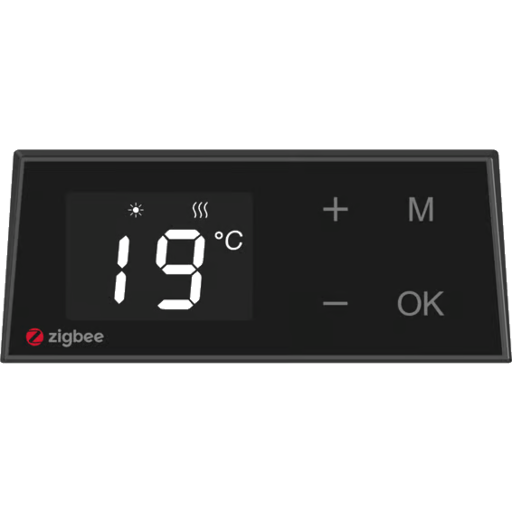 |
Options
How to use device type specific configuration
power_calibration: Calibrates the power value (percentual offset), takes into effect on next report of device. The value must be a number.power_precision: Number of digits after decimal point for power, takes into effect on next report of device. This option can only decrease the precision, not increase it. The value must be a number with a minimum value of0and with a maximum value of3energy_calibration: Calibrates the energy value (percentual offset), takes into effect on next report of device. The value must be a number.energy_precision: Number of digits after decimal point for energy, takes into effect on next report of device. This option can only decrease the precision, not increase it. The value must be a number with a minimum value of0and with a maximum value of3thermostat_unit: Controls the temperature unit of the thermostat (default celsius). The value must be one ofcelsius,fahrenheit
Exposes
Climate
This climate device supports the following features: local_temperature, occupied_heating_setpoint, local_temperature_calibration, system_mode, running_state.
occupied_heating_setpoint: Temperature setpoint. To control publish a message to topiczigbee2mqtt/FRIENDLY_NAME/setwith payload{"occupied_heating_setpoint": VALUE}whereVALUEis the °C between5and35. To read send a message tozigbee2mqtt/FRIENDLY_NAME/getwith payload{"occupied_heating_setpoint": ""}.local_temperature: Current temperature measured on the device (in °C). To read send a message tozigbee2mqtt/FRIENDLY_NAME/getwith payload{"local_temperature": ""}.system_mode: Mode of this device. To control publish a message to topiczigbee2mqtt/FRIENDLY_NAME/setwith payload{"system_mode": VALUE}whereVALUEis one of:off,heat,auto. To read send a message tozigbee2mqtt/FRIENDLY_NAME/getwith payload{"system_mode": ""}.running_state: The current running state. Possible values are:idle,heat. To read send a message tozigbee2mqtt/FRIENDLY_NAME/getwith payload{"running_state": ""}.local_temperature_calibration: Offset to add/subtract to the local temperature. To control publish a message to topiczigbee2mqtt/FRIENDLY_NAME/setwith payload{"local_temperature_calibration": VALUE}.To read send a message tozigbee2mqtt/FRIENDLY_NAME/getwith payload{"local_temperature": ""}.The minimal value is-10and the maximum value is10with a step size of0.5.
State (binary)
Virtual on/off (maps to systemMode). Value can be found in the published state on the state property. To read (/get) the value publish a message to topic zigbee2mqtt/FRIENDLY_NAME/get with payload {"state": ""}. To write (/set) a value publish a message to topic zigbee2mqtt/FRIENDLY_NAME/set with payload {"state": NEW_VALUE}. If value equals ON state is ON, if OFF OFF.
Frost mode (binary)
Frost protection: HEAT + 7°C, restores previous mode/setpoint when disabled. Value can be found in the published state on the frost_mode property. To read (/get) the value publish a message to topic zigbee2mqtt/FRIENDLY_NAME/get with payload {"frost_mode": ""}. To write (/set) a value publish a message to topic zigbee2mqtt/FRIENDLY_NAME/set with payload {"frost_mode": NEW_VALUE}. If value equals true frost mode is ON, if false OFF.
Child lock (binary)
Enables/disables physical input on the device. Value can be found in the published state on the child_lock property. To read (/get) the value publish a message to topic zigbee2mqtt/FRIENDLY_NAME/get with payload {"child_lock": ""}. To write (/set) a value publish a message to topic zigbee2mqtt/FRIENDLY_NAME/set with payload {"child_lock": NEW_VALUE}. If value equals LOCK child lock is ON, if UNLOCK OFF.
Hysteresis (numeric)
Hysteresis (0.5–5.0°C) for on/off control. Value can be found in the published state on the hysteresis property. To read (/get) the value publish a message to topic zigbee2mqtt/FRIENDLY_NAME/get with payload {"hysteresis": ""}. To write (/set) a value publish a message to topic zigbee2mqtt/FRIENDLY_NAME/set with payload {"hysteresis": NEW_VALUE}. The minimal value is 0.5 and the maximum value is 5. The unit of this value is °C.
Window open detection (binary)
Window open detection. Value can be found in the published state on the window_open_detection property. To read (/get) the value publish a message to topic zigbee2mqtt/FRIENDLY_NAME/get with payload {"window_open_detection": ""}. To write (/set) a value publish a message to topic zigbee2mqtt/FRIENDLY_NAME/set with payload {"window_open_detection": NEW_VALUE}. If value equals true window open detection is ON, if false OFF.
Window open (binary)
Whether the heater thinks window is open. Value can be found in the published state on the window_open property. It's not possible to read (/get) or write (/set) this value. If value equals true window open is ON, if false OFF.
Control method (enum)
System control method (PID or hysteresis). Value can be found in the published state on the control_method property. To read (/get) the value publish a message to topic zigbee2mqtt/FRIENDLY_NAME/get with payload {"control_method": ""}. To write (/set) a value publish a message to topic zigbee2mqtt/FRIENDLY_NAME/set with payload {"control_method": NEW_VALUE}. The possible values are: pid, hysteresis.
Adaptive function (binary)
Adaptive preheat function (on/off). Value can be found in the published state on the adaptive_function property. To read (/get) the value publish a message to topic zigbee2mqtt/FRIENDLY_NAME/get with payload {"adaptive_function": ""}. To write (/set) a value publish a message to topic zigbee2mqtt/FRIENDLY_NAME/set with payload {"adaptive_function": NEW_VALUE}. If value equals true adaptive function is ON, if false OFF.
Pid kp (numeric)
PID Kp. Value can be found in the published state on the pid_kp property. To read (/get) the value publish a message to topic zigbee2mqtt/FRIENDLY_NAME/get with payload {"pid_kp": ""}. To write (/set) a value publish a message to topic zigbee2mqtt/FRIENDLY_NAME/set with payload {"pid_kp": NEW_VALUE}. The minimal value is 0 and the maximum value is 1.
Pid ki (numeric)
PID Ki. Value can be found in the published state on the pid_ki property. To read (/get) the value publish a message to topic zigbee2mqtt/FRIENDLY_NAME/get with payload {"pid_ki": ""}. To write (/set) a value publish a message to topic zigbee2mqtt/FRIENDLY_NAME/set with payload {"pid_ki": NEW_VALUE}. The minimal value is 0 and the maximum value is 1.
Pid kd (numeric)
PID Kd. Value can be found in the published state on the pid_kd property. To read (/get) the value publish a message to topic zigbee2mqtt/FRIENDLY_NAME/get with payload {"pid_kd": ""}. To write (/set) a value publish a message to topic zigbee2mqtt/FRIENDLY_NAME/set with payload {"pid_kd": NEW_VALUE}. The minimal value is 0 and the maximum value is 1.
Display brightness (numeric)
Display brightness (read-only, set on the heater). Value can be found in the published state on the display_brightness property. It's not possible to read (/get) or write (/set) this value. The minimal value is 1 and the maximum value is 7.
Display auto off (binary)
Display auto off after 30s without interaction. Value can be found in the published state on the display_auto_off property. To read (/get) the value publish a message to topic zigbee2mqtt/FRIENDLY_NAME/get with payload {"display_auto_off": ""}. To write (/set) a value publish a message to topic zigbee2mqtt/FRIENDLY_NAME/set with payload {"display_auto_off": NEW_VALUE}. If value equals true display auto off is ON, if false OFF.
Power (numeric)
Instantaneous measured power. Value can be found in the published state on the power property. It's not possible to read (/get) or write (/set) this value. The unit of this value is W.
Energy (numeric)
Sum of consumed energy. Value can be found in the published state on the energy property. To read (/get) the value publish a message to topic zigbee2mqtt/FRIENDLY_NAME/get with payload {"energy": ""}. It's not possible to write (/set) this value. The unit of this value is kWh.