
Legrand 281506
| Model | 281506 |
| Vendor | Legrand |
| Description | Triple light switch |
| Exposes | led_in_dark, led_if_on, switch (state), power_on_behavior |
| Picture | 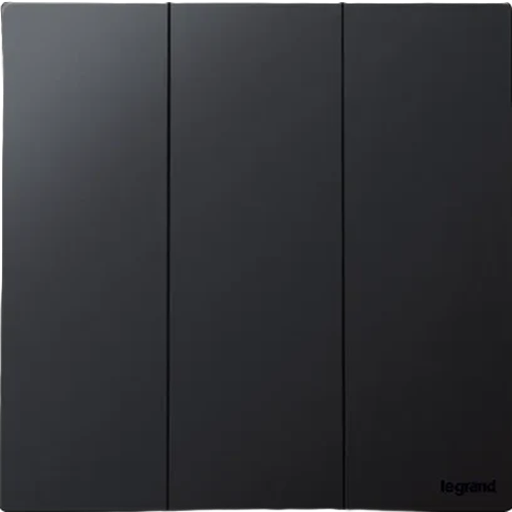 |
OTA updates
This device supports OTA updates, for more information see OTA updates.
Options
How to use device type specific configuration
identity_effect: Defines the identification effect to simplify the device identification. Example:
identity_effect:
  effect: blink 3 # allowed: 'blink 3', 'fixed', 'blink green', 'blink blue'
  color: red # allowed: 'default', 'red', 'green', 'blue', 'lightblue', 'yellow', 'pink', 'white'
state_action: State actions will also be published as 'action' when true (default false). The value must betrueorfalse
Exposes
Led in dark (binary)
Enables the built-in LED allowing to see the switch in the dark. Value can be found in the published state on the led_in_dark property. To read (/get) the value publish a message to topic zigbee2mqtt/FRIENDLY_NAME/get with payload {"led_in_dark": ""}. To write (/set) a value publish a message to topic zigbee2mqtt/FRIENDLY_NAME/set with payload {"led_in_dark": NEW_VALUE}. If value equals ON led in dark is ON, if OFF OFF.
Led if on (binary)
Enables the LED on activity. Value can be found in the published state on the led_if_on property. To read (/get) the value publish a message to topic zigbee2mqtt/FRIENDLY_NAME/get with payload {"led_if_on": ""}. To write (/set) a value publish a message to topic zigbee2mqtt/FRIENDLY_NAME/set with payload {"led_if_on": NEW_VALUE}. If value equals ON led if on is ON, if OFF OFF.
Switch (right endpoint)
The current state of this switch is in the published state under the state_right property (value is ON or OFF). To control this switch publish a message to topic zigbee2mqtt/FRIENDLY_NAME/set with payload {"state_right": "ON"}, {"state_right": "OFF"} or {"state_right": "TOGGLE"}. To read the current state of this switch publish a message to topic zigbee2mqtt/FRIENDLY_NAME/get with payload {"state_right": ""}.
On with timed off
When setting the state to ON, it might be possible to specify an automatic shutoff after a certain amount of time. To do this add an additional property on_time to the payload which is the time in seconds the state should remain on. Additionally an off_wait_time property can be added to the payload to specify the cooldown time in seconds when the switch will not answer to other on with timed off commands. Support depends on the switch firmware. Some devices might require both on_time and off_wait_time to work Examples : {"state" : "ON", "on_time": 300}, {"state" : "ON", "on_time": 300, "off_wait_time": 120}.
Switch (center endpoint)
The current state of this switch is in the published state under the state_center property (value is ON or OFF). To control this switch publish a message to topic zigbee2mqtt/FRIENDLY_NAME/set with payload {"state_center": "ON"}, {"state_center": "OFF"} or {"state_center": "TOGGLE"}. To read the current state of this switch publish a message to topic zigbee2mqtt/FRIENDLY_NAME/get with payload {"state_center": ""}.
On with timed off
When setting the state to ON, it might be possible to specify an automatic shutoff after a certain amount of time. To do this add an additional property on_time to the payload which is the time in seconds the state should remain on. Additionally an off_wait_time property can be added to the payload to specify the cooldown time in seconds when the switch will not answer to other on with timed off commands. Support depends on the switch firmware. Some devices might require both on_time and off_wait_time to work Examples : {"state" : "ON", "on_time": 300}, {"state" : "ON", "on_time": 300, "off_wait_time": 120}.
Switch (left endpoint)
The current state of this switch is in the published state under the state_left property (value is ON or OFF). To control this switch publish a message to topic zigbee2mqtt/FRIENDLY_NAME/set with payload {"state_left": "ON"}, {"state_left": "OFF"} or {"state_left": "TOGGLE"}. To read the current state of this switch publish a message to topic zigbee2mqtt/FRIENDLY_NAME/get with payload {"state_left": ""}.
On with timed off
When setting the state to ON, it might be possible to specify an automatic shutoff after a certain amount of time. To do this add an additional property on_time to the payload which is the time in seconds the state should remain on. Additionally an off_wait_time property can be added to the payload to specify the cooldown time in seconds when the switch will not answer to other on with timed off commands. Support depends on the switch firmware. Some devices might require both on_time and off_wait_time to work Examples : {"state" : "ON", "on_time": 300}, {"state" : "ON", "on_time": 300, "off_wait_time": 120}.
Power-on behavior (enum, right endpoint)
Controls the behavior when the device is powered on after power loss. Value can be found in the published state on the power_on_behavior_right property. To read (/get) the value publish a message to topic zigbee2mqtt/FRIENDLY_NAME/get with payload {"power_on_behavior_right": ""}. To write (/set) a value publish a message to topic zigbee2mqtt/FRIENDLY_NAME/set with payload {"power_on_behavior_right": NEW_VALUE}. The possible values are: off, on, toggle, previous.
Power-on behavior (enum, center endpoint)
Controls the behavior when the device is powered on after power loss. Value can be found in the published state on the power_on_behavior_center property. To read (/get) the value publish a message to topic zigbee2mqtt/FRIENDLY_NAME/get with payload {"power_on_behavior_center": ""}. To write (/set) a value publish a message to topic zigbee2mqtt/FRIENDLY_NAME/set with payload {"power_on_behavior_center": NEW_VALUE}. The possible values are: off, on, toggle, previous.
Power-on behavior (enum, left endpoint)
Controls the behavior when the device is powered on after power loss. Value can be found in the published state on the power_on_behavior_left property. To read (/get) the value publish a message to topic zigbee2mqtt/FRIENDLY_NAME/get with payload {"power_on_behavior_left": ""}. To write (/set) a value publish a message to topic zigbee2mqtt/FRIENDLY_NAME/set with payload {"power_on_behavior_left": NEW_VALUE}. The possible values are: off, on, toggle, previous.