
Plugwise 170-01
| Model | 170-01 |
| Vendor | Plugwise |
| Description | Emma Wired Pro / Emma Wireless |
| Exposes | application_fault_status, oem_fault_code, product_variant, temperature, climate (local_temperature, local_temperature_calibration, occupied_cooling_setpoint, occupied_heating_setpoint, system_mode, running_state), humidity, min_cool_setpoint_limit, max_cool_setpoint_limit, min_heat_setpoint_limit, max_heat_setpoint_limit, outdoor_temperature, dhw_temperature, return_water_temperature, boiler_water_temperature, external_heat_demand, external_heat_demand_timeout, max_dhw_setpoint, max_boiler_setpoint, boiler_setpoint, battery, battery_type, keypad_lockout |
| Picture | 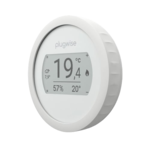 |
Options
How to use device type specific configuration
temperature_calibration: Calibrates the temperature value (absolute offset), takes into effect on next report of device. The value must be a number.temperature_precision: Number of digits after decimal point for temperature, takes into effect on next report of device. This option can only decrease the precision, not increase it. The value must be a number with a minimum value of0and with a maximum value of3humidity_calibration: Calibrates the humidity value (absolute offset), takes into effect on next report of device. The value must be a number.humidity_precision: Number of digits after decimal point for humidity, takes into effect on next report of device. This option can only decrease the precision, not increase it. The value must be a number with a minimum value of0and with a maximum value of3thermostat_unit: Controls the temperature unit of the thermostat (default celsius). The value must be one ofcelsius,fahrenheit
Exposes
Application fault status (numeric)
OpenTherm application fault status.. Value can be found in the published state on the application_fault_status property. It's not possible to read (/get) or write (/set) this value.
Oem fault code (numeric)
OpenTherm OEM-specific fault code.. Value can be found in the published state on the oem_fault_code property. It's not possible to read (/get) or write (/set) this value. The minimal value is 0 and the maximum value is 255.
Product variant (text)
Product variant reported by the device, based on the detected backplate. For example: 'OpenTherm', 'OnOff', 'OpenTherm/OnOff', or 'Wireless'.. Value can be found in the published state on the product_variant property. To read (/get) the value publish a message to topic zigbee2mqtt/FRIENDLY_NAME/get with payload {"product_variant": ""}. It's not possible to write (/set) this value.
Temperature (numeric)
Measured temperature value. Value can be found in the published state on the temperature property. To read (/get) the value publish a message to topic zigbee2mqtt/FRIENDLY_NAME/get with payload {"temperature": ""}. It's not possible to write (/set) this value. The unit of this value is °C.
Climate
This climate device supports the following features: local_temperature, local_temperature_calibration, occupied_cooling_setpoint, occupied_heating_setpoint, system_mode, running_state.
occupied_cooling_setpoint: Temperature setpoint. To control publish a message to topiczigbee2mqtt/FRIENDLY_NAME/setwith payload{"occupied_cooling_setpoint": VALUE}whereVALUEis the °C between0and30. To read send a message tozigbee2mqtt/FRIENDLY_NAME/getwith payload{"occupied_cooling_setpoint": ""}.occupied_heating_setpoint: Temperature setpoint. To control publish a message to topiczigbee2mqtt/FRIENDLY_NAME/setwith payload{"occupied_heating_setpoint": VALUE}whereVALUEis the °C between5and30. To read send a message tozigbee2mqtt/FRIENDLY_NAME/getwith payload{"occupied_heating_setpoint": ""}.local_temperature: Current temperature measured on the device (in °C). To read send a message tozigbee2mqtt/FRIENDLY_NAME/getwith payload{"local_temperature": ""}.system_mode: Mode of this device. To control publish a message to topiczigbee2mqtt/FRIENDLY_NAME/setwith payload{"system_mode": VALUE}whereVALUEis one of:off,heat,cool,auto. To read send a message tozigbee2mqtt/FRIENDLY_NAME/getwith payload{"system_mode": ""}.running_state: The current running state. Possible values are:idle,heat,cool. To read send a message tozigbee2mqtt/FRIENDLY_NAME/getwith payload{"running_state": ""}.local_temperature_calibration: Offset to add/subtract to the local temperature. To control publish a message to topiczigbee2mqtt/FRIENDLY_NAME/setwith payload{"local_temperature_calibration": VALUE}.To read send a message tozigbee2mqtt/FRIENDLY_NAME/getwith payload{"local_temperature": ""}.The minimal value is-12.5and the maximum value is12.5with a step size of0.1.
Humidity (numeric)
Measured relative humidity. Value can be found in the published state on the humidity property. To read (/get) the value publish a message to topic zigbee2mqtt/FRIENDLY_NAME/get with payload {"humidity": ""}. It's not possible to write (/set) this value. The unit of this value is %.
Min cool setpoint limit (numeric)
Minimum allowed cooling setpoint. Value can be found in the published state on the min_cool_setpoint_limit property. To read (/get) the value publish a message to topic zigbee2mqtt/FRIENDLY_NAME/get with payload {"min_cool_setpoint_limit": ""}. To write (/set) a value publish a message to topic zigbee2mqtt/FRIENDLY_NAME/set with payload {"min_cool_setpoint_limit": NEW_VALUE}. The minimal value is 0 and the maximum value is 30. The unit of this value is °C.
Max cool setpoint limit (numeric)
Maximum allowed cooling setpoint. Value can be found in the published state on the max_cool_setpoint_limit property. To read (/get) the value publish a message to topic zigbee2mqtt/FRIENDLY_NAME/get with payload {"max_cool_setpoint_limit": ""}. To write (/set) a value publish a message to topic zigbee2mqtt/FRIENDLY_NAME/set with payload {"max_cool_setpoint_limit": NEW_VALUE}. The minimal value is 0 and the maximum value is 30. The unit of this value is °C.
Min heat setpoint limit (numeric)
Minimum allowed heating setpoint. Value can be found in the published state on the min_heat_setpoint_limit property. To read (/get) the value publish a message to topic zigbee2mqtt/FRIENDLY_NAME/get with payload {"min_heat_setpoint_limit": ""}. To write (/set) a value publish a message to topic zigbee2mqtt/FRIENDLY_NAME/set with payload {"min_heat_setpoint_limit": NEW_VALUE}. The minimal value is 0 and the maximum value is 30. The unit of this value is °C.
Max heat setpoint limit (numeric)
Maximum allowed heating setpoint. Value can be found in the published state on the max_heat_setpoint_limit property. To read (/get) the value publish a message to topic zigbee2mqtt/FRIENDLY_NAME/get with payload {"max_heat_setpoint_limit": ""}. To write (/set) a value publish a message to topic zigbee2mqtt/FRIENDLY_NAME/set with payload {"max_heat_setpoint_limit": NEW_VALUE}. The minimal value is 0 and the maximum value is 30. The unit of this value is °C.
Outdoor temperature (numeric)
Outdoor temperature reported by thermostat.. Value can be found in the published state on the outdoor_temperature property. To read (/get) the value publish a message to topic zigbee2mqtt/FRIENDLY_NAME/get with payload {"outdoor_temperature": ""}. It's not possible to write (/set) this value. The unit of this value is °C.
Dhw temperature (numeric)
Domestic hot water temperature reported by OpenTherm.. Value can be found in the published state on the dhw_temperature property. It's not possible to read (/get) or write (/set) this value. The unit of this value is °C.
Return water temperature (numeric)
Boiler return water temperature reported by OpenTherm.. Value can be found in the published state on the return_water_temperature property. It's not possible to read (/get) or write (/set) this value. The unit of this value is °C.
Boiler water temperature (numeric)
Boiler supply water temperature reported by OpenTherm.. Value can be found in the published state on the boiler_water_temperature property. It's not possible to read (/get) or write (/set) this value. The unit of this value is °C.
External heat demand (numeric)
OpenTherm boiler control setpoint override. Set to 0 to disable the override and return control to the thermostat. Requires External Control to be unlocked on the device (see https://www.plugwise.com/emma-external-control).. Value can be found in the published state on the external_heat_demand property. To read (/get) the value publish a message to topic zigbee2mqtt/FRIENDLY_NAME/get with payload {"external_heat_demand": ""}. To write (/set) a value publish a message to topic zigbee2mqtt/FRIENDLY_NAME/set with payload {"external_heat_demand": NEW_VALUE}. The minimal value is 0 and the maximum value is 90. The unit of this value is °C.
External heat demand timeout (numeric)
Watchdog timeout for the external heat demand override before it is automatically cancelled. Requires External Control to be unlocked on the device (see https://www.plugwise.com/emma-external-control).. Value can be found in the published state on the external_heat_demand_timeout property. To read (/get) the value publish a message to topic zigbee2mqtt/FRIENDLY_NAME/get with payload {"external_heat_demand_timeout": ""}. To write (/set) a value publish a message to topic zigbee2mqtt/FRIENDLY_NAME/set with payload {"external_heat_demand_timeout": NEW_VALUE}. The minimal value is 300 and the maximum value is 3600. The unit of this value is s.
Max dhw setpoint (numeric)
Maximum domestic hot water (DHW) setpoint exchanged with the boiler over OpenTherm. Requires External Control to be unlocked on the device (see https://www.plugwise.com/emma-external-control).. Value can be found in the published state on the max_dhw_setpoint property. To read (/get) the value publish a message to topic zigbee2mqtt/FRIENDLY_NAME/get with payload {"max_dhw_setpoint": ""}. To write (/set) a value publish a message to topic zigbee2mqtt/FRIENDLY_NAME/set with payload {"max_dhw_setpoint": NEW_VALUE}. The minimal value is 0 and the maximum value is 100. The unit of this value is °C.
Max boiler setpoint (numeric)
Maximum central heating (CH) water setpoint exchanged with the boiler over OpenTherm. Requires External Control to be unlocked on the device (see https://www.plugwise.com/emma-external-control).. Value can be found in the published state on the max_boiler_setpoint property. To read (/get) the value publish a message to topic zigbee2mqtt/FRIENDLY_NAME/get with payload {"max_boiler_setpoint": ""}. To write (/set) a value publish a message to topic zigbee2mqtt/FRIENDLY_NAME/set with payload {"max_boiler_setpoint": NEW_VALUE}. The minimal value is 0 and the maximum value is 100. The unit of this value is °C.
Boiler setpoint (numeric)
Intended boiler water temperature. Value can be found in the published state on the boiler_setpoint property. It's not possible to read (/get) or write (/set) this value. The unit of this value is °C.
Battery (numeric)
Remaining battery in %. Value can be found in the published state on the battery property. To read (/get) the value publish a message to topic zigbee2mqtt/FRIENDLY_NAME/get with payload {"battery": ""}. It's not possible to write (/set) this value. The minimal value is 0 and the maximum value is 100. The unit of this value is %.
Battery type (enum)
Installed battery chemistry. Set this to match the batteries fitted: alkaline (non-rechargeable) or NiMH (rechargeable).. Value can be found in the published state on the battery_type property. To read (/get) the value publish a message to topic zigbee2mqtt/FRIENDLY_NAME/get with payload {"battery_type": ""}. To write (/set) a value publish a message to topic zigbee2mqtt/FRIENDLY_NAME/set with payload {"battery_type": NEW_VALUE}. The possible values are: alkaline, nimh.
Keypad lockout (enum)
Keypad lockout. No lockout — all buttons active. Level 1 — normal operation, menu blocked; setpoint change via slider still allowed. Level 2 — all buttons and slider blocked; only the hardware unlock sequence is accepted.. Value can be found in the published state on the keypad_lockout property. To read (/get) the value publish a message to topic zigbee2mqtt/FRIENDLY_NAME/get with payload {"keypad_lockout": ""}. To write (/set) a value publish a message to topic zigbee2mqtt/FRIENDLY_NAME/set with payload {"keypad_lockout": NEW_VALUE}. The possible values are: no_lockout, level_1, level_2.