
MySmartHouse msh.pzem
| Model | msh.pzem |
| Vendor | MySmartHouse |
| Description | MSH 100A AC DIN Power Meter |
| Exposes | power, voltage, ac_frequency, power_factor, current, energy, temperature, l3 |
| Picture | 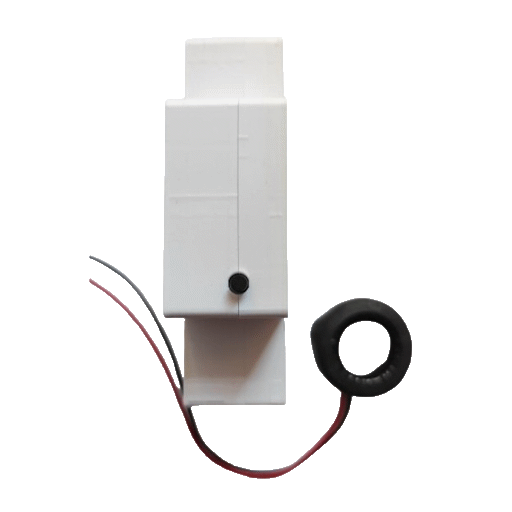 |
Notes
MSH 9‐30V, 100А AC DIN Power Meter
Options
How to use device type specific configuration
power_calibration: Calibrates the power value (percentual offset), takes into effect on next report of device. The value must be a number.power_precision: Number of digits after decimal point for power, takes into effect on next report of device. This option can only decrease the precision, not increase it. The value must be a number with a minimum value of0and with a maximum value of3voltage_calibration: Calibrates the voltage value (percentual offset), takes into effect on next report of device. The value must be a number.voltage_precision: Number of digits after decimal point for voltage, takes into effect on next report of device. This option can only decrease the precision, not increase it. The value must be a number with a minimum value of0and with a maximum value of3ac_frequency_calibration: Calibrates the ac_frequency value (absolute offset), takes into effect on next report of device. The value must be a number.ac_frequency_precision: Number of digits after decimal point for ac_frequency, takes into effect on next report of device. This option can only decrease the precision, not increase it. The value must be a number with a minimum value of0and with a maximum value of3current_calibration: Calibrates the current value (percentual offset), takes into effect on next report of device. The value must be a number.current_precision: Number of digits after decimal point for current, takes into effect on next report of device. This option can only decrease the precision, not increase it. The value must be a number with a minimum value of0and with a maximum value of3energy_calibration: Calibrates the energy value (percentual offset), takes into effect on next report of device. The value must be a number.energy_precision: Number of digits after decimal point for energy, takes into effect on next report of device. This option can only decrease the precision, not increase it. The value must be a number with a minimum value of0and with a maximum value of3temperature_calibration: Calibrates the temperature value (absolute offset), takes into effect on next report of device. The value must be a number.temperature_precision: Number of digits after decimal point for temperature, takes into effect on next report of device. This option can only decrease the precision, not increase it. The value must be a number with a minimum value of0and with a maximum value of3
Exposes
Power (numeric, l2 endpoint)
Instantaneous measured power. Value can be found in the published state on the power_l2 property. To read (/get) the value publish a message to topic zigbee2mqtt/FRIENDLY_NAME/get with payload {"power_l2": ""}. It's not possible to write (/set) this value. The unit of this value is W.
Voltage (numeric, l2 endpoint)
Measured electrical potential value. Value can be found in the published state on the voltage_l2 property. To read (/get) the value publish a message to topic zigbee2mqtt/FRIENDLY_NAME/get with payload {"voltage_l2": ""}. It's not possible to write (/set) this value. The unit of this value is V.
AC frequency (numeric, l2 endpoint)
Measured electrical AC frequency. Value can be found in the published state on the ac_frequency_l2 property. To read (/get) the value publish a message to topic zigbee2mqtt/FRIENDLY_NAME/get with payload {"ac_frequency_l2": ""}. It's not possible to write (/set) this value. The unit of this value is Hz.
Power factor (numeric, l2 endpoint)
Instantaneous measured power factor. Value can be found in the published state on the power_factor_l2 property. To read (/get) the value publish a message to topic zigbee2mqtt/FRIENDLY_NAME/get with payload {"power_factor_l2": ""}. It's not possible to write (/set) this value.
Current (numeric, l2 endpoint)
Instantaneous measured electrical current. Value can be found in the published state on the current_l2 property. To read (/get) the value publish a message to topic zigbee2mqtt/FRIENDLY_NAME/get with payload {"current_l2": ""}. It's not possible to write (/set) this value. The unit of this value is A.
Energy (numeric, l2 endpoint)
Sum of consumed energy. Value can be found in the published state on the energy_l2 property. To read (/get) the value publish a message to topic zigbee2mqtt/FRIENDLY_NAME/get with payload {"energy_l2": ""}. It's not possible to write (/set) this value. The unit of this value is kWh.
CPU Temperature (numeric, l1 endpoint)
Temperature of the CPU. Value can be found in the published state on the temperature_l1 property. It's not possible to read (/get) or write (/set) this value. The unit of this value is °C.
Uptime (numeric, l3 endpoint)
Uptime (seconds). Value can be found in the published state on the l3_l3 property. It's not possible to read (/get) or write (/set) this value. The unit of this value is s.