
LinknLink eMotion Air
| Model | eMotion Air |
| Vendor | LinknLink |
| Description | Battery-powered mmWave presence multi-sensor |
| Exposes | freq, trith, absence_timeout, radar_enable, lx_interval, sht_interval, lx_thread1, lx_thread2, temperature, humidity, illuminance, occupancy, battery, action |
| Picture | 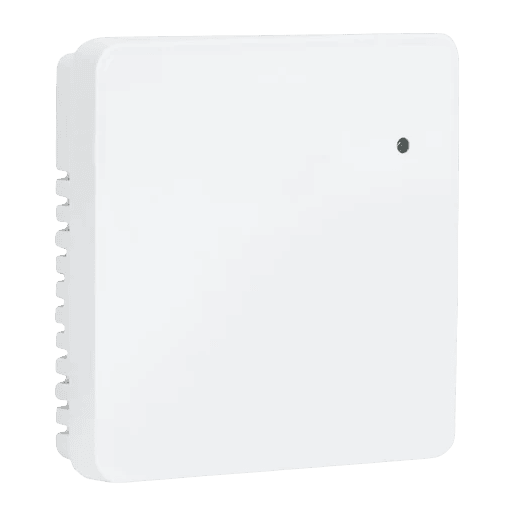 |
Notes
Pairing
Press and hold button of the device for 15 seconds until the LED starts blinking.
Options
How to use device type specific configuration
temperature_calibration: Calibrates the temperature value (absolute offset), takes into effect on next report of device. The value must be a number.temperature_precision: Number of digits after decimal point for temperature, takes into effect on next report of device. This option can only decrease the precision, not increase it. The value must be a number with a minimum value of0and with a maximum value of3humidity_calibration: Calibrates the humidity value (absolute offset), takes into effect on next report of device. The value must be a number.humidity_precision: Number of digits after decimal point for humidity, takes into effect on next report of device. This option can only decrease the precision, not increase it. The value must be a number with a minimum value of0and with a maximum value of3illuminance_calibration: Calibrates the illuminance value (percentual offset), takes into effect on next report of device. The value must be a number.illuminance_raw: Expose the raw illuminance value. The value must betrueorfalseno_occupancy_since: Sends a message after the last time no occupancy (occupancy: false) was detected. When setting this for example to [10, 60] a{"no_occupancy_since": 10}will be sent after 10 seconds and a{"no_occupancy_since": 60}after 60 seconds. The value must be a list of numbers.
Exposes
Freq (numeric)
Radar frequency band index (0..4). Value can be found in the published state on the freq property. To read (/get) the value publish a message to topic zigbee2mqtt/FRIENDLY_NAME/get with payload {"freq": ""}. To write (/set) a value publish a message to topic zigbee2mqtt/FRIENDLY_NAME/set with payload {"freq": NEW_VALUE}. The minimal value is 0 and the maximum value is 4.
Trith (numeric)
Radar trigger threshold (1..10). Value can be found in the published state on the trith property. To read (/get) the value publish a message to topic zigbee2mqtt/FRIENDLY_NAME/get with payload {"trith": ""}. To write (/set) a value publish a message to topic zigbee2mqtt/FRIENDLY_NAME/set with payload {"trith": NEW_VALUE}. The minimal value is 1 and the maximum value is 10.
Absence timeout (numeric)
Absence timeout / HOLD time in seconds (0..510, 2s steps). Value can be found in the published state on the absence_timeout property. To read (/get) the value publish a message to topic zigbee2mqtt/FRIENDLY_NAME/get with payload {"absence_timeout": ""}. To write (/set) a value publish a message to topic zigbee2mqtt/FRIENDLY_NAME/set with payload {"absence_timeout": NEW_VALUE}. The minimal value is 0 and the maximum value is 510. The unit of this value is s.
Radar enable (binary)
Enable mmWave radar sensing. Value can be found in the published state on the radar_enable property. To read (/get) the value publish a message to topic zigbee2mqtt/FRIENDLY_NAME/get with payload {"radar_enable": ""}. To write (/set) a value publish a message to topic zigbee2mqtt/FRIENDLY_NAME/set with payload {"radar_enable": NEW_VALUE}. If value equals true radar enable is ON, if false OFF.
Lx interval (numeric)
Illuminance sample interval. Value can be found in the published state on the lx_interval property. To read (/get) the value publish a message to topic zigbee2mqtt/FRIENDLY_NAME/get with payload {"lx_interval": ""}. To write (/set) a value publish a message to topic zigbee2mqtt/FRIENDLY_NAME/set with payload {"lx_interval": NEW_VALUE}. The minimal value is 2 and the maximum value is 60000. The unit of this value is s.
Sht interval (numeric)
Temperature/humidity sample interval. Value can be found in the published state on the sht_interval property. To read (/get) the value publish a message to topic zigbee2mqtt/FRIENDLY_NAME/get with payload {"sht_interval": ""}. To write (/set) a value publish a message to topic zigbee2mqtt/FRIENDLY_NAME/set with payload {"sht_interval": NEW_VALUE}. The minimal value is 10 and the maximum value is 60000. The unit of this value is s.
Lx thread1 (numeric)
Illuminance threshold 1 (must be < lx_thread2). Value can be found in the published state on the lx_thread1 property. To read (/get) the value publish a message to topic zigbee2mqtt/FRIENDLY_NAME/get with payload {"lx_thread1": ""}. To write (/set) a value publish a message to topic zigbee2mqtt/FRIENDLY_NAME/set with payload {"lx_thread1": NEW_VALUE}. The minimal value is 0 and the maximum value is 65535.
Lx thread2 (numeric)
Illuminance threshold 2 (must be > lx_thread1). Value can be found in the published state on the lx_thread2 property. To read (/get) the value publish a message to topic zigbee2mqtt/FRIENDLY_NAME/get with payload {"lx_thread2": ""}. To write (/set) a value publish a message to topic zigbee2mqtt/FRIENDLY_NAME/set with payload {"lx_thread2": NEW_VALUE}. The minimal value is 0 and the maximum value is 65535.
Temperature (numeric)
Measured temperature value. Value can be found in the published state on the temperature property. To read (/get) the value publish a message to topic zigbee2mqtt/FRIENDLY_NAME/get with payload {"temperature": ""}. It's not possible to write (/set) this value. The unit of this value is °C.
Humidity (numeric)
Measured relative humidity. Value can be found in the published state on the humidity property. To read (/get) the value publish a message to topic zigbee2mqtt/FRIENDLY_NAME/get with payload {"humidity": ""}. It's not possible to write (/set) this value. The unit of this value is %.
Illuminance (numeric)
Measured illuminance. 0 = too low to be measured. Value can be found in the published state on the illuminance property. To read (/get) the value publish a message to topic zigbee2mqtt/FRIENDLY_NAME/get with payload {"illuminance": ""}. It's not possible to write (/set) this value. The unit of this value is lx.
Occupancy (binary)
Indicates whether the device detected occupancy. Value can be found in the published state on the occupancy property. To read (/get) the value publish a message to topic zigbee2mqtt/FRIENDLY_NAME/get with payload {"occupancy": ""}. It's not possible to write (/set) this value. If value equals true occupancy is ON, if false OFF.
Battery (numeric)
Remaining battery in %. Value can be found in the published state on the battery property. To read (/get) the value publish a message to topic zigbee2mqtt/FRIENDLY_NAME/get with payload {"battery": ""}. It's not possible to write (/set) this value. The minimal value is 0 and the maximum value is 100. The unit of this value is %.
Action (enum)
Triggered action (e.g. a button click). Value can be found in the published state on the action property. It's not possible to read (/get) or write (/set) this value. The possible values are: single, double, triple, hold, release.