
Tuya ZY-N1
| Model | ZY-N1 |
| Vendor | Tuya |
| Description | Sound level sensor |
| Exposes | noise, noise_detected, noise_status, noise_state, report_mode, noise_lower_limit, noise_upper_limit, collect_time, noise_hold_time, noise_delay, report_threshold, indicator |
| Picture | 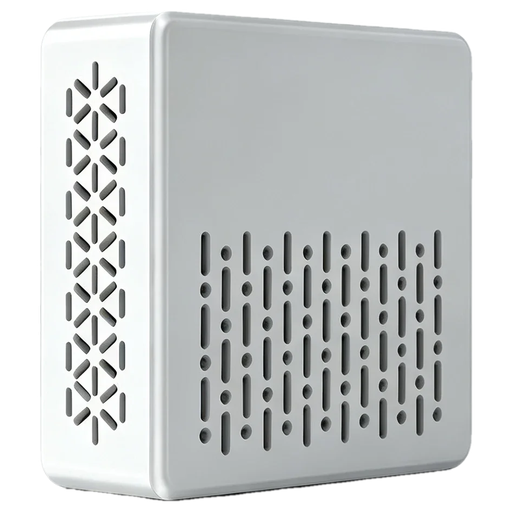 |
Options
How to use device type specific configuration
time_start: Reply to Tuya-specific time synchronization requests: "1970" - Reply with seconds since 1970/01/01 (recommended, should stop the device from asking), "2000" - Reply with seconds since 2000/01/01 (use if the weekday is wrong with 1970), "off" - Don't reply (use if replying causes too much traffic). Default for this device: "off". The value must be one of1970,2000,off
Exposes
Noise (numeric)
Measured sound level, reported according to report_threshold. Value can be found in the published state on the noise property. It's not possible to read (/get) or write (/set) this value. The unit of this value is dB.
Noise detected (binary)
Noise above noise_upper_limit detected (respects noise_delay and noise_hold_time). Value can be found in the published state on the noise_detected property. It's not possible to read (/get) or write (/set) this value. If value equals true noise detected is ON, if false OFF.
Noise status (enum)
Current level: below noise_lower_limit, between the limits, or above noise_upper_limit. Value can be found in the published state on the noise_status property. It's not possible to read (/get) or write (/set) this value. The possible values are: no_noise, noise_normal, noise.
Noise state (enum)
Debounced noise state including its duration. Value can be found in the published state on the noise_state property. It's not possible to read (/get) or write (/set) this value. The possible values are: noise, no_noise, noise_2min, noise_5min, no_noise_2min, no_noise_5min, no_noise_10min, noise_normal, noise_normal_2min, noise_normal_5min.
Report mode (enum)
collect_noise_floor: measures for collect_time, then sets noise_lower_limit to the maximum + 1 dB; realtime: reports every second for collect_time. Both switch back to threshold afterwards. Value can be found in the published state on the report_mode property. It's not possible to read (/get) this value. To write (/set) a value publish a message to topic zigbee2mqtt/FRIENDLY_NAME/set with payload {"report_mode": NEW_VALUE}. The possible values are: collect_noise_floor, realtime, threshold.
Noise lower limit (numeric)
Below this level the status is no_noise. Value can be found in the published state on the noise_lower_limit property. It's not possible to read (/get) this value. To write (/set) a value publish a message to topic zigbee2mqtt/FRIENDLY_NAME/set with payload {"noise_lower_limit": NEW_VALUE}. The minimal value is 0 and the maximum value is 60. The unit of this value is dB.
Noise upper limit (numeric)
Above this level the status is noise (labelled 'Min Sound Threshold' in the Tuya app). Value can be found in the published state on the noise_upper_limit property. It's not possible to read (/get) this value. To write (/set) a value publish a message to topic zigbee2mqtt/FRIENDLY_NAME/set with payload {"noise_upper_limit": NEW_VALUE}. The minimal value is 10 and the maximum value is 100. The unit of this value is dB.
Collect time (numeric)
Duration of the collect_noise_floor and realtime modes. Value can be found in the published state on the collect_time property. It's not possible to read (/get) this value. To write (/set) a value publish a message to topic zigbee2mqtt/FRIENDLY_NAME/set with payload {"collect_time": NEW_VALUE}. The minimal value is 0 and the maximum value is 100. The unit of this value is s.
Noise hold time (numeric)
How long noise is held after the level drops. Value can be found in the published state on the noise_hold_time property. It's not possible to read (/get) this value. To write (/set) a value publish a message to topic zigbee2mqtt/FRIENDLY_NAME/set with payload {"noise_hold_time": NEW_VALUE}. The minimal value is 0 and the maximum value is 300. The unit of this value is s.
Noise delay (numeric)
How long the level must stay above noise_upper_limit before noise is reported. Value can be found in the published state on the noise_delay property. It's not possible to read (/get) this value. To write (/set) a value publish a message to topic zigbee2mqtt/FRIENDLY_NAME/set with payload {"noise_delay": NEW_VALUE}. The minimal value is 0 and the maximum value is 300. The unit of this value is s.
Report threshold (enum)
Report the sound level when it changes by this amount. With no_report (default) it is only sent on query. Value can be found in the published state on the report_threshold property. It's not possible to read (/get) this value. To write (/set) a value publish a message to topic zigbee2mqtt/FRIENDLY_NAME/set with payload {"report_threshold": NEW_VALUE}. The possible values are: 1_db, 3_db, 5_db, 10_db, 20_db, no_report.
Indicator (binary)
LED indicator. Value can be found in the published state on the indicator property. It's not possible to read (/get) this value. To write (/set) a value publish a message to topic zigbee2mqtt/FRIENDLY_NAME/set with payload {"indicator": NEW_VALUE}. If value equals ON indicator is ON, if OFF OFF.