
Tuya ZRF01
| Model | ZRF01 |
| Vendor | Tuya |
| Description | Zigbee RF cloner with 8 slots |
| Exposes | illuminance, state, pack, button_1, button_2, button_3, button_4, button_5, button_6, button_7, button_8, start_1, start_2, start_3, start_4, start_5, start_6, start_7, start_8 |
| Picture | 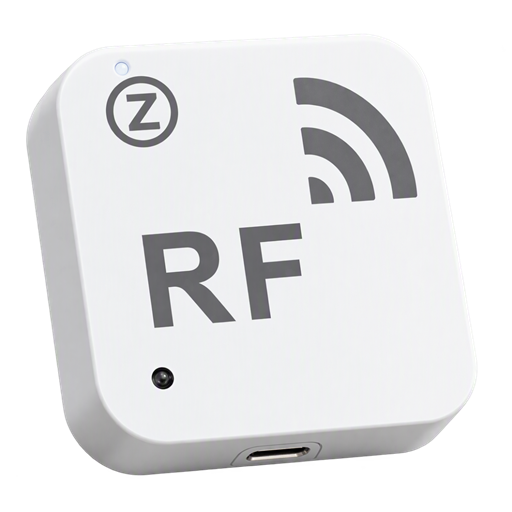 |
Options
How to use device type specific configuration
time_start: Reply to Tuya-specific time synchronization requests: "1970" - Reply with seconds since 1970/01/01 (recommended, should stop the device from asking), "2000" - Reply with seconds since 2000/01/01 (use if the weekday is wrong with 1970), "off" - Don't reply (use if replying causes too much traffic). Default for this device: "off". The value must be one of1970,2000,offilluminance_calibration: Calibrates the illuminance value (percentual offset), takes into effect on next report of device. The value must be a number.
Exposes
Illuminance (numeric)
Measured illuminance. Value can be found in the published state on the illuminance property. It's not possible to read (/get) or write (/set) this value. The unit of this value is lx.
State (binary)
Enable RF learning mode. Must be enabled before 'Learn' can be pressed for any button.. Value can be found in the published state on the state property. It's not possible to read (/get) this value. To write (/set) a value publish a message to topic zigbee2mqtt/FRIENDLY_NAME/set with payload {"state": VALUE}. If value equals true state is ON, if false OFF.
Packet Mode (binary)
Enable for 'Long Packet' mode, Disable for 'Short Packet' mode.. Value can be found in the published state on the pack property. It's not possible to read (/get) this value. To write (/set) a value publish a message to topic zigbee2mqtt/FRIENDLY_NAME/set with payload {"pack": VALUE}. If value equals true packet Mode is ON, if false OFF.
Button 1 Code Learning (enum)
Press 'Learn' to clone RF code. Press 'Delete' to clear RF code. 'Saved' gets enabled automatically after successful RF cloning.. Value can be found in the published state on the button_1 property. It's not possible to read (/get) this value. To write (/set) a value publish a message to topic zigbee2mqtt/FRIENDLY_NAME/set with payload {"button_1": "VALUE"}. The possible values are: Learn, Delete, Saved.
Button 2 Code Learning (enum)
Press 'Learn' to clone RF code. Press 'Delete' to clear RF code. 'Saved' gets enabled automatically after successful RF cloning.. Value can be found in the published state on the button_2 property. It's not possible to read (/get) this value. To write (/set) a value publish a message to topic zigbee2mqtt/FRIENDLY_NAME/set with payload {"button_2": "VALUE"}. The possible values are: Learn, Delete, Saved.
Button 3 Code Learning (enum)
Press 'Learn' to clone RF code. Press 'Delete' to clear RF code. 'Saved' gets enabled automatically after successful RF cloning.. Value can be found in the published state on the button_3 property. It's not possible to read (/get) this value. To write (/set) a value publish a message to topic zigbee2mqtt/FRIENDLY_NAME/set with payload {"button_3": "VALUE"}. The possible values are: Learn, Delete, Saved.
Button 4 Code Learning (enum)
Press 'Learn' to clone RF code. Press 'Delete' to clear RF code. 'Saved' gets enabled automatically after successful RF cloning.. Value can be found in the published state on the button_4 property. It's not possible to read (/get) this value. To write (/set) a value publish a message to topic zigbee2mqtt/FRIENDLY_NAME/set with payload {"button_4": "VALUE"}. The possible values are: Learn, Delete, Saved.
Button 5 Code Learning (enum)
Press 'Learn' to clone RF code. Press 'Delete' to clear RF code. 'Saved' gets enabled automatically after successful RF cloning.. Value can be found in the published state on the button_5 property. It's not possible to read (/get) this value. To write (/set) a value publish a message to topic zigbee2mqtt/FRIENDLY_NAME/set with payload {"button_5": "VALUE"}. The possible values are: Learn, Delete, Saved.
Button 6 Code Learning (enum)
Press 'Learn' to clone RF code. Press 'Delete' to clear RF code. 'Saved' gets enabled automatically after successful RF cloning.. Value can be found in the published state on the button_6 property. It's not possible to read (/get) this value. To write (/set) a value publish a message to topic zigbee2mqtt/FRIENDLY_NAME/set with payload {"button_6": "VALUE"}. The possible values are: Learn, Delete, Saved.
Button 7 Code Learning (enum)
Press 'Learn' to clone RF code. Press 'Delete' to clear RF code. 'Saved' gets enabled automatically after successful RF cloning.. Value can be found in the published state on the button_7 property. It's not possible to read (/get) this value. To write (/set) a value publish a message to topic zigbee2mqtt/FRIENDLY_NAME/set with payload {"button_7": "VALUE"}. The possible values are: Learn, Delete, Saved.
Button 8 Code Learning (enum)
Press 'Learn' to clone RF code. Press 'Delete' to clear RF code. 'Saved' gets enabled automatically after successful RF cloning.. Value can be found in the published state on the button_8 property. It's not possible to read (/get) this value. To write (/set) a value publish a message to topic zigbee2mqtt/FRIENDLY_NAME/set with payload {"button_8": "VALUE"}. The possible values are: Learn, Delete, Saved.
Button 1 Code Transmit (enum)
Press 'Transmit' to send saved code.. Value will not be published in the state. It's not possible to read (/get) this value. To write (/set) a value publish a message to topic zigbee2mqtt/FRIENDLY_NAME/set with payload {"start_1": "VALUE"}. The possible values are: Transmit.
Button 2 Code Transmit (enum)
Press 'Transmit' to send saved code.. Value will not be published in the state. It's not possible to read (/get) this value. To write (/set) a value publish a message to topic zigbee2mqtt/FRIENDLY_NAME/set with payload {"start_2": "VALUE"}. The possible values are: Transmit.
Button 3 Code Transmit (enum)
Press 'Transmit' to send saved code.. Value will not be published in the state. It's not possible to read (/get) this value. To write (/set) a value publish a message to topic zigbee2mqtt/FRIENDLY_NAME/set with payload {"start_3": "VALUE"}. The possible values are: Transmit.
Button 4 Code Transmit (enum)
Press 'Transmit' to send saved code.. Value will not be published in the state. It's not possible to read (/get) this value. To write (/set) a value publish a message to topic zigbee2mqtt/FRIENDLY_NAME/set with payload {"start_4": "VALUE"}. The possible values are: Transmit.
Button 5 Code Transmit (enum)
Press 'Transmit' to send saved code.. Value will not be published in the state. It's not possible to read (/get) this value. To write (/set) a value publish a message to topic zigbee2mqtt/FRIENDLY_NAME/set with payload {"start_5": "VALUE"}. The possible values are: Transmit.
Button 6 Code Transmit (enum)
Press 'Transmit' to send saved code.. Value will not be published in the state. It's not possible to read (/get) this value. To write (/set) a value publish a message to topic zigbee2mqtt/FRIENDLY_NAME/set with payload {"start_6": "VALUE"}. The possible values are: Transmit.
Button 7 Code Transmit (enum)
Press 'Transmit' to send saved code.. Value will not be published in the state. It's not possible to read (/get) this value. To write (/set) a value publish a message to topic zigbee2mqtt/FRIENDLY_NAME/set with payload {"start_7": "VALUE"}. The possible values are: Transmit.
Button 8 Code Transmit (enum)
Press 'Transmit' to send saved code.. Value will not be published in the state. It's not possible to read (/get) this value. To write (/set) a value publish a message to topic zigbee2mqtt/FRIENDLY_NAME/set with payload {"start_8": "VALUE"}. The possible values are: Transmit.