
Aqara ZNYB01LM
| Model | ZNYB01LM |
| Vendor | Aqara |
| Description | Smart bathroom heater T1 |
| Exposes | identify, light (state, brightness, color_temp, color_temp_startup), climate (local_temperature, current_heating_setpoint, system_mode, running_state, fan_mode, swing_mode), heater_power, operating_mode, night_light_mode, mute_prompt_tone, mute_prompt_start_time, mute_prompt_end_time, constant_temperature_mode |
| Picture | 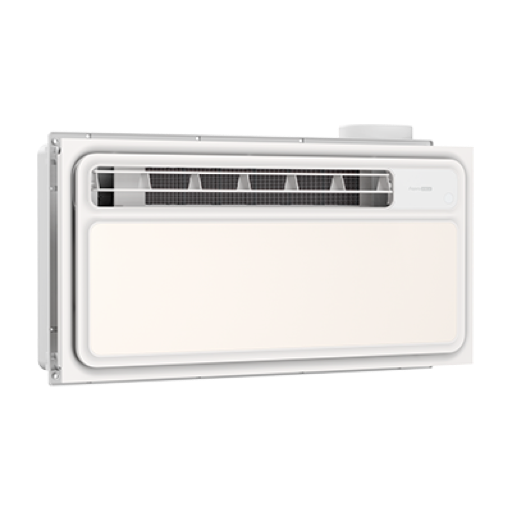 |
OTA updates
This device supports OTA updates, for more information see OTA updates.
Options
How to use device type specific configuration
identify_timeout: Sets the duration of the identification procedure in seconds (i.e., how long the device would flash).The value ranges from 1 to 30 seconds (default: 3). The value must be a number with a minimum value of1and with a maximum value of30transition: Controls the transition time (in seconds) of on/off, brightness, color temperature (if applicable) and color (if applicable) changes. Defaults to0(no transition). The value must be a number with a minimum value of0color_sync: When enabled colors will be synced, e.g. if the light supports both color x/y and color temperature a conversion from color x/y to color temperature will be done when setting the x/y color (default true). The value must betrueorfalsestate_action: State actions will also be published as 'action' when true (default false). The value must betrueorfalse
Exposes
Identify (enum)
Initiate device identification. Value will not be published in the state. It's not possible to read (/get) this value. To write (/set) a value publish a message to topic zigbee2mqtt/FRIENDLY_NAME/set with payload {"identify": NEW_VALUE}. The possible values are: identify.
Light
This light supports the following features: state, brightness, color_temp, color_temp_startup.
state: To control the state publish a message to topiczigbee2mqtt/FRIENDLY_NAME/setwith payload{"state": "ON"},{"state": "OFF"}or{"state": "TOGGLE"}. To read the state send a message tozigbee2mqtt/FRIENDLY_NAME/getwith payload{"state": ""}.brightness: To control the brightness publish a message to topiczigbee2mqtt/FRIENDLY_NAME/setwith payload{"brightness": VALUE}whereVALUEis a number between0and254. To read the brightness send a message tozigbee2mqtt/FRIENDLY_NAME/getwith payload{"brightness": ""}.color_temp: To control the color temperature (in reciprocal megakelvin a.k.a. mired scale) publish a message to topiczigbee2mqtt/FRIENDLY_NAME/setwith payload{"color_temp": VALUE}whereVALUEis a number between153and370, the higher the warmer the color. To read the color temperature send a message tozigbee2mqtt/FRIENDLY_NAME/getwith payload{"color_temp": ""}. Besides the numeric values the following values are accepted:coolest,cool,neutral,warmest.color_temp_startup: To set the startup color temperature (in reciprocal megakelvin a.k.a. mired scale) publish a message to topiczigbee2mqtt/FRIENDLY_NAME/setwith payload{"color_temp_startup": VALUE}whereVALUEis a number between153and370, the higher the warmer the color. To read the startup color temperature send a message tozigbee2mqtt/FRIENDLY_NAME/getwith payload{"color_temp_startup": ""}. Besides the numeric values the following values are accepted:coolest,cool,neutral,warmest,previous.
On with timed off
When setting the state to ON, it might be possible to specify an automatic shutoff after a certain amount of time. To do this add an additional property on_time to the payload which is the time in seconds the state should remain on. Additionally an off_wait_time property can be added to the payload to specify the cooldown time in seconds when the light will not answer to other on with timed off commands. Support depends on the light firmware. Some devices might require both on_time and off_wait_time to work Examples : {"state" : "ON", "on_time": 300}, {"state" : "ON", "on_time": 300, "off_wait_time": 120}.
Transition
For all of the above mentioned features it is possible to do a transition of the value over time. To do this add an additional property transition to the payload which is the transition time in seconds. Examples: {"brightness":156,"transition":3}, {"color_temp":241,"transition":1}.
Moving/stepping
Instead of setting a value (e.g. brightness) directly it is also possible to:
- move: this will automatically move the value over time, to stop send value
stopor0. - step: this will increment/decrement the current value by the given one.
The direction of move and step can be either up or down, provide a negative value to move/step down, a positive value to move/step up. To do this send a payload like below to zigbee2mqtt/FRIENDLY_NAME/set
NOTE: brightness move/step will stop at the minimum brightness and won't turn on the light when it's off. In this case use brightness_move_onoff/brightness_step_onoff
{
  "brightness_move": -40, // Starts moving brightness down at 40 units per second
  "brightness_move": 0, // Stop moving brightness
  "brightness_step": 40 // Increases brightness by 40
  "color_temp_move": 60, // Starts moving color temperature up at 60 units per second
  "color_temp_move": -40, // Starts moving color temperature down at 40 units per second
  "color_temp_move": "stop", // Stop moving color temperature
  "color_temp_move": "release", // Stop moving color temperature
  "color_temp_move": 0, // Stop moving color temperature
  "color_temp_move": "up", // Move to warmer color temperature at default rate
  "color_temp_move": 1, // Move to warmer color temperature at default rate
  "color_temp_move": "down", // Move to cooler color temperature at default rate
  "color_temp_move": {"rate": 30, "minimum": 150, "maximum": 500}, // Move with custom rate and constraints
  "color_temp_step": 99, // Increase color temperature by 99
}
Climate
This climate device supports the following features: local_temperature, current_heating_setpoint, system_mode, running_state, fan_mode, swing_mode.
current_heating_setpoint: Temperature setpoint. To control publish a message to topiczigbee2mqtt/FRIENDLY_NAME/setwith payload{"current_heating_setpoint": VALUE}whereVALUEis the °C between16and45. To read send a message tozigbee2mqtt/FRIENDLY_NAME/getwith payload{"current_heating_setpoint": ""}.local_temperature: Current temperature measured on the device (in °C). To read send a message tozigbee2mqtt/FRIENDLY_NAME/getwith payload{"local_temperature": ""}.system_mode: Mode of this device. To control publish a message to topiczigbee2mqtt/FRIENDLY_NAME/setwith payload{"system_mode": VALUE}whereVALUEis one of:off,heat,dry,fan_only. To read send a message tozigbee2mqtt/FRIENDLY_NAME/getwith payload{"system_mode": ""}.running_state: The current running state. Possible values are:idle,heat,fan_only. Reading (/get) this attribute is not possible.
Heater power (binary)
Bathroom heater power. Value can be found in the published state on the heater_power property. To read (/get) the value publish a message to topic zigbee2mqtt/FRIENDLY_NAME/get with payload {"heater_power": ""}. It's not possible to write (/set) this value. If value equals true heater power is ON, if false OFF.
Operating mode (enum)
Bathroom heater operating mode. Value can be found in the published state on the operating_mode property. To read (/get) the value publish a message to topic zigbee2mqtt/FRIENDLY_NAME/get with payload {"operating_mode": ""}. To write (/set) a value publish a message to topic zigbee2mqtt/FRIENDLY_NAME/set with payload {"operating_mode": NEW_VALUE}. The possible values are: off, warm, dry, fan_only, exhaust.
Night light mode (binary)
Enable scheduled night-light mode. Value can be found in the published state on the night_light_mode property. To read (/get) the value publish a message to topic zigbee2mqtt/FRIENDLY_NAME/get with payload {"night_light_mode": ""}. To write (/set) a value publish a message to topic zigbee2mqtt/FRIENDLY_NAME/set with payload {"night_light_mode": NEW_VALUE}. If value equals ON night light mode is ON, if OFF OFF.
Mute prompt tone (binary)
Mute device operation prompt tones. Value can be found in the published state on the mute_prompt_tone property. To read (/get) the value publish a message to topic zigbee2mqtt/FRIENDLY_NAME/get with payload {"mute_prompt_tone": ""}. To write (/set) a value publish a message to topic zigbee2mqtt/FRIENDLY_NAME/set with payload {"mute_prompt_tone": NEW_VALUE}. If value equals ON mute prompt tone is ON, if OFF OFF.
Mute prompt start time (text)
Prompt-tone mute start time in HH:MM format. Value can be found in the published state on the mute_prompt_start_time property. To read (/get) the value publish a message to topic zigbee2mqtt/FRIENDLY_NAME/get with payload {"mute_prompt_start_time": ""}. To write (/set) a value publish a message to topic zigbee2mqtt/FRIENDLY_NAME/set with payload {"mute_prompt_start_time": NEW_VALUE}.
Mute prompt end time (text)
Prompt-tone mute end time in HH:MM format. Value can be found in the published state on the mute_prompt_end_time property. To read (/get) the value publish a message to topic zigbee2mqtt/FRIENDLY_NAME/get with payload {"mute_prompt_end_time": ""}. To write (/set) a value publish a message to topic zigbee2mqtt/FRIENDLY_NAME/set with payload {"mute_prompt_end_time": NEW_VALUE}.
Constant temperature mode (binary)
Automatically regulate warm-air speed at the target temperature. Value can be found in the published state on the constant_temperature_mode property. To read (/get) the value publish a message to topic zigbee2mqtt/FRIENDLY_NAME/get with payload {"constant_temperature_mode": ""}. To write (/set) a value publish a message to topic zigbee2mqtt/FRIENDLY_NAME/set with payload {"constant_temperature_mode": NEW_VALUE}. If value equals ON constant temperature mode is ON, if OFF OFF.