
HOBEIAN ZG-204ZS-z
| Model | ZG-204ZS-z |
| Vendor | HOBEIAN |
| Description | Dual PIR and mmWave radar presence and luminance sensor (pvvx/ZigbeeTLc) |
| Exposes | battery, voltage, illuminance, occupancy, motion, presence, presence_state, switch (state), power_on_behavior, fading_time, zone1_motion_threshold, zone1_still_threshold, zone2_motion_threshold, zone2_still_threshold, zone3_motion_threshold, zone3_still_threshold, radar_trigger_scans, action |
| Picture | 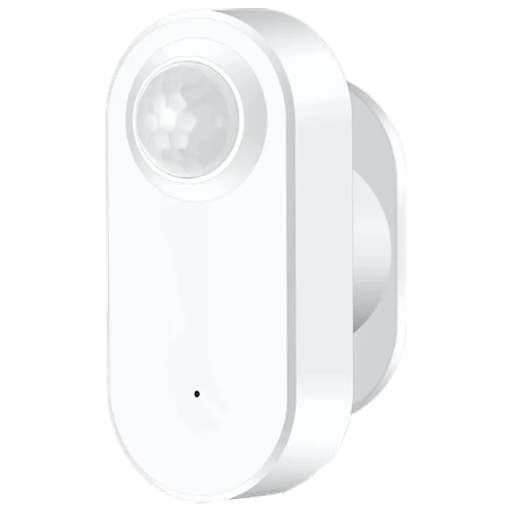 |
OTA updates
This device supports OTA updates, for more information see OTA updates.
Options
How to use device type specific configuration
illuminance_calibration: Calibrates the illuminance value (percentual offset), takes into effect on next report of device. The value must be a number.illuminance_raw: Expose the raw illuminance value. The value must betrueorfalsestate_action: State actions will also be published as 'action' when true (default false). The value must betrueorfalse
Exposes
Battery (numeric)
Remaining battery in %. Value can be found in the published state on the battery property. To read (/get) the value publish a message to topic zigbee2mqtt/FRIENDLY_NAME/get with payload {"battery": ""}. It's not possible to write (/set) this value. The minimal value is 0 and the maximum value is 100. The unit of this value is %.
Voltage (numeric)
Reported battery voltage in millivolts. Value can be found in the published state on the voltage property. To read (/get) the value publish a message to topic zigbee2mqtt/FRIENDLY_NAME/get with payload {"voltage": ""}. It's not possible to write (/set) this value. The unit of this value is mV.
Illuminance (numeric)
Measured illuminance. 0 = too low to be measured. Value can be found in the published state on the illuminance property. To read (/get) the value publish a message to topic zigbee2mqtt/FRIENDLY_NAME/get with payload {"illuminance": ""}. It's not possible to write (/set) this value. The unit of this value is lx.
Occupancy (binary)
Indicates whether the device detected occupancy. Value can be found in the published state on the occupancy property. To read (/get) the value publish a message to topic zigbee2mqtt/FRIENDLY_NAME/get with payload {"occupancy": ""}. It's not possible to write (/set) this value. If value equals true occupancy is ON, if false OFF.
Motion (binary)
Indicates whether PIR motion is detected. Value can be found in the published state on the motion property. It's not possible to read (/get) or write (/set) this value. If value equals true motion is ON, if false OFF.
Presence (binary)
Indicates whether mmWave radar presence is detected. Value can be found in the published state on the presence property. It's not possible to read (/get) or write (/set) this value. If value equals true presence is ON, if false OFF.
Presence state (enum)
Current presence state. Value can be found in the published state on the presence_state property. It's not possible to read (/get) or write (/set) this value. The possible values are: clear, motion, presence, motion_and_presence.
Switch
The current state of this switch is in the published state under the state property (value is ON or OFF). To control this switch publish a message to topic zigbee2mqtt/FRIENDLY_NAME/set with payload {"state": "ON"}, {"state": "OFF"} or {"state": "TOGGLE"}. To read the current state of this switch publish a message to topic zigbee2mqtt/FRIENDLY_NAME/get with payload {"state": ""}.
On with timed off
When setting the state to ON, it might be possible to specify an automatic shutoff after a certain amount of time. To do this add an additional property on_time to the payload which is the time in seconds the state should remain on. Additionally an off_wait_time property can be added to the payload to specify the cooldown time in seconds when the switch will not answer to other on with timed off commands. Support depends on the switch firmware. Some devices might require both on_time and off_wait_time to work Examples : {"state" : "ON", "on_time": 300}, {"state" : "ON", "on_time": 300, "off_wait_time": 120}.
Power on behavior (enum)
Power-on behavior for state (remote On/Off enable). Value can be found in the published state on the power_on_behavior property. To read (/get) the value publish a message to topic zigbee2mqtt/FRIENDLY_NAME/get with payload {"power_on_behavior": ""}. To write (/set) a value publish a message to topic zigbee2mqtt/FRIENDLY_NAME/set with payload {"power_on_behavior": "VALUE"}. The possible values are: off, on, toggle, previous.
Fading time (numeric)
Occupancy hold time in seconds. Firmware default 35 s.. Value can be found in the published state on the fading_time property. To read (/get) the value publish a message to topic zigbee2mqtt/FRIENDLY_NAME/get with payload {"fading_time": ""}. To write (/set) a value publish a message to topic zigbee2mqtt/FRIENDLY_NAME/set with payload {"fading_time": VALUE}. The minimal value is 0 and the maximum value is 524. The unit of this value is s.
Zone 1 motion threshold (numeric)
Zone 1 (0-2m) motion sensitivity threshold (higher = less sensitive, 99 = disabled). Firmware default 14.. Value can be found in the published state on the zone1_motion_threshold property. To read (/get) the value publish a message to topic zigbee2mqtt/FRIENDLY_NAME/get with payload {"zone1_motion_threshold": ""}. To write (/set) a value publish a message to topic zigbee2mqtt/FRIENDLY_NAME/set with payload {"zone1_motion_threshold": VALUE}. The minimal value is 0 and the maximum value is 99.
Zone 1 still threshold (numeric)
Zone 1 (0-2m) still presence threshold (higher = less sensitive, 99 = disabled). Firmware default 2.. Value can be found in the published state on the zone1_still_threshold property. To read (/get) the value publish a message to topic zigbee2mqtt/FRIENDLY_NAME/get with payload {"zone1_still_threshold": ""}. To write (/set) a value publish a message to topic zigbee2mqtt/FRIENDLY_NAME/set with payload {"zone1_still_threshold": VALUE}. The minimal value is 0 and the maximum value is 99.
Zone 2 motion threshold (numeric)
Zone 2 (2-5m) motion sensitivity threshold (higher = less sensitive, 99 = disabled). Firmware default 10.. Value can be found in the published state on the zone2_motion_threshold property. To read (/get) the value publish a message to topic zigbee2mqtt/FRIENDLY_NAME/get with payload {"zone2_motion_threshold": ""}. To write (/set) a value publish a message to topic zigbee2mqtt/FRIENDLY_NAME/set with payload {"zone2_motion_threshold": VALUE}. The minimal value is 0 and the maximum value is 99.
Zone 2 still threshold (numeric)
Zone 2 (2-5m) still presence threshold (higher = less sensitive, 99 = disabled). Firmware default 4.. Value can be found in the published state on the zone2_still_threshold property. To read (/get) the value publish a message to topic zigbee2mqtt/FRIENDLY_NAME/get with payload {"zone2_still_threshold": ""}. To write (/set) a value publish a message to topic zigbee2mqtt/FRIENDLY_NAME/set with payload {"zone2_still_threshold": VALUE}. The minimal value is 0 and the maximum value is 99.
Zone 3 motion threshold (numeric)
Zone 3 (5-10m) motion sensitivity threshold (higher = less sensitive, 99 = disabled). Firmware default 10.. Value can be found in the published state on the zone3_motion_threshold property. To read (/get) the value publish a message to topic zigbee2mqtt/FRIENDLY_NAME/get with payload {"zone3_motion_threshold": ""}. To write (/set) a value publish a message to topic zigbee2mqtt/FRIENDLY_NAME/set with payload {"zone3_motion_threshold": VALUE}. The minimal value is 0 and the maximum value is 99.
Zone 3 still threshold (numeric)
Zone 3 (5-10m) still presence threshold (higher = less sensitive, 99 = disabled). Firmware default 4.. Value can be found in the published state on the zone3_still_threshold property. To read (/get) the value publish a message to topic zigbee2mqtt/FRIENDLY_NAME/get with payload {"zone3_still_threshold": ""}. To write (/set) a value publish a message to topic zigbee2mqtt/FRIENDLY_NAME/set with payload {"zone3_still_threshold": VALUE}. The minimal value is 0 and the maximum value is 99.
Radar trigger scans (numeric)
Number of consecutive radar scans needed to trigger presence (1 = instant). Firmware default 1.. Value can be found in the published state on the radar_trigger_scans property. To read (/get) the value publish a message to topic zigbee2mqtt/FRIENDLY_NAME/get with payload {"radar_trigger_scans": ""}. To write (/set) a value publish a message to topic zigbee2mqtt/FRIENDLY_NAME/set with payload {"radar_trigger_scans": VALUE}. The minimal value is 1 and the maximum value is 10.
Action (enum)
Triggered action (e.g. a button click). Value can be found in the published state on the action property. It's not possible to read (/get) or write (/set) this value. The possible values are: on, off, toggle.