Zigbee2MQTTZigbee2MQTT
  • Getting started
  • Supported Adapters
  • Supported Devices
  • Installation
  • Configuration
  • Usage
  • FAQ
Devices
  • Zigbee

    • Zigbee network
    • Improve network range and stability
    • Sniff Zigbee traffic
    • Create a CC2530 router
  • Support new devices

    • Support new devices
    • Support new Tuya devices
    • Find Tuya Data Points
  • Remote Adapter

    • Connect to a remote adapter
    • Connect to a remote Sonoff ZBBridge
  • More

    • 3D cases
    • External converters
    • External extensions
    • Switch to the dev branch
    • Get Tuya and Xiaomi OTA url
  • Forum
  • Discord
  • Issues
  • Donate
GitHub
GitHub (docs)
  • Getting started
  • Supported Adapters
  • Supported Devices
  • Installation
  • Configuration
  • Usage
  • FAQ
Devices
  • Zigbee

    • Zigbee network
    • Improve network range and stability
    • Sniff Zigbee traffic
    • Create a CC2530 router
  • Support new devices

    • Support new devices
    • Support new Tuya devices
    • Find Tuya Data Points
  • Remote Adapter

    • Connect to a remote adapter
    • Connect to a remote Sonoff ZBBridge
  • More

    • 3D cases
    • External converters
    • External extensions
    • Switch to the dev branch
    • Get Tuya and Xiaomi OTA url
  • Forum
  • Discord
  • Issues
  • Donate
GitHub
GitHub (docs)

Tuya TS0603

ModelTS0603
VendorTuya
DescriptionGarage door opener
Exposesstate, garage_door_contact
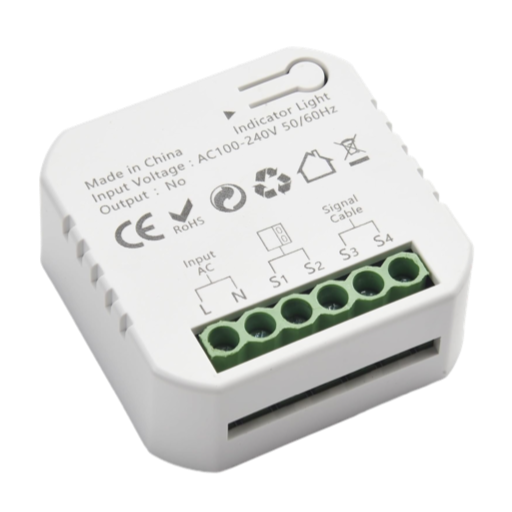
PictureTuya TS0603

Options

How to use device type specific configuration

  • time_start: Reply to Tuya-specific time synchronization requests: "1970" - Reply with seconds since 1970/01/01 (recommended, should stop the device from asking), "2000" - Reply with seconds since 2000/01/01 (use if the weekday is wrong with 1970), "off" - Don't reply (use if replying causes too much traffic). Default for this device: "off". The value must be one of 1970, 2000, off

Exposes

State (binary)

Trigger the door movement. Value can be found in the published state on the state property. It's not possible to read (/get) this value. To write (/set) a value publish a message to topic zigbee2mqtt/FRIENDLY_NAME/set with payload {"state": NEW_VALUE}. If value equals true state is ON, if false OFF.

Garage door contact (binary)

Indicates if the garage door contact is closed (= true) or open (= false). Value can be found in the published state on the garage_door_contact property. It's not possible to read (/get) or write (/set) this value. If value equals true garage door contact is ON, if false OFF.

Help to make the docu better and edit this page on Github ✌
Page was last updated on: 8/30/26, 6:20 PM