
Tuya TS0601_smart_temperature_switch
| Model | TS0601_smart_temperature_switch |
| Vendor | Tuya |
| Description | Smart temperature switch with manual and automatic modes: heating & cooling |
| Exposes | temperature_c, temperature_f, switch (state), autowork, work_mode, temperature_unit, temperature_c_setpoint, temperature_f_setpoint, temperature_range, temperature_calibration, cooling_delay_switch, cooling_delay, countdown, schedules |
| Picture | 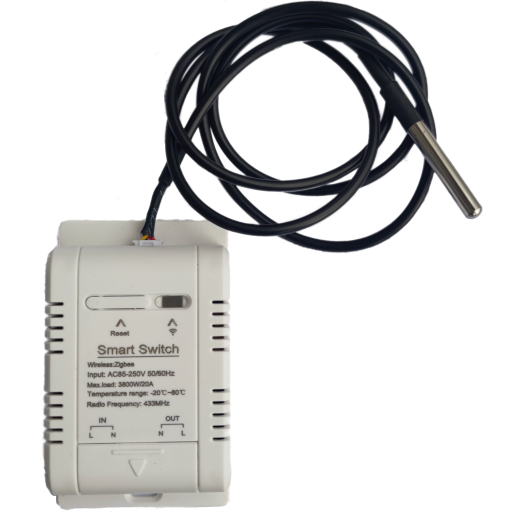 |
Options
How to use device type specific configuration
time_start: Reply to Tuya-specific time synchronization requests: "1970" - Reply with seconds since 1970/01/01 (recommended, should stop the device from asking), "2000" - Reply with seconds since 2000/01/01 (use if the weekday is wrong with 1970), "off" - Don't reply (use if replying causes too much traffic). Default for this device: "1970". The value must be one of1970,2000,off
Exposes
Temperature c (numeric)
Measured temperature in ℃. Device reports it only when it set ℃ unit.. Value can be found in the published state on the temperature_c property. It's not possible to read (/get) or write (/set) this value. The unit of this value is ℃.
Temperature f (numeric)
Measured temperature in ℉. Value can be found in the published state on the temperature_f property. It's not possible to read (/get) or write (/set) this value. The unit of this value is ℉.
Switch
The current state of this switch is in the published state under the state property (value is ON or OFF). To control this switch publish a message to topic zigbee2mqtt/FRIENDLY_NAME/set with payload {"state": "ON"}, {"state": "OFF"} or {"state": "TOGGLE"}. To read the current state of this switch publish a message to topic zigbee2mqtt/FRIENDLY_NAME/get with payload {"state": ""}.
Autowork (binary)
Turn on automatic mode to control constant temperature. Value can be found in the published state on the autowork property. To read (/get) the value publish a message to topic zigbee2mqtt/FRIENDLY_NAME/get with payload {"autowork": ""}. To write (/set) a value publish a message to topic zigbee2mqtt/FRIENDLY_NAME/set with payload {"autowork": NEW_VALUE}. If value equals ON autowork is ON, if OFF OFF.
Work mode (enum)
            Heating: switch is turned ON until temperature will increase to setpoint (then will turn OFF). When temperature will go down below set temperature range, switch will turn ON again.
            Cooling: switch is turned ON until temperature will decrease to setpoint (then will turn OFF). When temperature will go up above set temperature range, switch will turn ON again.
        .
Value can be found in the published state on the work_mode property. To read (/get) the value publish a message to topic zigbee2mqtt/FRIENDLY_NAME/get with payload {"work_mode": ""}. To write (/set) a value publish a message to topic zigbee2mqtt/FRIENDLY_NAME/set with payload {"work_mode": NEW_VALUE}. The possible values are: heating, cooling.
Temperature unit (enum)
Temperature unit. Value can be found in the published state on the temperature_unit property. To read (/get) the value publish a message to topic zigbee2mqtt/FRIENDLY_NAME/get with payload {"temperature_unit": ""}. To write (/set) a value publish a message to topic zigbee2mqtt/FRIENDLY_NAME/set with payload {"temperature_unit": NEW_VALUE}. The possible values are: celsius, fahrenheit.
Temperature c setpoint (numeric)
Temperature ℃ set point. Value can be found in the published state on the temperature_c_setpoint property. To read (/get) the value publish a message to topic zigbee2mqtt/FRIENDLY_NAME/get with payload {"temperature_c_setpoint": ""}. To write (/set) a value publish a message to topic zigbee2mqtt/FRIENDLY_NAME/set with payload {"temperature_c_setpoint": NEW_VALUE}. The minimal value is -20 and the maximum value is 102. The unit of this value is ℃.
Temperature f setpoint (numeric)
Temperature ℉ set point. Value can be found in the published state on the temperature_f_setpoint property. To read (/get) the value publish a message to topic zigbee2mqtt/FRIENDLY_NAME/get with payload {"temperature_f_setpoint": ""}. To write (/set) a value publish a message to topic zigbee2mqtt/FRIENDLY_NAME/set with payload {"temperature_f_setpoint": NEW_VALUE}. The minimal value is -4 and the maximum value is 221. The unit of this value is ℉.
Temperature range (numeric)
The delta between temperature setpoint and measured temperature to trigger heating or cooling. Value can be found in the published state on the temperature_range property. To read (/get) the value publish a message to topic zigbee2mqtt/FRIENDLY_NAME/get with payload {"temperature_range": ""}. To write (/set) a value publish a message to topic zigbee2mqtt/FRIENDLY_NAME/set with payload {"temperature_range": NEW_VALUE}. The minimal value is 1 and the maximum value is 9.
Temperature calibration (numeric)
Temperature calibration always in ℉. Value can be found in the published state on the temperature_calibration property. It's not possible to read (/get) this value. To write (/set) a value publish a message to topic zigbee2mqtt/FRIENDLY_NAME/set with payload {"temperature_calibration": NEW_VALUE}. The minimal value is -9 and the maximum value is 9. The unit of this value is ℉.
Cooling delay switch (binary)
Turn on cooling mode delay. Value can be found in the published state on the cooling_delay_switch property. To read (/get) the value publish a message to topic zigbee2mqtt/FRIENDLY_NAME/get with payload {"cooling_delay_switch": ""}. To write (/set) a value publish a message to topic zigbee2mqtt/FRIENDLY_NAME/set with payload {"cooling_delay_switch": NEW_VALUE}. If value equals ON cooling delay switch is ON, if OFF OFF.
Cooling delay (numeric)
Delay to turn on - only for cooling mode. Value can be found in the published state on the cooling_delay property. To read (/get) the value publish a message to topic zigbee2mqtt/FRIENDLY_NAME/get with payload {"cooling_delay": ""}. To write (/set) a value publish a message to topic zigbee2mqtt/FRIENDLY_NAME/set with payload {"cooling_delay": NEW_VALUE}. The minimal value is 0 and the maximum value is 10. The unit of this value is m.
Countdown (numeric)
Countdown to turn device on/off after a certain time. Value can be found in the published state on the countdown property. To read (/get) the value publish a message to topic zigbee2mqtt/FRIENDLY_NAME/get with payload {"countdown": ""}. To write (/set) a value publish a message to topic zigbee2mqtt/FRIENDLY_NAME/set with payload {"countdown": NEW_VALUE}. The minimal value is 0 and the maximum value is 86400. The unit of this value is s.
Schedules (list)
Schedules for automatic mode work at certain week day and time. Can be set by publishing to zigbee2mqtt/FRIENDLY_NAME/set with payload {"schedules": [{"enabled": VALUE, "work_mode": VALUE, "temperature_f": VALUE, "start": VALUE, "end": VALUE, "week_days": VALUE}]}
enabled(binary): Enable schedule allowed values:trueorfalsework_mode(enum) allowed values:heating,coolingtemperature_f(numeric): Target temperature in ℉ unit is ℉start(composite)end(composite)week_days(composite)