
Tuya TS0601_smart_scene_knob
| Model | TS0601_smart_scene_knob |
| Vendor | Tuya |
| Description | Smart scene knob controller with 4 buttons |
| Exposes | brightness, color_temp, curtain_position, assignment_status, base_group_id, action_button, action_group, bind_all_scene, bind_all_light, bind_all_curtain, assign_button_1, set_base_group_id, action |
| Picture | 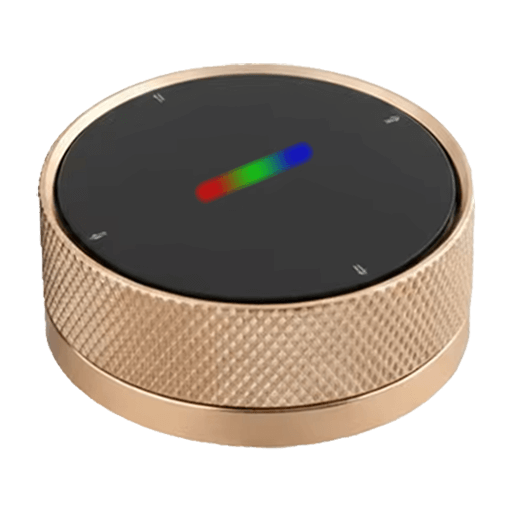 |
Notes
Device Overview
Smart scene knob controller with 4 physical buttons and rotation knob. Each button can be configured to one of three modes:
| Mode | LED Color | Function |
|---|---|---|
| Scene | Red | Triggers scene actions (DP 1-4) |
| Light | Green | Controls brightness & color temperature |
| Curtain | Blue | Controls curtain position |
Mode Switching
Hold button 2 (left) or 4 (right) for 3 seconds to cycle through bound modes. Only modes that have been bound are available.
Initial Setup (Light/Curtain Mode)
Light and Curtain modes use Group ID broadcasting which must be detected on first use:
- Click
bind_all_lightorbind_all_curtainin the device settings - Status changes to
waiting_button_1 - Press button 1 on the physical device
- Base Group ID is auto-detected, status changes to
ready
To reassign, use assign_button_1 or manually set via set_base_group_id.
Group ID Pattern
Group IDs follow the pattern: base + (button - 1) × 20
| Button | Offset | Example (base=11220) |
|---|---|---|
| 1 | +0 | 11220 |
| 2 | +20 | 11240 |
| 3 | +40 | 11260 |
| 4 | +60 | 11280 |
Actions
Scene mode:
- Single press:
scene_1/scene_2/scene_3/scene_4
Light mode:
- Single press:
light_X_on/light_X_off - Knob rotation:
light_X_brightness_up/light_X_brightness_down - Double press (LED blinks) + knob rotation:
light_X_colortemp_up/light_X_colortemp_down
Curtain mode:
- Single press:
curtain_X_start/curtain_X_stop - Knob rotation:
curtain_X_position_open/curtain_X_position_close
Known Limitations
- Battery status is not exposed (not available even in Tuya app)
- In Light/Curtain mode, you must press a button first before rotating the knob to select which button/device to control. This means a button press action is always sent before knob rotation, which may trigger unintended commands.
- In Light mode, knob rotation (brightness/color temp) only works after
light_X_on. The knob does not function when the light is off.
Options
How to use device type specific configuration
time_start: Reply to Tuya-specific time synchronization requests: "1970" - Reply with seconds since 1970/01/01 (recommended, should stop the device from asking), "2000" - Reply with seconds since 2000/01/01 (use if the weekday is wrong with 1970), "off" - Don't reply (use if replying causes too much traffic). Default for this device: "off". The value must be one of1970,2000,off
Exposes
Brightness (numeric)
Brightness level from light mode (1-255). Value can be found in the published state on the brightness property. It's not possible to read (/get) or write (/set) this value. The minimal value is 1 and the maximum value is 255.
Color temp (numeric)
Color temperature from light mode (mired). Value can be found in the published state on the color_temp property. It's not possible to read (/get) or write (/set) this value. The minimal value is 153 and the maximum value is 523.
Curtain position (numeric)
Curtain position from curtain mode (0-100%). Value can be found in the published state on the curtain_position property. It's not possible to read (/get) or write (/set) this value. The minimal value is 0 and the maximum value is 100. The unit of this value is %.
Assignment status (enum)
Button assignment status. Value can be found in the published state on the assignment_status property. It's not possible to read (/get) or write (/set) this value. The possible values are: unassigned, waiting_button_1, ready.
Base group id (numeric)
Base Group ID for button 1 (buttons 2-4 are +20, +40, +60). Value can be found in the published state on the base_group_id property. It's not possible to read (/get) or write (/set) this value.
Action button (numeric)
Button number from last action. Value can be found in the published state on the action_button property. It's not possible to read (/get) or write (/set) this value. The minimal value is 1 and the maximum value is 4.
Action group (numeric)
Group ID from last action. Value can be found in the published state on the action_group property. It's not possible to read (/get) or write (/set) this value.
Bind all scene (enum)
Bind all buttons to Scene mode (red LED). Value will not be published in the state. It's not possible to read (/get) this value. To write (/set) a value publish a message to topic zigbee2mqtt/FRIENDLY_NAME/set with payload {"bind_all_scene": NEW_VALUE}. The possible values are: bind.
Bind all light (enum)
Bind all buttons to Light mode (green LED). Value will not be published in the state. It's not possible to read (/get) this value. To write (/set) a value publish a message to topic zigbee2mqtt/FRIENDLY_NAME/set with payload {"bind_all_light": NEW_VALUE}. The possible values are: bind.
Bind all curtain (enum)
Bind all buttons to Curtain mode (blue LED). Value will not be published in the state. It's not possible to read (/get) this value. To write (/set) a value publish a message to topic zigbee2mqtt/FRIENDLY_NAME/set with payload {"bind_all_curtain": NEW_VALUE}. The possible values are: bind.
Assign button 1 (enum)
Start assignment: press button 1 after clicking. Value will not be published in the state. It's not possible to read (/get) this value. To write (/set) a value publish a message to topic zigbee2mqtt/FRIENDLY_NAME/set with payload {"assign_button_1": NEW_VALUE}. The possible values are: assign.
Set base group id (numeric)
Manually set base Group ID (advanced). Value will not be published in the state. It's not possible to read (/get) this value. To write (/set) a value publish a message to topic zigbee2mqtt/FRIENDLY_NAME/set with payload {"set_base_group_id": NEW_VALUE}. The minimal value is 1 and the maximum value is 65000.
Action (enum)
Triggered action (e.g. a button click). Value can be found in the published state on the action property. It's not possible to read (/get) or write (/set) this value. The possible values are: scene_1, scene_2, scene_3, scene_4, light_1_on, light_1_off, light_1_brightness_up, light_1_brightness_down, light_1_colortemp_up, light_1_colortemp_down, light_2_on, light_2_off, light_2_brightness_up, light_2_brightness_down, light_2_colortemp_up, light_2_colortemp_down, light_3_on, light_3_off, light_3_brightness_up, light_3_brightness_down, light_3_colortemp_up, light_3_colortemp_down, light_4_on, light_4_off, light_4_brightness_up, light_4_brightness_down, light_4_colortemp_up, light_4_colortemp_down, curtain_1_start, curtain_1_stop, curtain_1_position_open, curtain_1_position_close, curtain_2_start, curtain_2_stop, curtain_2_position_open, curtain_2_position_close, curtain_3_start, curtain_3_stop, curtain_3_position_open, curtain_3_position_close, curtain_4_start, curtain_4_stop, curtain_4_position_open, curtain_4_position_close.