
Tuya TS0601_floor_thermostat_006
| Model | TS0601_floor_thermostat_006 |
| Vendor | Tuya |
| Description | Zigbee thermostat for electric floors with selectable internal and external sensors |
| Exposes | climate (system_mode, preset, running_state, current_heating_setpoint, local_temperature, local_temperature_calibration), internal_temperature, external_temperature_input, sensor, eco_mode, deadzone_temperature, child_lock, schedule_monday, schedule_tuesday, schedule_wednesday, schedule_thursday, schedule_friday, schedule_saturday, schedule_sunday |
| Picture | 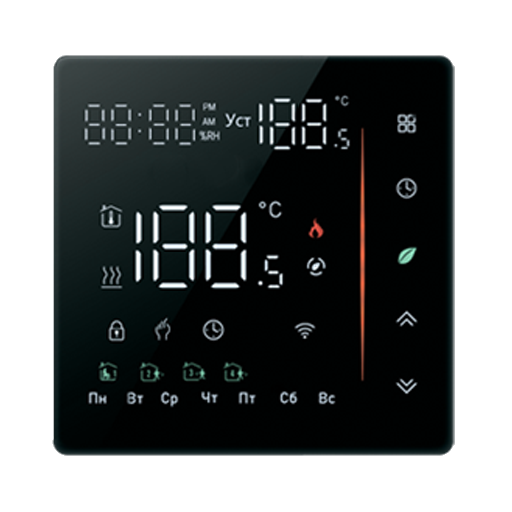 |
Options
How to use device type specific configuration
time_start: Reply to Tuya-specific time synchronization requests: "1970" - Reply with seconds since 1970/01/01 (recommended, should stop the device from asking), "2000" - Reply with seconds since 2000/01/01 (use if the weekday is wrong with 1970), "off" - Don't reply (use if replying causes too much traffic). Default for this device: "1970". The value must be one of1970,2000,off
Exposes
Climate
This climate device supports the following features: system_mode, preset, running_state, current_heating_setpoint, local_temperature, local_temperature_calibration.
current_heating_setpoint: Temperature setpoint. To control publish a message to topiczigbee2mqtt/FRIENDLY_NAME/setwith payload{"current_heating_setpoint": VALUE}whereVALUEis the °C between5and35. Reading (/get) this attribute is not possible.local_temperature: Current temperature measured on the device (in °C). Reading (/get) this attribute is not possible.system_mode: Mode of this device. To control publish a message to topiczigbee2mqtt/FRIENDLY_NAME/setwith payload{"system_mode": "VALUE"}whereVALUEis one of:off,heat. Reading (/get) this attribute is not possible.preset: Mode of this device (similar to system_mode). To control publish a message to topiczigbee2mqtt/FRIENDLY_NAME/setwith payload{"preset": "VALUE"}whereVALUEis one of:manual,auto. Reading (/get) this attribute is not possible.running_state: The current running state. Possible values are:idle,heat. Reading (/get) this attribute is not possible.local_temperature_calibration: Offset to add/subtract to the local temperature. To control publish a message to topiczigbee2mqtt/FRIENDLY_NAME/setwith payload{"local_temperature_calibration": VALUE}.The minimal value is-9and the maximum value is9with a step size of0.1.
Internal temperature (numeric)
Temperature reported by the internal sensor. Value can be found in the published state on the internal_temperature property. It's not possible to read (/get) or write (/set) this value. The unit of this value is °C.
External temperature input (numeric)
Temperature reported by the external floor sensor. Value can be found in the published state on the external_temperature_input property. It's not possible to read (/get) or write (/set) this value. The unit of this value is °C.
Sensor (enum)
IN: internal sensor; OU: external sensor; AL: internal control with external floor limit. Value can be found in the published state on the sensor property. It's not possible to read (/get) this value. To write (/set) a value publish a message to topic zigbee2mqtt/FRIENDLY_NAME/set with payload {"sensor": "VALUE"}. The possible values are: IN, OU, AL.
ECO mode (binary)
Value can be found in the published state on the eco_mode property. It's not possible to read (/get) this value. To write (/set) a value publish a message to topic zigbee2mqtt/FRIENDLY_NAME/set with payload {"eco_mode": "VALUE"}. If value equals ON eCO mode is ON, if OFF OFF.
Deadzone temperature (numeric)
Heating hysteresis. Value can be found in the published state on the deadzone_temperature property. It's not possible to read (/get) this value. To write (/set) a value publish a message to topic zigbee2mqtt/FRIENDLY_NAME/set with payload {"deadzone_temperature": VALUE}. The minimal value is 0.5 and the maximum value is 5. The unit of this value is °C.
Child lock (binary)
Enables/disables physical input on the device. Value can be found in the published state on the child_lock property. It's not possible to read (/get) this value. To write (/set) a value publish a message to topic zigbee2mqtt/FRIENDLY_NAME/set with payload {"child_lock": "VALUE"}. If value equals LOCK child lock is ON, if UNLOCK OFF.
Schedule monday (text)
Schedule for monday, example: "HH:MM/C HH:MM/C HH:MM/C HH:MM/C". Value can be found in the published state on the schedule_monday property. It's not possible to read (/get) this value. To write (/set) a value publish a message to topic zigbee2mqtt/FRIENDLY_NAME/set with payload {"schedule_monday": "VALUE"}.
Schedule tuesday (text)
Schedule for tuesday, example: "HH:MM/C HH:MM/C HH:MM/C HH:MM/C". Value can be found in the published state on the schedule_tuesday property. It's not possible to read (/get) this value. To write (/set) a value publish a message to topic zigbee2mqtt/FRIENDLY_NAME/set with payload {"schedule_tuesday": "VALUE"}.
Schedule wednesday (text)
Schedule for wednesday, example: "HH:MM/C HH:MM/C HH:MM/C HH:MM/C". Value can be found in the published state on the schedule_wednesday property. It's not possible to read (/get) this value. To write (/set) a value publish a message to topic zigbee2mqtt/FRIENDLY_NAME/set with payload {"schedule_wednesday": "VALUE"}.
Schedule thursday (text)
Schedule for thursday, example: "HH:MM/C HH:MM/C HH:MM/C HH:MM/C". Value can be found in the published state on the schedule_thursday property. It's not possible to read (/get) this value. To write (/set) a value publish a message to topic zigbee2mqtt/FRIENDLY_NAME/set with payload {"schedule_thursday": "VALUE"}.
Schedule friday (text)
Schedule for friday, example: "HH:MM/C HH:MM/C HH:MM/C HH:MM/C". Value can be found in the published state on the schedule_friday property. It's not possible to read (/get) this value. To write (/set) a value publish a message to topic zigbee2mqtt/FRIENDLY_NAME/set with payload {"schedule_friday": "VALUE"}.
Schedule saturday (text)
Schedule for saturday, example: "HH:MM/C HH:MM/C HH:MM/C HH:MM/C". Value can be found in the published state on the schedule_saturday property. It's not possible to read (/get) this value. To write (/set) a value publish a message to topic zigbee2mqtt/FRIENDLY_NAME/set with payload {"schedule_saturday": "VALUE"}.
Schedule sunday (text)
Schedule for sunday, example: "HH:MM/C HH:MM/C HH:MM/C HH:MM/C". Value can be found in the published state on the schedule_sunday property. It's not possible to read (/get) this value. To write (/set) a value publish a message to topic zigbee2mqtt/FRIENDLY_NAME/set with payload {"schedule_sunday": "VALUE"}.