
Slacky-DIY TS0044-z-SlD
| Model | TS0044-z-SlD |
| Vendor | Slacky-DIY |
| Description | Tuya wireless switch with 4 buttons with custom firmware |
| Exposes | battery, switch_actions, switch_type, scene_id, group_id, min_level, max_level, action |
| Picture | 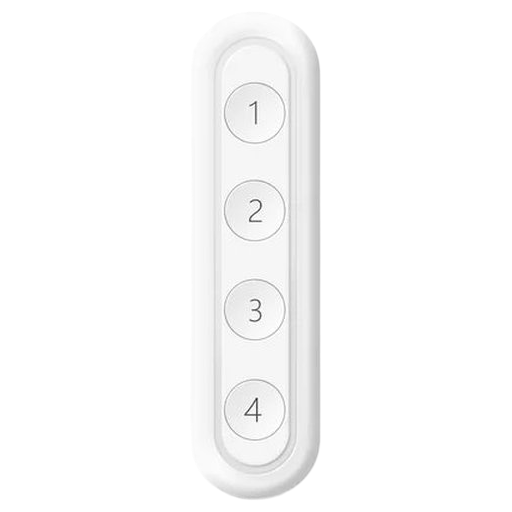 |
OTA updates
This device supports OTA updates, for more information see OTA updates.
Options
How to use device type specific configuration
simulated_brightness: Simulate a brightness value. If this device provides a brightness_move_up or brightness_move_down action it is possible to specify the update interval and delta. The action_brightness_delta indicates the delta for each interval. Example:
simulated_brightness:
  delta: 20 # delta per interval, default = 20
  interval: 200 # interval in milliseconds, default = 200
Exposes
Battery (numeric)
Remaining battery in %. Value can be found in the published state on the battery property. To read (/get) the value publish a message to topic zigbee2mqtt/FRIENDLY_NAME/get with payload {"battery": ""}. It's not possible to write (/set) this value. The minimal value is 0 and the maximum value is 100. The unit of this value is %.
Switch actions (enum, 1 endpoint)
Actions switch. Value can be found in the published state on the switch_actions_1 property. To read (/get) the value publish a message to topic zigbee2mqtt/FRIENDLY_NAME/get with payload {"switch_actions_1": ""}. To write (/set) a value publish a message to topic zigbee2mqtt/FRIENDLY_NAME/set with payload {"switch_actions_1": NEW_VALUE}. The possible values are: off, on, toggle.
Switch actions (enum, 2 endpoint)
Actions switch. Value can be found in the published state on the switch_actions_2 property. To read (/get) the value publish a message to topic zigbee2mqtt/FRIENDLY_NAME/get with payload {"switch_actions_2": ""}. To write (/set) a value publish a message to topic zigbee2mqtt/FRIENDLY_NAME/set with payload {"switch_actions_2": NEW_VALUE}. The possible values are: off, on, toggle.
Switch actions (enum, 3 endpoint)
Actions switch. Value can be found in the published state on the switch_actions_3 property. To read (/get) the value publish a message to topic zigbee2mqtt/FRIENDLY_NAME/get with payload {"switch_actions_3": ""}. To write (/set) a value publish a message to topic zigbee2mqtt/FRIENDLY_NAME/set with payload {"switch_actions_3": NEW_VALUE}. The possible values are: off, on, toggle.
Switch actions (enum, 4 endpoint)
Actions switch. Value can be found in the published state on the switch_actions_4 property. To read (/get) the value publish a message to topic zigbee2mqtt/FRIENDLY_NAME/get with payload {"switch_actions_4": ""}. To write (/set) a value publish a message to topic zigbee2mqtt/FRIENDLY_NAME/set with payload {"switch_actions_4": NEW_VALUE}. The possible values are: off, on, toggle.
Switch type (enum, 1 endpoint)
Switch type. Value can be found in the published state on the switch_type_1 property. To read (/get) the value publish a message to topic zigbee2mqtt/FRIENDLY_NAME/get with payload {"switch_type_1": ""}. To write (/set) a value publish a message to topic zigbee2mqtt/FRIENDLY_NAME/set with payload {"switch_type_1": NEW_VALUE}. The possible values are: toggle, momentary, multifunction, brightness_level, brightness_level_up, brightness_level_down, move_to_color_temperature, move_to_color_temperature_up, move_to_color_temperature_down, scene.
Switch type (enum, 2 endpoint)
Switch type. Value can be found in the published state on the switch_type_2 property. To read (/get) the value publish a message to topic zigbee2mqtt/FRIENDLY_NAME/get with payload {"switch_type_2": ""}. To write (/set) a value publish a message to topic zigbee2mqtt/FRIENDLY_NAME/set with payload {"switch_type_2": NEW_VALUE}. The possible values are: toggle, momentary, multifunction, brightness_level, brightness_level_up, brightness_level_down, move_to_color_temperature, move_to_color_temperature_up, move_to_color_temperature_down, scene.
Switch type (enum, 3 endpoint)
Switch type. Value can be found in the published state on the switch_type_3 property. To read (/get) the value publish a message to topic zigbee2mqtt/FRIENDLY_NAME/get with payload {"switch_type_3": ""}. To write (/set) a value publish a message to topic zigbee2mqtt/FRIENDLY_NAME/set with payload {"switch_type_3": NEW_VALUE}. The possible values are: toggle, momentary, multifunction, brightness_level, brightness_level_up, brightness_level_down, move_to_color_temperature, move_to_color_temperature_up, move_to_color_temperature_down, scene.
Switch type (enum, 4 endpoint)
Switch type. Value can be found in the published state on the switch_type_4 property. To read (/get) the value publish a message to topic zigbee2mqtt/FRIENDLY_NAME/get with payload {"switch_type_4": ""}. To write (/set) a value publish a message to topic zigbee2mqtt/FRIENDLY_NAME/set with payload {"switch_type_4": NEW_VALUE}. The possible values are: toggle, momentary, multifunction, brightness_level, brightness_level_up, brightness_level_down, move_to_color_temperature, move_to_color_temperature_up, move_to_color_temperature_down, scene.
Scene id (numeric, 1 endpoint)
Scene ID. Value can be found in the published state on the scene_id_1 property. To read (/get) the value publish a message to topic zigbee2mqtt/FRIENDLY_NAME/get with payload {"scene_id_1": ""}. To write (/set) a value publish a message to topic zigbee2mqtt/FRIENDLY_NAME/set with payload {"scene_id_1": NEW_VALUE}. The minimal value is 0 and the maximum value is 255.
Scene id (numeric, 2 endpoint)
Scene ID. Value can be found in the published state on the scene_id_2 property. To read (/get) the value publish a message to topic zigbee2mqtt/FRIENDLY_NAME/get with payload {"scene_id_2": ""}. To write (/set) a value publish a message to topic zigbee2mqtt/FRIENDLY_NAME/set with payload {"scene_id_2": NEW_VALUE}. The minimal value is 0 and the maximum value is 255.
Scene id (numeric, 3 endpoint)
Scene ID. Value can be found in the published state on the scene_id_3 property. To read (/get) the value publish a message to topic zigbee2mqtt/FRIENDLY_NAME/get with payload {"scene_id_3": ""}. To write (/set) a value publish a message to topic zigbee2mqtt/FRIENDLY_NAME/set with payload {"scene_id_3": NEW_VALUE}. The minimal value is 0 and the maximum value is 255.
Scene id (numeric, 4 endpoint)
Scene ID. Value can be found in the published state on the scene_id_4 property. To read (/get) the value publish a message to topic zigbee2mqtt/FRIENDLY_NAME/get with payload {"scene_id_4": ""}. To write (/set) a value publish a message to topic zigbee2mqtt/FRIENDLY_NAME/set with payload {"scene_id_4": NEW_VALUE}. The minimal value is 0 and the maximum value is 255.
Group id (numeric, 1 endpoint)
Group ID for scenes. Value can be found in the published state on the group_id_1 property. To read (/get) the value publish a message to topic zigbee2mqtt/FRIENDLY_NAME/get with payload {"group_id_1": ""}. To write (/set) a value publish a message to topic zigbee2mqtt/FRIENDLY_NAME/set with payload {"group_id_1": NEW_VALUE}. The minimal value is 0 and the maximum value is 65527.
Group id (numeric, 2 endpoint)
Group ID for scenes. Value can be found in the published state on the group_id_2 property. To read (/get) the value publish a message to topic zigbee2mqtt/FRIENDLY_NAME/get with payload {"group_id_2": ""}. To write (/set) a value publish a message to topic zigbee2mqtt/FRIENDLY_NAME/set with payload {"group_id_2": NEW_VALUE}. The minimal value is 0 and the maximum value is 65527.
Group id (numeric, 3 endpoint)
Group ID for scenes. Value can be found in the published state on the group_id_3 property. To read (/get) the value publish a message to topic zigbee2mqtt/FRIENDLY_NAME/get with payload {"group_id_3": ""}. To write (/set) a value publish a message to topic zigbee2mqtt/FRIENDLY_NAME/set with payload {"group_id_3": NEW_VALUE}. The minimal value is 0 and the maximum value is 65527.
Group id (numeric, 4 endpoint)
Group ID for scenes. Value can be found in the published state on the group_id_4 property. To read (/get) the value publish a message to topic zigbee2mqtt/FRIENDLY_NAME/get with payload {"group_id_4": ""}. To write (/set) a value publish a message to topic zigbee2mqtt/FRIENDLY_NAME/set with payload {"group_id_4": NEW_VALUE}. The minimal value is 0 and the maximum value is 65527.
Min level (numeric, 1 endpoint)
Minimum level when decreasing. Value can be found in the published state on the min_level_1 property. To read (/get) the value publish a message to topic zigbee2mqtt/FRIENDLY_NAME/get with payload {"min_level_1": ""}. To write (/set) a value publish a message to topic zigbee2mqtt/FRIENDLY_NAME/set with payload {"min_level_1": NEW_VALUE}. The minimal value is 1 and the maximum value is 255.
Min level (numeric, 2 endpoint)
Minimum level when decreasing. Value can be found in the published state on the min_level_2 property. To read (/get) the value publish a message to topic zigbee2mqtt/FRIENDLY_NAME/get with payload {"min_level_2": ""}. To write (/set) a value publish a message to topic zigbee2mqtt/FRIENDLY_NAME/set with payload {"min_level_2": NEW_VALUE}. The minimal value is 1 and the maximum value is 255.
Min level (numeric, 3 endpoint)
Minimum level when decreasing. Value can be found in the published state on the min_level_3 property. To read (/get) the value publish a message to topic zigbee2mqtt/FRIENDLY_NAME/get with payload {"min_level_3": ""}. To write (/set) a value publish a message to topic zigbee2mqtt/FRIENDLY_NAME/set with payload {"min_level_3": NEW_VALUE}. The minimal value is 1 and the maximum value is 255.
Min level (numeric, 4 endpoint)
Minimum level when decreasing. Value can be found in the published state on the min_level_4 property. To read (/get) the value publish a message to topic zigbee2mqtt/FRIENDLY_NAME/get with payload {"min_level_4": ""}. To write (/set) a value publish a message to topic zigbee2mqtt/FRIENDLY_NAME/set with payload {"min_level_4": NEW_VALUE}. The minimal value is 1 and the maximum value is 255.
Max level (numeric, 1 endpoint)
Maximum level when increasing. Value can be found in the published state on the max_level_1 property. To read (/get) the value publish a message to topic zigbee2mqtt/FRIENDLY_NAME/get with payload {"max_level_1": ""}. To write (/set) a value publish a message to topic zigbee2mqtt/FRIENDLY_NAME/set with payload {"max_level_1": NEW_VALUE}. The minimal value is 1 and the maximum value is 255.
Max level (numeric, 2 endpoint)
Maximum level when increasing. Value can be found in the published state on the max_level_2 property. To read (/get) the value publish a message to topic zigbee2mqtt/FRIENDLY_NAME/get with payload {"max_level_2": ""}. To write (/set) a value publish a message to topic zigbee2mqtt/FRIENDLY_NAME/set with payload {"max_level_2": NEW_VALUE}. The minimal value is 1 and the maximum value is 255.
Max level (numeric, 3 endpoint)
Maximum level when increasing. Value can be found in the published state on the max_level_3 property. To read (/get) the value publish a message to topic zigbee2mqtt/FRIENDLY_NAME/get with payload {"max_level_3": ""}. To write (/set) a value publish a message to topic zigbee2mqtt/FRIENDLY_NAME/set with payload {"max_level_3": NEW_VALUE}. The minimal value is 1 and the maximum value is 255.
Max level (numeric, 4 endpoint)
Maximum level when increasing. Value can be found in the published state on the max_level_4 property. To read (/get) the value publish a message to topic zigbee2mqtt/FRIENDLY_NAME/get with payload {"max_level_4": ""}. To write (/set) a value publish a message to topic zigbee2mqtt/FRIENDLY_NAME/set with payload {"max_level_4": NEW_VALUE}. The minimal value is 1 and the maximum value is 255.
Action (enum)
Triggered action (e.g. a button click). Value can be found in the published state on the action property. It's not possible to read (/get) or write (/set) this value. The possible values are: on_1, on_2, on_3, on_4, off_1, off_2, off_3, off_4, toggle_1, toggle_2, toggle_3, toggle_4, hold_1, hold_2, hold_3, hold_4, single_1, single_2, single_3, single_4, double_1, double_2, double_3, double_4, triple_1, triple_2, triple_3, triple_4, quadruple_1, quadruple_2, quadruple_3, quadruple_4, quintuple_1, quintuple_2, quintuple_3, quintuple_4, release_1, release_2, release_3, release_4, brightness_move_to_level_1, brightness_move_to_level_2, brightness_move_to_level_3, brightness_move_to_level_4, brightness_move_up_1, brightness_move_up_2, brightness_move_up_3, brightness_move_up_4, brightness_move_down_1, brightness_move_down_2, brightness_move_down_3, brightness_move_down_4, brightness_step_up_1, brightness_step_up_2, brightness_step_up_3, brightness_step_up_4, brightness_step_down_1, brightness_step_down_2, brightness_step_down_3, brightness_step_down_4, brightness_stop_1, brightness_stop_2, brightness_stop_3, brightness_stop_4, color_temperature_move_stop_1, color_temperature_move_stop_2, color_temperature_move_stop_3, color_temperature_move_stop_4, color_temperature_move_up_1, color_temperature_move_up_2, color_temperature_move_up_3, color_temperature_move_up_4, color_temperature_move_down_1, color_temperature_move_down_2, color_temperature_move_down_3, color_temperature_move_down_4, color_temperature_step_up_1, color_temperature_step_up_2, color_temperature_step_up_3, color_temperature_step_up_4, color_temperature_step_down_1, color_temperature_step_down_2, color_temperature_step_down_3, color_temperature_step_down_4, enhanced_move_to_hue_and_saturation_1, enhanced_move_to_hue_and_saturation_2, enhanced_move_to_hue_and_saturation_3, enhanced_move_to_hue_and_saturation_4, move_to_hue_and_saturation_1, move_to_hue_and_saturation_2, move_to_hue_and_saturation_3, move_to_hue_and_saturation_4, color_hue_step_up_1, color_hue_step_up_2, color_hue_step_up_3, color_hue_step_up_4, color_hue_step_down_1, color_hue_step_down_2, color_hue_step_down_3, color_hue_step_down_4, color_saturation_step_up_1, color_saturation_step_up_2, color_saturation_step_up_3, color_saturation_step_up_4, color_saturation_step_down_1, color_saturation_step_down_2, color_saturation_step_down_3, color_saturation_step_down_4, color_loop_set_1, color_loop_set_2, color_loop_set_3, color_loop_set_4, color_temperature_move_1, color_temperature_move_2, color_temperature_move_3, color_temperature_move_4, color_move_1, color_move_2, color_move_3, color_move_4, hue_move_1, hue_move_2, hue_move_3, hue_move_4, hue_stop_1, hue_stop_2, hue_stop_3, hue_stop_4, move_to_saturation_1, move_to_saturation_2, move_to_saturation_3, move_to_saturation_4, move_to_hue_1, move_to_hue_2, move_to_hue_3, move_to_hue_4, stop_move_step_1, stop_move_step_2, stop_move_step_3, stop_move_step_4, recall_1, recall_2, recall_3, recall_4, store_1, store_2, store_3, store_4, add_1, add_2, add_3, add_4, remove_1, remove_2, remove_3, remove_4, remove_all_1, remove_all_2, remove_all_3, remove_all_4.