
SONOFF TRV-ZBT
| Model | TRV-ZBT |
| Vendor | SONOFF |
| Description | Zigbee thermostatic radiator valve |
| Exposes | climate (occupied_heating_setpoint, local_temperature, local_temperature_calibration, system_mode, running_state), battery, fault_status, screen_direction, child_lock, open_window, frost_protection_temperature, temperature_sensor_select, external_temperature_input, idle_steps, closing_steps, valve_opening_limit_voltage, valve_closing_limit_voltage, valve_motor_running_voltage, heating_valve_position, idle_valve_position, temperature_accuracy, smart_temperature_control, temporary_mode_mode, temporary_mode_duration, temporary_mode_target_temperature, low_battery_valve_state, schedule_active_group, schedule_group_to_edit, weekly_schedule_sunday, weekly_schedule_monday, weekly_schedule_tuesday, weekly_schedule_wednesday, weekly_schedule_thursday, weekly_schedule_friday, weekly_schedule_saturday, remote_temperature_linkage, remote_setpoint_temperature, open_window_detected, heat_percentage_hour, valve_travel_calibration, motor_travel_calibration_status, bluetooth_pairing, bluetooth_pairing_status, read_temperature_control_history, temperature_control_history |
| Picture | 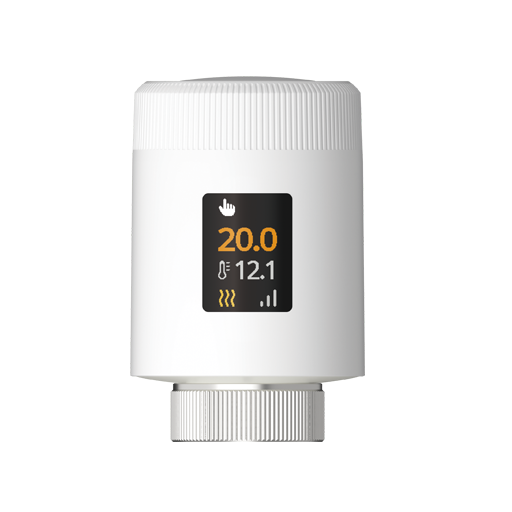 |
OTA updates
This device supports OTA updates, for more information see OTA updates.
Options
How to use device type specific configuration
thermostat_unit: Controls the temperature unit of the thermostat (default celsius). The value must be one ofcelsius,fahrenheit
Exposes
Climate
This climate device supports the following features: occupied_heating_setpoint, local_temperature, local_temperature_calibration, system_mode, running_state.
occupied_heating_setpoint: Temperature setpoint. To control publish a message to topiczigbee2mqtt/FRIENDLY_NAME/setwith payload{"occupied_heating_setpoint": VALUE}whereVALUEis the °C between5and30. To read send a message tozigbee2mqtt/FRIENDLY_NAME/getwith payload{"occupied_heating_setpoint": ""}.local_temperature: Current temperature measured on the device (in °C). To read send a message tozigbee2mqtt/FRIENDLY_NAME/getwith payload{"local_temperature": ""}.system_mode: Mode of the thermostat. To control publish a message to topiczigbee2mqtt/FRIENDLY_NAME/setwith payload{"system_mode": VALUE}whereVALUEis one of:off,auto,heat. To read send a message tozigbee2mqtt/FRIENDLY_NAME/getwith payload{"system_mode": ""}.running_state: The current running state. Possible values are:idle,heat. To read send a message tozigbee2mqtt/FRIENDLY_NAME/getwith payload{"running_state": ""}.local_temperature_calibration: Offset to add/subtract to the local temperature. To control publish a message to topiczigbee2mqtt/FRIENDLY_NAME/setwith payload{"local_temperature_calibration": VALUE}.To read send a message tozigbee2mqtt/FRIENDLY_NAME/getwith payload{"local_temperature": ""}.The minimal value is-10and the maximum value is10with a step size of0.2.
Battery (numeric)
Remaining battery in %, can take up to 24 hours before reported. Value can be found in the published state on the battery property. It's not possible to read (/get) or write (/set) this value. The minimal value is 0 and the maximum value is 100. The unit of this value is %.
Fault status (text)
Reports the current device fault condition.. Value can be found in the published state on the fault_status property. To read (/get) the value publish a message to topic zigbee2mqtt/FRIENDLY_NAME/get with payload {"fault_status": ""}. It's not possible to write (/set) this value.
Screen direction (enum)
Screen direction in degrees. Value can be found in the published state on the screen_direction property. To read (/get) the value publish a message to topic zigbee2mqtt/FRIENDLY_NAME/get with payload {"screen_direction": ""}. To write (/set) a value publish a message to topic zigbee2mqtt/FRIENDLY_NAME/set with payload {"screen_direction": NEW_VALUE}. The possible values are: 0, 90, 180, 270.
Child lock (binary)
Enables/disables physical input on the device. Value can be found in the published state on the child_lock property. To read (/get) the value publish a message to topic zigbee2mqtt/FRIENDLY_NAME/get with payload {"child_lock": ""}. To write (/set) a value publish a message to topic zigbee2mqtt/FRIENDLY_NAME/set with payload {"child_lock": NEW_VALUE}. If value equals LOCK child lock is ON, if UNLOCK OFF.
Open window (binary)
Automatically turns off the radiator when local temperature drops by more than 1.5°C in 5 minutes.. Value can be found in the published state on the open_window property. To read (/get) the value publish a message to topic zigbee2mqtt/FRIENDLY_NAME/get with payload {"open_window": ""}. To write (/set) a value publish a message to topic zigbee2mqtt/FRIENDLY_NAME/set with payload {"open_window": NEW_VALUE}. If value equals ON open window is ON, if OFF OFF.
Frost protection temperature (numeric)
Minimum temperature at which to automatically turn on the radiator to prevent freezing.. Value can be found in the published state on the frost_protection_temperature property. To read (/get) the value publish a message to topic zigbee2mqtt/FRIENDLY_NAME/get with payload {"frost_protection_temperature": ""}. To write (/set) a value publish a message to topic zigbee2mqtt/FRIENDLY_NAME/set with payload {"frost_protection_temperature": NEW_VALUE}. The minimal value is 5 and the maximum value is 15. The unit of this value is °C.
Temperature sensor (enum)
Select the temperature source used for control.local_temperature: Uses the built-in sensor.remote_temperature: Uses the external temperature sensor.remote_source_offline: The external sensor is offline, so the device automatically uses the built-in sensor.When the external sensor reconnects, the device reports 0x03 and switches back to the external temperature sensor.. Value can be found in the published state on the temperature_sensor_select property. To read (/get) the value publish a message to topic zigbee2mqtt/FRIENDLY_NAME/get with payload {"temperature_sensor_select": ""}. To write (/set) a value publish a message to topic zigbee2mqtt/FRIENDLY_NAME/set with payload {"temperature_sensor_select": NEW_VALUE}. The possible values are: local_temperature, remote_temperature, remote_source_offline.
External temperature (numeric)
The value of an external temperature sensor. Note: synchronisation of this value with the external temperature sensor needs to happen outside of Zigbee2MQTT.. Value can be found in the published state on the external_temperature_input property. To read (/get) the value publish a message to topic zigbee2mqtt/FRIENDLY_NAME/get with payload {"external_temperature_input": ""}. To write (/set) a value publish a message to topic zigbee2mqtt/FRIENDLY_NAME/set with payload {"external_temperature_input": NEW_VALUE}. The minimal value is 0 and the maximum value is 99.9. The unit of this value is °C.
Idle steps (numeric)
Number of steps used for calibration (no-load steps). Value can be found in the published state on the idle_steps property. To read (/get) the value publish a message to topic zigbee2mqtt/FRIENDLY_NAME/get with payload {"idle_steps": ""}. It's not possible to write (/set) this value.
Closing steps (numeric)
Number of steps it takes to close the valve. Value can be found in the published state on the closing_steps property. To read (/get) the value publish a message to topic zigbee2mqtt/FRIENDLY_NAME/get with payload {"closing_steps": ""}. It's not possible to write (/set) this value.
Valve opening limit voltage (numeric)
Valve opening limit voltage. Value can be found in the published state on the valve_opening_limit_voltage property. To read (/get) the value publish a message to topic zigbee2mqtt/FRIENDLY_NAME/get with payload {"valve_opening_limit_voltage": ""}. It's not possible to write (/set) this value. The unit of this value is mV.
Valve closing limit voltage (numeric)
Valve closing limit voltage. Value can be found in the published state on the valve_closing_limit_voltage property. To read (/get) the value publish a message to topic zigbee2mqtt/FRIENDLY_NAME/get with payload {"valve_closing_limit_voltage": ""}. It's not possible to write (/set) this value. The unit of this value is mV.
Valve motor running voltage (numeric)
Valve motor running voltage. Value can be found in the published state on the valve_motor_running_voltage property. To read (/get) the value publish a message to topic zigbee2mqtt/FRIENDLY_NAME/get with payload {"valve_motor_running_voltage": ""}. It's not possible to write (/set) this value. The unit of this value is mV.
Heating valve position (numeric)
Valve opening percentage during heating.. Value can be found in the published state on the heating_valve_position property. To read (/get) the value publish a message to topic zigbee2mqtt/FRIENDLY_NAME/get with payload {"heating_valve_position": ""}. To write (/set) a value publish a message to topic zigbee2mqtt/FRIENDLY_NAME/set with payload {"heating_valve_position": NEW_VALUE}. The minimal value is 0 and the maximum value is 100. The unit of this value is %.
Idle valve position (numeric)
Valve opening percentage when not heating.Recommended: set the heating valve position higher than the idle valve position.. Value can be found in the published state on the idle_valve_position property. To read (/get) the value publish a message to topic zigbee2mqtt/FRIENDLY_NAME/get with payload {"idle_valve_position": ""}. To write (/set) a value publish a message to topic zigbee2mqtt/FRIENDLY_NAME/set with payload {"idle_valve_position": NEW_VALUE}. The minimal value is 0 and the maximum value is 100. The unit of this value is %.
Temperature accuracy (numeric)
Temperature control accuracy. The range is -0.2 ~ -1°C, with an interval of 0.2, and the default is -1. If the temperature control accuracy is selected as -1°C (default value) and the target temperature is 26 degrees, then TRV-ZBT will close the valve when the room temperature reaches 26 degrees and open the valve at 25 degrees. If -0.4°C is chosen as the temperature control accuracy, then the valve will close when the room temperature reaches 26 degrees and open at 25.6 degrees. . Value can be found in the published state on the temperature_accuracy property. To read (/get) the value publish a message to topic zigbee2mqtt/FRIENDLY_NAME/get with payload {"temperature_accuracy": ""}. To write (/set) a value publish a message to topic zigbee2mqtt/FRIENDLY_NAME/set with payload {"temperature_accuracy": NEW_VALUE}. The minimal value is -1 and the maximum value is -0.2. The unit of this value is °C.
Smart temperature control (binary)
Enable adaptive valve control using a PID algorithm. When enabled, "Valve Opening Percentage" and "Temperature Accuracy" are unavailable.. Value can be found in the published state on the smart_temperature_control property. To read (/get) the value publish a message to topic zigbee2mqtt/FRIENDLY_NAME/get with payload {"smart_temperature_control": ""}. To write (/set) a value publish a message to topic zigbee2mqtt/FRIENDLY_NAME/set with payload {"smart_temperature_control": NEW_VALUE}. If value equals ON smart temperature control is ON, if OFF OFF.
Temporary mode mode (enum)
Temporary mode: Boost heats at 30°C; Timer uses a custom temperature and duration.. Value can be found in the published state on the temporary_mode_mode property. To read (/get) the value publish a message to topic zigbee2mqtt/FRIENDLY_NAME/get with payload {"temporary_mode_mode": ""}. To write (/set) a value publish a message to topic zigbee2mqtt/FRIENDLY_NAME/set with payload {"temporary_mode_mode": NEW_VALUE}. The possible values are: disabled, timer, boost.
Temporary mode duration (numeric)
Boost Mode: Sets maximum TRV temperature for up to 180 minutes. Timer Mode: Customizes temperature and duration, up to 24 hours.. Value can be found in the published state on the temporary_mode_duration property. To read (/get) the value publish a message to topic zigbee2mqtt/FRIENDLY_NAME/get with payload {"temporary_mode_duration": ""}. To write (/set) a value publish a message to topic zigbee2mqtt/FRIENDLY_NAME/set with payload {"temporary_mode_duration": NEW_VALUE}. The minimal value is 1 and the maximum value is 1440. The unit of this value is minutes.
Temporary mode target temperature (numeric)
Target temperature used in timer mode.. Value can be found in the published state on the temporary_mode_target_temperature property. To read (/get) the value publish a message to topic zigbee2mqtt/FRIENDLY_NAME/get with payload {"temporary_mode_target_temperature": ""}. To write (/set) a value publish a message to topic zigbee2mqtt/FRIENDLY_NAME/set with payload {"temporary_mode_target_temperature": NEW_VALUE}. The minimal value is 5 and the maximum value is 30. The unit of this value is °C.
Low battery valve state (enum)
Fixed valve opening percentage used when the battery is too low to operate.. Value can be found in the published state on the low_battery_valve_state property. To read (/get) the value publish a message to topic zigbee2mqtt/FRIENDLY_NAME/get with payload {"low_battery_valve_state": ""}. To write (/set) a value publish a message to topic zigbee2mqtt/FRIENDLY_NAME/set with payload {"low_battery_valve_state": NEW_VALUE}. The possible values are: close, open_30.
Schedule active group (enum)
The schedule group currently used in Auto mode.. Value can be found in the published state on the schedule_active_group property. To read (/get) the value publish a message to topic zigbee2mqtt/FRIENDLY_NAME/get with payload {"schedule_active_group": ""}. To write (/set) a value publish a message to topic zigbee2mqtt/FRIENDLY_NAME/set with payload {"schedule_active_group": NEW_VALUE}. The possible values are: 1, 2, 3.
Schedule group to edit (enum)
Select the schedule group to view or edit its weekly schedule settings.. Value can be found in the published state on the schedule_group_to_edit property. To read (/get) the value publish a message to topic zigbee2mqtt/FRIENDLY_NAME/get with payload {"schedule_group_to_edit": ""}. To write (/set) a value publish a message to topic zigbee2mqtt/FRIENDLY_NAME/set with payload {"schedule_group_to_edit": NEW_VALUE}. The possible values are: 1, 2, 3.
Weekly schedule sunday (text)
The preset heating schedule to use when the system mode is set to "auto" (indicated with ⏲ on the TRV). Up to 12 transitions can be defined per day, where a transition is expressed in the format 'HH:mm/temperature', each separated by a space. The first transition for each day must start at 00:00 and the valid temperature range is 5-30°C (in 0.5°C steps). The temperature will be set at the time of the first transition until the time of the next transition, e.g. '04:00/20 10:00/25' will result in the temperature being set to 20°C at 04:00 until 10:00, when it will change to 25°C.. Value can be found in the published state on the weekly_schedule_sunday property. To read (/get) the value publish a message to topic zigbee2mqtt/FRIENDLY_NAME/get with payload {"weekly_schedule_sunday": ""}. To write (/set) a value publish a message to topic zigbee2mqtt/FRIENDLY_NAME/set with payload {"weekly_schedule_sunday": NEW_VALUE}.
Weekly schedule monday (text)
The preset heating schedule to use when the system mode is set to "auto" (indicated with ⏲ on the TRV). Up to 12 transitions can be defined per day, where a transition is expressed in the format 'HH:mm/temperature', each separated by a space. The first transition for each day must start at 00:00 and the valid temperature range is 5-30°C (in 0.5°C steps). The temperature will be set at the time of the first transition until the time of the next transition, e.g. '04:00/20 10:00/25' will result in the temperature being set to 20°C at 04:00 until 10:00, when it will change to 25°C.. Value can be found in the published state on the weekly_schedule_monday property. To read (/get) the value publish a message to topic zigbee2mqtt/FRIENDLY_NAME/get with payload {"weekly_schedule_monday": ""}. To write (/set) a value publish a message to topic zigbee2mqtt/FRIENDLY_NAME/set with payload {"weekly_schedule_monday": NEW_VALUE}.
Weekly schedule tuesday (text)
The preset heating schedule to use when the system mode is set to "auto" (indicated with ⏲ on the TRV). Up to 12 transitions can be defined per day, where a transition is expressed in the format 'HH:mm/temperature', each separated by a space. The first transition for each day must start at 00:00 and the valid temperature range is 5-30°C (in 0.5°C steps). The temperature will be set at the time of the first transition until the time of the next transition, e.g. '04:00/20 10:00/25' will result in the temperature being set to 20°C at 04:00 until 10:00, when it will change to 25°C.. Value can be found in the published state on the weekly_schedule_tuesday property. To read (/get) the value publish a message to topic zigbee2mqtt/FRIENDLY_NAME/get with payload {"weekly_schedule_tuesday": ""}. To write (/set) a value publish a message to topic zigbee2mqtt/FRIENDLY_NAME/set with payload {"weekly_schedule_tuesday": NEW_VALUE}.
Weekly schedule wednesday (text)
The preset heating schedule to use when the system mode is set to "auto" (indicated with ⏲ on the TRV). Up to 12 transitions can be defined per day, where a transition is expressed in the format 'HH:mm/temperature', each separated by a space. The first transition for each day must start at 00:00 and the valid temperature range is 5-30°C (in 0.5°C steps). The temperature will be set at the time of the first transition until the time of the next transition, e.g. '04:00/20 10:00/25' will result in the temperature being set to 20°C at 04:00 until 10:00, when it will change to 25°C.. Value can be found in the published state on the weekly_schedule_wednesday property. To read (/get) the value publish a message to topic zigbee2mqtt/FRIENDLY_NAME/get with payload {"weekly_schedule_wednesday": ""}. To write (/set) a value publish a message to topic zigbee2mqtt/FRIENDLY_NAME/set with payload {"weekly_schedule_wednesday": NEW_VALUE}.
Weekly schedule thursday (text)
The preset heating schedule to use when the system mode is set to "auto" (indicated with ⏲ on the TRV). Up to 12 transitions can be defined per day, where a transition is expressed in the format 'HH:mm/temperature', each separated by a space. The first transition for each day must start at 00:00 and the valid temperature range is 5-30°C (in 0.5°C steps). The temperature will be set at the time of the first transition until the time of the next transition, e.g. '04:00/20 10:00/25' will result in the temperature being set to 20°C at 04:00 until 10:00, when it will change to 25°C.. Value can be found in the published state on the weekly_schedule_thursday property. To read (/get) the value publish a message to topic zigbee2mqtt/FRIENDLY_NAME/get with payload {"weekly_schedule_thursday": ""}. To write (/set) a value publish a message to topic zigbee2mqtt/FRIENDLY_NAME/set with payload {"weekly_schedule_thursday": NEW_VALUE}.
Weekly schedule friday (text)
The preset heating schedule to use when the system mode is set to "auto" (indicated with ⏲ on the TRV). Up to 12 transitions can be defined per day, where a transition is expressed in the format 'HH:mm/temperature', each separated by a space. The first transition for each day must start at 00:00 and the valid temperature range is 5-30°C (in 0.5°C steps). The temperature will be set at the time of the first transition until the time of the next transition, e.g. '04:00/20 10:00/25' will result in the temperature being set to 20°C at 04:00 until 10:00, when it will change to 25°C.. Value can be found in the published state on the weekly_schedule_friday property. To read (/get) the value publish a message to topic zigbee2mqtt/FRIENDLY_NAME/get with payload {"weekly_schedule_friday": ""}. To write (/set) a value publish a message to topic zigbee2mqtt/FRIENDLY_NAME/set with payload {"weekly_schedule_friday": NEW_VALUE}.
Weekly schedule saturday (text)
The preset heating schedule to use when the system mode is set to "auto" (indicated with ⏲ on the TRV). Up to 12 transitions can be defined per day, where a transition is expressed in the format 'HH:mm/temperature', each separated by a space. The first transition for each day must start at 00:00 and the valid temperature range is 5-30°C (in 0.5°C steps). The temperature will be set at the time of the first transition until the time of the next transition, e.g. '04:00/20 10:00/25' will result in the temperature being set to 20°C at 04:00 until 10:00, when it will change to 25°C.. Value can be found in the published state on the weekly_schedule_saturday property. To read (/get) the value publish a message to topic zigbee2mqtt/FRIENDLY_NAME/get with payload {"weekly_schedule_saturday": ""}. To write (/set) a value publish a message to topic zigbee2mqtt/FRIENDLY_NAME/set with payload {"weekly_schedule_saturday": NEW_VALUE}.
Thermostat Linkage (binary)
Enables or disables target temperature linkage with the thermostat.. Value can be found in the published state on the remote_temperature_linkage property. To read (/get) the value publish a message to topic zigbee2mqtt/FRIENDLY_NAME/get with payload {"remote_temperature_linkage": ""}. To write (/set) a value publish a message to topic zigbee2mqtt/FRIENDLY_NAME/set with payload {"remote_temperature_linkage": NEW_VALUE}. If value equals ON thermostat Linkage is ON, if OFF OFF.
Thermostat Linkage Target Temperature (numeric)
Target temperature received from the thermostat while linkage is enabled.. Value can be found in the published state on the remote_setpoint_temperature property. To read (/get) the value publish a message to topic zigbee2mqtt/FRIENDLY_NAME/get with payload {"remote_setpoint_temperature": ""}. To write (/set) a value publish a message to topic zigbee2mqtt/FRIENDLY_NAME/set with payload {"remote_setpoint_temperature": NEW_VALUE}. The minimal value is 5 and the maximum value is 30. The unit of this value is °C.
Open window detected (binary)
Indicates whether open window detection was triggered.. Value can be found in the published state on the open_window_detected property. It's not possible to read (/get) or write (/set) this value. If value equals true open window detected is ON, if false OFF.
Heat percentage hour (numeric)
Heating percentage over the last hour. Value can be found in the published state on the heat_percentage_hour property. To read (/get) the value publish a message to topic zigbee2mqtt/FRIENDLY_NAME/get with payload {"heat_percentage_hour": ""}. It's not possible to write (/set) this value. The minimal value is 0 and the maximum value is 100. The unit of this value is %.
Valve travel calibration (enum)
Calibrates the valve travel range to ensure accurate opening and closing control.. Value can be found in the published state on the valve_travel_calibration property. To read (/get) the value publish a message to topic zigbee2mqtt/FRIENDLY_NAME/get with payload {"valve_travel_calibration": ""}. To write (/set) a value publish a message to topic zigbee2mqtt/FRIENDLY_NAME/set with payload {"valve_travel_calibration": NEW_VALUE}. The possible values are: calibrate.
Motor travel calibration status (text)
Motor travel calibration status. Value can be found in the published state on the motor_travel_calibration_status property. To read (/get) the value publish a message to topic zigbee2mqtt/FRIENDLY_NAME/get with payload {"motor_travel_calibration_status": ""}. It's not possible to write (/set) this value.
Bluetooth pairing (enum)
Start or stop TRV-ZBT Bluetooth pairing mode.. Value will not be published in the state. It's not possible to read (/get) this value. To write (/set) a value publish a message to topic zigbee2mqtt/FRIENDLY_NAME/set with payload {"bluetooth_pairing": NEW_VALUE}. The possible values are: start, stop.
Bluetooth pairing status (enum)
Result of the Bluetooth pairing command.. Value can be found in the published state on the bluetooth_pairing_status property. It's not possible to read (/get) or write (/set) this value. The possible values are: success, fail.
Read temperature control history (composite)
Read TRV-ZBT temperature control history.. Can be set by publishing to zigbee2mqtt/FRIENDLY_NAME/set with payload {"read_temperature_control_history": {"type": VALUE, "time_range": VALUE}}
type(enum) allowed values:day,month,half_yeartime_range(composite)
Temperature control history (text)
Last decoded TRV-ZBT temperature control history response.. Value can be found in the published state on the temperature_control_history property. It's not possible to read (/get) or write (/set) this value.