
SONOFF TP-WGZBA
| Model | TP-WGZBA |
| Vendor | SONOFF |
| Description | Zigbee thermostat panel |
| Exposes | climate (occupied_heating_setpoint, local_temperature, local_temperature_calibration, system_mode, running_state), child_lock, open_window, open_window_detected, frost_protection_temperature, schedule_active_group, schedule_group_to_edit, weekly_schedule_sunday, weekly_schedule_monday, weekly_schedule_tuesday, weekly_schedule_wednesday, weekly_schedule_thursday, weekly_schedule_friday, weekly_schedule_saturday, temporary_mode_mode, temporary_mode_duration, temporary_mode_target_temperature, temperature_sensor_select, external_temperature_input, hysteresis_low, hysteresis_high, hydronic_underfloor_heating_relay_output, boiler_dry_contact_output, ntc_temperature, ntc_overheat_protection, ntc_overheat_protection_temperature, radar_detection, radar_sensitivity, radar_do_not_disturb, radar_do_not_disturb_period, standby_brightness, active_brightness, night_mode, night_mode_period, night_brightness, bluetooth_pairing, read_temperature_control_history, temperature_control_history, factory_reset |
| Picture | 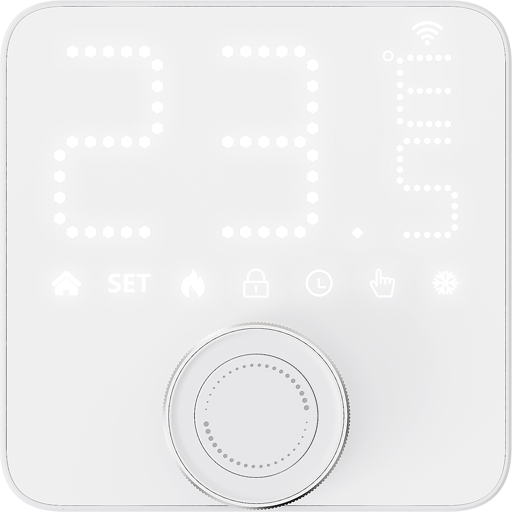 |
OTA updates
This device supports OTA updates, for more information see OTA updates.
Options
How to use device type specific configuration
thermostat_unit: Controls the temperature unit of the thermostat (default celsius). The value must be one ofcelsius,fahrenheit
Exposes
Climate
This climate device supports the following features: occupied_heating_setpoint, local_temperature, local_temperature_calibration, system_mode, running_state.
occupied_heating_setpoint: Temperature setpoint. To control publish a message to topiczigbee2mqtt/FRIENDLY_NAME/setwith payload{"occupied_heating_setpoint": VALUE}whereVALUEis the °C between5and30. To read send a message tozigbee2mqtt/FRIENDLY_NAME/getwith payload{"occupied_heating_setpoint": ""}.local_temperature: Current temperature measured on the device (in °C). To read send a message tozigbee2mqtt/FRIENDLY_NAME/getwith payload{"local_temperature": ""}.system_mode: Mode of the thermostat. To control publish a message to topiczigbee2mqtt/FRIENDLY_NAME/setwith payload{"system_mode": VALUE}whereVALUEis one of:off,auto,heat. To read send a message tozigbee2mqtt/FRIENDLY_NAME/getwith payload{"system_mode": ""}.running_state: The current running state. Possible values are:idle,heat. To read send a message tozigbee2mqtt/FRIENDLY_NAME/getwith payload{"running_state": ""}.local_temperature_calibration: Offset to add/subtract to the local temperature. To control publish a message to topiczigbee2mqtt/FRIENDLY_NAME/setwith payload{"local_temperature_calibration": VALUE}.To read send a message tozigbee2mqtt/FRIENDLY_NAME/getwith payload{"local_temperature": ""}.The minimal value is-10and the maximum value is10with a step size of0.2.
Child lock (binary)
Enables/disables physical input on the device. Value can be found in the published state on the child_lock property. To read (/get) the value publish a message to topic zigbee2mqtt/FRIENDLY_NAME/get with payload {"child_lock": ""}. To write (/set) a value publish a message to topic zigbee2mqtt/FRIENDLY_NAME/set with payload {"child_lock": NEW_VALUE}. If value equals LOCK child lock is ON, if UNLOCK OFF.
Open window (binary)
Automatically stops heating when the room temperature drops by more than 1.5°C within 5 minutes.. Value can be found in the published state on the open_window property. To read (/get) the value publish a message to topic zigbee2mqtt/FRIENDLY_NAME/get with payload {"open_window": ""}. To write (/set) a value publish a message to topic zigbee2mqtt/FRIENDLY_NAME/set with payload {"open_window": NEW_VALUE}. If value equals ON open window is ON, if OFF OFF.
Open window detected (binary)
Indicates whether open window detection was triggered.. Value can be found in the published state on the open_window_detected property. It's not possible to read (/get) or write (/set) this value. If value equals true open window detected is ON, if false OFF.
Frost protection temperature (numeric)
The minimum room temperature at which heating automatically turns on in Off mode to prevent pipes from freezing.. Value can be found in the published state on the frost_protection_temperature property. To read (/get) the value publish a message to topic zigbee2mqtt/FRIENDLY_NAME/get with payload {"frost_protection_temperature": ""}. To write (/set) a value publish a message to topic zigbee2mqtt/FRIENDLY_NAME/set with payload {"frost_protection_temperature": NEW_VALUE}. The minimal value is 5 and the maximum value is 15. The unit of this value is °C.
Schedule active group (enum)
The schedule group currently used in Auto mode.. Value can be found in the published state on the schedule_active_group property. To read (/get) the value publish a message to topic zigbee2mqtt/FRIENDLY_NAME/get with payload {"schedule_active_group": ""}. To write (/set) a value publish a message to topic zigbee2mqtt/FRIENDLY_NAME/set with payload {"schedule_active_group": NEW_VALUE}. The possible values are: 1, 2, 3.
Schedule group to edit (enum)
Select the schedule group to view or edit.. Value can be found in the published state on the schedule_group_to_edit property. To read (/get) the value publish a message to topic zigbee2mqtt/FRIENDLY_NAME/get with payload {"schedule_group_to_edit": ""}. To write (/set) a value publish a message to topic zigbee2mqtt/FRIENDLY_NAME/set with payload {"schedule_group_to_edit": NEW_VALUE}. The possible values are: 1, 2, 3.
Weekly schedule sunday (text)
The preset heating schedule to use when the system mode is set to "auto". Up to 12 transitions can be defined per day, where a transition is expressed in the format 'HH:mm/temperature'. The first transition for each day must start at 00:00 and the valid temperature range is 5-30°C.. Value can be found in the published state on the weekly_schedule_sunday property. To read (/get) the value publish a message to topic zigbee2mqtt/FRIENDLY_NAME/get with payload {"weekly_schedule_sunday": ""}. To write (/set) a value publish a message to topic zigbee2mqtt/FRIENDLY_NAME/set with payload {"weekly_schedule_sunday": NEW_VALUE}.
Weekly schedule monday (text)
The preset heating schedule to use when the system mode is set to "auto". Up to 12 transitions can be defined per day, where a transition is expressed in the format 'HH:mm/temperature'. The first transition for each day must start at 00:00 and the valid temperature range is 5-30°C.. Value can be found in the published state on the weekly_schedule_monday property. To read (/get) the value publish a message to topic zigbee2mqtt/FRIENDLY_NAME/get with payload {"weekly_schedule_monday": ""}. To write (/set) a value publish a message to topic zigbee2mqtt/FRIENDLY_NAME/set with payload {"weekly_schedule_monday": NEW_VALUE}.
Weekly schedule tuesday (text)
The preset heating schedule to use when the system mode is set to "auto". Up to 12 transitions can be defined per day, where a transition is expressed in the format 'HH:mm/temperature'. The first transition for each day must start at 00:00 and the valid temperature range is 5-30°C.. Value can be found in the published state on the weekly_schedule_tuesday property. To read (/get) the value publish a message to topic zigbee2mqtt/FRIENDLY_NAME/get with payload {"weekly_schedule_tuesday": ""}. To write (/set) a value publish a message to topic zigbee2mqtt/FRIENDLY_NAME/set with payload {"weekly_schedule_tuesday": NEW_VALUE}.
Weekly schedule wednesday (text)
The preset heating schedule to use when the system mode is set to "auto". Up to 12 transitions can be defined per day, where a transition is expressed in the format 'HH:mm/temperature'. The first transition for each day must start at 00:00 and the valid temperature range is 5-30°C.. Value can be found in the published state on the weekly_schedule_wednesday property. To read (/get) the value publish a message to topic zigbee2mqtt/FRIENDLY_NAME/get with payload {"weekly_schedule_wednesday": ""}. To write (/set) a value publish a message to topic zigbee2mqtt/FRIENDLY_NAME/set with payload {"weekly_schedule_wednesday": NEW_VALUE}.
Weekly schedule thursday (text)
The preset heating schedule to use when the system mode is set to "auto". Up to 12 transitions can be defined per day, where a transition is expressed in the format 'HH:mm/temperature'. The first transition for each day must start at 00:00 and the valid temperature range is 5-30°C.. Value can be found in the published state on the weekly_schedule_thursday property. To read (/get) the value publish a message to topic zigbee2mqtt/FRIENDLY_NAME/get with payload {"weekly_schedule_thursday": ""}. To write (/set) a value publish a message to topic zigbee2mqtt/FRIENDLY_NAME/set with payload {"weekly_schedule_thursday": NEW_VALUE}.
Weekly schedule friday (text)
The preset heating schedule to use when the system mode is set to "auto". Up to 12 transitions can be defined per day, where a transition is expressed in the format 'HH:mm/temperature'. The first transition for each day must start at 00:00 and the valid temperature range is 5-30°C.. Value can be found in the published state on the weekly_schedule_friday property. To read (/get) the value publish a message to topic zigbee2mqtt/FRIENDLY_NAME/get with payload {"weekly_schedule_friday": ""}. To write (/set) a value publish a message to topic zigbee2mqtt/FRIENDLY_NAME/set with payload {"weekly_schedule_friday": NEW_VALUE}.
Weekly schedule saturday (text)
The preset heating schedule to use when the system mode is set to "auto". Up to 12 transitions can be defined per day, where a transition is expressed in the format 'HH:mm/temperature'. The first transition for each day must start at 00:00 and the valid temperature range is 5-30°C.. Value can be found in the published state on the weekly_schedule_saturday property. To read (/get) the value publish a message to topic zigbee2mqtt/FRIENDLY_NAME/get with payload {"weekly_schedule_saturday": ""}. To write (/set) a value publish a message to topic zigbee2mqtt/FRIENDLY_NAME/set with payload {"weekly_schedule_saturday": NEW_VALUE}.
Temporary mode mode (enum)
Disabled exits temporary mode. Boost runs the heating at 30°C. Timer runs the heating at a custom temperature and duration.. Value can be found in the published state on the temporary_mode_mode property. To read (/get) the value publish a message to topic zigbee2mqtt/FRIENDLY_NAME/get with payload {"temporary_mode_mode": ""}. To write (/set) a value publish a message to topic zigbee2mqtt/FRIENDLY_NAME/set with payload {"temporary_mode_mode": NEW_VALUE}. The possible values are: disabled, timer, boost.
Temporary mode duration (numeric)
Boost Mode: Runs for up to 180 minutes. Timer Mode: Runs at a custom temperature for up to 24 hours.. Value can be found in the published state on the temporary_mode_duration property. To read (/get) the value publish a message to topic zigbee2mqtt/FRIENDLY_NAME/get with payload {"temporary_mode_duration": ""}. To write (/set) a value publish a message to topic zigbee2mqtt/FRIENDLY_NAME/set with payload {"temporary_mode_duration": NEW_VALUE}. The minimal value is 1 and the maximum value is 1440. The unit of this value is minutes.
Temporary mode target temperature (numeric)
In timer mode, the temperature can be set to 5-30°C.. Value can be found in the published state on the temporary_mode_target_temperature property. To read (/get) the value publish a message to topic zigbee2mqtt/FRIENDLY_NAME/get with payload {"temporary_mode_target_temperature": ""}. To write (/set) a value publish a message to topic zigbee2mqtt/FRIENDLY_NAME/set with payload {"temporary_mode_target_temperature": NEW_VALUE}. The minimal value is 5 and the maximum value is 30. The unit of this value is °C.
Temperature sensor (enum)
Select the temperature source used for control.local_temperature: Uses the built-in sensor.remote_temperature: Uses the external temperature sensor.remote_source_offline: The external sensor is offline, so the device automatically uses the built-in sensor.When the external sensor reconnects, the device reports 0x03 and switches back to the external temperature sensor.. Value can be found in the published state on the temperature_sensor_select property. To read (/get) the value publish a message to topic zigbee2mqtt/FRIENDLY_NAME/get with payload {"temperature_sensor_select": ""}. To write (/set) a value publish a message to topic zigbee2mqtt/FRIENDLY_NAME/set with payload {"temperature_sensor_select": NEW_VALUE}. The possible values are: local_temperature, remote_temperature, remote_source_offline.
External temperature (numeric)
The value of an external temperature sensor. Note: synchronisation of this value with the external temperature sensor needs to happen outside of Zigbee2MQTT.. Value can be found in the published state on the external_temperature_input property. To read (/get) the value publish a message to topic zigbee2mqtt/FRIENDLY_NAME/get with payload {"external_temperature_input": ""}. To write (/set) a value publish a message to topic zigbee2mqtt/FRIENDLY_NAME/set with payload {"external_temperature_input": NEW_VALUE}. The minimal value is 0 and the maximum value is 99.9. The unit of this value is °C.
Minimum heating start threshold (numeric)
Heating starts when the room temperature falls below the target temperature plus this offset.. Value can be found in the published state on the hysteresis_low property. To read (/get) the value publish a message to topic zigbee2mqtt/FRIENDLY_NAME/get with payload {"hysteresis_low": ""}. To write (/set) a value publish a message to topic zigbee2mqtt/FRIENDLY_NAME/set with payload {"hysteresis_low": NEW_VALUE}. The minimal value is -2.6 and the maximum value is -0.2. The unit of this value is °C.
Maximum heating stop threshold (numeric)
Heating stops when the room temperature rises above the target temperature plus this offset.. Value can be found in the published state on the hysteresis_high property. To read (/get) the value publish a message to topic zigbee2mqtt/FRIENDLY_NAME/get with payload {"hysteresis_high": ""}. To write (/set) a value publish a message to topic zigbee2mqtt/FRIENDLY_NAME/set with payload {"hysteresis_high": NEW_VALUE}. The minimal value is 0 and the maximum value is 2.6. The unit of this value is °C.
Hydronic underfloor heating relay output (enum)
Select how the 3 A relay operates. Normally open (NO): The output is powered during heating and unpowered when heating stops. Normally closed (NC): The output is unpowered during heating and powered when heating stops.. Value can be found in the published state on the hydronic_underfloor_heating_relay_output property. To read (/get) the value publish a message to topic zigbee2mqtt/FRIENDLY_NAME/get with payload {"hydronic_underfloor_heating_relay_output": ""}. To write (/set) a value publish a message to topic zigbee2mqtt/FRIENDLY_NAME/set with payload {"hydronic_underfloor_heating_relay_output": NEW_VALUE}. The possible values are: normally_open_no, normally_closed_nc.
Boiler dry contact output (enum)
Select how the boiler dry-contact relay operates. Normally open (NO): The contact closes during heating and opens when heating stops. Normally closed (NC): The contact opens during heating and closes when heating stops.. Value can be found in the published state on the boiler_dry_contact_output property. To read (/get) the value publish a message to topic zigbee2mqtt/FRIENDLY_NAME/get with payload {"boiler_dry_contact_output": ""}. To write (/set) a value publish a message to topic zigbee2mqtt/FRIENDLY_NAME/set with payload {"boiler_dry_contact_output": NEW_VALUE}. The possible values are: normally_open_no, normally_closed_nc.
NTC temperature (text)
Current external NTC temperature or sensor status.. Value can be found in the published state on the ntc_temperature property. It's not possible to read (/get) or write (/set) this value.
NTC overheat protection (binary)
Enable or disable NTC overheat protection.. Value can be found in the published state on the ntc_overheat_protection property. To read (/get) the value publish a message to topic zigbee2mqtt/FRIENDLY_NAME/get with payload {"ntc_overheat_protection": ""}. To write (/set) a value publish a message to topic zigbee2mqtt/FRIENDLY_NAME/set with payload {"ntc_overheat_protection": NEW_VALUE}. If value equals ON nTC overheat protection is ON, if OFF OFF.
NTC overheat protection temperature (numeric)
Temperature threshold at which NTC overheat protection is triggered.. Value can be found in the published state on the ntc_overheat_protection_temperature property. To read (/get) the value publish a message to topic zigbee2mqtt/FRIENDLY_NAME/get with payload {"ntc_overheat_protection_temperature": ""}. To write (/set) a value publish a message to topic zigbee2mqtt/FRIENDLY_NAME/set with payload {"ntc_overheat_protection_temperature": NEW_VALUE}. The minimal value is 20 and the maximum value is 50. The unit of this value is °C.
Radar detection (binary)
Enable or disable radar presence detection.. Value can be found in the published state on the radar_detection property. To read (/get) the value publish a message to topic zigbee2mqtt/FRIENDLY_NAME/get with payload {"radar_detection": ""}. To write (/set) a value publish a message to topic zigbee2mqtt/FRIENDLY_NAME/set with payload {"radar_detection": NEW_VALUE}. If value equals enable radar detection is ON, if disable OFF.
Radar sensitivity (enum)
Radar detection sensitivity.. Value can be found in the published state on the radar_sensitivity property. To read (/get) the value publish a message to topic zigbee2mqtt/FRIENDLY_NAME/get with payload {"radar_sensitivity": ""}. To write (/set) a value publish a message to topic zigbee2mqtt/FRIENDLY_NAME/set with payload {"radar_sensitivity": NEW_VALUE}. The possible values are: low, medium, high.
Radar do not disturb (binary)
Do not wake the screen automatically when presence is detected during the configured period.. Value can be found in the published state on the radar_do_not_disturb property. To read (/get) the value publish a message to topic zigbee2mqtt/FRIENDLY_NAME/get with payload {"radar_do_not_disturb": ""}. To write (/set) a value publish a message to topic zigbee2mqtt/FRIENDLY_NAME/set with payload {"radar_do_not_disturb": NEW_VALUE}. If value equals enable radar do not disturb is ON, if disable OFF.
Radar do not disturb period (text)
During the scheduled period, presence detection will not wake the screen automatically. Format: HH:mm-HH:mm, e.g. 00:00-06:00.. Value can be found in the published state on the radar_do_not_disturb_period property. To read (/get) the value publish a message to topic zigbee2mqtt/FRIENDLY_NAME/get with payload {"radar_do_not_disturb_period": ""}. To write (/set) a value publish a message to topic zigbee2mqtt/FRIENDLY_NAME/set with payload {"radar_do_not_disturb_period": NEW_VALUE}.
Standby brightness (numeric)
Screen brightness when the device is idle.. Value can be found in the published state on the standby_brightness property. To read (/get) the value publish a message to topic zigbee2mqtt/FRIENDLY_NAME/get with payload {"standby_brightness": ""}. To write (/set) a value publish a message to topic zigbee2mqtt/FRIENDLY_NAME/set with payload {"standby_brightness": NEW_VALUE}. The minimal value is 0 and the maximum value is 8.
Active brightness (numeric)
Screen brightness when the device is active.. Value can be found in the published state on the active_brightness property. To read (/get) the value publish a message to topic zigbee2mqtt/FRIENDLY_NAME/get with payload {"active_brightness": ""}. To write (/set) a value publish a message to topic zigbee2mqtt/FRIENDLY_NAME/set with payload {"active_brightness": NEW_VALUE}. The minimal value is 0 and the maximum value is 8.
Night mode (binary)
Reduce screen brightness during the scheduled period.. Value can be found in the published state on the night_mode property. To read (/get) the value publish a message to topic zigbee2mqtt/FRIENDLY_NAME/get with payload {"night_mode": ""}. To write (/set) a value publish a message to topic zigbee2mqtt/FRIENDLY_NAME/set with payload {"night_mode": NEW_VALUE}. If value equals enable night mode is ON, if disable OFF.
Night mode period (text)
Period during which night mode brightness is used. Format: HH:mm-HH:mm, e.g. 00:00-06:00.. Value can be found in the published state on the night_mode_period property. To read (/get) the value publish a message to topic zigbee2mqtt/FRIENDLY_NAME/get with payload {"night_mode_period": ""}. To write (/set) a value publish a message to topic zigbee2mqtt/FRIENDLY_NAME/set with payload {"night_mode_period": NEW_VALUE}.
Night brightness (numeric)
Adjusts the screen brightness when the device is in standby during the scheduled period.. Value can be found in the published state on the night_brightness property. To read (/get) the value publish a message to topic zigbee2mqtt/FRIENDLY_NAME/get with payload {"night_brightness": ""}. To write (/set) a value publish a message to topic zigbee2mqtt/FRIENDLY_NAME/set with payload {"night_brightness": NEW_VALUE}. The minimal value is 0 and the maximum value is 8.
Bluetooth pairing (binary)
Start or stop Bluetooth pairing broadcast.. Value can be found in the published state on the bluetooth_pairing property. To read (/get) the value publish a message to topic zigbee2mqtt/FRIENDLY_NAME/get with payload {"bluetooth_pairing": ""}. To write (/set) a value publish a message to topic zigbee2mqtt/FRIENDLY_NAME/set with payload {"bluetooth_pairing": NEW_VALUE}. If value equals start bluetooth pairing is ON, if stop OFF.
Read temperature control history (composite)
Read TP-WGZBA temperature control history.. Can be set by publishing to zigbee2mqtt/FRIENDLY_NAME/set with payload {"read_temperature_control_history": {"type": VALUE, "time_range": VALUE}}
type(enum) allowed values:day,month,half_yeartime_range(composite)
Temperature control history (text)
Last decoded TP-WGZBA temperature control history response.. Value can be found in the published state on the temperature_control_history property. It's not possible to read (/get) or write (/set) this value.
Factory reset (enum)
Resetting the device will restore its factory settings and erase all device data. Please proceed with caution.. Value will not be published in the state. It's not possible to read (/get) this value. To write (/set) a value publish a message to topic zigbee2mqtt/FRIENDLY_NAME/set with payload {"factory_reset": NEW_VALUE}. The possible values are: reset.