
SONOFF SWV-ZF2
| Model | SWV-ZF2 |
| Vendor | SONOFF |
| Description | Zigbee dual-channel smart water valve |
| Exposes | battery, switch (state), child_lock, valve_abnormal_state, water_flow_unit, manual_default_settings, irrigation_plan_settings, irrigation_plan_report, irrigation_plan_remove, irrigation_plan_removed_report, irrigation_schedule_status, rain_delay, rain_delay_end_datetime, seasonal_watering_adjustment, valve_alarm_settings, real_time_irrigation_duration, real_time_irrigation_volume, hour_irrigation_duration, hour_irrigation_volume, 24_hours_records, 30_days_records, 180_days_records, read_swvzf_records |
| Picture | 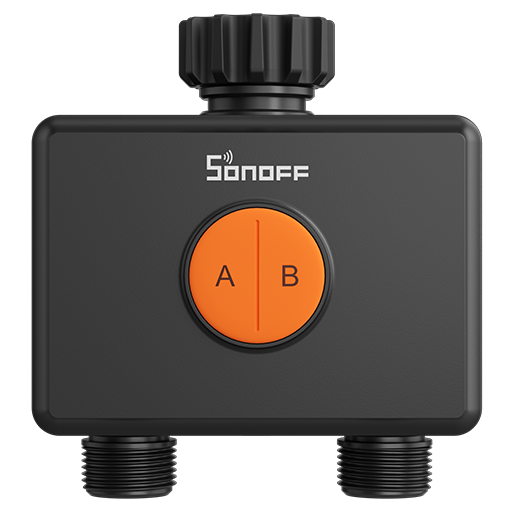 |
OTA updates
This device supports OTA updates, for more information see OTA updates.
Options
How to use device type specific configuration
state_action: State actions will also be published as 'action' when true (default false). The value must betrueorfalse
Exposes
Battery (numeric)
Remaining battery in %. Value can be found in the published state on the battery property. To read (/get) the value publish a message to topic zigbee2mqtt/FRIENDLY_NAME/get with payload {"battery": ""}. It's not possible to write (/set) this value. The minimal value is 0 and the maximum value is 100. The unit of this value is %.
Switch (1 endpoint)
The current state of this switch is in the published state under the state_1 property (value is ON or OFF). To control this switch publish a message to topic zigbee2mqtt/FRIENDLY_NAME/set with payload {"state_1": "ON"}, {"state_1": "OFF"} or {"state_1": "TOGGLE"}. To read the current state of this switch publish a message to topic zigbee2mqtt/FRIENDLY_NAME/get with payload {"state_1": ""}.
On with timed off
When setting the state to ON, it might be possible to specify an automatic shutoff after a certain amount of time. To do this add an additional property on_time to the payload which is the time in seconds the state should remain on. Additionally an off_wait_time property can be added to the payload to specify the cooldown time in seconds when the switch will not answer to other on with timed off commands. Support depends on the switch firmware. Some devices might require both on_time and off_wait_time to work Examples : {"state" : "ON", "on_time": 300}, {"state" : "ON", "on_time": 300, "off_wait_time": 120}.
Switch (2 endpoint)
The current state of this switch is in the published state under the state_2 property (value is ON or OFF). To control this switch publish a message to topic zigbee2mqtt/FRIENDLY_NAME/set with payload {"state_2": "ON"}, {"state_2": "OFF"} or {"state_2": "TOGGLE"}. To read the current state of this switch publish a message to topic zigbee2mqtt/FRIENDLY_NAME/get with payload {"state_2": ""}.
On with timed off
When setting the state to ON, it might be possible to specify an automatic shutoff after a certain amount of time. To do this add an additional property on_time to the payload which is the time in seconds the state should remain on. Additionally an off_wait_time property can be added to the payload to specify the cooldown time in seconds when the switch will not answer to other on with timed off commands. Support depends on the switch firmware. Some devices might require both on_time and off_wait_time to work Examples : {"state" : "ON", "on_time": 300}, {"state" : "ON", "on_time": 300, "off_wait_time": 120}.
Child lock (binary)
Enables/disables physical input on the device. Value can be found in the published state on the child_lock property. To read (/get) the value publish a message to topic zigbee2mqtt/FRIENDLY_NAME/get with payload {"child_lock": ""}. To write (/set) a value publish a message to topic zigbee2mqtt/FRIENDLY_NAME/set with payload {"child_lock": NEW_VALUE}. If value equals LOCK child lock is ON, if UNLOCK OFF.
Valve abnormal state (enum)
Valve abnormal state. Value can be found in the published state on the valve_abnormal_state property. It's not possible to read (/get) or write (/set) this value. The possible values are: normal, water_shortage_channel_1, water_leakage, water_shortage_channel_1,water_leakage, fail_safe_channel_1, water_shortage_channel_1,fail_safe_channel_1, water_leakage,fail_safe_channel_1, water_shortage_channel_1,water_leakage,fail_safe_channel_1, water_shortage_channel_2, water_shortage_channel_1,water_shortage_channel_2, water_leakage,water_shortage_channel_2, water_shortage_channel_1,water_leakage,water_shortage_channel_2, fail_safe_channel_1,water_shortage_channel_2, water_shortage_channel_1,fail_safe_channel_1,water_shortage_channel_2, water_leakage,fail_safe_channel_1,water_shortage_channel_2, water_shortage_channel_1,water_leakage,fail_safe_channel_1,water_shortage_channel_2, fail_safe_channel_2, water_shortage_channel_1,fail_safe_channel_2, water_leakage,fail_safe_channel_2, water_shortage_channel_1,water_leakage,fail_safe_channel_2, fail_safe_channel_1,fail_safe_channel_2, water_shortage_channel_1,fail_safe_channel_1,fail_safe_channel_2, water_leakage,fail_safe_channel_1,fail_safe_channel_2, water_shortage_channel_1,water_leakage,fail_safe_channel_1,fail_safe_channel_2, water_shortage_channel_2,fail_safe_channel_2, water_shortage_channel_1,water_shortage_channel_2,fail_safe_channel_2, water_leakage,water_shortage_channel_2,fail_safe_channel_2, water_shortage_channel_1,water_leakage,water_shortage_channel_2,fail_safe_channel_2, fail_safe_channel_1,water_shortage_channel_2,fail_safe_channel_2, water_shortage_channel_1,fail_safe_channel_1,water_shortage_channel_2,fail_safe_channel_2, water_leakage,fail_safe_channel_1,water_shortage_channel_2,fail_safe_channel_2, water_shortage_channel_1,water_leakage,fail_safe_channel_1,water_shortage_channel_2,fail_safe_channel_2.
Water flow unit (enum)
Unified water flow unit. Value can be found in the published state on the water_flow_unit property. To read (/get) the value publish a message to topic zigbee2mqtt/FRIENDLY_NAME/get with payload {"water_flow_unit": ""}. To write (/set) a value publish a message to topic zigbee2mqtt/FRIENDLY_NAME/set with payload {"water_flow_unit": NEW_VALUE}. The possible values are: liter, us_gallon, imperial_gallon.
Manual default settings (composite)
Single irrigation settings. Can be set by publishing to zigbee2mqtt/FRIENDLY_NAME/set with payload {"manual_default_settings": {"irrigation_duration": VALUE, "irrigation_mode": VALUE, "irrigation_amount": VALUE, "fail_safe": VALUE}} To read (/get) the value publish a message to topic zigbee2mqtt/FRIENDLY_NAME/get with payload {"manual_default_settings": ""}.
irrigation_duration(numeric): Irrigation duration min value is 1, max value is 719, unit is minirrigation_mode(enum): Irrigation mode: duration or capacity allowed values:duration,capacityirrigation_amount(numeric): Irrigation volume max value is 10000fail_safe(numeric): Safety protection timeout max value is 719, unit is min
Irrigation plan settings (composite, 1 endpoint)
Set irrigation plan. Can be set by publishing to zigbee2mqtt/FRIENDLY_NAME/set with payload {"irrigation_plan_settings_1": {"plan_index": VALUE, "enable_state": VALUE, "loop_type_mode": VALUE, "loop_type_interval_days": VALUE, "loop_type_week_days": VALUE, "enable_date": VALUE, "start_time": VALUE, "irrigation_mode": VALUE, "irrigation_total_duration": VALUE, "irrigation_duration": VALUE, "interval_duration": VALUE, "irrigation_amount": VALUE, "fail_safe": VALUE, "create_datetime": VALUE}}
plan_index(numeric): Plan index max value is 5enable_state(binary) allowed values:trueorfalseloop_type_mode(enum) allowed values:odd_days,even_days,day_interval,weekdaysloop_type_interval_days(numeric): Only effective when loop_type_mode is day_interval min value is 1, max value is 30loop_type_week_days(composite): Only effective when loop_type_mode is weekdaysenable_date(text): Enable date in local YYYY-MM-DD format.start_time(text): Start time in local HH:mm format (24-hour, zero-padded).irrigation_mode(enum) allowed values:duration,capacity,duration_with_intervalirrigation_total_duration(numeric) max value is 719, unit is minirrigation_duration(numeric) min value is 1, max value is 60, unit is mininterval_duration(numeric) min value is 1, max value is 60, unit is minirrigation_amount(numeric) min value is 1, max value is 10000fail_safe(numeric) max value is 719, unit is mincreate_datetime(text): Create datetime in ISO format with timezone (e.g. YYYY-MM-DDTHH:mm:ss+08:00)
Irrigation plan settings (composite, 2 endpoint)
Set irrigation plan. Can be set by publishing to zigbee2mqtt/FRIENDLY_NAME/set with payload {"irrigation_plan_settings_2": {"plan_index": VALUE, "enable_state": VALUE, "loop_type_mode": VALUE, "loop_type_interval_days": VALUE, "loop_type_week_days": VALUE, "enable_date": VALUE, "start_time": VALUE, "irrigation_mode": VALUE, "irrigation_total_duration": VALUE, "irrigation_duration": VALUE, "interval_duration": VALUE, "irrigation_amount": VALUE, "fail_safe": VALUE, "create_datetime": VALUE}}
plan_index(numeric): Plan index max value is 5enable_state(binary) allowed values:trueorfalseloop_type_mode(enum) allowed values:odd_days,even_days,day_interval,weekdaysloop_type_interval_days(numeric): Only effective when loop_type_mode is day_interval min value is 1, max value is 30loop_type_week_days(composite): Only effective when loop_type_mode is weekdaysenable_date(text): Enable date in local YYYY-MM-DD format.start_time(text): Start time in local HH:mm format (24-hour, zero-padded).irrigation_mode(enum) allowed values:duration,capacity,duration_with_intervalirrigation_total_duration(numeric) max value is 719, unit is minirrigation_duration(numeric) min value is 1, max value is 60, unit is mininterval_duration(numeric) min value is 1, max value is 60, unit is minirrigation_amount(numeric) min value is 1, max value is 10000fail_safe(numeric) max value is 719, unit is mincreate_datetime(text): Create datetime in ISO format with timezone (e.g. YYYY-MM-DDTHH:mm:ss+08:00)
Irrigation plan report (composite, 1 endpoint)
Irrigation plan report.
plan_index(numeric)enable_state(binary) allowed values:trueorfalseloop_type_mode(enum) allowed values:odd_days,even_days,day_interval,weekdaysloop_type_interval_days(numeric): Effective when loop_type_mode is day_intervalloop_type_week_days(composite): Effective when loop_type_mode is weekdaysenable_date(text): Enable date in local YYYY-MM-DD format (local day start)start_time(text): Start time in local HH:mm format (24-hour)irrigation_mode(enum) allowed values:duration,capacity,duration_with_intervalirrigation_total_duration(numeric)irrigation_duration(numeric)interval_duration(numeric)irrigation_amount_unit(enum) allowed values:us_gallon,liter,imperial_gallonirrigation_amount(numeric)fail_safe(numeric)create_datetime(text): Create datetime in ISO format with timezone (e.g. YYYY-MM-DDTHH:mm:ss+08:00)
Irrigation plan report (composite, 2 endpoint)
Irrigation plan report.
plan_index(numeric)enable_state(binary) allowed values:trueorfalseloop_type_mode(enum) allowed values:odd_days,even_days,day_interval,weekdaysloop_type_interval_days(numeric): Effective when loop_type_mode is day_intervalloop_type_week_days(composite): Effective when loop_type_mode is weekdaysenable_date(text): Enable date in local YYYY-MM-DD format (local day start)start_time(text): Start time in local HH:mm format (24-hour)irrigation_mode(enum) allowed values:duration,capacity,duration_with_intervalirrigation_total_duration(numeric)irrigation_duration(numeric)interval_duration(numeric)irrigation_amount_unit(enum) allowed values:us_gallon,liter,imperial_gallonirrigation_amount(numeric)fail_safe(numeric)create_datetime(text): Create datetime in ISO format with timezone (e.g. YYYY-MM-DDTHH:mm:ss+08:00)
Irrigation plan remove (composite, 1 endpoint)
Remove irrigation plan. Can be set by publishing to zigbee2mqtt/FRIENDLY_NAME/set with payload {"irrigation_plan_remove_1": {"plan_index": VALUE}}
plan_index(numeric): The index of the irrigation plan to remove max value is 5
Irrigation plan remove (composite, 2 endpoint)
Remove irrigation plan. Can be set by publishing to zigbee2mqtt/FRIENDLY_NAME/set with payload {"irrigation_plan_remove_2": {"plan_index": VALUE}}
plan_index(numeric): The index of the irrigation plan to remove max value is 5
Irrigation plan removed report (numeric, 1 endpoint)
Local irrigation plan removed report. Value can be found in the published state on the irrigation_plan_removed_report_1 property. It's not possible to read (/get) or write (/set) this value. The minimal value is 0 and the maximum value is 5.
Irrigation plan removed report (numeric, 2 endpoint)
Local irrigation plan removed report. Value can be found in the published state on the irrigation_plan_removed_report_2 property. It's not possible to read (/get) or write (/set) this value. The minimal value is 0 and the maximum value is 5.
Irrigation schedule status (composite, 1 endpoint)
Irrigation schedule execution status. To read (/get) the value publish a message to topic zigbee2mqtt/FRIENDLY_NAME/get with payload {"irrigation_schedule_status_1": ""}.
schedule_status(enum): Schedule status allowed values:start,end,running,standbyschedule_index(numeric): Schedule indexschedule_type(enum): Schedule type allowed values:automatic,manualirrigation_mode(enum): Irrigation mode allowed values:duration,capacity,duration_with_intervalstart_time(text): Schedule start timeexpected_end_time(text): Expected end timeactual_end_time(text): Actual end timeirrigation_amount_unit(enum): Irrigation amount unit allowed values:us_gallon,liter,imperial_gallonexpected_irrigation_amount(numeric): Expected irrigation amountactual_irrigation_amount(numeric): Actual irrigation amount
Irrigation schedule status (composite, 2 endpoint)
Irrigation schedule execution status. To read (/get) the value publish a message to topic zigbee2mqtt/FRIENDLY_NAME/get with payload {"irrigation_schedule_status_2": ""}.
schedule_status(enum): Schedule status allowed values:start,end,running,standbyschedule_index(numeric): Schedule indexschedule_type(enum): Schedule type allowed values:automatic,manualirrigation_mode(enum): Irrigation mode allowed values:duration,capacity,duration_with_intervalstart_time(text): Schedule start timeexpected_end_time(text): Expected end timeactual_end_time(text): Actual end timeirrigation_amount_unit(enum): Irrigation amount unit allowed values:us_gallon,liter,imperial_gallonexpected_irrigation_amount(numeric): Expected irrigation amountactual_irrigation_amount(numeric): Actual irrigation amount
Rain delay (text)
Schedule delay end time in ISO format with timezone (e.g. YYYY-MM-DDTHH:mm:ss+08:00), or "0" to disable. Value will not be published in the state. It's not possible to read (/get) this value. To write (/set) a value publish a message to topic zigbee2mqtt/FRIENDLY_NAME/set with payload {"rain_delay": NEW_VALUE}.
Rain delay end datetime (text)
User triggered delay end time.. Value can be found in the published state on the rain_delay_end_datetime property. It's not possible to read (/get) or write (/set) this value.
Seasonal watering adjustment (composite)
Monthly watering adjustment multiplier (1.0 = 100%, 2.0 = 200%). Can be set by publishing to zigbee2mqtt/FRIENDLY_NAME/set with payload {"seasonal_watering_adjustment": {"january": VALUE, "february": VALUE, "march": VALUE, "april": VALUE, "may": VALUE, "june": VALUE, "july": VALUE, "august": VALUE, "september": VALUE, "october": VALUE, "november": VALUE, "december": VALUE}} To read (/get) the value publish a message to topic zigbee2mqtt/FRIENDLY_NAME/get with payload {"seasonal_watering_adjustment": ""}.
january(numeric): Adjustment multiplier for january min value is 0.1, max value is 2february(numeric): Adjustment multiplier for february min value is 0.1, max value is 2march(numeric): Adjustment multiplier for march min value is 0.1, max value is 2april(numeric): Adjustment multiplier for april min value is 0.1, max value is 2may(numeric): Adjustment multiplier for may min value is 0.1, max value is 2june(numeric): Adjustment multiplier for june min value is 0.1, max value is 2july(numeric): Adjustment multiplier for july min value is 0.1, max value is 2august(numeric): Adjustment multiplier for august min value is 0.1, max value is 2september(numeric): Adjustment multiplier for september min value is 0.1, max value is 2october(numeric): Adjustment multiplier for october min value is 0.1, max value is 2november(numeric): Adjustment multiplier for november min value is 0.1, max value is 2december(numeric): Adjustment multiplier for december min value is 0.1, max value is 2
Valve alarm settings (composite)
Valve alarm settings. Can be set by publishing to zigbee2mqtt/FRIENDLY_NAME/set with payload {"valve_alarm_settings": {"enable_alarm_water_shortage": VALUE, "enable_alarm_water_leak": VALUE, "enable_water_shortage_auto_close": VALUE, "alarm_water_shortage_duration": VALUE, "alarm_water_leak_duration": VALUE}} To read (/get) the value publish a message to topic zigbee2mqtt/FRIENDLY_NAME/get with payload {"valve_alarm_settings": ""}.
enable_alarm_water_shortage(binary): Water shortage alarm allowed values:trueorfalseenable_alarm_water_leak(binary): Water leak alarm allowed values:trueorfalseenable_water_shortage_auto_close(binary): Auto close valve on water shortage allowed values:trueorfalsealarm_water_shortage_duration(numeric): Water shortage trigger alarm duration min value is 1, max value is 10, unit is minalarm_water_leak_duration(numeric): Water leak trigger alarm duration min value is 1, max value is 3, unit is min
Real time irrigation duration (numeric, 1 endpoint)
Real-time irrigation duration. Value can be found in the published state on the real_time_irrigation_duration_1 property. To read (/get) the value publish a message to topic zigbee2mqtt/FRIENDLY_NAME/get with payload {"real_time_irrigation_duration_1": ""}. It's not possible to write (/set) this value. The unit of this value is min.
Real time irrigation duration (numeric, 2 endpoint)
Real-time irrigation duration. Value can be found in the published state on the real_time_irrigation_duration_2 property. To read (/get) the value publish a message to topic zigbee2mqtt/FRIENDLY_NAME/get with payload {"real_time_irrigation_duration_2": ""}. It's not possible to write (/set) this value. The unit of this value is min.
Real time irrigation volume (numeric)
The amount of water irrigated in real time. Value can be found in the published state on the real_time_irrigation_volume property. To read (/get) the value publish a message to topic zigbee2mqtt/FRIENDLY_NAME/get with payload {"real_time_irrigation_volume": ""}. It's not possible to write (/set) this value. The unit of this value is L.
Hour irrigation duration (numeric, 1 endpoint)
Hourly irrigation duration. Value can be found in the published state on the hour_irrigation_duration_1 property. To read (/get) the value publish a message to topic zigbee2mqtt/FRIENDLY_NAME/get with payload {"hour_irrigation_duration_1": ""}. It's not possible to write (/set) this value. The unit of this value is min.
Hour irrigation duration (numeric, 2 endpoint)
Hourly irrigation duration. Value can be found in the published state on the hour_irrigation_duration_2 property. To read (/get) the value publish a message to topic zigbee2mqtt/FRIENDLY_NAME/get with payload {"hour_irrigation_duration_2": ""}. It's not possible to write (/set) this value. The unit of this value is min.
Hour irrigation volume (numeric)
Hourly irrigation volume. Value can be found in the published state on the hour_irrigation_volume property. To read (/get) the value publish a message to topic zigbee2mqtt/FRIENDLY_NAME/get with payload {"hour_irrigation_volume": ""}. It's not possible to write (/set) this value. The unit of this value is L.
24 hours records (text)
Value can be found in the published state on the 24_hours_records property. It's not possible to read (/get) or write (/set) this value.
30 days records (text)
Value can be found in the published state on the 30_days_records property. It's not possible to read (/get) or write (/set) this value.
180 days records (text)
Value can be found in the published state on the 180_days_records property. It's not possible to read (/get) or write (/set) this value.
Read irrigation history (composite)
Read irrigation water volume and duration in the past 24 hours, 30 days, and 6 months.. Can be set by publishing to zigbee2mqtt/FRIENDLY_NAME/set with payload {"read_swvzf_records": {"type": VALUE, "time_start": VALUE, "time_end": VALUE}}
type(enum): Reading type allowed values:24_hours,30_days,6_monthstime_start(text): Start time in ISO format with timezone (e.g. YYYY-MM-DDTHH:mm:ss+08:00)time_end(text): End time in ISO format with timezone (e.g. YYYY-MM-DDTHH:mm:ss+08:00)