
Gluon ST001
| Model | ST001 |
| Vendor | Gluon |
| Description | FCU thermostat with minimum temperature limit |
| Exposes | climate (local_temperature, system_mode, fan_mode, current_heating_setpoint, preset, local_temperature_calibration), child_lock, min_temperature, max_temperature, deadzone_temperature, schedule_text |
| Picture | 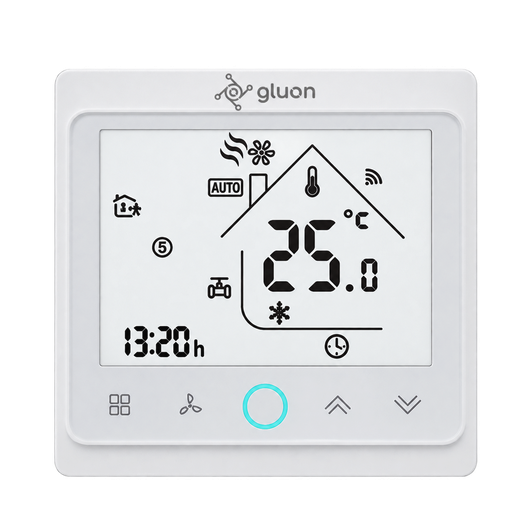 |
Notes
Pairing
Switch the thermostat off first, otherwise it will not enter pairing mode. Then press and hold the fan speed button and the down arrow together until the Wi-Fi-like icon starts blinking. The manual states 30 seconds, but pairing mode is usually entered after about 8 seconds. Turn the thermostat back on once the interview has finished.
Relation to the Tuya BAC-002-ALZB
This is the same FCU thermostat hardware as the Tuya BAC-002-ALZB / BAC-003, but with a different Zigbee module (Silicon Labs instead of Telink) and a firmware that reassigns several datapoints. It therefore needs its own definition. The differences, all verified on the device:
| Function | ST001 (_TZE200_d2nady2a, _TZE204_d2nady2a) | BAC-002-ALZB (_TZE204_dzuqwsyg) |
|---|---|---|
| Minimum setpoint limit | DP 26 | not available |
| Hysteresis (deadzone) | DP 102 | DP 26 |
| Fan speed | DP 49 | DP 28 |
| Preset (auto/manual) | DP 103 | DP 4 |
On this firmware DP 4 still reports, but is stuck at manual and ignores writes, so it is not mapped.
The device ships with two Tuya manufacturer names, _TZE200_d2nady2a and _TZE204_d2nady2a. Both run the same firmware and expose the same datapoints.
Minimum temperature
min_temperature sets the lowest setpoint that can be selected, both from Zigbee and from the device itself. It is the counterpart of max_temperature. Ranges come from the thermostat's hidden installer menu: minimum 5–20 °C, maximum 30–45 °C, hysteresis 1–5 °C.
Settings only available on the device
The hidden installer menu has several parameters that this firmware does not expose over Zigbee: fan behaviour when the setpoint is reached, which buttons the child lock blocks, cooling-only vs cooling/heating mode selection, 12/24 hour display and the display mode. These can only be changed from the thermostat.
Reporting behaviour
The device only reports a datapoint when its value changes; it does not send a full dump on request. After pairing, values appear one by one as they change, so some entities stay empty until the corresponding setting is touched once.
Stop message flooding
Like other thermostats of this family, this unit sends several identical messages per update. To stop this from flooding your MQTT queues, add the following to your configuration.yaml:
devices:
  '0x1234567890abcdef':
    friendly_name: thermostat
    debounce: 1
Options
How to use device type specific configuration
control_sequence_of_operation: Report either cooling and fan or cooling, heating and fan capability. The value must be one ofcooling_only,cooling_and_heatingexpose_device_state: Expose a separate on/off switch, instead of including it in system mode. The value must betrueorfalsewake_before_power_transition: Send a wake-up command before turning the device on or/off, required for some firmware revisions. The value must betrueorfalsetime_start: Reply to Tuya-specific time synchronization requests: "1970" - Reply with seconds since 1970/01/01 (recommended, should stop the device from asking), "2000" - Reply with seconds since 2000/01/01 (use if the weekday is wrong with 1970), "off" - Don't reply (use if replying causes too much traffic). Default for this device: "1970". The value must be one of1970,2000,off
Exposes
Climate
This climate device supports the following features: local_temperature, system_mode, fan_mode, current_heating_setpoint, preset, local_temperature_calibration.
current_heating_setpoint: Temperature setpoint. To control publish a message to topiczigbee2mqtt/FRIENDLY_NAME/setwith payload{"current_heating_setpoint": VALUE}whereVALUEis the °C between5and35. Reading (/get) this attribute is not possible.local_temperature: Current temperature measured on the device (in °C). Reading (/get) this attribute is not possible.system_mode: Mode of this device. To control publish a message to topiczigbee2mqtt/FRIENDLY_NAME/setwith payload{"system_mode": VALUE}whereVALUEis one of:off,cool,heat,fan_only. Reading (/get) this attribute is not possible.preset: Mode of this device (similar to system_mode). To control publish a message to topiczigbee2mqtt/FRIENDLY_NAME/setwith payload{"preset": VALUE}whereVALUEis one of:auto,manual. Reading (/get) this attribute is not possible.local_temperature_calibration: Offset to add/subtract to the local temperature. To control publish a message to topiczigbee2mqtt/FRIENDLY_NAME/setwith payload{"local_temperature_calibration": VALUE}.The minimal value is-9and the maximum value is9with a step size of1.
Child lock (binary)
Enables/disables physical input on the device. Value can be found in the published state on the child_lock property. It's not possible to read (/get) this value. To write (/set) a value publish a message to topic zigbee2mqtt/FRIENDLY_NAME/set with payload {"child_lock": NEW_VALUE}. If value equals LOCK child lock is ON, if UNLOCK OFF.
Min temperature (numeric)
Lowest setpoint that can be selected. Value can be found in the published state on the min_temperature property. It's not possible to read (/get) this value. To write (/set) a value publish a message to topic zigbee2mqtt/FRIENDLY_NAME/set with payload {"min_temperature": NEW_VALUE}. The minimal value is 5 and the maximum value is 20. The unit of this value is °C.
Max temperature (numeric)
Maximum temperature. Value can be found in the published state on the max_temperature property. It's not possible to read (/get) this value. To write (/set) a value publish a message to topic zigbee2mqtt/FRIENDLY_NAME/set with payload {"max_temperature": NEW_VALUE}. The minimal value is 30 and the maximum value is 45. The unit of this value is °C.
Deadzone temperature (numeric)
Hysteresis. Value can be found in the published state on the deadzone_temperature property. It's not possible to read (/get) this value. To write (/set) a value publish a message to topic zigbee2mqtt/FRIENDLY_NAME/set with payload {"deadzone_temperature": NEW_VALUE}. The minimal value is 1 and the maximum value is 5. The unit of this value is °C.
Schedule text (text)
Weekly schedule in the format "HH:MM/TT HH:MM/TT ...". Example for 12 segments: "06:00/20 11:30/21 13:30/22 17:30/23 06:00/24 12:00/23 14:30/22 17:30/21 06:00/19 12:30/20 14:30/21 18:30/20". Each segment contains: - HH:MM: Time in 24-hour format. - TT: Temperature in °C. Ensure all 12 segments are defined and separated by spaces.. Value can be found in the published state on the schedule_text property. It's not possible to read (/get) this value. To write (/set) a value publish a message to topic zigbee2mqtt/FRIENDLY_NAME/set with payload {"schedule_text": NEW_VALUE}.