
Sunricher SR-ZG9032A-PIR
| Model | SR-ZG9032A-PIR |
| Vendor | Sunricher |
| Description | Zigbee motion sensor + light sensor + 0-10V dimming |
| Exposes | light (state, brightness), effect, power_on_behavior, occupancy, illuminance, dimming_brightness_curve, motion_sensor_lux_threshold, motion_sensor_sensitivity, brightness_module_enable, light_on_time, pwm_brightness_value, pwm_output_percentage, light_status_after_first_delay, second_delay_time, light_status_after_second_delay, linearity_error_ratio_lux, fixed_deviation_lux, action |
| Picture | 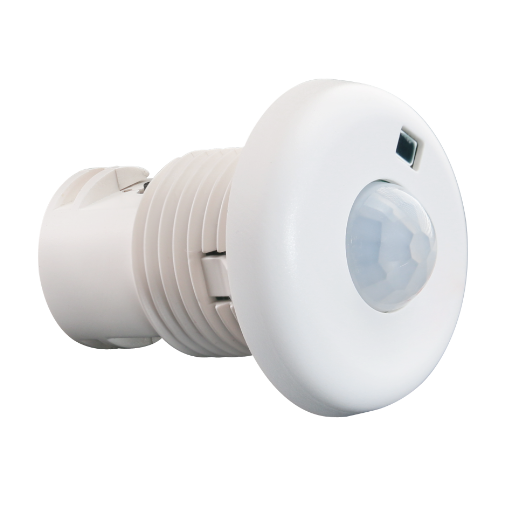 |
Options
How to use device type specific configuration
illuminance_calibration: Calibrates the illuminance value (percentual offset), takes into effect on next report of device. The value must be a number.transition: Controls the transition time (in seconds) of on/off, brightness, color temperature (if applicable) and color (if applicable) changes. Defaults to0(no transition). The value must be a number with a minimum value of0state_action: State actions will also be published as 'action' when true (default false). The value must betrueorfalseno_occupancy_since: Sends a message after the last time no occupancy (occupancy: false) was detected. When setting this for example to [10, 60] a{"no_occupancy_since": 10}will be sent after 10 seconds and a{"no_occupancy_since": 60}after 60 seconds. The value must be a list of numbers.illuminance_raw: Expose the raw illuminance value. The value must betrueorfalsesimulated_brightness: Simulate a brightness value. If this device provides a brightness_move_up or brightness_move_down action it is possible to specify the update interval and delta. The action_brightness_delta indicates the delta for each interval. Example:
simulated_brightness:
  delta: 20 # delta per interval, default = 20
  interval: 200 # interval in milliseconds, default = 200
Exposes
Light (1 endpoint)
This light supports the following features: state, brightness.
state: To control the state publish a message to topiczigbee2mqtt/FRIENDLY_NAME/setwith payload{"state_1": "ON"},{"state_1": "OFF"}or{"state_1": "TOGGLE"}. To read the state send a message tozigbee2mqtt/FRIENDLY_NAME/getwith payload{"state_1": ""}.brightness: To control the brightness publish a message to topiczigbee2mqtt/FRIENDLY_NAME/setwith payload{"brightness_1": VALUE}whereVALUEis a number between0and254. To read the brightness send a message tozigbee2mqtt/FRIENDLY_NAME/getwith payload{"brightness_1": ""}.
On with timed off
When setting the state to ON, it might be possible to specify an automatic shutoff after a certain amount of time. To do this add an additional property on_time to the payload which is the time in seconds the state should remain on. Additionally an off_wait_time property can be added to the payload to specify the cooldown time in seconds when the light will not answer to other on with timed off commands. Support depends on the light firmware. Some devices might require both on_time and off_wait_time to work Examples : {"state" : "ON", "on_time": 300}, {"state" : "ON", "on_time": 300, "off_wait_time": 120}.
Transition
For all of the above mentioned features it is possible to do a transition of the value over time. To do this add an additional property transition to the payload which is the transition time in seconds. Examples: {"brightness":156,"transition":3}, {"color_temp":241,"transition":1}.
Moving/stepping
Instead of setting a value (e.g. brightness) directly it is also possible to:
- move: this will automatically move the value over time, to stop send value
stopor0. - step: this will increment/decrement the current value by the given one.
The direction of move and step can be either up or down, provide a negative value to move/step down, a positive value to move/step up. To do this send a payload like below to zigbee2mqtt/FRIENDLY_NAME/set
NOTE: brightness move/step will stop at the minimum brightness and won't turn on the light when it's off. In this case use brightness_move_onoff/brightness_step_onoff
{
  "brightness_move": -40, // Starts moving brightness down at 40 units per second
  "brightness_move": 0, // Stop moving brightness
  "brightness_step": 40 // Increases brightness by 40
}
Effect (enum, 1 endpoint)
Triggers an effect on the light (e.g. make light blink for a few seconds). Value will not be published in the state. It's not possible to read (/get) this value. To write (/set) a value publish a message to topic zigbee2mqtt/FRIENDLY_NAME/set with payload {"effect_1": NEW_VALUE}. The possible values are: blink, breathe, okay, channel_change, finish_effect, stop_effect.
Power-on behavior (enum, 1 endpoint)
Controls the behavior when the device is powered on after power loss. Value can be found in the published state on the power_on_behavior_1 property. To read (/get) the value publish a message to topic zigbee2mqtt/FRIENDLY_NAME/get with payload {"power_on_behavior_1": ""}. To write (/set) a value publish a message to topic zigbee2mqtt/FRIENDLY_NAME/set with payload {"power_on_behavior_1": NEW_VALUE}. The possible values are: off, on, toggle, previous.
Occupancy (binary, 2 endpoint)
Indicates whether the device detected occupancy. Value can be found in the published state on the occupancy_2 property. To read (/get) the value publish a message to topic zigbee2mqtt/FRIENDLY_NAME/get with payload {"occupancy_2": ""}. It's not possible to write (/set) this value. If value equals true occupancy is ON, if false OFF.
Illuminance (numeric, 3 endpoint)
Measured illuminance. Value can be found in the published state on the illuminance_3 property. To read (/get) the value publish a message to topic zigbee2mqtt/FRIENDLY_NAME/get with payload {"illuminance_3": ""}. It's not possible to write (/set) this value. The unit of this value is lx.
Dimming brightness curve (enum)
Dimming brightness curve. Options: linear, gamma 1.5, gamma 1.8. Default: linear.. Value can be found in the published state on the dimming_brightness_curve property. To read (/get) the value publish a message to topic zigbee2mqtt/FRIENDLY_NAME/get with payload {"dimming_brightness_curve": ""}. To write (/set) a value publish a message to topic zigbee2mqtt/FRIENDLY_NAME/set with payload {"dimming_brightness_curve": NEW_VALUE}. The possible values are: linear, gamma_1_5, gamma_1_8.
Motion sensor lux threshold (numeric)
Daylight sensor lux threshold. When the measured lux is below this value, the light is allowed to turn on. Set to minimum value to disable this function. Default: disabled.. Value can be found in the published state on the motion_sensor_lux_threshold property. To read (/get) the value publish a message to topic zigbee2mqtt/FRIENDLY_NAME/get with payload {"motion_sensor_lux_threshold": ""}. To write (/set) a value publish a message to topic zigbee2mqtt/FRIENDLY_NAME/set with payload {"motion_sensor_lux_threshold": NEW_VALUE}. The minimal value is 0 and the maximum value is 65535.
Motion sensor sensitivity (numeric)
Motion sensor sensitivity. 0 is highest sensitivity, 15 is lowest. Default: 1.. Value can be found in the published state on the motion_sensor_sensitivity property. To read (/get) the value publish a message to topic zigbee2mqtt/FRIENDLY_NAME/get with payload {"motion_sensor_sensitivity": ""}. To write (/set) a value publish a message to topic zigbee2mqtt/FRIENDLY_NAME/set with payload {"motion_sensor_sensitivity": NEW_VALUE}. The minimal value is 0 and the maximum value is 15.
Brightness module enable (enum)
Enable or disable the brightness module. Options: enabled, disabled. Default: enabled.. Value can be found in the published state on the brightness_module_enable property. To read (/get) the value publish a message to topic zigbee2mqtt/FRIENDLY_NAME/get with payload {"brightness_module_enable": ""}. To write (/set) a value publish a message to topic zigbee2mqtt/FRIENDLY_NAME/set with payload {"brightness_module_enable": NEW_VALUE}. The possible values are: disabled, enabled.
Light on time (numeric)
Light on time (first delay). When motion is detected and then the area is vacated, this is the time the light stays on. Unit: seconds. Default: 60 seconds.. Value can be found in the published state on the light_on_time property. To read (/get) the value publish a message to topic zigbee2mqtt/FRIENDLY_NAME/get with payload {"light_on_time": ""}. To write (/set) a value publish a message to topic zigbee2mqtt/FRIENDLY_NAME/set with payload {"light_on_time": NEW_VALUE}. The minimal value is 0 and the maximum value is 65535. The unit of this value is s.
Pwm brightness value (numeric)
Brightness value for PWM output when motion is detected. 0 disables this function. Default: disabled.. Value can be found in the published state on the pwm_brightness_value property. To read (/get) the value publish a message to topic zigbee2mqtt/FRIENDLY_NAME/get with payload {"pwm_brightness_value": ""}. To write (/set) a value publish a message to topic zigbee2mqtt/FRIENDLY_NAME/set with payload {"pwm_brightness_value": NEW_VALUE}. The minimal value is 0 and the maximum value is 1000. The unit of this value is lux.
Pwm output percentage (numeric)
PWM output percentage when motion is detected. Range: 0-100%. Default: 100%.. Value can be found in the published state on the pwm_output_percentage property. To read (/get) the value publish a message to topic zigbee2mqtt/FRIENDLY_NAME/get with payload {"pwm_output_percentage": ""}. To write (/set) a value publish a message to topic zigbee2mqtt/FRIENDLY_NAME/set with payload {"pwm_output_percentage": NEW_VALUE}. The minimal value is 0 and the maximum value is 254. The unit of this value is %.
Light status after first delay (numeric)
Light status after the first delay expires, during the second delay. Range: 0-100%. Default: 0% (off).. Value can be found in the published state on the light_status_after_first_delay property. To read (/get) the value publish a message to topic zigbee2mqtt/FRIENDLY_NAME/get with payload {"light_status_after_first_delay": ""}. To write (/set) a value publish a message to topic zigbee2mqtt/FRIENDLY_NAME/set with payload {"light_status_after_first_delay": NEW_VALUE}. The minimal value is 0 and the maximum value is 254. The unit of this value is %.
Second delay time (numeric)
Duration of the second delay after the first delay expires. Unit: seconds. Default: 60 seconds.. Value can be found in the published state on the second_delay_time property. To read (/get) the value publish a message to topic zigbee2mqtt/FRIENDLY_NAME/get with payload {"second_delay_time": ""}. To write (/set) a value publish a message to topic zigbee2mqtt/FRIENDLY_NAME/set with payload {"second_delay_time": NEW_VALUE}. The minimal value is 0 and the maximum value is 65535. The unit of this value is s.
Light status after second delay (numeric)
Light status after the second delay expires. Range: 0-100%. Default: 0% (off).. Value can be found in the published state on the light_status_after_second_delay property. To read (/get) the value publish a message to topic zigbee2mqtt/FRIENDLY_NAME/get with payload {"light_status_after_second_delay": ""}. To write (/set) a value publish a message to topic zigbee2mqtt/FRIENDLY_NAME/set with payload {"light_status_after_second_delay": NEW_VALUE}. The minimal value is 0 and the maximum value is 254. The unit of this value is %.
Linearity error ratio lux (numeric)
Linearity error ratio coefficient for LUX measurement. 1000 means 1000‰ (default). Increasing this value magnifies the LUX measurement linearly, decreasing minifies it.. Value can be found in the published state on the linearity_error_ratio_lux property. To read (/get) the value publish a message to topic zigbee2mqtt/FRIENDLY_NAME/get with payload {"linearity_error_ratio_lux": ""}. To write (/set) a value publish a message to topic zigbee2mqtt/FRIENDLY_NAME/set with payload {"linearity_error_ratio_lux": NEW_VALUE}. The minimal value is 100 and the maximum value is 10000.
Fixed deviation lux (numeric)
Fixed deviation of LUX measurement. Positive value increases, negative value decreases the measured LUX.. Value can be found in the published state on the fixed_deviation_lux property. To read (/get) the value publish a message to topic zigbee2mqtt/FRIENDLY_NAME/get with payload {"fixed_deviation_lux": ""}. To write (/set) a value publish a message to topic zigbee2mqtt/FRIENDLY_NAME/set with payload {"fixed_deviation_lux": NEW_VALUE}. The minimal value is -100 and the maximum value is 100.
Action (enum)
Triggered action (e.g. a button click). Value can be found in the published state on the action property. It's not possible to read (/get) or write (/set) this value. The possible values are: on_1, off_1, toggle_1, brightness_move_to_level_1, brightness_move_up_1, brightness_move_down_1, brightness_step_up_1, brightness_step_down_1, brightness_stop_1.