
SONOFF SNZB-02UL
| Model | SNZB-02UL |
| Vendor | SONOFF |
| Description | E-ink screen temperature and humidity sensor |
| Exposes | battery, temperature, humidity, dew_point, vpd, remote_sensors_state, remote_temperature, remote_humidity, remote_pressure, weather, comfort_temperature_min, comfort_temperature_max, temperature_units, comfort_humidity_min, comfort_humidity_max, temperature_calibration, humidity_calibration |
| Picture | 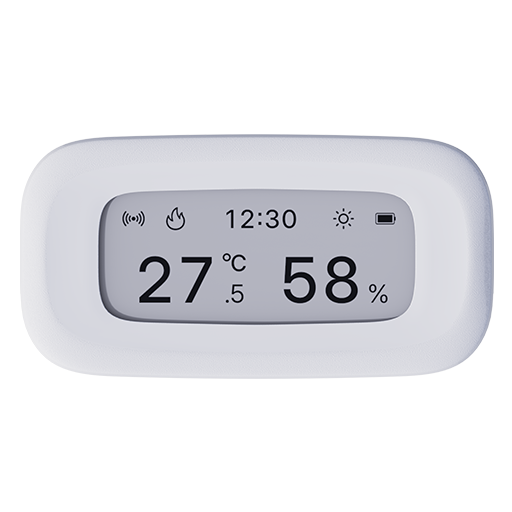 |
OTA updates
This device supports OTA updates, for more information see OTA updates.
Options
How to use device type specific configuration
temperature_calibration: Calibrates the temperature value (absolute offset), takes into effect on next report of device. The value must be a number.temperature_precision: Number of digits after decimal point for temperature, takes into effect on next report of device. This option can only decrease the precision, not increase it. The value must be a number with a minimum value of0and with a maximum value of3humidity_calibration: Calibrates the humidity value (absolute offset), takes into effect on next report of device. The value must be a number.humidity_precision: Number of digits after decimal point for humidity, takes into effect on next report of device. This option can only decrease the precision, not increase it. The value must be a number with a minimum value of0and with a maximum value of3
Exposes
Battery (numeric)
Remaining battery in %. Value can be found in the published state on the battery property. To read (/get) the value publish a message to topic zigbee2mqtt/FRIENDLY_NAME/get with payload {"battery": ""}. It's not possible to write (/set) this value. The minimal value is 0 and the maximum value is 100. The unit of this value is %.
Temperature (numeric)
Measured temperature value. Value can be found in the published state on the temperature property. To read (/get) the value publish a message to topic zigbee2mqtt/FRIENDLY_NAME/get with payload {"temperature": ""}. It's not possible to write (/set) this value. The unit of this value is °C.
Humidity (numeric)
Measured relative humidity. Value can be found in the published state on the humidity property. To read (/get) the value publish a message to topic zigbee2mqtt/FRIENDLY_NAME/get with payload {"humidity": ""}. It's not possible to write (/set) this value. The unit of this value is %.
Dew point (numeric)
Calculated dew point temperature. Value can be found in the published state on the dew_point property. It's not possible to read (/get) or write (/set) this value. The unit of this value is °C.
Vpd (numeric)
Calculated vapor pressure deficit. Value can be found in the published state on the vpd property. It's not possible to read (/get) or write (/set) this value. The unit of this value is kPa.
Remote sensors state (enum)
The remote temperature‑humidity source shares the same display area with the date. When the remote temperature‑humidity source is enabled, the date will no longer be shown. Note: wake up the device by pressing the button on the back before changing this value.. Value can be found in the published state on the remote_sensors_state property. It's not possible to read (/get) this value. To write (/set) a value publish a message to topic zigbee2mqtt/FRIENDLY_NAME/set with payload {"remote_sensors_state": NEW_VALUE}. The possible values are: enable, disable.
Remote temperature (numeric)
Remote temperature value displayed on the E-ink screen. Note: wake up the device by pressing the button on the back before changing this value.. Value can be found in the published state on the remote_temperature property. It's not possible to read (/get) this value. To write (/set) a value publish a message to topic zigbee2mqtt/FRIENDLY_NAME/set with payload {"remote_temperature": NEW_VALUE}. The minimal value is -20 and the maximum value is 60. The unit of this value is °C.
Remote humidity (numeric)
Remote humidity value displayed on the E-ink screen. Note: wake up the device by pressing the button on the back before changing this value.. Value can be found in the published state on the remote_humidity property. It's not possible to read (/get) this value. To write (/set) a value publish a message to topic zigbee2mqtt/FRIENDLY_NAME/set with payload {"remote_humidity": NEW_VALUE}. The minimal value is 5 and the maximum value is 95. The unit of this value is %.
Remote pressure (numeric)
Remote atmospheric pressure value displayed on the E-ink screen. Note: wake up the device by pressing the button on the back before changing this value.. Value can be found in the published state on the remote_pressure property. It's not possible to read (/get) this value. To write (/set) a value publish a message to topic zigbee2mqtt/FRIENDLY_NAME/set with payload {"remote_pressure": NEW_VALUE}. The minimal value is 700 and the maximum value is 1100. The unit of this value is hPa.
Weather (enum)
Weather shown on the E-ink screen. Selecting a value sends the default coordinates to the device and is applied on its next weather request. Note: wake up the device by pressing the button on the back before changing this value.. Value can be found in the published state on the weather property. It's not possible to read (/get) this value. To write (/set) a value publish a message to topic zigbee2mqtt/FRIENDLY_NAME/set with payload {"weather": NEW_VALUE}. The possible values are: sunny, partly_cloudy, overcast, rain, snow, windy.
Comfort temperature min (numeric)
Minimum temperature that is considered comfortable. The device will display a snowflake icon❄ when the temperature is lower than this value. Note: wake up the device by pressing the button on the back before changing this value.. Value can be found in the published state on the comfort_temperature_min property. To read (/get) the value publish a message to topic zigbee2mqtt/FRIENDLY_NAME/get with payload {"comfort_temperature_min": ""}. To write (/set) a value publish a message to topic zigbee2mqtt/FRIENDLY_NAME/set with payload {"comfort_temperature_min": NEW_VALUE}. The minimal value is 0 and the maximum value is 50. The unit of this value is °C.
Comfort temperature max (numeric)
Maximum temperature that is considered comfortable. The device will display a flame icon🔥 when the temperature is higher than this value. Note: wake up the device by pressing the button on the back before changing this value.. Value can be found in the published state on the comfort_temperature_max property. To read (/get) the value publish a message to topic zigbee2mqtt/FRIENDLY_NAME/get with payload {"comfort_temperature_max": ""}. To write (/set) a value publish a message to topic zigbee2mqtt/FRIENDLY_NAME/set with payload {"comfort_temperature_max": NEW_VALUE}. The minimal value is 0 and the maximum value is 50. The unit of this value is °C.
Temperature units (enum)
The unit of the temperature displayed on the device screen. Note: wake up the device by pressing the button on the back before changing this value.. Value can be found in the published state on the temperature_units property. To read (/get) the value publish a message to topic zigbee2mqtt/FRIENDLY_NAME/get with payload {"temperature_units": ""}. To write (/set) a value publish a message to topic zigbee2mqtt/FRIENDLY_NAME/set with payload {"temperature_units": NEW_VALUE}. The possible values are: celsius, fahrenheit.
Comfort humidity min (numeric)
Minimum humidity that is considered comfortable. The device will display an empty droplet icon💧 when the humidity is lower than this value. Note: wake up the device by pressing the button on the back before changing this value.. Value can be found in the published state on the comfort_humidity_min property. To read (/get) the value publish a message to topic zigbee2mqtt/FRIENDLY_NAME/get with payload {"comfort_humidity_min": ""}. To write (/set) a value publish a message to topic zigbee2mqtt/FRIENDLY_NAME/set with payload {"comfort_humidity_min": NEW_VALUE}. The minimal value is 5 and the maximum value is 95. The unit of this value is %.
Comfort humidity max (numeric)
Maximum humidity that is considered comfortable. The device will display a half‑filled droplet icon💧 when the humidity is higher than this value. Note: wake up the device by pressing the button on the back before changing this value.. Value can be found in the published state on the comfort_humidity_max property. To read (/get) the value publish a message to topic zigbee2mqtt/FRIENDLY_NAME/get with payload {"comfort_humidity_max": ""}. To write (/set) a value publish a message to topic zigbee2mqtt/FRIENDLY_NAME/set with payload {"comfort_humidity_max": NEW_VALUE}. The minimal value is 5 and the maximum value is 95. The unit of this value is %.
Temperature calibration (numeric)
Calibrated temperature target value (supports 0.1°C step). Note: wake up the device by pressing the button on the back before changing this value.. Value can be found in the published state on the temperature_calibration property. To read (/get) the value publish a message to topic zigbee2mqtt/FRIENDLY_NAME/get with payload {"temperature_calibration": ""}. To write (/set) a value publish a message to topic zigbee2mqtt/FRIENDLY_NAME/set with payload {"temperature_calibration": NEW_VALUE}. The minimal value is -50 and the maximum value is 50. The unit of this value is °C.
Humidity calibration (numeric)
Calibrated relative humidity target value (supports 0.1% step). Note: wake up the device by pressing the button on the back before changing this value.. Value can be found in the published state on the humidity_calibration property. To read (/get) the value publish a message to topic zigbee2mqtt/FRIENDLY_NAME/get with payload {"humidity_calibration": ""}. To write (/set) a value publish a message to topic zigbee2mqtt/FRIENDLY_NAME/set with payload {"humidity_calibration": NEW_VALUE}. The minimal value is -50 and the maximum value is 50. The unit of this value is %.