
NodOn SEM-4-3-20
| Model | SEM-4-3-20 |
| Vendor | NodOn |
| Description | 3CT Energy Meter |
| Exposes | energy_reset, power_factor, power_factor_phase_b, power_factor_phase_c, power_reactive, power_reactive_phase_b, power_reactive_phase_c, power_apparent, power_apparent_phase_b, power_apparent_phase_c, total_active_power, total_reactive_power, total_apparent_power, energy_tier_1, produced_energy_tier_1, energy_tier_2, produced_energy_tier_2, energy_tier_3, produced_energy_tier_3, identify, power, voltage, ac_frequency, current, energy, produced_energy, power_phase_b, power_phase_c, voltage_phase_b, voltage_phase_c, current_phase_b, current_phase_c |
| Picture | 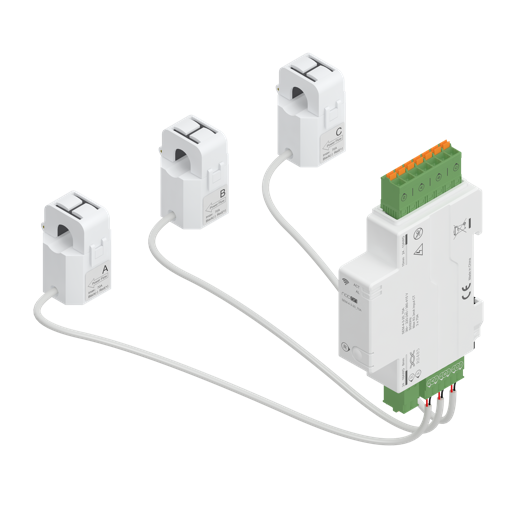 |
OTA updates
This device supports OTA updates, for more information see OTA updates.
Options
How to use device type specific configuration
power_calibration: Calibrates the power value (percentual offset), takes into effect on next report of device. The value must be a number.power_precision: Number of digits after decimal point for power, takes into effect on next report of device. This option can only decrease the precision, not increase it. The value must be a number with a minimum value of0and with a maximum value of3voltage_calibration: Calibrates the voltage value (percentual offset), takes into effect on next report of device. The value must be a number.voltage_precision: Number of digits after decimal point for voltage, takes into effect on next report of device. This option can only decrease the precision, not increase it. The value must be a number with a minimum value of0and with a maximum value of3ac_frequency_calibration: Calibrates the ac_frequency value (absolute offset), takes into effect on next report of device. The value must be a number.ac_frequency_precision: Number of digits after decimal point for ac_frequency, takes into effect on next report of device. This option can only decrease the precision, not increase it. The value must be a number with a minimum value of0and with a maximum value of3current_calibration: Calibrates the current value (percentual offset), takes into effect on next report of device. The value must be a number.current_precision: Number of digits after decimal point for current, takes into effect on next report of device. This option can only decrease the precision, not increase it. The value must be a number with a minimum value of0and with a maximum value of3energy_calibration: Calibrates the energy value (percentual offset), takes into effect on next report of device. The value must be a number.energy_precision: Number of digits after decimal point for energy, takes into effect on next report of device. This option can only decrease the precision, not increase it. The value must be a number with a minimum value of0and with a maximum value of3power_phase_b_calibration: Calibrates the power_phase_b value (percentual offset), takes into effect on next report of device. The value must be a number.power_phase_b_precision: Number of digits after decimal point for power_phase_b, takes into effect on next report of device. This option can only decrease the precision, not increase it. The value must be a number with a minimum value of0and with a maximum value of3power_phase_c_calibration: Calibrates the power_phase_c value (percentual offset), takes into effect on next report of device. The value must be a number.power_phase_c_precision: Number of digits after decimal point for power_phase_c, takes into effect on next report of device. This option can only decrease the precision, not increase it. The value must be a number with a minimum value of0and with a maximum value of3voltage_phase_b_calibration: Calibrates the voltage_phase_b value (percentual offset), takes into effect on next report of device. The value must be a number.voltage_phase_b_precision: Number of digits after decimal point for voltage_phase_b, takes into effect on next report of device. This option can only decrease the precision, not increase it. The value must be a number with a minimum value of0and with a maximum value of3voltage_phase_c_calibration: Calibrates the voltage_phase_c value (percentual offset), takes into effect on next report of device. The value must be a number.voltage_phase_c_precision: Number of digits after decimal point for voltage_phase_c, takes into effect on next report of device. This option can only decrease the precision, not increase it. The value must be a number with a minimum value of0and with a maximum value of3current_phase_b_calibration: Calibrates the current_phase_b value (percentual offset), takes into effect on next report of device. The value must be a number.current_phase_b_precision: Number of digits after decimal point for current_phase_b, takes into effect on next report of device. This option can only decrease the precision, not increase it. The value must be a number with a minimum value of0and with a maximum value of3current_phase_c_calibration: Calibrates the current_phase_c value (percentual offset), takes into effect on next report of device. The value must be a number.current_phase_c_precision: Number of digits after decimal point for current_phase_c, takes into effect on next report of device. This option can only decrease the precision, not increase it. The value must be a number with a minimum value of0and with a maximum value of3identify_timeout: Sets the duration of the identification procedure in seconds (i.e., how long the device would flash).The value ranges from 1 to 30 seconds (default: 3). The value must be a number with a minimum value of1and with a maximum value of30
Exposes
Energy reset (enum)
Reset all energy counters to 0. Value will not be published in the state. It's not possible to read (/get) this value. To write (/set) a value publish a message to topic zigbee2mqtt/FRIENDLY_NAME/set with payload {"energy_reset": NEW_VALUE}. The possible values are: reset.
Power factor - Phase A (numeric)
Instantaneous measured power factor. Value can be found in the published state on the power_factor property. It's not possible to read (/get) or write (/set) this value.
Power factor - Phase B (numeric)
Instantaneous measured power factor on phase B. Value can be found in the published state on the power_factor_phase_b property. It's not possible to read (/get) or write (/set) this value.
Power factor - Phase C (numeric)
Instantaneous measured power factor on phase C. Value can be found in the published state on the power_factor_phase_c property. It's not possible to read (/get) or write (/set) this value.
Reactive power - Phase A (numeric)
Instantaneous measured reactive power. Value can be found in the published state on the power_reactive property. It's not possible to read (/get) or write (/set) this value. The unit of this value is VAR.
Reactive power - Phase B (numeric)
Instantaneous measured reactive power on phase B. Value can be found in the published state on the power_reactive_phase_b property. It's not possible to read (/get) or write (/set) this value. The unit of this value is VAR.
Reactive power - Phase C (numeric)
Instantaneous measured reactive power on phase C. Value can be found in the published state on the power_reactive_phase_c property. It's not possible to read (/get) or write (/set) this value. The unit of this value is VAR.
Apparent power - Phase A (numeric)
Instantaneous measured apparent power. Value can be found in the published state on the power_apparent property. It's not possible to read (/get) or write (/set) this value. The unit of this value is VA.
Apparent power - Phase B (numeric)
Instantaneous measured apparent power on phase B. Value can be found in the published state on the power_apparent_phase_b property. It's not possible to read (/get) or write (/set) this value. The unit of this value is VA.
Apparent power - Phase C (numeric)
Instantaneous measured apparent power on phase C. Value can be found in the published state on the power_apparent_phase_c property. It's not possible to read (/get) or write (/set) this value. The unit of this value is VA.
Total active power (numeric)
Total active power across all 3 phases. Value can be found in the published state on the total_active_power property. It's not possible to read (/get) or write (/set) this value. The unit of this value is W.
Total reactive power (numeric)
Total reactive power across all 3 phases. Value can be found in the published state on the total_reactive_power property. It's not possible to read (/get) or write (/set) this value. The unit of this value is VAR.
Total apparent power (numeric)
Total apparent power across all 3 phases. Value can be found in the published state on the total_apparent_power property. It's not possible to read (/get) or write (/set) this value. The unit of this value is VA.
Consumed energy - Phase A (numeric)
Energy consumed by Phase A. Value can be found in the published state on the energy_tier_1 property. It's not possible to read (/get) or write (/set) this value. The unit of this value is kWh.
Produced energy - Phase A (numeric)
Energy exported by Phase A. Value can be found in the published state on the produced_energy_tier_1 property. It's not possible to read (/get) or write (/set) this value. The unit of this value is kWh.
Consumed energy - Phase B (numeric)
Energy consumed by Phase B. Value can be found in the published state on the energy_tier_2 property. It's not possible to read (/get) or write (/set) this value. The unit of this value is kWh.
Produced energy - Phase B (numeric)
Energy exported by Phase B. Value can be found in the published state on the produced_energy_tier_2 property. It's not possible to read (/get) or write (/set) this value. The unit of this value is kWh.
Consumed energy - Phase C (numeric)
Energy consumed by Phase C. Value can be found in the published state on the energy_tier_3 property. It's not possible to read (/get) or write (/set) this value. The unit of this value is kWh.
Produced energy - Phase C (numeric)
Energy exported by Phase C. Value can be found in the published state on the produced_energy_tier_3 property. It's not possible to read (/get) or write (/set) this value. The unit of this value is kWh.
Identify (enum)
Initiate device identification. Value will not be published in the state. It's not possible to read (/get) this value. To write (/set) a value publish a message to topic zigbee2mqtt/FRIENDLY_NAME/set with payload {"identify": NEW_VALUE}. The possible values are: identify.
Active power - Phase A (numeric)
Instantaneous measured power. Value can be found in the published state on the power property. To read (/get) the value publish a message to topic zigbee2mqtt/FRIENDLY_NAME/get with payload {"power": ""}. It's not possible to write (/set) this value. The unit of this value is W.
Voltage - Phase A (numeric)
Measured electrical potential value. Value can be found in the published state on the voltage property. To read (/get) the value publish a message to topic zigbee2mqtt/FRIENDLY_NAME/get with payload {"voltage": ""}. It's not possible to write (/set) this value. The unit of this value is V.
AC frequency (numeric)
Measured electrical AC frequency. Value can be found in the published state on the ac_frequency property. To read (/get) the value publish a message to topic zigbee2mqtt/FRIENDLY_NAME/get with payload {"ac_frequency": ""}. It's not possible to write (/set) this value. The unit of this value is Hz.
Current - Phase A (numeric)
Instantaneous measured electrical current. Value can be found in the published state on the current property. To read (/get) the value publish a message to topic zigbee2mqtt/FRIENDLY_NAME/get with payload {"current": ""}. It's not possible to write (/set) this value. The unit of this value is A.
Total consumed energy (numeric)
Sum of consumed energy. Value can be found in the published state on the energy property. To read (/get) the value publish a message to topic zigbee2mqtt/FRIENDLY_NAME/get with payload {"energy": ""}. It's not possible to write (/set) this value. The unit of this value is kWh.
Total produced energy (numeric)
Sum of produced energy. Value can be found in the published state on the produced_energy property. To read (/get) the value publish a message to topic zigbee2mqtt/FRIENDLY_NAME/get with payload {"produced_energy": ""}. It's not possible to write (/set) this value. The unit of this value is kWh.
Active power - Phase B (numeric)
Instantaneous measured power on phase B. Value can be found in the published state on the power_phase_b property. To read (/get) the value publish a message to topic zigbee2mqtt/FRIENDLY_NAME/get with payload {"power_phase_b": ""}. It's not possible to write (/set) this value. The unit of this value is W.
Active power - Phase C (numeric)
Instantaneous measured power on phase C. Value can be found in the published state on the power_phase_c property. To read (/get) the value publish a message to topic zigbee2mqtt/FRIENDLY_NAME/get with payload {"power_phase_c": ""}. It's not possible to write (/set) this value. The unit of this value is W.
Voltage - Phase B (numeric)
Measured electrical potential value on phase B. Value can be found in the published state on the voltage_phase_b property. To read (/get) the value publish a message to topic zigbee2mqtt/FRIENDLY_NAME/get with payload {"voltage_phase_b": ""}. It's not possible to write (/set) this value. The unit of this value is V.
Voltage - Phase C (numeric)
Measured electrical potential value on phase C. Value can be found in the published state on the voltage_phase_c property. To read (/get) the value publish a message to topic zigbee2mqtt/FRIENDLY_NAME/get with payload {"voltage_phase_c": ""}. It's not possible to write (/set) this value. The unit of this value is V.
Current - Phase B (numeric)
Instantaneous measured electrical current on phase B. Value can be found in the published state on the current_phase_b property. To read (/get) the value publish a message to topic zigbee2mqtt/FRIENDLY_NAME/get with payload {"current_phase_b": ""}. It's not possible to write (/set) this value. The unit of this value is A.
Current - Phase C (numeric)
Instantaneous measured electrical current on phase C. Value can be found in the published state on the current_phase_c property. To read (/get) the value publish a message to topic zigbee2mqtt/FRIENDLY_NAME/get with payload {"current_phase_c": ""}. It's not possible to write (/set) this value. The unit of this value is A.