
Sber SBDV-00200
| Model | SBDV-00200 |
| Vendor | Sber |
| Description | Smart Wall Switch (optional neutral wire, two buttons) |
| Exposes | action, switch (state), power_on_behavior, relay_mode, allow_double_click, identify, led_indicator_on_enable, led_indicator_on_h, led_indicator_on_s, led_indicator_on_b, led_indicator_off_enable, led_indicator_off_h, led_indicator_off_s, led_indicator_off_b, state, position, cover_mode, calibration_time, motor_timeout, buttons_mode, child_lock, serial_number, neutral_presence, power_profile, led_indication_type, resets_count, uptime, button_clicks_count_1, button_clicks_count_2, button_clicks_count_3, relay_switches_count_1, relay_switches_count_2 |
| Picture | 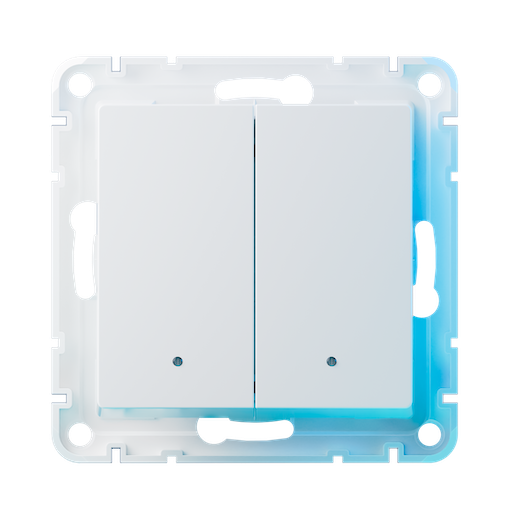 |
Notes
Pairing as a switch
To put the device in pairing mode, detach button covers and press pairing button for 5 seconds until LEDs start pairing animation, then release pairing button. When pairing process is completed, LEDs animation will stop. Animation style depends on neutral wire presence: LEDs are breathing if neutral wire is present, and are flashing shortly if neutral wire is absent.
Pairing as a covers controller
This device can also be used as a covers controller. In this mode it can control different types of single phase AC motors: window covers, curtains, garage door motors etc. Single phase AC motors are supported, with active current limit up to 1 А (220 Watts max). To put device in pairing mode as a covers controller, detach button covers and press pairing button and right switch button together for 5 seconds until LEDs start pairing animation (right LED will change its color to blue). CAUTION: please see additional installation instructions on how to properly install this device in covers controller mode.
Factory reset
If device is removed from network by pressing the pairing button for 5 seconds, then its settings will remain intact. To perform reset to factory settings it is required to hold pairing button for 10 seconds until white LED blinks. Also this device resets itself to factory settings when it is removed from the Zigbee network, if this removal has been initiated by coordinator (i.e. via frontend or by sending command to zigbee2mqtt/bridge/request/device/remove topic).
OTA updates
This device supports OTA updates, for more information see OTA updates.
Options
How to use device type specific configuration
invert_cover: Inverts the reported cover position and the state derived from it, false: open=100,close=0, true: open=0,close=100 (default false). The value must betrueorfalsecover_position_tilt_disable_report: Do not publish set cover target position as a normal 'position' value (default false). The value must betrueorfalseidentify_timeout: Sets the duration of the identification procedure in seconds (i.e., how long the device would flash).The value ranges from 1 to 60 seconds (default: 30). The value must be a number with a minimum value of1and with a maximum value of60state_action: State actions will also be published as 'action' when true (default false). The value must betrueorfalse
Exposes
Action (enum)
Triggered action (e.g. a button click). Value can be found in the published state on the action property. It's not possible to read (/get) or write (/set) this value. The possible values are: hold_switch_1, hold_switch_2, single_switch_1, single_switch_2, double_switch_1, double_switch_2.
Switch (switch_1 endpoint)
The current state of this switch is in the published state under the state_switch_1 property (value is ON or OFF). To control this switch publish a message to topic zigbee2mqtt/FRIENDLY_NAME/set with payload {"state_switch_1": "ON"}, {"state_switch_1": "OFF"} or {"state_switch_1": "TOGGLE"}. To read the current state of this switch publish a message to topic zigbee2mqtt/FRIENDLY_NAME/get with payload {"state_switch_1": ""}.
(1) Power-on behavior (enum, switch_1 endpoint)
Controls the behavior when the device is powered on after power loss. Value can be found in the published state on the power_on_behavior_switch_1 property. To read (/get) the value publish a message to topic zigbee2mqtt/FRIENDLY_NAME/get with payload {"power_on_behavior_switch_1": ""}. To write (/set) a value publish a message to topic zigbee2mqtt/FRIENDLY_NAME/set with payload {"power_on_behavior_switch_1": NEW_VALUE}. The possible values are: off, on, toggle, previous.
(1) Relay mode (enum, switch_1 endpoint)
Decoupled mode. Value can be found in the published state on the relay_mode_switch_1 property. To read (/get) the value publish a message to topic zigbee2mqtt/FRIENDLY_NAME/get with payload {"relay_mode_switch_1": ""}. To write (/set) a value publish a message to topic zigbee2mqtt/FRIENDLY_NAME/set with payload {"relay_mode_switch_1": NEW_VALUE}. The possible values are: control_relay, decoupled.
(1) Allow double clicks (binary, switch_1 endpoint)
Allow detection of double clicks, may introduce delay in reaction when enabled. Value can be found in the published state on the allow_double_click_switch_1 property. To read (/get) the value publish a message to topic zigbee2mqtt/FRIENDLY_NAME/get with payload {"allow_double_click_switch_1": ""}. To write (/set) a value publish a message to topic zigbee2mqtt/FRIENDLY_NAME/set with payload {"allow_double_click_switch_1": NEW_VALUE}. If value equals ON (1) Allow double clicks is ON, if OFF OFF.
(1) Identify (enum, switch_1 endpoint)
Initiate device identification. Value will not be published in the state. It's not possible to read (/get) this value. To write (/set) a value publish a message to topic zigbee2mqtt/FRIENDLY_NAME/set with payload {"identify_switch_1": NEW_VALUE}. The possible values are: identify.
(1) LED indication (binary, switch_1 endpoint)
Is LED indicator enabled in ON state. Value can be found in the published state on the led_indicator_on_enable_switch_1 property. To read (/get) the value publish a message to topic zigbee2mqtt/FRIENDLY_NAME/get with payload {"led_indicator_on_enable_switch_1": ""}. To write (/set) a value publish a message to topic zigbee2mqtt/FRIENDLY_NAME/set with payload {"led_indicator_on_enable_switch_1": NEW_VALUE}. If value equals ON (1) LED indication is ON, if OFF OFF.
(1) Hue (numeric, switch_1 endpoint)
Hue of LED in ON state. Value can be found in the published state on the led_indicator_on_h_switch_1 property. To read (/get) the value publish a message to topic zigbee2mqtt/FRIENDLY_NAME/get with payload {"led_indicator_on_h_switch_1": ""}. To write (/set) a value publish a message to topic zigbee2mqtt/FRIENDLY_NAME/set with payload {"led_indicator_on_h_switch_1": NEW_VALUE}. The minimal value is 0 and the maximum value is 359. The unit of this value is °.
(1) Saturation (numeric, switch_1 endpoint)
Saturation of LED in ON state. Value can be found in the published state on the led_indicator_on_s_switch_1 property. To read (/get) the value publish a message to topic zigbee2mqtt/FRIENDLY_NAME/get with payload {"led_indicator_on_s_switch_1": ""}. To write (/set) a value publish a message to topic zigbee2mqtt/FRIENDLY_NAME/set with payload {"led_indicator_on_s_switch_1": NEW_VALUE}. The minimal value is 0 and the maximum value is 254.
(1) Brightness (numeric, switch_1 endpoint)
Brightness of LED in ON state. Value can be found in the published state on the led_indicator_on_b_switch_1 property. To read (/get) the value publish a message to topic zigbee2mqtt/FRIENDLY_NAME/get with payload {"led_indicator_on_b_switch_1": ""}. To write (/set) a value publish a message to topic zigbee2mqtt/FRIENDLY_NAME/set with payload {"led_indicator_on_b_switch_1": NEW_VALUE}. The minimal value is 1 and the maximum value is 254.
(1) LED indication (binary, switch_1 endpoint)
Is LED indicator enabled in OFF state. Value can be found in the published state on the led_indicator_off_enable_switch_1 property. To read (/get) the value publish a message to topic zigbee2mqtt/FRIENDLY_NAME/get with payload {"led_indicator_off_enable_switch_1": ""}. To write (/set) a value publish a message to topic zigbee2mqtt/FRIENDLY_NAME/set with payload {"led_indicator_off_enable_switch_1": NEW_VALUE}. If value equals ON (1) LED indication is ON, if OFF OFF.
(1) Hue (numeric, switch_1 endpoint)
Hue of LED in OFF state. Value can be found in the published state on the led_indicator_off_h_switch_1 property. To read (/get) the value publish a message to topic zigbee2mqtt/FRIENDLY_NAME/get with payload {"led_indicator_off_h_switch_1": ""}. To write (/set) a value publish a message to topic zigbee2mqtt/FRIENDLY_NAME/set with payload {"led_indicator_off_h_switch_1": NEW_VALUE}. The minimal value is 0 and the maximum value is 359. The unit of this value is °.
(1) Saturation (numeric, switch_1 endpoint)
Saturation of LED in OFF state. Value can be found in the published state on the led_indicator_off_s_switch_1 property. To read (/get) the value publish a message to topic zigbee2mqtt/FRIENDLY_NAME/get with payload {"led_indicator_off_s_switch_1": ""}. To write (/set) a value publish a message to topic zigbee2mqtt/FRIENDLY_NAME/set with payload {"led_indicator_off_s_switch_1": NEW_VALUE}. The minimal value is 0 and the maximum value is 254.
(1) Brightness (numeric, switch_1 endpoint)
Brightness of LED in OFF state. Value can be found in the published state on the led_indicator_off_b_switch_1 property. To read (/get) the value publish a message to topic zigbee2mqtt/FRIENDLY_NAME/get with payload {"led_indicator_off_b_switch_1": ""}. To write (/set) a value publish a message to topic zigbee2mqtt/FRIENDLY_NAME/set with payload {"led_indicator_off_b_switch_1": NEW_VALUE}. The minimal value is 1 and the maximum value is 254.
Switch (switch_2 endpoint)
The current state of this switch is in the published state under the state_switch_2 property (value is ON or OFF). To control this switch publish a message to topic zigbee2mqtt/FRIENDLY_NAME/set with payload {"state_switch_2": "ON"}, {"state_switch_2": "OFF"} or {"state_switch_2": "TOGGLE"}. To read the current state of this switch publish a message to topic zigbee2mqtt/FRIENDLY_NAME/get with payload {"state_switch_2": ""}.
(2) Power-on behavior (enum, switch_2 endpoint)
Controls the behavior when the device is powered on after power loss. Value can be found in the published state on the power_on_behavior_switch_2 property. To read (/get) the value publish a message to topic zigbee2mqtt/FRIENDLY_NAME/get with payload {"power_on_behavior_switch_2": ""}. To write (/set) a value publish a message to topic zigbee2mqtt/FRIENDLY_NAME/set with payload {"power_on_behavior_switch_2": NEW_VALUE}. The possible values are: off, on, toggle, previous.
(2) Relay mode (enum, switch_2 endpoint)
Decoupled mode. Value can be found in the published state on the relay_mode_switch_2 property. To read (/get) the value publish a message to topic zigbee2mqtt/FRIENDLY_NAME/get with payload {"relay_mode_switch_2": ""}. To write (/set) a value publish a message to topic zigbee2mqtt/FRIENDLY_NAME/set with payload {"relay_mode_switch_2": NEW_VALUE}. The possible values are: control_relay, decoupled.
(2) Allow double clicks (binary, switch_2 endpoint)
Allow detection of double clicks, may introduce delay in reaction when enabled. Value can be found in the published state on the allow_double_click_switch_2 property. To read (/get) the value publish a message to topic zigbee2mqtt/FRIENDLY_NAME/get with payload {"allow_double_click_switch_2": ""}. To write (/set) a value publish a message to topic zigbee2mqtt/FRIENDLY_NAME/set with payload {"allow_double_click_switch_2": NEW_VALUE}. If value equals ON (2) Allow double clicks is ON, if OFF OFF.
(2) Identify (enum, switch_2 endpoint)
Initiate device identification. Value will not be published in the state. It's not possible to read (/get) this value. To write (/set) a value publish a message to topic zigbee2mqtt/FRIENDLY_NAME/set with payload {"identify_switch_2": NEW_VALUE}. The possible values are: identify.
(2) LED indication (binary, switch_2 endpoint)
Is LED indicator enabled in ON state. Value can be found in the published state on the led_indicator_on_enable_switch_2 property. To read (/get) the value publish a message to topic zigbee2mqtt/FRIENDLY_NAME/get with payload {"led_indicator_on_enable_switch_2": ""}. To write (/set) a value publish a message to topic zigbee2mqtt/FRIENDLY_NAME/set with payload {"led_indicator_on_enable_switch_2": NEW_VALUE}. If value equals ON (2) LED indication is ON, if OFF OFF.
(2) Hue (numeric, switch_2 endpoint)
Hue of LED in ON state. Value can be found in the published state on the led_indicator_on_h_switch_2 property. To read (/get) the value publish a message to topic zigbee2mqtt/FRIENDLY_NAME/get with payload {"led_indicator_on_h_switch_2": ""}. To write (/set) a value publish a message to topic zigbee2mqtt/FRIENDLY_NAME/set with payload {"led_indicator_on_h_switch_2": NEW_VALUE}. The minimal value is 0 and the maximum value is 359. The unit of this value is °.
(2) Saturation (numeric, switch_2 endpoint)
Saturation of LED in ON state. Value can be found in the published state on the led_indicator_on_s_switch_2 property. To read (/get) the value publish a message to topic zigbee2mqtt/FRIENDLY_NAME/get with payload {"led_indicator_on_s_switch_2": ""}. To write (/set) a value publish a message to topic zigbee2mqtt/FRIENDLY_NAME/set with payload {"led_indicator_on_s_switch_2": NEW_VALUE}. The minimal value is 0 and the maximum value is 254.
(2) Brightness (numeric, switch_2 endpoint)
Brightness of LED in ON state. Value can be found in the published state on the led_indicator_on_b_switch_2 property. To read (/get) the value publish a message to topic zigbee2mqtt/FRIENDLY_NAME/get with payload {"led_indicator_on_b_switch_2": ""}. To write (/set) a value publish a message to topic zigbee2mqtt/FRIENDLY_NAME/set with payload {"led_indicator_on_b_switch_2": NEW_VALUE}. The minimal value is 1 and the maximum value is 254.
(2) LED indication (binary, switch_2 endpoint)
Is LED indicator enabled in OFF state. Value can be found in the published state on the led_indicator_off_enable_switch_2 property. To read (/get) the value publish a message to topic zigbee2mqtt/FRIENDLY_NAME/get with payload {"led_indicator_off_enable_switch_2": ""}. To write (/set) a value publish a message to topic zigbee2mqtt/FRIENDLY_NAME/set with payload {"led_indicator_off_enable_switch_2": NEW_VALUE}. If value equals ON (2) LED indication is ON, if OFF OFF.
(2) Hue (numeric, switch_2 endpoint)
Hue of LED in OFF state. Value can be found in the published state on the led_indicator_off_h_switch_2 property. To read (/get) the value publish a message to topic zigbee2mqtt/FRIENDLY_NAME/get with payload {"led_indicator_off_h_switch_2": ""}. To write (/set) a value publish a message to topic zigbee2mqtt/FRIENDLY_NAME/set with payload {"led_indicator_off_h_switch_2": NEW_VALUE}. The minimal value is 0 and the maximum value is 359. The unit of this value is °.
(2) Saturation (numeric, switch_2 endpoint)
Saturation of LED in OFF state. Value can be found in the published state on the led_indicator_off_s_switch_2 property. To read (/get) the value publish a message to topic zigbee2mqtt/FRIENDLY_NAME/get with payload {"led_indicator_off_s_switch_2": ""}. To write (/set) a value publish a message to topic zigbee2mqtt/FRIENDLY_NAME/set with payload {"led_indicator_off_s_switch_2": NEW_VALUE}. The minimal value is 0 and the maximum value is 254.
(2) Brightness (numeric, switch_2 endpoint)
Brightness of LED in OFF state. Value can be found in the published state on the led_indicator_off_b_switch_2 property. To read (/get) the value publish a message to topic zigbee2mqtt/FRIENDLY_NAME/get with payload {"led_indicator_off_b_switch_2": ""}. To write (/set) a value publish a message to topic zigbee2mqtt/FRIENDLY_NAME/set with payload {"led_indicator_off_b_switch_2": NEW_VALUE}. The minimal value is 1 and the maximum value is 254.
State (enum, cover endpoint)
Value can be found in the published state on the current_state_cover property. It's not possible to read (/get) this value. To write (/set) a value publish a message to topic zigbee2mqtt/FRIENDLY_NAME/set with payload {"current_state_cover": NEW_VALUE}. The possible values are: OPEN, CLOSE, STOP.
Position (numeric, cover endpoint)
Position of this cover, 100 is fully open if 'Invert cover' option is false (default). Value can be found in the published state on the position_cover property. To read (/get) the value publish a message to topic zigbee2mqtt/FRIENDLY_NAME/get with payload {"position_cover": ""}. To write (/set) a value publish a message to topic zigbee2mqtt/FRIENDLY_NAME/set with payload {"position_cover": NEW_VALUE}. The minimal value is 0 and the maximum value is 100. The unit of this value is %.
Cover mode (composite, cover endpoint)
Can be set by publishing to zigbee2mqtt/FRIENDLY_NAME/set with payload {"cover_mode_cover": {"reversed_cover": VALUE}} To read (/get) the value publish a message to topic zigbee2mqtt/FRIENDLY_NAME/get with payload {"cover_mode_cover": ""}.
reversed(binary): Reversal of the motor rotating direction allowed values:trueorfalse
Calibration time (numeric, cover endpoint)
Calibration time. Value can be found in the published state on the calibration_time_cover property. To read (/get) the value publish a message to topic zigbee2mqtt/FRIENDLY_NAME/get with payload {"calibration_time_cover": ""}. To write (/set) a value publish a message to topic zigbee2mqtt/FRIENDLY_NAME/set with payload {"calibration_time_cover": NEW_VALUE}. The minimal value is 0 and the maximum value is 3600. The unit of this value is s.
Motor timeout (numeric, cover endpoint)
Timeout for continuous motor action. Value can be found in the published state on the motor_timeout_cover property. To read (/get) the value publish a message to topic zigbee2mqtt/FRIENDLY_NAME/get with payload {"motor_timeout_cover": ""}. To write (/set) a value publish a message to topic zigbee2mqtt/FRIENDLY_NAME/set with payload {"motor_timeout_cover": NEW_VALUE}. The minimal value is 0 and the maximum value is 3600. The unit of this value is s.
Buttons mode (enum, cover endpoint)
Value can be found in the published state on the buttons_mode_cover property. To read (/get) the value publish a message to topic zigbee2mqtt/FRIENDLY_NAME/get with payload {"buttons_mode_cover": ""}. To write (/set) a value publish a message to topic zigbee2mqtt/FRIENDLY_NAME/set with payload {"buttons_mode_cover": NEW_VALUE}. The possible values are: normal, inverted.
Identify (enum, cover endpoint)
Initiate device identification. Value will not be published in the state. It's not possible to read (/get) this value. To write (/set) a value publish a message to topic zigbee2mqtt/FRIENDLY_NAME/set with payload {"identify_cover": NEW_VALUE}. The possible values are: identify.
LED indication (binary, cover endpoint)
Is LED indicator enabled. Value can be found in the published state on the led_indicator_off_enable_cover property. To read (/get) the value publish a message to topic zigbee2mqtt/FRIENDLY_NAME/get with payload {"led_indicator_off_enable_cover": ""}. To write (/set) a value publish a message to topic zigbee2mqtt/FRIENDLY_NAME/set with payload {"led_indicator_off_enable_cover": NEW_VALUE}. If value equals ON lED indication is ON, if OFF OFF.
Hue (numeric, cover endpoint)
Hue of LED indicator. Value can be found in the published state on the led_indicator_off_h_cover property. To read (/get) the value publish a message to topic zigbee2mqtt/FRIENDLY_NAME/get with payload {"led_indicator_off_h_cover": ""}. To write (/set) a value publish a message to topic zigbee2mqtt/FRIENDLY_NAME/set with payload {"led_indicator_off_h_cover": NEW_VALUE}. The minimal value is 0 and the maximum value is 359. The unit of this value is °.
Saturation (numeric, cover endpoint)
Saturation of LED indicator. Value can be found in the published state on the led_indicator_off_s_cover property. To read (/get) the value publish a message to topic zigbee2mqtt/FRIENDLY_NAME/get with payload {"led_indicator_off_s_cover": ""}. To write (/set) a value publish a message to topic zigbee2mqtt/FRIENDLY_NAME/set with payload {"led_indicator_off_s_cover": NEW_VALUE}. The minimal value is 0 and the maximum value is 254.
Brightness (numeric, cover endpoint)
Brightness of LED indicator. Value can be found in the published state on the led_indicator_off_b_cover property. To read (/get) the value publish a message to topic zigbee2mqtt/FRIENDLY_NAME/get with payload {"led_indicator_off_b_cover": ""}. To write (/set) a value publish a message to topic zigbee2mqtt/FRIENDLY_NAME/set with payload {"led_indicator_off_b_cover": NEW_VALUE}. The minimal value is 1 and the maximum value is 254.
Child lock (binary)
Enable child lock to prevent manual button operation. Value can be found in the published state on the child_lock property. To read (/get) the value publish a message to topic zigbee2mqtt/FRIENDLY_NAME/get with payload {"child_lock": ""}. To write (/set) a value publish a message to topic zigbee2mqtt/FRIENDLY_NAME/set with payload {"child_lock": NEW_VALUE}. If value equals ON child lock is ON, if OFF OFF.
Serial Number (text)
Value can be found in the published state on the serial_number property. To read (/get) the value publish a message to topic zigbee2mqtt/FRIENDLY_NAME/get with payload {"serial_number": ""}. It's not possible to write (/set) this value.
Neutral presence (binary)
Neutral wire presence status. Value can be found in the published state on the neutral_presence property. To read (/get) the value publish a message to topic zigbee2mqtt/FRIENDLY_NAME/get with payload {"neutral_presence": ""}. It's not possible to write (/set) this value. If value equals YES neutral presence is ON, if NO OFF.
Power profile (enum)
Power Profile when neutral wire is absent: quick mode is for fastest device response; anti-flicker (af) modes have different polling intervals (in ms). Anti-flicker fallback mode is the safest one: device will fall back to it automatically if unstable behavior has been detected in more responsive mode. Value can be found in the published state on the power_profile property. To read (/get) the value publish a message to topic zigbee2mqtt/FRIENDLY_NAME/get with payload {"power_profile": ""}. To write (/set) a value publish a message to topic zigbee2mqtt/FRIENDLY_NAME/set with payload {"power_profile": NEW_VALUE}. The possible values are: quick, af_250, af_500, af_750, af_1000, af_1250, af_1750, af_2000, af_fallback.
Led indication type (enum)
Type of LED indication (ignored in cover controller mode). Either continuous light, or short flashes. Value can be found in the published state on the led_indication_type property. To read (/get) the value publish a message to topic zigbee2mqtt/FRIENDLY_NAME/get with payload {"led_indication_type": ""}. To write (/set) a value publish a message to topic zigbee2mqtt/FRIENDLY_NAME/set with payload {"led_indication_type": NEW_VALUE}. The possible values are: continuous, flashes.
Resets count (numeric)
(telemetry) Number of resets. Value can be found in the published state on the resets_count property. To read (/get) the value publish a message to topic zigbee2mqtt/FRIENDLY_NAME/get with payload {"resets_count": ""}. It's not possible to write (/set) this value.
Uptime (numeric)
(telemetry) Device uptime, in seconds. Value can be found in the published state on the uptime property. To read (/get) the value publish a message to topic zigbee2mqtt/FRIENDLY_NAME/get with payload {"uptime": ""}. It's not possible to write (/set) this value. The unit of this value is s.
Button clicks count 1 (numeric)
(telemetry) Total clicks count of button 1. Value can be found in the published state on the button_clicks_count_1 property. To read (/get) the value publish a message to topic zigbee2mqtt/FRIENDLY_NAME/get with payload {"button_clicks_count_1": ""}. It's not possible to write (/set) this value.
Button clicks count 2 (numeric)
(telemetry) Total clicks count of button 2. Value can be found in the published state on the button_clicks_count_2 property. To read (/get) the value publish a message to topic zigbee2mqtt/FRIENDLY_NAME/get with payload {"button_clicks_count_2": ""}. It's not possible to write (/set) this value.
Button clicks count 3 (numeric)
(telemetry) Total clicks count of button 3. Value can be found in the published state on the button_clicks_count_3 property. To read (/get) the value publish a message to topic zigbee2mqtt/FRIENDLY_NAME/get with payload {"button_clicks_count_3": ""}. It's not possible to write (/set) this value.
Relay switches count 1 (numeric)
(telemetry) Total toggle count of relay 1. Value can be found in the published state on the relay_switches_count_1 property. To read (/get) the value publish a message to topic zigbee2mqtt/FRIENDLY_NAME/get with payload {"relay_switches_count_1": ""}. It's not possible to write (/set) this value.
Relay switches count 2 (numeric)
(telemetry) Total toggle count of relay 2. Value can be found in the published state on the relay_switches_count_2 property. To read (/get) the value publish a message to topic zigbee2mqtt/FRIENDLY_NAME/get with payload {"relay_switches_count_2": ""}. It's not possible to write (/set) this value.