
Shelly S4SN-0A24X
| Model | S4SN-0A24X |
| Vendor | Shelly |
| Description | i4 Gen4 |
| Exposes | action, switch_type, momentary_toggle_binding, wifi_status, ip_address, dhcp_enabled, wifi_config, identify |
| Picture | 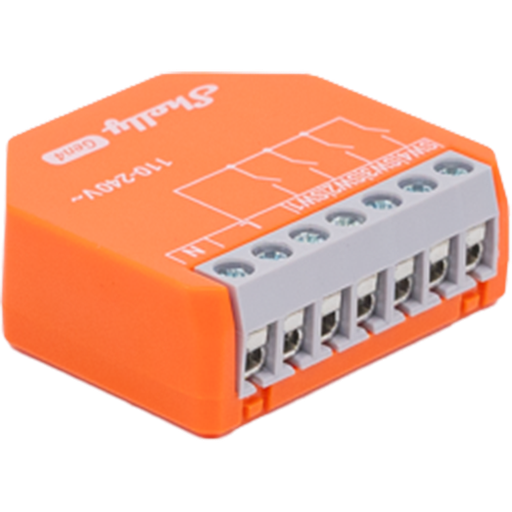 |
Firmware
It is recommended to connect Shelly devices by WiFi / Bluetooth, and update their firmware, until they gain support for OTA updates over Zigbee.
The latest firmware fixes known issues like negative power readings on some models.
Note they roll-out updates in phases. Check "beta" channels if you are specifically looking for a fix.
Notes
Zigbee / Matter mode
The device ships in Matter mode by default. To use the device with Zigbee2MQTT, switching to Zigbee mode is required. This can either be done via the Web UI, or by pressing the button on the device 5 times. Afterwards, the device will start pairing mode for 3 minutes. To restart pairing mode, press the button three times again.
Switch inputs
The i4 has no relay, the four inputs only publish actions. With switch_type set to toggle an input sends input_N_on/input_N_off, with momentary it sends input_N_single, input_N_double, input_N_triple and input_N_hold.
Direct binding
To toggle a bound group with a momentary input, set its switch_type to momentary and turn on momentary_toggle_binding for that input. A single press then sends both input_N_single and input_N_toggle.
Vendor product page: Shelly i4 Gen4
Maintenance and factory reset
To enable the on-device access point and bluetooth for maintenance, press and hold the button on the device for 5 seconds. Doing so for 10 seconds will trigger a factory reset.
OTA updates
This device supports OTA updates, for more information see OTA updates.
Options
How to use device type specific configuration
shelly_wifi_ssid: Full Wi-Fi SSID to use when the Shelly Wi-Fi setup cluster reports a shortened network name. The value must be textual.identify_timeout: Sets the duration of the identification procedure in seconds (i.e., how long the device would flash).The value ranges from 1 to 30 seconds (default: 3). The value must be a number with a minimum value of1and with a maximum value of30
Exposes
Action (enum)
Triggered action (e.g. a button click). Value can be found in the published state on the action property. It's not possible to read (/get) or write (/set) this value. The possible values are: input_1_on, input_1_off, input_1_toggle, input_1_single, input_1_double, input_1_triple, input_1_hold, input_2_on, input_2_off, input_2_toggle, input_2_single, input_2_double, input_2_triple, input_2_hold, input_3_on, input_3_off, input_3_toggle, input_3_single, input_3_double, input_3_triple, input_3_hold, input_4_on, input_4_off, input_4_toggle, input_4_single, input_4_double, input_4_triple, input_4_hold.
Switch type (enum, sw1 endpoint)
Switch input type. Value can be found in the published state on the switch_type_sw1 property. To read (/get) the value publish a message to topic zigbee2mqtt/FRIENDLY_NAME/get with payload {"switch_type_sw1": ""}. To write (/set) a value publish a message to topic zigbee2mqtt/FRIENDLY_NAME/set with payload {"switch_type_sw1": "VALUE"}. The possible values are: toggle, momentary.
Switch type (enum, sw2 endpoint)
Switch input type. Value can be found in the published state on the switch_type_sw2 property. To read (/get) the value publish a message to topic zigbee2mqtt/FRIENDLY_NAME/get with payload {"switch_type_sw2": ""}. To write (/set) a value publish a message to topic zigbee2mqtt/FRIENDLY_NAME/set with payload {"switch_type_sw2": "VALUE"}. The possible values are: toggle, momentary.
Switch type (enum, sw3 endpoint)
Switch input type. Value can be found in the published state on the switch_type_sw3 property. To read (/get) the value publish a message to topic zigbee2mqtt/FRIENDLY_NAME/get with payload {"switch_type_sw3": ""}. To write (/set) a value publish a message to topic zigbee2mqtt/FRIENDLY_NAME/set with payload {"switch_type_sw3": "VALUE"}. The possible values are: toggle, momentary.
Switch type (enum, sw4 endpoint)
Switch input type. Value can be found in the published state on the switch_type_sw4 property. To read (/get) the value publish a message to topic zigbee2mqtt/FRIENDLY_NAME/get with payload {"switch_type_sw4": ""}. To write (/set) a value publish a message to topic zigbee2mqtt/FRIENDLY_NAME/set with payload {"switch_type_sw4": "VALUE"}. The possible values are: toggle, momentary.
Momentary toggle binding (binary, sw1 endpoint)
Enable or disable toggle commands for a direct group binding with a momentary input. Value can be found in the published state on the momentary_toggle_binding_sw1 property. To read (/get) the value publish a message to topic zigbee2mqtt/FRIENDLY_NAME/get with payload {"momentary_toggle_binding_sw1": ""}. To write (/set) a value publish a message to topic zigbee2mqtt/FRIENDLY_NAME/set with payload {"momentary_toggle_binding_sw1": "VALUE"}. If value equals ON momentary toggle binding is ON, if OFF OFF.
Momentary toggle binding (binary, sw2 endpoint)
Enable or disable toggle commands for a direct group binding with a momentary input. Value can be found in the published state on the momentary_toggle_binding_sw2 property. To read (/get) the value publish a message to topic zigbee2mqtt/FRIENDLY_NAME/get with payload {"momentary_toggle_binding_sw2": ""}. To write (/set) a value publish a message to topic zigbee2mqtt/FRIENDLY_NAME/set with payload {"momentary_toggle_binding_sw2": "VALUE"}. If value equals ON momentary toggle binding is ON, if OFF OFF.
Momentary toggle binding (binary, sw3 endpoint)
Enable or disable toggle commands for a direct group binding with a momentary input. Value can be found in the published state on the momentary_toggle_binding_sw3 property. To read (/get) the value publish a message to topic zigbee2mqtt/FRIENDLY_NAME/get with payload {"momentary_toggle_binding_sw3": ""}. To write (/set) a value publish a message to topic zigbee2mqtt/FRIENDLY_NAME/set with payload {"momentary_toggle_binding_sw3": "VALUE"}. If value equals ON momentary toggle binding is ON, if OFF OFF.
Momentary toggle binding (binary, sw4 endpoint)
Enable or disable toggle commands for a direct group binding with a momentary input. Value can be found in the published state on the momentary_toggle_binding_sw4 property. To read (/get) the value publish a message to topic zigbee2mqtt/FRIENDLY_NAME/get with payload {"momentary_toggle_binding_sw4": ""}. To write (/set) a value publish a message to topic zigbee2mqtt/FRIENDLY_NAME/set with payload {"momentary_toggle_binding_sw4": "VALUE"}. If value equals ON momentary toggle binding is ON, if OFF OFF.
Wi-Fi status (text)
Current connection status. Value can be found in the published state on the wifi_status property. To read (/get) the value publish a message to topic zigbee2mqtt/FRIENDLY_NAME/get with payload {"wifi_status": ""}. It's not possible to write (/set) this value.
IP address (text)
IP address currently assigned to the device. Value can be found in the published state on the ip_address property. To read (/get) the value publish a message to topic zigbee2mqtt/FRIENDLY_NAME/get with payload {"ip_address": ""}. It's not possible to write (/set) this value.
DHCP enabled (binary)
Indicates whether DHCP is used to automatically assign network settings. Value can be found in the published state on the dhcp_enabled property. To read (/get) the value publish a message to topic zigbee2mqtt/FRIENDLY_NAME/get with payload {"dhcp_enabled": ""}. It's not possible to write (/set) this value. If value equals true dHCP enabled is ON, if false OFF.
Wi-Fi Configuration (composite)
Can be set by publishing to zigbee2mqtt/FRIENDLY_NAME/set with payload {"wifi_config": {"enabled": VALUE, "ssid": "VALUE", "password": "VALUE", "static_ip": "VALUE", "net_mask": "VALUE", "gateway": "VALUE", "name_server": "VALUE"}} To read (/get) the value publish a message to topic zigbee2mqtt/FRIENDLY_NAME/get with payload {"wifi_config": ""}.
enabled(binary): Enable/disable Wi-Fi connectivity allowed values:trueorfalsessid(text): Name (SSID) of the Wi-Fi network to connect topassword(text): Password for the selected Wi-Fi networkstatic_ip(text): Manually assigned IP address (used when DHCP is disabled)net_mask(text): Subnet mask for the static IP configurationgateway(text): Default gateway address for static IP configurationname_server(text): Name server address for static IP configuration
Identify (enum)
Initiate device identification. Value will not be published in the state. It's not possible to read (/get) this value. To write (/set) a value publish a message to topic zigbee2mqtt/FRIENDLY_NAME/set with payload {"identify": "VALUE"}. The possible values are: identify.