
Tuya OXT-4CH-RELAY-DC
| Model | OXT-4CH-RELAY-DC |
| Vendor | Tuya |
| Description | 4 channel relay module DC |
| Exposes | switch (state), countdown, power_on_behavior |
| Picture | 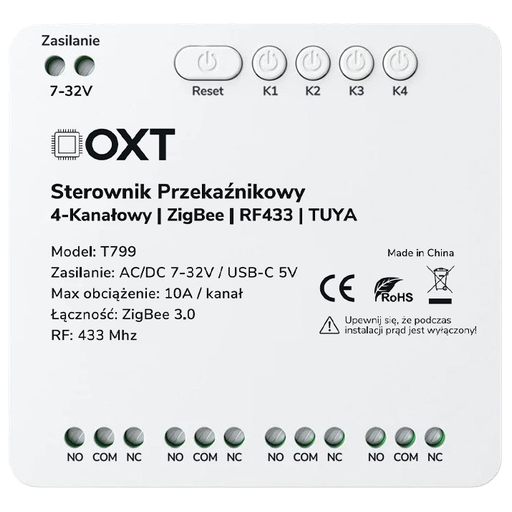 |
Options
How to use device type specific configuration
time_start: Reply to Tuya-specific time synchronization requests: "1970" - Reply with seconds since 1970/01/01 (recommended, should stop the device from asking), "2000" - Reply with seconds since 2000/01/01 (use if the weekday is wrong with 1970), "off" - Don't reply (use if replying causes too much traffic). Default for this device: "off". The value must be one of1970,2000,off
Exposes
Switch (l1 endpoint)
The current state of this switch is in the published state under the state_l1 property (value is ON or OFF). To control this switch publish a message to topic zigbee2mqtt/FRIENDLY_NAME/set with payload {"state_l1": "ON"}, {"state_l1": "OFF"} or {"state_l1": "TOGGLE"}. It's not possible to read (/get) this value.
Switch (l2 endpoint)
The current state of this switch is in the published state under the state_l2 property (value is ON or OFF). To control this switch publish a message to topic zigbee2mqtt/FRIENDLY_NAME/set with payload {"state_l2": "ON"}, {"state_l2": "OFF"} or {"state_l2": "TOGGLE"}. It's not possible to read (/get) this value.
Switch (l3 endpoint)
The current state of this switch is in the published state under the state_l3 property (value is ON or OFF). To control this switch publish a message to topic zigbee2mqtt/FRIENDLY_NAME/set with payload {"state_l3": "ON"}, {"state_l3": "OFF"} or {"state_l3": "TOGGLE"}. It's not possible to read (/get) this value.
Switch (l4 endpoint)
The current state of this switch is in the published state under the state_l4 property (value is ON or OFF). To control this switch publish a message to topic zigbee2mqtt/FRIENDLY_NAME/set with payload {"state_l4": "ON"}, {"state_l4": "OFF"} or {"state_l4": "TOGGLE"}. It's not possible to read (/get) this value.
Countdown (numeric, l1 endpoint)
Toggle the device after a set duration (one time action). Value can be found in the published state on the countdown_l1 property. It's not possible to read (/get) this value. To write (/set) a value publish a message to topic zigbee2mqtt/FRIENDLY_NAME/set with payload {"countdown_l1": VALUE}. The minimal value is 0 and the maximum value is 43200. The unit of this value is s.
Countdown (numeric, l2 endpoint)
Toggle the device after a set duration (one time action). Value can be found in the published state on the countdown_l2 property. It's not possible to read (/get) this value. To write (/set) a value publish a message to topic zigbee2mqtt/FRIENDLY_NAME/set with payload {"countdown_l2": VALUE}. The minimal value is 0 and the maximum value is 43200. The unit of this value is s.
Countdown (numeric, l3 endpoint)
Toggle the device after a set duration (one time action). Value can be found in the published state on the countdown_l3 property. It's not possible to read (/get) this value. To write (/set) a value publish a message to topic zigbee2mqtt/FRIENDLY_NAME/set with payload {"countdown_l3": VALUE}. The minimal value is 0 and the maximum value is 43200. The unit of this value is s.
Countdown (numeric, l4 endpoint)
Toggle the device after a set duration (one time action). Value can be found in the published state on the countdown_l4 property. It's not possible to read (/get) this value. To write (/set) a value publish a message to topic zigbee2mqtt/FRIENDLY_NAME/set with payload {"countdown_l4": VALUE}. The minimal value is 0 and the maximum value is 43200. The unit of this value is s.
Power-on behavior (enum, l1 endpoint)
Controls the behavior when the device is powered on after power loss. Value can be found in the published state on the power_on_behavior_l1 property. It's not possible to read (/get) this value. To write (/set) a value publish a message to topic zigbee2mqtt/FRIENDLY_NAME/set with payload {"power_on_behavior_l1": "VALUE"}. The possible values are: off, on, previous.
Power-on behavior (enum, l2 endpoint)
Controls the behavior when the device is powered on after power loss. Value can be found in the published state on the power_on_behavior_l2 property. It's not possible to read (/get) this value. To write (/set) a value publish a message to topic zigbee2mqtt/FRIENDLY_NAME/set with payload {"power_on_behavior_l2": "VALUE"}. The possible values are: off, on, previous.
Power-on behavior (enum, l3 endpoint)
Controls the behavior when the device is powered on after power loss. Value can be found in the published state on the power_on_behavior_l3 property. It's not possible to read (/get) this value. To write (/set) a value publish a message to topic zigbee2mqtt/FRIENDLY_NAME/set with payload {"power_on_behavior_l3": "VALUE"}. The possible values are: off, on, previous.
Power-on behavior (enum, l4 endpoint)
Controls the behavior when the device is powered on after power loss. Value can be found in the published state on the power_on_behavior_l4 property. It's not possible to read (/get) this value. To write (/set) a value publish a message to topic zigbee2mqtt/FRIENDLY_NAME/set with payload {"power_on_behavior_l4": "VALUE"}. The possible values are: off, on, previous.