
Ouellet OTH3600-GA-ZB
| Model | OTH3600-GA-ZB |
| Vendor | Ouellet |
| Description | Zigbee smart floor heating thermostat |
| Exposes | second_display_mode, thermostat_outdoor_temperature, outdoor_temperature_timeout, voltage, current, power, running_state, identify, climate (local_temperature, occupied_heating_setpoint, system_mode, pi_heating_demand), temperature_display_mode, keypad_lockout, temperature, energy |
| Picture | 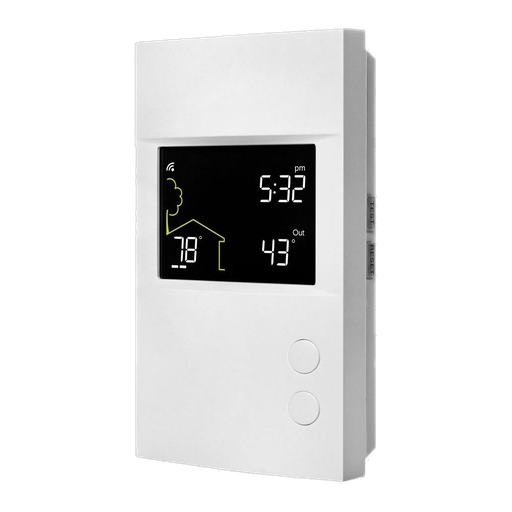 |
Options
How to use device type specific configuration
voltage_calibration: Calibrates the voltage value (percentual offset), takes into effect on next report of device. The value must be a number.voltage_precision: Number of digits after decimal point for voltage, takes into effect on next report of device. This option can only decrease the precision, not increase it. The value must be a number with a minimum value of0and with a maximum value of3current_calibration: Calibrates the current value (percentual offset), takes into effect on next report of device. The value must be a number.current_precision: Number of digits after decimal point for current, takes into effect on next report of device. This option can only decrease the precision, not increase it. The value must be a number with a minimum value of0and with a maximum value of3power_calibration: Calibrates the power value (percentual offset), takes into effect on next report of device. The value must be a number.power_precision: Number of digits after decimal point for power, takes into effect on next report of device. This option can only decrease the precision, not increase it. The value must be a number with a minimum value of0and with a maximum value of3temperature_calibration: Calibrates the temperature value (absolute offset), takes into effect on next report of device. The value must be a number.temperature_precision: Number of digits after decimal point for temperature, takes into effect on next report of device. This option can only decrease the precision, not increase it. The value must be a number with a minimum value of0and with a maximum value of3energy_calibration: Calibrates the energy value (percentual offset), takes into effect on next report of device. The value must be a number.energy_precision: Number of digits after decimal point for energy, takes into effect on next report of device. This option can only decrease the precision, not increase it. The value must be a number with a minimum value of0and with a maximum value of3identify_timeout: Sets the duration of the identification procedure in seconds (i.e., how long the device would flash).The value ranges from 1 to 30 seconds (default: 3). The value must be a number with a minimum value of1and with a maximum value of30thermostat_unit: Controls the temperature unit of the thermostat (default celsius). The value must be one ofcelsius,fahrenheit
Exposes
Second display mode (enum)
Displays the outdoor temperature and then returns to the set point in "auto" mode, or clears in "outdoor temp" mode when expired.. Value can be found in the published state on the second_display_mode property. To read (/get) the value publish a message to topic zigbee2mqtt/FRIENDLY_NAME/get with payload {"second_display_mode": ""}. To write (/set) a value publish a message to topic zigbee2mqtt/FRIENDLY_NAME/set with payload {"second_display_mode": NEW_VALUE}. The possible values are: auto, setpoint, outdoor temp.
Thermostat outdoor temperature (numeric)
Outdoor temperature for the secondary display. Value can be found in the published state on the thermostat_outdoor_temperature property. To read (/get) the value publish a message to topic zigbee2mqtt/FRIENDLY_NAME/get with payload {"thermostat_outdoor_temperature": ""}. To write (/set) a value publish a message to topic zigbee2mqtt/FRIENDLY_NAME/set with payload {"thermostat_outdoor_temperature": NEW_VALUE}. The minimal value is -99.5 and the maximum value is 99.5. The unit of this value is °C.
Outdoor temperature timeout (numeric)
Time in seconds after which the outdoor temperature is considered to have expired. Value can be found in the published state on the outdoor_temperature_timeout property. To read (/get) the value publish a message to topic zigbee2mqtt/FRIENDLY_NAME/get with payload {"outdoor_temperature_timeout": ""}. To write (/set) a value publish a message to topic zigbee2mqtt/FRIENDLY_NAME/set with payload {"outdoor_temperature_timeout": NEW_VALUE}. The minimal value is 30 and the maximum value is 64800. The unit of this value is s. Besides the numeric values the following values are accepted: 15 min, 30 min, 1 hour.
Voltage (numeric)
Measured electrical potential value. Value can be found in the published state on the voltage property. To read (/get) the value publish a message to topic zigbee2mqtt/FRIENDLY_NAME/get with payload {"voltage": ""}. It's not possible to write (/set) this value. The unit of this value is V.
Current (numeric)
Instantaneous measured electrical current. Value can be found in the published state on the current property. To read (/get) the value publish a message to topic zigbee2mqtt/FRIENDLY_NAME/get with payload {"current": ""}. It's not possible to write (/set) this value. The unit of this value is A.
Power (numeric)
Instantaneous measured power. Value can be found in the published state on the power property. To read (/get) the value publish a message to topic zigbee2mqtt/FRIENDLY_NAME/get with payload {"power": ""}. It's not possible to write (/set) this value. The unit of this value is W.
Running state (enum)
Heating state calculated from PI heating demand. Value can be found in the published state on the running_state property. To read (/get) the value publish a message to topic zigbee2mqtt/FRIENDLY_NAME/get with payload {"running_state": ""}. It's not possible to write (/set) this value. The possible values are: idle, heat.
Identify (enum)
Initiate device identification. Value will not be published in the state. It's not possible to read (/get) this value. To write (/set) a value publish a message to topic zigbee2mqtt/FRIENDLY_NAME/set with payload {"identify": NEW_VALUE}. The possible values are: identify.
Climate
This climate device supports the following features: local_temperature, occupied_heating_setpoint, system_mode, pi_heating_demand.
occupied_heating_setpoint: Temperature setpoint. To control publish a message to topiczigbee2mqtt/FRIENDLY_NAME/setwith payload{"occupied_heating_setpoint": VALUE}whereVALUEis the °C between7and30. To read send a message tozigbee2mqtt/FRIENDLY_NAME/getwith payload{"occupied_heating_setpoint": ""}.pi_heating_demand: Position of the valve (= demanded heat) where 0% is fully closed and 100% is fully open. Writing (/set) this attribute is not possible. To read send a message tozigbee2mqtt/FRIENDLY_NAME/getwith payload{"pi_heating_demand": ""}.local_temperature: Current temperature measured on the device (in °C). To read send a message tozigbee2mqtt/FRIENDLY_NAME/getwith payload{"local_temperature": ""}.system_mode: Mode of this device. To control publish a message to topiczigbee2mqtt/FRIENDLY_NAME/setwith payload{"system_mode": VALUE}whereVALUEis one of:off,heat. To read send a message tozigbee2mqtt/FRIENDLY_NAME/getwith payload{"system_mode": ""}.
Temperature display mode (enum)
Temperature display mode. Value can be found in the published state on the temperature_display_mode property. To read (/get) the value publish a message to topic zigbee2mqtt/FRIENDLY_NAME/get with payload {"temperature_display_mode": ""}. To write (/set) a value publish a message to topic zigbee2mqtt/FRIENDLY_NAME/set with payload {"temperature_display_mode": NEW_VALUE}. The possible values are: celsius, fahrenheit.
Keypad lockout (enum)
Keypad lockout mode. Value can be found in the published state on the keypad_lockout property. To read (/get) the value publish a message to topic zigbee2mqtt/FRIENDLY_NAME/get with payload {"keypad_lockout": ""}. To write (/set) a value publish a message to topic zigbee2mqtt/FRIENDLY_NAME/set with payload {"keypad_lockout": NEW_VALUE}. The possible values are: unlock, lock1, lock2, lock3, lock4, lock5.
Temperature (numeric)
Measured temperature value. Value can be found in the published state on the temperature property. To read (/get) the value publish a message to topic zigbee2mqtt/FRIENDLY_NAME/get with payload {"temperature": ""}. It's not possible to write (/set) this value. The unit of this value is °C.
Energy (numeric)
Sum of consumed energy. Value can be found in the published state on the energy property. To read (/get) the value publish a message to topic zigbee2mqtt/FRIENDLY_NAME/get with payload {"energy": ""}. It's not possible to write (/set) this value. The unit of this value is kWh.