
Sprut.device Neptun.Smart
| Model | Neptun.Smart |
| Vendor | Sprut.device |
| Description | Neptun Smart leak protect module. |
| Exposes | modbus_address, uart_baud_rate, wireless_sensor_pairing, child_lock, zone_count, close_valves_if_sensor_lost, switch_relay_on_alarm, switch_relay_on_valve_closing, rf_sensor_count, wired_sensor_feedback, count_wired_sensors, alarm_duration, error_code, valve_1_status, valve_2_status, valve_3_status, valve_4_status, floor_washing_mode, switch (state), type, zone_assignment, status, wired_sensor_count, water_leak, summation_delivered, multiplier, divisor |
| Picture | 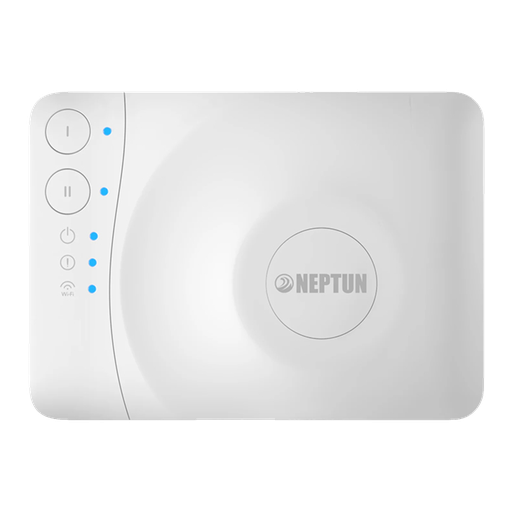 |
OTA updates
This device supports OTA updates, for more information see OTA updates.
Options
How to use device type specific configuration
state_action: State actions will also be published as 'action' when true (default false). The value must betrueorfalse
Exposes
Modbus address (numeric)
Modbus device address. Value can be found in the published state on the modbus_address property. To read (/get) the value publish a message to topic zigbee2mqtt/FRIENDLY_NAME/get with payload {"modbus_address": ""}. To write (/set) a value publish a message to topic zigbee2mqtt/FRIENDLY_NAME/set with payload {"modbus_address": NEW_VALUE}. The minimal value is 1 and the maximum value is 247.
Uart baud rate (enum)
MODBUS RTU baud rate. Value can be found in the published state on the uart_baud_rate property. To read (/get) the value publish a message to topic zigbee2mqtt/FRIENDLY_NAME/get with payload {"uart_baud_rate": ""}. To write (/set) a value publish a message to topic zigbee2mqtt/FRIENDLY_NAME/set with payload {"uart_baud_rate": NEW_VALUE}. The possible values are: 1200, 2400, 4800, 9600, 19200, 38400, 57600, 115200.
Wireless sensor pairing (binary)
Enable pairing of wireless sensors. Value can be found in the published state on the wireless_sensor_pairing property. To read (/get) the value publish a message to topic zigbee2mqtt/FRIENDLY_NAME/get with payload {"wireless_sensor_pairing": ""}. To write (/set) a value publish a message to topic zigbee2mqtt/FRIENDLY_NAME/set with payload {"wireless_sensor_pairing": NEW_VALUE}. If value equals true wireless sensor pairing is ON, if false OFF.
Child lock (binary)
Lock physical buttons. Value can be found in the published state on the child_lock property. To read (/get) the value publish a message to topic zigbee2mqtt/FRIENDLY_NAME/get with payload {"child_lock": ""}. To write (/set) a value publish a message to topic zigbee2mqtt/FRIENDLY_NAME/set with payload {"child_lock": NEW_VALUE}. If value equals true child lock is ON, if false OFF.
Zone count (enum)
Operation mode. Value can be found in the published state on the zone_count property. To read (/get) the value publish a message to topic zigbee2mqtt/FRIENDLY_NAME/get with payload {"zone_count": ""}. To write (/set) a value publish a message to topic zigbee2mqtt/FRIENDLY_NAME/set with payload {"zone_count": NEW_VALUE}. The possible values are: Single-zone, Dual-zone.
Close valves if sensor lost (binary)
Close valves if sensors are lost. Value can be found in the published state on the close_valves_if_sensor_lost property. To read (/get) the value publish a message to topic zigbee2mqtt/FRIENDLY_NAME/get with payload {"close_valves_if_sensor_lost": ""}. To write (/set) a value publish a message to topic zigbee2mqtt/FRIENDLY_NAME/set with payload {"close_valves_if_sensor_lost": NEW_VALUE}. If value equals true close valves if sensor lost is ON, if false OFF.
Switch relay on alarm (enum)
Switch relay on alarm mode. Value can be found in the published state on the switch_relay_on_alarm property. To read (/get) the value publish a message to topic zigbee2mqtt/FRIENDLY_NAME/get with payload {"switch_relay_on_alarm": ""}. To write (/set) a value publish a message to topic zigbee2mqtt/FRIENDLY_NAME/set with payload {"switch_relay_on_alarm": NEW_VALUE}. The possible values are: Dont switch, On first zone alarm, On second zone alarm, On any zone alarm.
Switch relay on valve closing (enum)
Switch relay on valve closing. Value can be found in the published state on the switch_relay_on_valve_closing property. To read (/get) the value publish a message to topic zigbee2mqtt/FRIENDLY_NAME/get with payload {"switch_relay_on_valve_closing": ""}. To write (/set) a value publish a message to topic zigbee2mqtt/FRIENDLY_NAME/set with payload {"switch_relay_on_valve_closing": NEW_VALUE}. The possible values are: Dont switch, On first zone, On second zone, On any zone.
Rf sensor count (numeric)
Amount of connected wireless sensors. Value can be found in the published state on the rf_sensor_count property. To read (/get) the value publish a message to topic zigbee2mqtt/FRIENDLY_NAME/get with payload {"rf_sensor_count": ""}. It's not possible to write (/set) this value.
Wired sensor feedback (binary)
Enable monitoring of wired sensors. Value can be found in the published state on the wired_sensor_feedback property. To read (/get) the value publish a message to topic zigbee2mqtt/FRIENDLY_NAME/get with payload {"wired_sensor_feedback": ""}. To write (/set) a value publish a message to topic zigbee2mqtt/FRIENDLY_NAME/set with payload {"wired_sensor_feedback": NEW_VALUE}. If value equals true wired sensor feedback is ON, if false OFF.
Count wired sensors (binary)
Detect the amount of wired sensors. Value can be found in the published state on the count_wired_sensors property. To read (/get) the value publish a message to topic zigbee2mqtt/FRIENDLY_NAME/get with payload {"count_wired_sensors": ""}. To write (/set) a value publish a message to topic zigbee2mqtt/FRIENDLY_NAME/set with payload {"count_wired_sensors": NEW_VALUE}. If value equals true count wired sensors is ON, if false OFF.
Alarm duration (numeric)
Duration of alarm sound. Value can be found in the published state on the alarm_duration property. To read (/get) the value publish a message to topic zigbee2mqtt/FRIENDLY_NAME/get with payload {"alarm_duration": ""}. To write (/set) a value publish a message to topic zigbee2mqtt/FRIENDLY_NAME/set with payload {"alarm_duration": NEW_VALUE}. The minimal value is 0 and the maximum value is 255. The unit of this value is min.
Error code (numeric)
Reported error code. Value can be found in the published state on the error_code property. To read (/get) the value publish a message to topic zigbee2mqtt/FRIENDLY_NAME/get with payload {"error_code": ""}. It's not possible to write (/set) this value.
Valve 1 status (enum)
State of valve 1. Value can be found in the published state on the valve_1_status property. To read (/get) the value publish a message to topic zigbee2mqtt/FRIENDLY_NAME/get with payload {"valve_1_status": ""}. It's not possible to write (/set) this value. The possible values are: Unknown, Ok, Open circuit, Valve stuck.
Valve 2 status (enum)
State of valve 2. Value can be found in the published state on the valve_2_status property. To read (/get) the value publish a message to topic zigbee2mqtt/FRIENDLY_NAME/get with payload {"valve_2_status": ""}. It's not possible to write (/set) this value. The possible values are: Unknown, Ok, Open circuit, Valve stuck.
Valve 3 status (enum)
State of valve 3. Value can be found in the published state on the valve_3_status property. To read (/get) the value publish a message to topic zigbee2mqtt/FRIENDLY_NAME/get with payload {"valve_3_status": ""}. It's not possible to write (/set) this value. The possible values are: Unknown, Ok, Open circuit, Valve stuck.
Valve 4 status (enum)
State of valve 4. Value can be found in the published state on the valve_4_status property. To read (/get) the value publish a message to topic zigbee2mqtt/FRIENDLY_NAME/get with payload {"valve_4_status": ""}. It's not possible to write (/set) this value. The possible values are: Unknown, Ok, Open circuit, Valve stuck.
Floor washing mode (binary)
Enable floor washing mode. Value can be found in the published state on the floor_washing_mode property. To read (/get) the value publish a message to topic zigbee2mqtt/FRIENDLY_NAME/get with payload {"floor_washing_mode": ""}. To write (/set) a value publish a message to topic zigbee2mqtt/FRIENDLY_NAME/set with payload {"floor_washing_mode": NEW_VALUE}. If value equals true floor washing mode is ON, if false OFF.
Switch (valve_group_1 endpoint)
The current state of this switch is in the published state under the state_valve_group_1 property (value is ON or OFF). To control this switch publish a message to topic zigbee2mqtt/FRIENDLY_NAME/set with payload {"state_valve_group_1": "ON"}, {"state_valve_group_1": "OFF"} or {"state_valve_group_1": "TOGGLE"}. To read the current state of this switch publish a message to topic zigbee2mqtt/FRIENDLY_NAME/get with payload {"state_valve_group_1": ""}.
On with timed off
When setting the state to ON, it might be possible to specify an automatic shutoff after a certain amount of time. To do this add an additional property on_time to the payload which is the time in seconds the state should remain on. Additionally an off_wait_time property can be added to the payload to specify the cooldown time in seconds when the switch will not answer to other on with timed off commands. Support depends on the switch firmware. Some devices might require both on_time and off_wait_time to work Examples : {"state" : "ON", "on_time": 300}, {"state" : "ON", "on_time": 300, "off_wait_time": 120}.
Switch (valve_group_2 endpoint)
The current state of this switch is in the published state under the state_valve_group_2 property (value is ON or OFF). To control this switch publish a message to topic zigbee2mqtt/FRIENDLY_NAME/set with payload {"state_valve_group_2": "ON"}, {"state_valve_group_2": "OFF"} or {"state_valve_group_2": "TOGGLE"}. To read the current state of this switch publish a message to topic zigbee2mqtt/FRIENDLY_NAME/get with payload {"state_valve_group_2": ""}.
On with timed off
When setting the state to ON, it might be possible to specify an automatic shutoff after a certain amount of time. To do this add an additional property on_time to the payload which is the time in seconds the state should remain on. Additionally an off_wait_time property can be added to the payload to specify the cooldown time in seconds when the switch will not answer to other on with timed off commands. Support depends on the switch firmware. Some devices might require both on_time and off_wait_time to work Examples : {"state" : "ON", "on_time": 300}, {"state" : "ON", "on_time": 300, "off_wait_time": 120}.
Type (enum, wire_1 endpoint)
Type of device connected to line 1. Value can be found in the published state on the type_wire_1 property. To read (/get) the value publish a message to topic zigbee2mqtt/FRIENDLY_NAME/get with payload {"type_wire_1": ""}. To write (/set) a value publish a message to topic zigbee2mqtt/FRIENDLY_NAME/set with payload {"type_wire_1": NEW_VALUE}. The possible values are: Water leak sensor, Button (falling edge trigger), Switch (switch valve on signal level).
Zone assignment (enum, wire_1 endpoint)
Line 1 zone assignment. Value can be found in the published state on the zone_assignment_wire_1 property. To read (/get) the value publish a message to topic zigbee2mqtt/FRIENDLY_NAME/get with payload {"zone_assignment_wire_1": ""}. To write (/set) a value publish a message to topic zigbee2mqtt/FRIENDLY_NAME/set with payload {"zone_assignment_wire_1": NEW_VALUE}. The possible values are: Close valves in zone 1, Close valves in zone 2, Close valves in both zones.
Status (enum, wire_1 endpoint)
Line 1 status. Value can be found in the published state on the status_wire_1 property. To read (/get) the value publish a message to topic zigbee2mqtt/FRIENDLY_NAME/get with payload {"status_wire_1": ""}. It's not possible to write (/set) this value. The possible values are: Ok, Sensor lost, Sensor detected, Short circuit.
Wired sensor count (numeric, wire_1 endpoint)
Amount of wired sensors on line 1. Value can be found in the published state on the wired_sensor_count_wire_1 property. To read (/get) the value publish a message to topic zigbee2mqtt/FRIENDLY_NAME/get with payload {"wired_sensor_count_wire_1": ""}. It's not possible to write (/set) this value.
Type (enum, wire_2 endpoint)
Type of device connected to line 2. Value can be found in the published state on the type_wire_2 property. To read (/get) the value publish a message to topic zigbee2mqtt/FRIENDLY_NAME/get with payload {"type_wire_2": ""}. To write (/set) a value publish a message to topic zigbee2mqtt/FRIENDLY_NAME/set with payload {"type_wire_2": NEW_VALUE}. The possible values are: Water leak sensor, Button (falling edge trigger), Switch (switch valve on signal level).
Zone assignment (enum, wire_2 endpoint)
Line 2 zone assignment. Value can be found in the published state on the zone_assignment_wire_2 property. To read (/get) the value publish a message to topic zigbee2mqtt/FRIENDLY_NAME/get with payload {"zone_assignment_wire_2": ""}. To write (/set) a value publish a message to topic zigbee2mqtt/FRIENDLY_NAME/set with payload {"zone_assignment_wire_2": NEW_VALUE}. The possible values are: Close valves in zone 1, Close valves in zone 2, Close valves in both zones.
Status (enum, wire_2 endpoint)
Line 2 status. Value can be found in the published state on the status_wire_2 property. To read (/get) the value publish a message to topic zigbee2mqtt/FRIENDLY_NAME/get with payload {"status_wire_2": ""}. It's not possible to write (/set) this value. The possible values are: Ok, Sensor lost, Sensor detected, Short circuit.
Wired sensor count (numeric, wire_2 endpoint)
Amount of wired sensors on line 2. Value can be found in the published state on the wired_sensor_count_wire_2 property. To read (/get) the value publish a message to topic zigbee2mqtt/FRIENDLY_NAME/get with payload {"wired_sensor_count_wire_2": ""}. It's not possible to write (/set) this value.
Type (enum, wire_3 endpoint)
Type of device connected to line 3. Value can be found in the published state on the type_wire_3 property. To read (/get) the value publish a message to topic zigbee2mqtt/FRIENDLY_NAME/get with payload {"type_wire_3": ""}. To write (/set) a value publish a message to topic zigbee2mqtt/FRIENDLY_NAME/set with payload {"type_wire_3": NEW_VALUE}. The possible values are: Water leak sensor, Button (falling edge trigger), Switch (switch valve on signal level).
Zone assignment (enum, wire_3 endpoint)
Line 3 zone assignment. Value can be found in the published state on the zone_assignment_wire_3 property. To read (/get) the value publish a message to topic zigbee2mqtt/FRIENDLY_NAME/get with payload {"zone_assignment_wire_3": ""}. To write (/set) a value publish a message to topic zigbee2mqtt/FRIENDLY_NAME/set with payload {"zone_assignment_wire_3": NEW_VALUE}. The possible values are: Close valves in zone 1, Close valves in zone 2, Close valves in both zones.
Status (enum, wire_3 endpoint)
Line 3 status. Value can be found in the published state on the status_wire_3 property. To read (/get) the value publish a message to topic zigbee2mqtt/FRIENDLY_NAME/get with payload {"status_wire_3": ""}. It's not possible to write (/set) this value. The possible values are: Ok, Sensor lost, Sensor detected, Short circuit.
Wired sensor count (numeric, wire_3 endpoint)
Amount of wired sensors on line 3. Value can be found in the published state on the wired_sensor_count_wire_3 property. To read (/get) the value publish a message to topic zigbee2mqtt/FRIENDLY_NAME/get with payload {"wired_sensor_count_wire_3": ""}. It's not possible to write (/set) this value.
Type (enum, wire_4 endpoint)
Type of device connected to line 4. Value can be found in the published state on the type_wire_4 property. To read (/get) the value publish a message to topic zigbee2mqtt/FRIENDLY_NAME/get with payload {"type_wire_4": ""}. To write (/set) a value publish a message to topic zigbee2mqtt/FRIENDLY_NAME/set with payload {"type_wire_4": NEW_VALUE}. The possible values are: Water leak sensor, Button (falling edge trigger), Switch (switch valve on signal level).
Zone assignment (enum, wire_4 endpoint)
Line 4 zone assignment. Value can be found in the published state on the zone_assignment_wire_4 property. To read (/get) the value publish a message to topic zigbee2mqtt/FRIENDLY_NAME/get with payload {"zone_assignment_wire_4": ""}. To write (/set) a value publish a message to topic zigbee2mqtt/FRIENDLY_NAME/set with payload {"zone_assignment_wire_4": NEW_VALUE}. The possible values are: Close valves in zone 1, Close valves in zone 2, Close valves in both zones.
Status (enum, wire_4 endpoint)
Line 4 status. Value can be found in the published state on the status_wire_4 property. To read (/get) the value publish a message to topic zigbee2mqtt/FRIENDLY_NAME/get with payload {"status_wire_4": ""}. It's not possible to write (/set) this value. The possible values are: Ok, Sensor lost, Sensor detected, Short circuit.
Wired sensor count (numeric, wire_4 endpoint)
Amount of wired sensors on line 4. Value can be found in the published state on the wired_sensor_count_wire_4 property. To read (/get) the value publish a message to topic zigbee2mqtt/FRIENDLY_NAME/get with payload {"wired_sensor_count_wire_4": ""}. It's not possible to write (/set) this value.
Water leak (binary, both_zones endpoint)
Water leak detected. Value can be found in the published state on the water_leak_both_zones property. To read (/get) the value publish a message to topic zigbee2mqtt/FRIENDLY_NAME/get with payload {"water_leak_both_zones": ""}. It's not possible to write (/set) this value. If value equals true water leak is ON, if false OFF.
Water leak (binary, zone_1 endpoint)
Water leak detected. Value can be found in the published state on the water_leak_zone_1 property. To read (/get) the value publish a message to topic zigbee2mqtt/FRIENDLY_NAME/get with payload {"water_leak_zone_1": ""}. It's not possible to write (/set) this value. If value equals true water leak is ON, if false OFF.
Water leak (binary, zone_2 endpoint)
Water leak detected. Value can be found in the published state on the water_leak_zone_2 property. To read (/get) the value publish a message to topic zigbee2mqtt/FRIENDLY_NAME/get with payload {"water_leak_zone_2": ""}. It's not possible to write (/set) this value. If value equals true water leak is ON, if false OFF.
Water leak (binary, wire_1 endpoint)
Water leak detected. Value can be found in the published state on the water_leak_wire_1 property. To read (/get) the value publish a message to topic zigbee2mqtt/FRIENDLY_NAME/get with payload {"water_leak_wire_1": ""}. It's not possible to write (/set) this value. If value equals true water leak is ON, if false OFF.
Water leak (binary, wire_2 endpoint)
Water leak detected. Value can be found in the published state on the water_leak_wire_2 property. To read (/get) the value publish a message to topic zigbee2mqtt/FRIENDLY_NAME/get with payload {"water_leak_wire_2": ""}. It's not possible to write (/set) this value. If value equals true water leak is ON, if false OFF.
Water leak (binary, wire_3 endpoint)
Water leak detected. Value can be found in the published state on the water_leak_wire_3 property. To read (/get) the value publish a message to topic zigbee2mqtt/FRIENDLY_NAME/get with payload {"water_leak_wire_3": ""}. It's not possible to write (/set) this value. If value equals true water leak is ON, if false OFF.
Water leak (binary, wire_4 endpoint)
Water leak detected. Value can be found in the published state on the water_leak_wire_4 property. To read (/get) the value publish a message to topic zigbee2mqtt/FRIENDLY_NAME/get with payload {"water_leak_wire_4": ""}. It's not possible to write (/set) this value. If value equals true water leak is ON, if false OFF.
Water leak (binary)
Indicates whether the device detected a water leak. Value can be found in the published state on the water_leak property. It's not possible to read (/get) or write (/set) this value. If value equals true water leak is ON, if false OFF.
Summation delivered (numeric, meter_1 endpoint)
Total amount of impulses produced by meter 1. Value can be found in the published state on the summation_delivered_meter_1 property. To read (/get) the value publish a message to topic zigbee2mqtt/FRIENDLY_NAME/get with payload {"summation_delivered_meter_1": ""}. It's not possible to write (/set) this value.
Summation delivered (numeric, meter_2 endpoint)
Total amount of impulses produced by meter 1. Value can be found in the published state on the summation_delivered_meter_2 property. To read (/get) the value publish a message to topic zigbee2mqtt/FRIENDLY_NAME/get with payload {"summation_delivered_meter_2": ""}. It's not possible to write (/set) this value.
Summation delivered (numeric, meter_3 endpoint)
Total amount of impulses produced by meter 1. Value can be found in the published state on the summation_delivered_meter_3 property. To read (/get) the value publish a message to topic zigbee2mqtt/FRIENDLY_NAME/get with payload {"summation_delivered_meter_3": ""}. It's not possible to write (/set) this value.
Summation delivered (numeric, meter_4 endpoint)
Total amount of impulses produced by meter 1. Value can be found in the published state on the summation_delivered_meter_4 property. To read (/get) the value publish a message to topic zigbee2mqtt/FRIENDLY_NAME/get with payload {"summation_delivered_meter_4": ""}. It's not possible to write (/set) this value.
Multiplier (numeric, meter_1 endpoint)
Multiplier used by meter. Value can be found in the published state on the multiplier_meter_1 property. To read (/get) the value publish a message to topic zigbee2mqtt/FRIENDLY_NAME/get with payload {"multiplier_meter_1": ""}. It's not possible to write (/set) this value.
Multiplier (numeric, meter_2 endpoint)
Multiplier used by meter. Value can be found in the published state on the multiplier_meter_2 property. To read (/get) the value publish a message to topic zigbee2mqtt/FRIENDLY_NAME/get with payload {"multiplier_meter_2": ""}. It's not possible to write (/set) this value.
Multiplier (numeric, meter_3 endpoint)
Multiplier used by meter. Value can be found in the published state on the multiplier_meter_3 property. To read (/get) the value publish a message to topic zigbee2mqtt/FRIENDLY_NAME/get with payload {"multiplier_meter_3": ""}. It's not possible to write (/set) this value.
Multiplier (numeric, meter_4 endpoint)
Multiplier used by meter. Value can be found in the published state on the multiplier_meter_4 property. To read (/get) the value publish a message to topic zigbee2mqtt/FRIENDLY_NAME/get with payload {"multiplier_meter_4": ""}. It's not possible to write (/set) this value.
Divisor (numeric, meter_1 endpoint)
Divisor used by meter. Value can be found in the published state on the divisor_meter_1 property. To read (/get) the value publish a message to topic zigbee2mqtt/FRIENDLY_NAME/get with payload {"divisor_meter_1": ""}. It's not possible to write (/set) this value.
Divisor (numeric, meter_2 endpoint)
Divisor used by meter. Value can be found in the published state on the divisor_meter_2 property. To read (/get) the value publish a message to topic zigbee2mqtt/FRIENDLY_NAME/get with payload {"divisor_meter_2": ""}. It's not possible to write (/set) this value.
Divisor (numeric, meter_3 endpoint)
Divisor used by meter. Value can be found in the published state on the divisor_meter_3 property. To read (/get) the value publish a message to topic zigbee2mqtt/FRIENDLY_NAME/get with payload {"divisor_meter_3": ""}. It's not possible to write (/set) this value.
Divisor (numeric, meter_4 endpoint)
Divisor used by meter. Value can be found in the published state on the divisor_meter_4 property. To read (/get) the value publish a message to topic zigbee2mqtt/FRIENDLY_NAME/get with payload {"divisor_meter_4": ""}. It's not possible to write (/set) this value.