
Mowe MW833P
| Model | MW833P |
| Vendor | Mowe |
| Description | Smart presence sensor (24 GHz mmWave radar) |
| Exposes | presence, human_motion_state, illuminance, body_motion, move_direction, sensitivity, scene, nobody_time, radar_self_check, check_end_flag, radar_reset_flag, radar_detection_data, hardware_version, soft_version, radar_id |
| Picture | 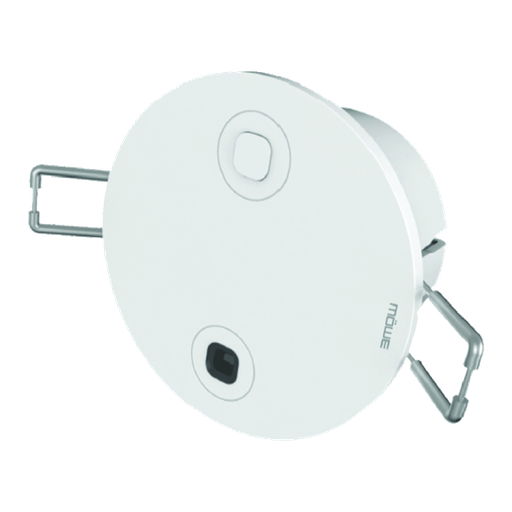 |
Options
How to use device type specific configuration
time_start: Reply to Tuya-specific time synchronization requests: "1970" - Reply with seconds since 1970/01/01 (recommended, should stop the device from asking), "2000" - Reply with seconds since 2000/01/01 (use if the weekday is wrong with 1970), "off" - Don't reply (use if replying causes too much traffic). Default for this device: "off". The value must be one of1970,2000,offilluminance_calibration: Calibrates the illuminance value (percentual offset), takes into effect on next report of device. The value must be a number.
Exposes
Presence (binary)
Indicates whether the device detected presence. Value can be found in the published state on the presence property. It's not possible to read (/get) or write (/set) this value. If value equals true presence is ON, if false OFF.
Human motion state (enum)
Motion state reported by the radar: nobody, present but still, or moving. Value can be found in the published state on the human_motion_state property. It's not possible to read (/get) or write (/set) this value. The possible values are: none, peaceful, motion.
Illuminance (numeric)
Measured illuminance. Value can be found in the published state on the illuminance property. It's not possible to read (/get) or write (/set) this value. The unit of this value is lx.
Body motion (numeric)
Body-motion amplitude, emitted every 5 seconds. 0 means nobody detected. Value can be found in the published state on the body_motion property. It's not possible to read (/get) or write (/set) this value. The minimal value is 0 and the maximum value is 100.
Move direction (enum)
Direction of the detected movement relative to the sensor. Value can be found in the published state on the move_direction property. It's not possible to read (/get) or write (/set) this value. The possible values are: none, close_to, far_away.
Sensitivity (numeric)
Radar sensitivity, 1 (least sensitive) to 3 (most sensitive). Value can be found in the published state on the sensitivity property. It's not possible to read (/get) this value. To write (/set) a value publish a message to topic zigbee2mqtt/FRIENDLY_NAME/set with payload {"sensitivity": NEW_VALUE}. The minimal value is 1 and the maximum value is 3.
Scene (enum)
Detection profile tuned for the size and use of the room. Value can be found in the published state on the scene property. It's not possible to read (/get) this value. To write (/set) a value publish a message to topic zigbee2mqtt/FRIENDLY_NAME/set with payload {"scene": NEW_VALUE}. The possible values are: default, area, toilet, bedroom, parlour, office, hotel.
Nobody time (enum)
How long presence is held after the last detection before clearing. Value can be found in the published state on the nobody_time property. It's not possible to read (/get) this value. To write (/set) a value publish a message to topic zigbee2mqtt/FRIENDLY_NAME/set with payload {"nobody_time": NEW_VALUE}. The possible values are: none, 10s, 30s, 1min, 2min, 5min, 10min, 30min, 1hour.
Radar self check (binary)
Start the radar self-check routine. Value can be found in the published state on the radar_self_check property. It's not possible to read (/get) this value. To write (/set) a value publish a message to topic zigbee2mqtt/FRIENDLY_NAME/set with payload {"radar_self_check": NEW_VALUE}. If value equals true radar self check is ON, if false OFF.
Check end flag (binary)
Radar self-check has finished. Value can be found in the published state on the check_end_flag property. It's not possible to read (/get) or write (/set) this value. If value equals true check end flag is ON, if false OFF.
Radar reset flag (binary)
Radar reset marker, pushed by the device. Value can be found in the published state on the radar_reset_flag property. It's not possible to read (/get) or write (/set) this value. If value equals true radar reset flag is ON, if false OFF.
Radar detection data (text)
Self-check output: '1111' confirms a false presence report, '0000' confirms it was genuine. Value can be found in the published state on the radar_detection_data property. It's not possible to read (/get) or write (/set) this value.
Hardware version (text)
Radar hardware version. Value can be found in the published state on the hardware_version property. It's not possible to read (/get) or write (/set) this value.
Soft version (text)
Radar firmware version. Value can be found in the published state on the soft_version property. It's not possible to read (/get) or write (/set) this value.
Radar id (text)
Radar module identifier. Value can be found in the published state on the radar_id property. It's not possible to read (/get) or write (/set) this value.