
MakeGood MG-GPO02Z
| Model | MG-GPO02Z |
| Vendor | MakeGood |
| Description | Double GPO with energy monitoring and RGB backlights |
| Exposes | switch (state), countdown, power_on_behavior, all_on_off, power, current, voltage, energy, backlight_mode, backlight_color, child_lock |
| Picture | 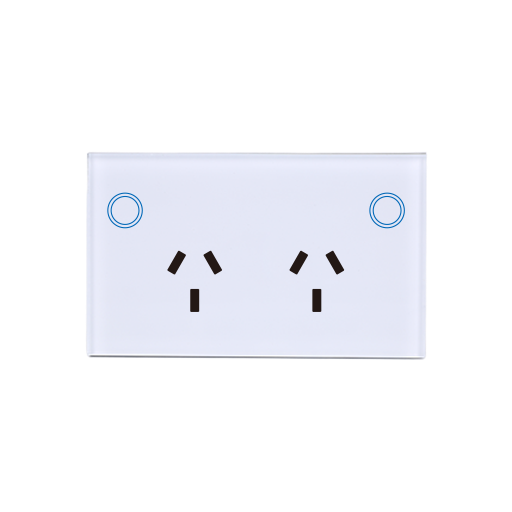 |
Options
How to use device type specific configuration
time_start: Reply to Tuya-specific time synchronization requests: "1970" - Reply with seconds since 1970/01/01 (recommended, should stop the device from asking), "2000" - Reply with seconds since 2000/01/01 (use if the weekday is wrong with 1970), "off" - Don't reply (use if replying causes too much traffic). Default for this device: "1970". The value must be one of1970,2000,offpower_calibration: Calibrates the power value (percentual offset), takes into effect on next report of device. The value must be a number.power_precision: Number of digits after decimal point for power, takes into effect on next report of device. This option can only decrease the precision, not increase it. The value must be a number with a minimum value of0and with a maximum value of3current_calibration: Calibrates the current value (percentual offset), takes into effect on next report of device. The value must be a number.current_precision: Number of digits after decimal point for current, takes into effect on next report of device. This option can only decrease the precision, not increase it. The value must be a number with a minimum value of0and with a maximum value of3voltage_calibration: Calibrates the voltage value (percentual offset), takes into effect on next report of device. The value must be a number.voltage_precision: Number of digits after decimal point for voltage, takes into effect on next report of device. This option can only decrease the precision, not increase it. The value must be a number with a minimum value of0and with a maximum value of3energy_calibration: Calibrates the energy value (percentual offset), takes into effect on next report of device. The value must be a number.energy_precision: Number of digits after decimal point for energy, takes into effect on next report of device. This option can only decrease the precision, not increase it. The value must be a number with a minimum value of0and with a maximum value of3
Exposes
Switch (l1 endpoint)
The current state of this switch is in the published state under the state_l1 property (value is ON or OFF). To control this switch publish a message to topic zigbee2mqtt/FRIENDLY_NAME/set with payload {"state_l1": "ON"}, {"state_l1": "OFF"} or {"state_l1": "TOGGLE"}. It's not possible to read (/get) this value.
Switch (l2 endpoint)
The current state of this switch is in the published state under the state_l2 property (value is ON or OFF). To control this switch publish a message to topic zigbee2mqtt/FRIENDLY_NAME/set with payload {"state_l2": "ON"}, {"state_l2": "OFF"} or {"state_l2": "TOGGLE"}. It's not possible to read (/get) this value.
Countdown (numeric, l1 endpoint)
Toggle the device after a set duration (one time action). Value can be found in the published state on the countdown_l1 property. It's not possible to read (/get) this value. To write (/set) a value publish a message to topic zigbee2mqtt/FRIENDLY_NAME/set with payload {"countdown_l1": NEW_VALUE}. The minimal value is 0 and the maximum value is 43200. The unit of this value is s.
Countdown (numeric, l2 endpoint)
Toggle the device after a set duration (one time action). Value can be found in the published state on the countdown_l2 property. It's not possible to read (/get) this value. To write (/set) a value publish a message to topic zigbee2mqtt/FRIENDLY_NAME/set with payload {"countdown_l2": NEW_VALUE}. The minimal value is 0 and the maximum value is 43200. The unit of this value is s.
Power-on behavior (enum, l1 endpoint)
Controls the behavior when the device is powered on after power loss. Value can be found in the published state on the power_on_behavior_l1 property. It's not possible to read (/get) this value. To write (/set) a value publish a message to topic zigbee2mqtt/FRIENDLY_NAME/set with payload {"power_on_behavior_l1": NEW_VALUE}. The possible values are: off, previous, on.
Power-on behavior (enum, l2 endpoint)
Controls the behavior when the device is powered on after power loss. Value can be found in the published state on the power_on_behavior_l2 property. It's not possible to read (/get) this value. To write (/set) a value publish a message to topic zigbee2mqtt/FRIENDLY_NAME/set with payload {"power_on_behavior_l2": NEW_VALUE}. The possible values are: off, previous, on.
All on off (binary)
Turn all channels on or off simultaneously. Value can be found in the published state on the all_on_off property. It's not possible to read (/get) this value. To write (/set) a value publish a message to topic zigbee2mqtt/FRIENDLY_NAME/set with payload {"all_on_off": NEW_VALUE}. If value equals ON all on off is ON, if OFF OFF.
Power (numeric)
Instantaneous measured power. Value can be found in the published state on the power property. It's not possible to read (/get) or write (/set) this value. The unit of this value is W.
Current (numeric)
Instantaneous measured electrical current. Value can be found in the published state on the current property. It's not possible to read (/get) or write (/set) this value. The unit of this value is A.
Voltage (numeric)
Measured electrical potential value. Value can be found in the published state on the voltage property. It's not possible to read (/get) or write (/set) this value. The unit of this value is V.
Energy (numeric)
Sum of consumed energy. Value can be found in the published state on the energy property. It's not possible to read (/get) or write (/set) this value. The unit of this value is kWh.
Backlight mode (binary)
Mode of the backlight. Value can be found in the published state on the backlight_mode property. It's not possible to read (/get) this value. To write (/set) a value publish a message to topic zigbee2mqtt/FRIENDLY_NAME/set with payload {"backlight_mode": NEW_VALUE}. If value equals ON backlight mode is ON, if OFF OFF.
Backlight color (composite)
Backlight colour configuration, only meaningful when backlight mode is ON. Can be set by publishing to zigbee2mqtt/FRIENDLY_NAME/set with payload {"backlight_color": {"mode": VALUE, "socket1": VALUE, "socket2": VALUE}}
mode(enum): single: one colour per channel; multi: separate on and off colours per channel allowed values:single,multisocket1(composite): Socket 1 backlight settingssocket2(composite): Socket 2 backlight settings
Child lock (binary)
Enables/disables physical input on the device. Value can be found in the published state on the child_lock property. It's not possible to read (/get) this value. To write (/set) a value publish a message to topic zigbee2mqtt/FRIENDLY_NAME/set with payload {"child_lock": NEW_VALUE}. If value equals LOCK child lock is ON, if UNLOCK OFF.