
Ecobuy Well ME173
| Model | ME173 |
| Vendor | Ecobuy Well |
| Description | Thermostatic radiator valve |
| Exposes | child_lock, battery, climate (current_heating_setpoint, local_temperature, system_mode, preset, running_state, local_temperature_calibration), schedule_monday, schedule_tuesday, schedule_wednesday, schedule_thursday, schedule_friday, schedule_saturday, schedule_sunday, eco_temperature, comfort_temperature, window_detection, window_open, scale_protection, frost_protection, error, display_orientation, boost_time, boost_timeset_countdown |
| Picture | 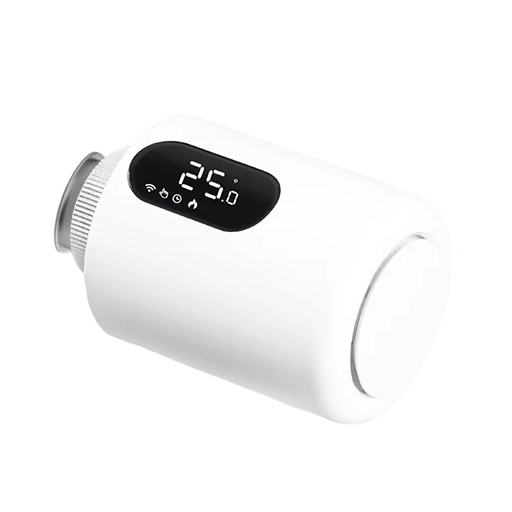 |
Notes
Pairing
- Mount valve without batteries on radiator and remove cover by pressing mechanical button and pulling cover out of the valve.
- Insert batteries - it will display LA and calibration process will start.
- Insert cover.
- Turn the knob counterclockwise (target temperature will decrease). Below 5°C OF will be displayed.
- Press the knob for 5s, Wireless signal (WiFi-like) will start flashing. To repair, just repeat steps 4. and 5.
Options
How to use device type specific configuration
time_start: Reply to Tuya-specific time synchronization requests: "1970" - Reply with seconds since 1970/01/01 (recommended, should stop the device from asking), "2000" - Reply with seconds since 2000/01/01 (use if the weekday is wrong with 1970), "off" - Don't reply (use if replying causes too much traffic). Default for this device: "1970". The value must be one of1970,2000,off
Exposes
Child lock (binary)
Enables/disables physical input on the device. Value can be found in the published state on the child_lock property. It's not possible to read (/get) this value. To write (/set) a value publish a message to topic zigbee2mqtt/FRIENDLY_NAME/set with payload {"child_lock": "VALUE"}. If value equals LOCK child lock is ON, if UNLOCK OFF.
Battery (numeric)
Remaining battery in %, can take up to 24 hours before reported. Value can be found in the published state on the battery property. It's not possible to read (/get) or write (/set) this value. The minimal value is 0 and the maximum value is 100. The unit of this value is %.
Climate
This climate device supports the following features: current_heating_setpoint, local_temperature, system_mode, preset, running_state, local_temperature_calibration.
current_heating_setpoint: Temperature setpoint. To control publish a message to topiczigbee2mqtt/FRIENDLY_NAME/setwith payload{"current_heating_setpoint": VALUE}whereVALUEis the °C between5and35. Reading (/get) this attribute is not possible.local_temperature: Current temperature measured on the device (in °C). Reading (/get) this attribute is not possible.system_mode: Mode of this device. To control publish a message to topiczigbee2mqtt/FRIENDLY_NAME/setwith payload{"system_mode": "VALUE"}whereVALUEis one of:off,heat,auto. Reading (/get) this attribute is not possible.preset: Mode of this device (similar to system_mode). To control publish a message to topiczigbee2mqtt/FRIENDLY_NAME/setwith payload{"preset": "VALUE"}whereVALUEis one of:schedule,manual,off,eco,comfort,boost. Reading (/get) this attribute is not possible.running_state: The current running state. Possible values are:idle,heat. Reading (/get) this attribute is not possible.local_temperature_calibration: Offset to add/subtract to the local temperature. To control publish a message to topiczigbee2mqtt/FRIENDLY_NAME/setwith payload{"local_temperature_calibration": VALUE}.The minimal value is-9and the maximum value is9with a step size of1.
Schedule monday (text)
Schedule for monday, example: "HH:MM/C HH:MM/C HH:MM/C HH:MM/C HH:MM/C HH:MM/C". Value can be found in the published state on the schedule_monday property. It's not possible to read (/get) this value. To write (/set) a value publish a message to topic zigbee2mqtt/FRIENDLY_NAME/set with payload {"schedule_monday": "VALUE"}.
Schedule tuesday (text)
Schedule for tuesday, example: "HH:MM/C HH:MM/C HH:MM/C HH:MM/C HH:MM/C HH:MM/C". Value can be found in the published state on the schedule_tuesday property. It's not possible to read (/get) this value. To write (/set) a value publish a message to topic zigbee2mqtt/FRIENDLY_NAME/set with payload {"schedule_tuesday": "VALUE"}.
Schedule wednesday (text)
Schedule for wednesday, example: "HH:MM/C HH:MM/C HH:MM/C HH:MM/C HH:MM/C HH:MM/C". Value can be found in the published state on the schedule_wednesday property. It's not possible to read (/get) this value. To write (/set) a value publish a message to topic zigbee2mqtt/FRIENDLY_NAME/set with payload {"schedule_wednesday": "VALUE"}.
Schedule thursday (text)
Schedule for thursday, example: "HH:MM/C HH:MM/C HH:MM/C HH:MM/C HH:MM/C HH:MM/C". Value can be found in the published state on the schedule_thursday property. It's not possible to read (/get) this value. To write (/set) a value publish a message to topic zigbee2mqtt/FRIENDLY_NAME/set with payload {"schedule_thursday": "VALUE"}.
Schedule friday (text)
Schedule for friday, example: "HH:MM/C HH:MM/C HH:MM/C HH:MM/C HH:MM/C HH:MM/C". Value can be found in the published state on the schedule_friday property. It's not possible to read (/get) this value. To write (/set) a value publish a message to topic zigbee2mqtt/FRIENDLY_NAME/set with payload {"schedule_friday": "VALUE"}.
Schedule saturday (text)
Schedule for saturday, example: "HH:MM/C HH:MM/C HH:MM/C HH:MM/C HH:MM/C HH:MM/C". Value can be found in the published state on the schedule_saturday property. It's not possible to read (/get) this value. To write (/set) a value publish a message to topic zigbee2mqtt/FRIENDLY_NAME/set with payload {"schedule_saturday": "VALUE"}.
Schedule sunday (text)
Schedule for sunday, example: "HH:MM/C HH:MM/C HH:MM/C HH:MM/C HH:MM/C HH:MM/C". Value can be found in the published state on the schedule_sunday property. It's not possible to read (/get) this value. To write (/set) a value publish a message to topic zigbee2mqtt/FRIENDLY_NAME/set with payload {"schedule_sunday": "VALUE"}.
Eco temperature (numeric)
Eco temperature. Value can be found in the published state on the eco_temperature property. It's not possible to read (/get) this value. To write (/set) a value publish a message to topic zigbee2mqtt/FRIENDLY_NAME/set with payload {"eco_temperature": VALUE}. The minimal value is 10 and the maximum value is 20. The unit of this value is °C.
Comfort temperature (numeric)
Comfort temperature. Value can be found in the published state on the comfort_temperature property. It's not possible to read (/get) this value. To write (/set) a value publish a message to topic zigbee2mqtt/FRIENDLY_NAME/set with payload {"comfort_temperature": VALUE}. The minimal value is 10 and the maximum value is 25. The unit of this value is °C.
Window detection (binary)
Enable open window detection. Value can be found in the published state on the window_detection property. It's not possible to read (/get) this value. To write (/set) a value publish a message to topic zigbee2mqtt/FRIENDLY_NAME/set with payload {"window_detection": "VALUE"}. If value equals ON window detection is ON, if OFF OFF.
Window open (binary)
Window status. Value can be found in the published state on the window_open property. It's not possible to read (/get) or write (/set) this value. If value equals OPEN window open is ON, if CLOSE OFF.
Scale protection (binary)
Opens the valve fully for 30 seconds every two weeks to prevent scaling (displays "Ad"). Value can be found in the published state on the scale_protection property. It's not possible to read (/get) this value. To write (/set) a value publish a message to topic zigbee2mqtt/FRIENDLY_NAME/set with payload {"scale_protection": "VALUE"}. If value equals ON scale protection is ON, if OFF OFF.
Frost protection (binary)
Opens the valve below 5 °C and closes it again at 8 °C, also when the valve is off. Value can be found in the published state on the frost_protection property. It's not possible to read (/get) this value. To write (/set) a value publish a message to topic zigbee2mqtt/FRIENDLY_NAME/set with payload {"frost_protection": "VALUE"}. If value equals ON frost protection is ON, if OFF OFF.
Error (numeric)
If NTC is damaged, "Er" will be on the TRV display.. Value can be found in the published state on the error property. It's not possible to read (/get) or write (/set) this value.
Display orientation (enum)
Display orientation. Value can be found in the published state on the display_orientation property. It's not possible to read (/get) this value. To write (/set) a value publish a message to topic zigbee2mqtt/FRIENDLY_NAME/set with payload {"display_orientation": "VALUE"}. The possible values are: left, right.
Boost time (numeric)
Duration of the boost preset, which heats at 35 °C. Value can be found in the published state on the boost_time property. It's not possible to read (/get) this value. To write (/set) a value publish a message to topic zigbee2mqtt/FRIENDLY_NAME/set with payload {"boost_time": VALUE}. The minimal value is 0 and the maximum value is 180. The unit of this value is min.
Boost timeset countdown (numeric)
Remaining boost time. Value can be found in the published state on the boost_timeset_countdown property. It's not possible to read (/get) or write (/set) this value. The unit of this value is min.